Network proxy settings page for DeepSeek Harness: set a global HTTP(S) proxy with bypass hosts, or give each LLM provider its own proxy or a direct connection; changes apply on save without a restart.
Install
# from npm (prebuilt)
dsh plugin --profile web add @copylee/dsh-proxy
# from GitHub (first run asks for allowBuilds approval — follow the hint, retry)
dsh plugin --profile web add github:copylee711/dsh-proxy
Any plugin you install runs third-party code with your own permissions — it can read your files, use your credentials, and reach the network, and tool approvals don’t sandbox it. GitHub-sourced plugins also run build scripts at install time — pnpm blocks those until you allow them, so an install can stop with ERR_PNPM_GIT_DEP_PREPARE_NOT_ALLOWED or ERR_PNPM_IGNORED_BUILDS; dsh prints the exact key to add under allowBuilds in your profile’s pnpm-workspace.yaml, and the install works on the next run. Allowing a build is a trust decision: only install sources you trust, and pin a commit (github:owner/repo#sha).
README
English | 中文
A network proxy plugin for DeepSeek Harness (dsh):
- Global proxy: enter
http://127.0.0.1:7890under Settings → Network proxy, and model requests, web search, web fetch, HTTP MCP, and commands the agent runs all go through it. - Per-provider proxy: give one model provider its own proxy or force it direct. For example, Anthropic through
http://127.0.0.1:7890and DeepSeek direct. - Applies on save: no dsh restart needed.
Precedence: provider setting > global proxy > HTTP(S)_PROXY from launch.
Install
dsh plugin --profile web add @copylee/dsh-proxy
Restart dsh web, and a Network proxy page appears in Settings.
Keep the
@copylee/scope. The unscopeddsh-proxyanddsh-network-proxypackages on npm belong to other people and are unrelated.
You can also install straight from GitHub. Built output is committed, so no build script or allowBuilds entry is needed:
dsh plugin --profile web add github:copylee711/dsh-proxy
Use
Open Settings → Network proxy:
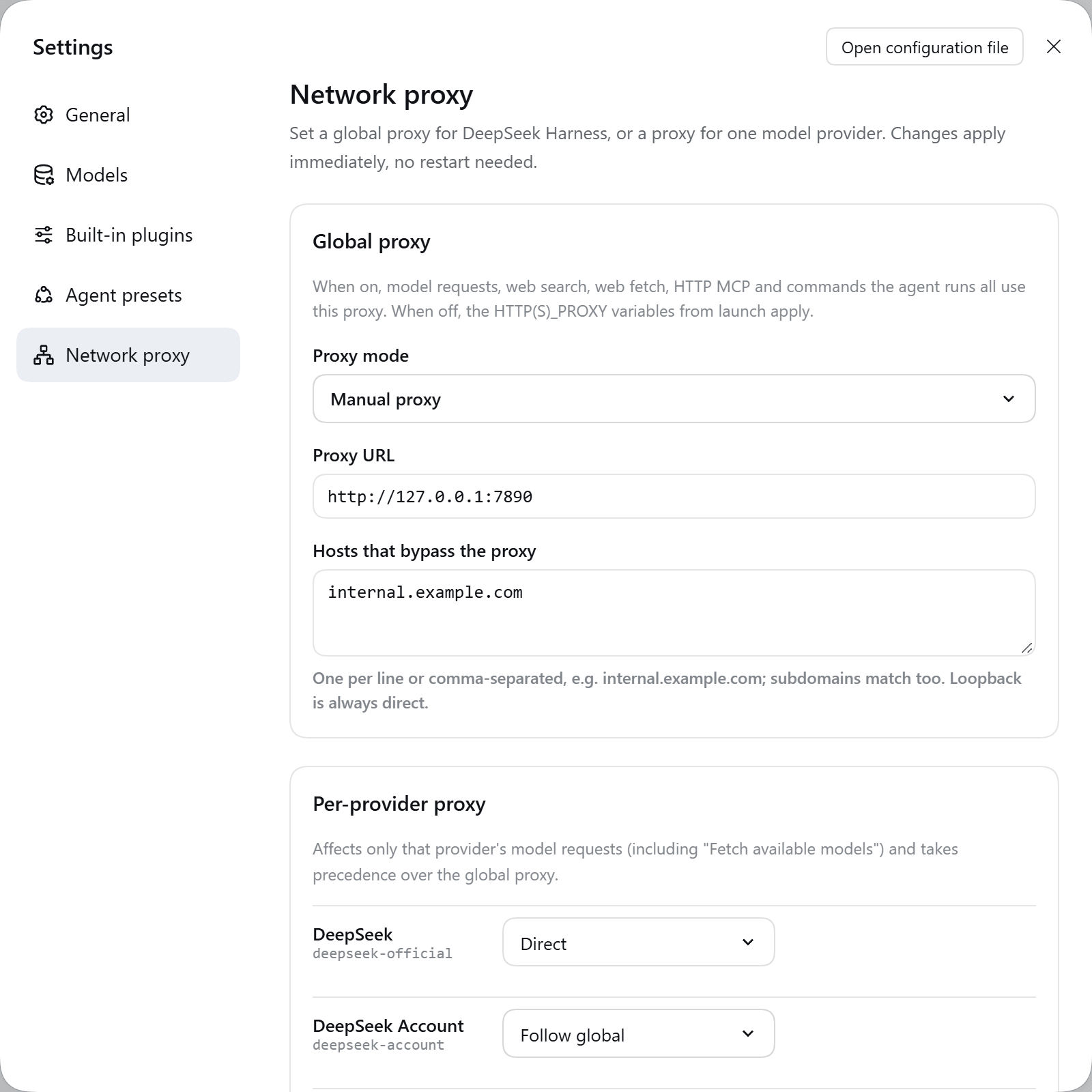
| Area | What it does |
|---|---|
| Global proxy | Tick Enabled and enter the proxy URL. Hosts that bypass the proxy takes one host per line and matches subdomains too. localhost / 127.0.0.1 are always direct. |
| Per-provider proxy | Lists configured model providers. Each can be Follow global, Use proxy, or Direct. Add a provider not in the list by typing its id below it (e.g. deepseek-official, anthropic, openai, or a custom Provider ID from the Models page). |
Save applies to the next request, including Fetch available models on the Models page.
System proxy
The global selector offers Off (use launch settings), System proxy (auto-detect), and Manual proxy. Each provider can also select its own system proxy, overriding the global route. Menus follow dsh-free-search's floating cards, hover highlights, and selection checkmarks, with Arrow, Home/End, Enter, Esc, and Tab keyboard support.
Detection tries valid HTTP(S) values from HTTPS_PROXY / https_proxy, HTTP_PROXY / http_proxy, and ALL_PROXY / all_proxy in that order, then Windows current-user Internet Settings or macOS scutil. Linux uses environment variables. A launch environment snapshot prevents the plugin's own installed proxy from feeding back into detection. OS settings are checked every 30 seconds; the settings page also offers Detect again. SOCKS, PAC, and WPAD are not supported. When detection finds no usable proxy, the global layer restores launch settings and provider overrides fall back to the global route with a warning. Status and logs mask proxy credentials.
global:
  enabled: true
  mode: system
  noProxy: []
providers:
  openai:
    enabled: true
    mode: system
Existing configurations without mode continue using their manual proxy. The global proxy remains disabled by default.
Accent colour
The bottom of the page offers an accent colour (terracotta, blue or black) for the primary button and focus rings. The choice is shared with the other copylee plugins: changing it in any one of them recolours all of them.
Configuration file
The same settings live in $DSH_HOME/profiles/<profile>/cordis.patch.yml (the Web UI profile is web):
- id: dsh-proxy
  config:
    global:
      enabled: true
      url: http://127.0.0.1:7890
      noProxy: [internal.example.com]
    providers:
      anthropic:
        mode: proxy
        url: http://127.0.0.1:7890
      deepseek-official:
        mode: direct
| Field | Meaning |
|---|---|
global.enabled |
Turn the global proxy on. Default false, which keeps the launch environment's proxy. |
global.url |
Global proxy URL. |
global.noProxy |
Hosts reached directly while the global proxy is on. |
providers.<id>.enabled |
Use this provider's own setting. Default true; false follows the global route. |
providers.<id>.mode |
proxy (use url) or direct (bypass every proxy, the global one included). |
providers.<id>.url |
This provider's proxy URL. |
Proxy URLs may be http:// or https://. A bare 127.0.0.1:7890 becomes http://127.0.0.1:7890. Credentials go in the URL: http://user:password@host:port.
How it works
- Global proxy installs through dsh's own
@deepseek-ai/dsh-http-proxy, the package the launcher uses forHTTP(S)_PROXY. Loopback bypass,NO_PROXYmatching,web_fetchrouting, and the proxy environment of spawned tools therefore behave exactly as upstream. Turning it off restores the launch policy. - Per-provider proxy hooks the
llm/streammiddleware. A provider's model call runs in one async context. The plugin puts that provider's undiciProxyAgent(or a directAgent) in an AsyncLocalStorage, andfetchuses it inside that context. Other requests are untouched, and concurrent calls to different providers don't interfere. - Both sections are Cordis volatile fields. Saving in Settings fires
loader/volatile-update, and the plugin switches routes in place without reloading.
Limits
- HTTP(S) proxies only; SOCKS5 is not supported. The "mixed port" of Clash, v2rayN, and similar apps (e.g. 7890) also speaks HTTP, so use that port.
- Per-provider routes cover that provider's model requests only (including model discovery). Web search, web fetch, and other traffic use the global route.
- Credentials are stored in plain text. A username and password in the URL are saved in the profile's
cordis.patch.yml. The global proxy URL also reaches commands the agent runs through their environment. - Telemetry stays direct. It uses Node's
httpmodule, as it does in upstream dsh.
Develop
npm install
npm run typecheck
npm test        # global / per-provider / direct routing against local fake proxies
npm run build   # regenerates lib/ and client/ (commit them)
Try it in a local dsh: dsh plugin --profile web add /path/to/dsh-proxy.
License
MIT
Links
More in this category
Tencent/WeKnora#dsh-weknora★ 37764
Four read-only tools over a WeKnora knowledge base: list knowledge bases, hybrid passage search, reassemble one document's chunks in order, and WeKnora's own cited RAG or ReAct-agent answer with a resumable session id.
DayuanJiang/next-ai-draw-io#dsh-plugin★ 37055
Draws draw.io diagrams in DeepSeek Harness through the next-ai-drawio MCP server: the link in the reply opens a live preview in the right sidebar, you can edit the diagram by hand, and each AI change is a version you can restore. Node.js 18+; npx downloads the MCP server on first use.
superdesigndev/treg★ 8452
Tool catalog for agents: search ~2,600 external endpoints (SEO and SERP, backlinks, social, people and company enrichment, ad libraries, scraping) by the task you want done, read each one's parameters and per-call price, then call it with the credential injected server-side. Ships the skill plus an MCP row that stays disabled until TREG_TOKEN is set.
T-Auto/dsh-ops★ 5921
Provides bash, PowerShell 7, and high-performance Rust tools for DSH on Windows to reduce token usage.
sixtysevenlf/dsh-blender-plugin★ 2194
Lets a DSH agent drive a local Blender over a direct TCP channel with 15 tools: viewport frames, custom-angle renders, Python execution, headless and job offload, transaction rollback, and a planning layer of 228 ops across 34 families.
helloHub1212/dsh-windows-mcp★ 1751
Bridges the CursorTouch/Windows-MCP desktop automation server into DSH through the official MCP client bridge, registering its screenshot, UI tree snapshot, mouse and keyboard input, clipboard, process and registry tools as mcp__windows__* tools for the model, and adds a windows_mcp_doctor diagnostic tool. Computer Use is off by default and is switched on from the plugin panel.
Community comments
Comments are public GitHub Discussions. Loading them connects to GitHub and Giscus; a GitHub account is required to post.