Computer use for Windows: screenshot, mouse, keyboard, clipboard and window tools with per-app access that goes through DSH approval; while the agent is in control the screen shows an orange glow and a status bar, and Esc pauses or resumes.
Install
# from npm (prebuilt)
dsh plugin --profile web add @copylee/dsh-computer-use
# from GitHub (first run asks for allowBuilds approval — follow the hint, retry)
dsh plugin --profile web add github:copylee711/dsh-computer-use
Any plugin you install runs third-party code with your own permissions — it can read your files, use your credentials, and reach the network, and tool approvals don’t sandbox it. GitHub-sourced plugins also run build scripts at install time — pnpm blocks those until you allow them, so an install can stop with ERR_PNPM_GIT_DEP_PREPARE_NOT_ALLOWED or ERR_PNPM_IGNORED_BUILDS; dsh prints the exact key to add under allowBuilds in your profile’s pnpm-workspace.yaml, and the install works on the next run. Allowing a build is a trust decision: only install sources you trust, and pin a commit (github:owner/repo#sha).
README
This plugin publishes its README in Chinese only.
在 DeepSeek Harness 里交代一个任务,让模型用你已经安装的 Windows 应用完成它。它可以打开应用、读界面、点击和输入,也可以在操作后检查结果。你可以在屏幕上看着它做,随时暂停或接手。
可以这样说:「打开记事本,把下面三条待办写进去,保存到桌面,最后告诉我文件名。」
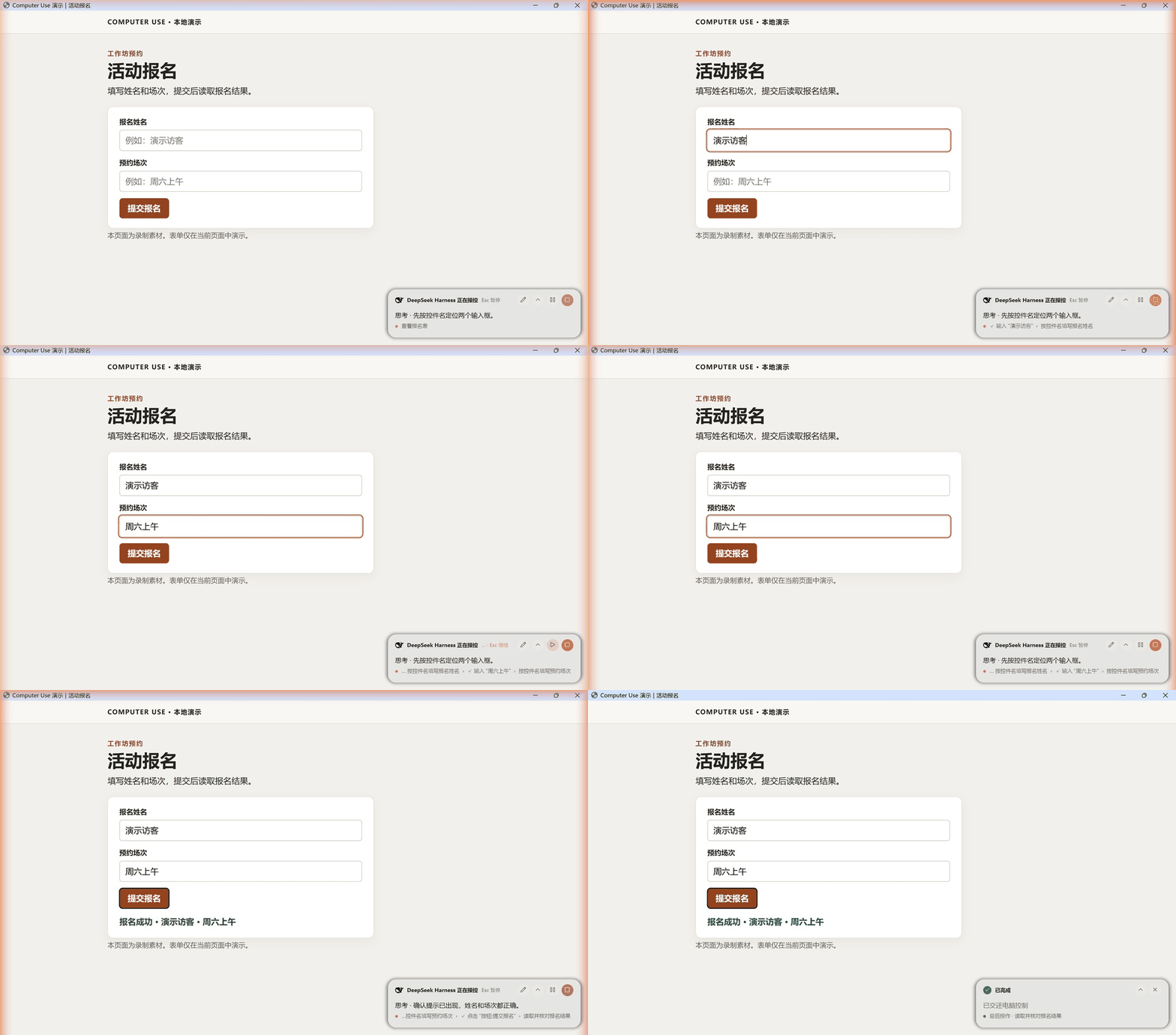
演示中,插件按控件名填写报名表,中途暂停,继续后提交并读出确认文字。画面取自隔离 Chrome 配置中的实际操作,动作由脚本发起,卡片使用演示文案。
可以用它做什么
| 场景 | 可以交给 DSH 的任务 |
|---|---|
| 浏览器 | 用当前已打开的 Chrome,在同一窗口的新标签打开网址,填写表单并检查确认提示。 |
| 办公软件 | 在 Word、WPS 或记事本中输入和整理内容,按指定位置保存,再确认文件名。 |
| 桌面应用 | 打开计算器、文件资源管理器等应用,操作菜单或对话框,再读出屏幕上的结果。 |
一次操作是怎么完成的
- 先看清界面。 模型可以读截图,也可以通过 Windows UI Automation 获取按钮、输入框及其内容。例如,直接定位「按钮:提交报名」;同名控件还能用 AutomationId 区分。截图上的坐标由插件换算,适配 Windows 的缩放和多显示器。
- 连续完成几步。 「填字段 → 提交 → 等成功提示」可以放进同一个批次。等待条件满足就继续,结束时等画面稳定再回传截图,也可以只读出窗口文字。
- 处理常用应用时参考操作笔记。 插件内置 Word、Excel、Chrome 等应用的技能,模型打开对应应用时会收到常用快捷键和操作步骤。你可以在设置页查看或编辑这些笔记。
操控期间,你仍然掌握主动权
默认按应用授权,DSH 会在需要时请求操作目标应用。开始操控后,橙色光晕标出操控状态,迷你卡片上方显示 DSH 提供的思考内容,下方保留操作时间线。按 Esc 暂停或继续,点 停止 结束本轮。你也可以直接在卡片上输入新指令,或者亲自接手键盘。
正文一开始输出,就回到 DSH 对话阅读。桌面版会恢复窗口并切回前台,Web GUI 会尝试回到任务开始时识别到的活动 DSH 标签。可查看暂停时的卡片和任务结束的画面。授权范围、截图和剪贴板的处理规则见数据与权限。


安装并试一次
需要 Windows 10 2004+ 或 Windows 11,以及 DeepSeek Harness 0.2.0-rc.2 或更新版本。在 DSH 桌面版的 插件 → 添加插件 中输入 @copylee/dsh-computer-use,安装后启用。
第一次可以试试「打开计算器,算 1234 × 5678,然后读出结果」。支持图片输入的模型可以看截图;纯文本模型可以读取应用提供的无障碍控件和窗口文字。游戏、画布和部分自绘界面可能需要截图定位。Web GUI 安装方式和常见问题见安装与排障。
文档
| 文档 | 内容 |
|---|---|
| 安装与排障 | 桌面版与 Web 安装、第一次操作和常见问题 |
| 操作指南 | 示例任务、授权、暂停与接管、应用技能 |
| 设置参考 | 截图、输入方式、浮层和 Web GUI 地址 |
| Agent 工具 | 工具清单、控件定位、批量动作与文字结果 |
| 数据与权限 | 模型可见数据、截图缓存、剪贴板与 Windows 限制 |
| 开发与验证 | 架构、构建、Windows 冒烟测试和本地联调 |
Links
More in this category
Tencent/WeKnora#dsh-weknora★ 37685
Four read-only tools over a WeKnora knowledge base: list knowledge bases, hybrid passage search, reassemble one document's chunks in order, and WeKnora's own cited RAG or ReAct-agent answer with a resumable session id.
DayuanJiang/next-ai-draw-io#dsh-plugin★ 37029
Draws draw.io diagrams in DeepSeek Harness through the next-ai-drawio MCP server: the link in the reply opens a live preview in the right sidebar, you can edit the diagram by hand, and each AI change is a version you can restore. Node.js 18+; npx downloads the MCP server on first use.
superdesigndev/treg★ 8322
Tool catalog for agents: search ~2,600 external endpoints (SEO and SERP, backlinks, social, people and company enrichment, ad libraries, scraping) by the task you want done, read each one's parameters and per-call price, then call it with the credential injected server-side. Ships the skill plus an MCP row that stays disabled until TREG_TOKEN is set.
T-Auto/dsh-ops★ 5899
Provides bash, PowerShell 7, and high-performance Rust tools for DSH on Windows to reduce token usage.
sixtysevenlf/dsh-blender-plugin★ 2178
Lets a DSH agent drive a local Blender over a direct TCP channel with 15 tools: viewport frames, custom-angle renders, Python execution, headless and job offload, transaction rollback, and a planning layer of 228 ops across 34 families.
helloHub1212/dsh-windows-mcp★ 1612
Bridges the CursorTouch/Windows-MCP desktop automation server into DSH through the official MCP client bridge, registering its screenshot, UI tree snapshot, mouse and keyboard input, clipboard, process and registry tools as mcp__windows__* tools for the model, and adds a windows_mcp_doctor diagnostic tool. Computer Use is off by default and is switched on from the plugin panel.
Community comments
Comments are public GitHub Discussions. Loading them connects to GitHub and Giscus; a GitHub account is required to post.