Role-play conversations with character cards, in-chat character-card authoring and editing, and image generation through configurable backends.
Install
# from npm (prebuilt)
dsh plugin --profile web add dsh-roleplay
# from GitHub (first run asks for allowBuilds approval — follow the hint, retry)
dsh plugin --profile web add github:chinosk6/dsh-roleplay
Any plugin you install runs third-party code with your own permissions — it can read your files, use your credentials, and reach the network, and tool approvals don’t sandbox it. GitHub-sourced plugins also run build scripts at install time — pnpm blocks those until you allow them, so an install can stop with ERR_PNPM_GIT_DEP_PREPARE_NOT_ALLOWED or ERR_PNPM_IGNORED_BUILDS; dsh prints the exact key to add under allowBuilds in your profile’s pnpm-workspace.yaml, and the install works on the next run. Allowing a build is a trust decision: only install sources you trust, and pin a commit (github:owner/repo#sha).
README
English | 简体中文
- DeepSeek Harness role-play plugin
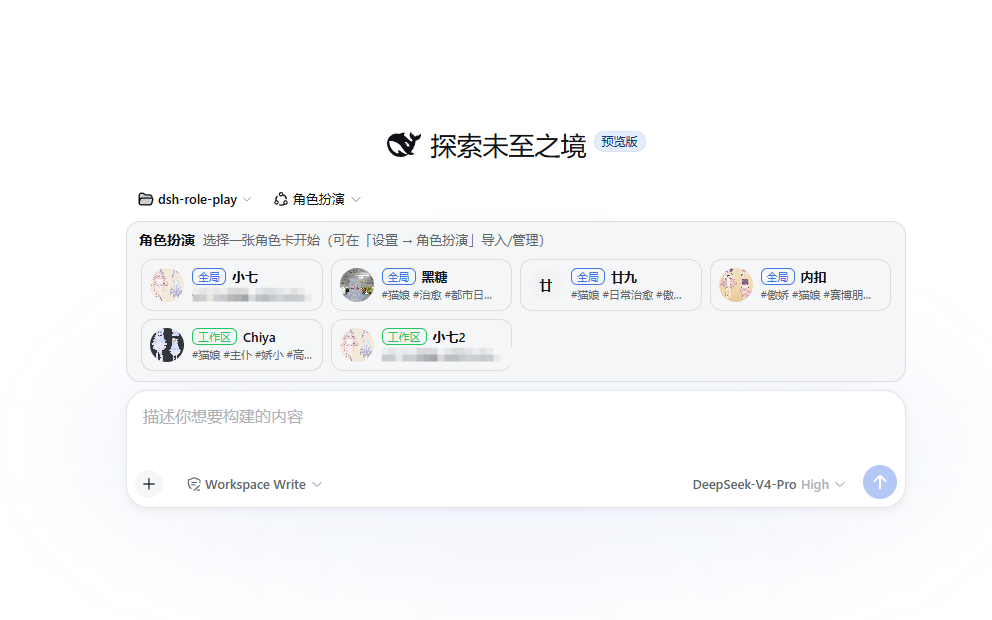
Features
Character card generation / import, with interactive character card creation
Image generation, supporting:
- Official NAI API
- ai.erp.sex third-party API
- Local Stable Diffusion WebUI API
Requirements
Install
From npm
dsh plugin --profile web add -w dsh-roleplay
From GitHub
dsh plugin --profile web add -w github:chinosk6/dsh-roleplay
You can also pin a branch or tag:
dsh plugin --profile web add -w github:chinosk6/dsh-roleplay#v0.1.0
Git installs run prepare to build lib/. If pnpm reports that the build script was ignored, add this to ~/.dsh/profiles/web/pnpm-workspace.yaml:
allowBuilds:
  dsh-roleplay: true
Update
dsh plugin --profile web update dsh-roleplay
Then restart dsh.
Uninstall
dsh plugin --profile web remove dsh-roleplay
- Character cards and generated image caches remain in
$DSH_HOME/roleplay/and must be removed manually.
Build
pnpm install
pnpm run build
On Windows, if npx / pnpm is blocked by the execution policy, you can run:
node node_modules/typescript/bin/tsc -p tsconfig.json --noEmit
node node_modules/typescript/bin/tsc -p tsconfig.client.json --noEmit
node scripts/build.mjs
Add a local checkout to dsh:
dsh plugin --profile web add -w .
Then restart dsh web.
Credits
- Character cards from RP-Hub can be imported. Some prompts were adapted from that project.
Links
More in this category
PC2005-cloud/dsh-pet#dsh-pet★ 983
Desktop pet for the DSH Web UI with 25 transparent animations, screen wandering, click reactions and drag, plus a reproducible asset-generation pipeline.
Nagi-ovo/dsh-ads★ 646
Parody ads in 2005-Chinese-web style: sidebar banners, in-chat feeds, corner popups, and a close button whose hit area is smaller than it looks. All fictional.
vlln/whale-girl★ 341
Desktop pet (QQ-pet style): floats in the corner, draggable, feedable, playable.
a86582751/dsh-nexttavern★ 136
Roleplay workspace for DeepSeek Harness: import SillyTavern/TauriTavern character cards or author one from scratch through an interactive flow; turn a long TXT novel into a playable card with either an intensive or a coarse reading pass; the main agent consults worldbooks on demand, and prose is read in a dedicated tavern reader tab; explore multiple worldlines inside one conversation (regenerate, edit-and-send, explicit clone); scoped style presets with 16 built-in styles, a character agent cluster, a standalone decision card, and card or novel export; long stories hold together through a frozen settings prefix, a hard-cut context window, traceable director notes and keyword/semantic/hybrid recall, with embeddings either online or fully local. Targets Harness 0.1.2-alpha.3 and applies its documented compatibility patches.
yyh-001/dsh-meme★ 125
Chat meme stickers: text-only send, mood auto-send, QQ/WeChat-style picker, auto-learn, custom packs.
Sutera-Diffusus/dsh-whale-musume★ 108
A whale-girl desktop pet for the DeepSeek Harness Web UI: pat-to-raise growth, work-state poses per tool type, 494 dialogue lines, 30 achievements, a growth diary, drag physics, theme sync and an accessibility mode. Chat-keyword sensing and API-balance care ship off and are opt-in; an optional weather mood calls Open-Meteo only after you name a city. No telemetry.
Community comments
Comments are public GitHub Discussions. Loading them connects to GitHub and Giscus; a GitHub account is required to post.