Adds mark-unread, copy session info, reveal in Finder or open with your IDE, and permanent delete (with child sessions) to the DSH sidebar session menu, plus error and unread status dots, hover-card details, one-click delete for archived rows, and a settings panel that switches each menu item on or off; the interface is available in English and Chinese.
Install
# from npm (prebuilt)
dsh plugin --profile web add dsh-session-menu
# from GitHub (first run asks for allowBuilds approval — follow the hint, retry)
dsh plugin --profile web add github:big-head-pigeon/dsh-session-menu
Any plugin you install runs third-party code with your own permissions — it can read your files, use your credentials, and reach the network, and tool approvals don’t sandbox it. GitHub-sourced plugins also run build scripts at install time — pnpm blocks those until you allow them, so an install can stop with ERR_PNPM_GIT_DEP_PREPARE_NOT_ALLOWED or ERR_PNPM_IGNORED_BUILDS; dsh prints the exact key to add under allowBuilds in your profile’s pnpm-workspace.yaml, and the install works on the next run. Allowing a build is a trust decision: only install sources you trust, and pin a commit (github:owner/repo#sha).
README
dsh-session-menu
Adds mark-unread, copy session info, reveal in Finder or open with your IDE, and permanent delete to the DSH (DeepSeek Harness) sidebar session menu — plus status dots, hover-card details and one-click delete for archived rows.
UI · Install · Uninstall · Settings · Configuration
UI
| Session menu | Status dots |
|---|---|
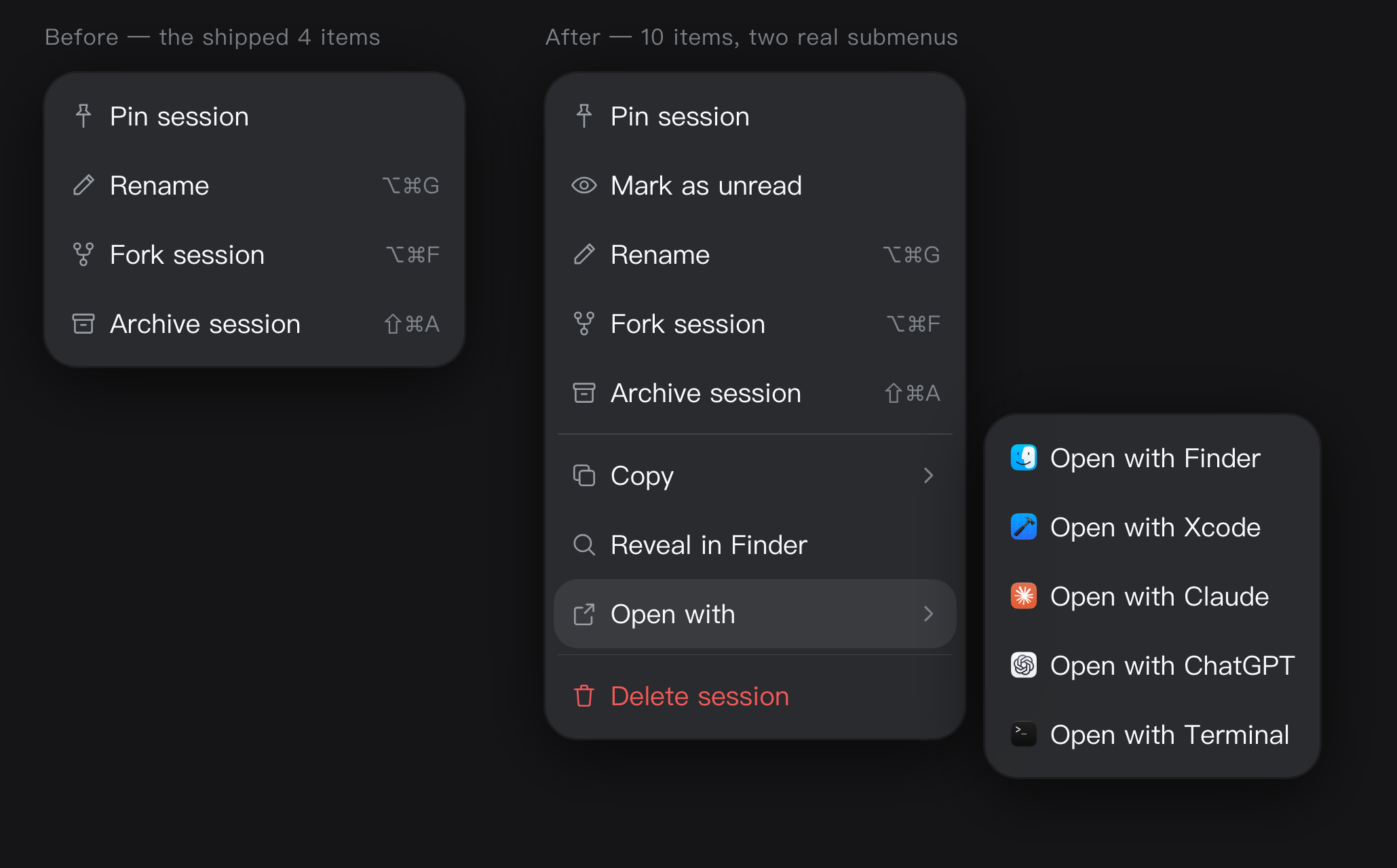 |
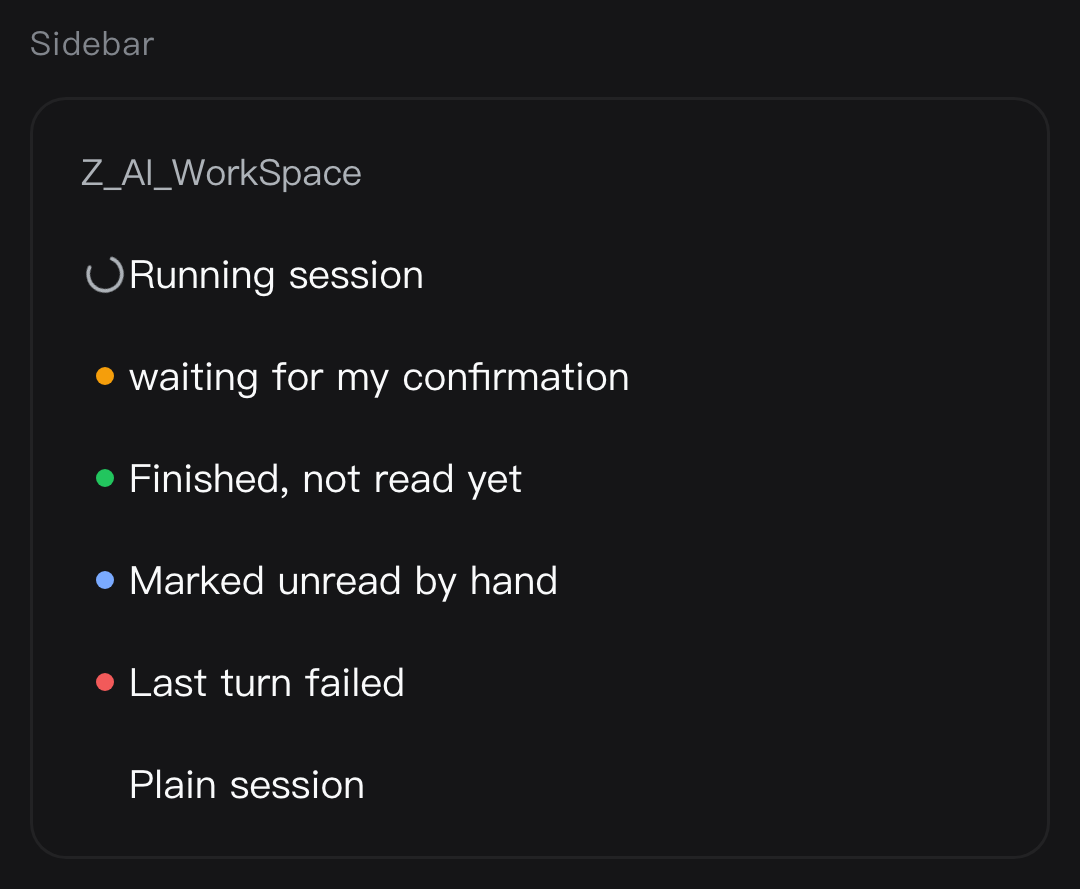 |
| Hover card | Archived rows: one-click delete + bulk entry |
|---|---|
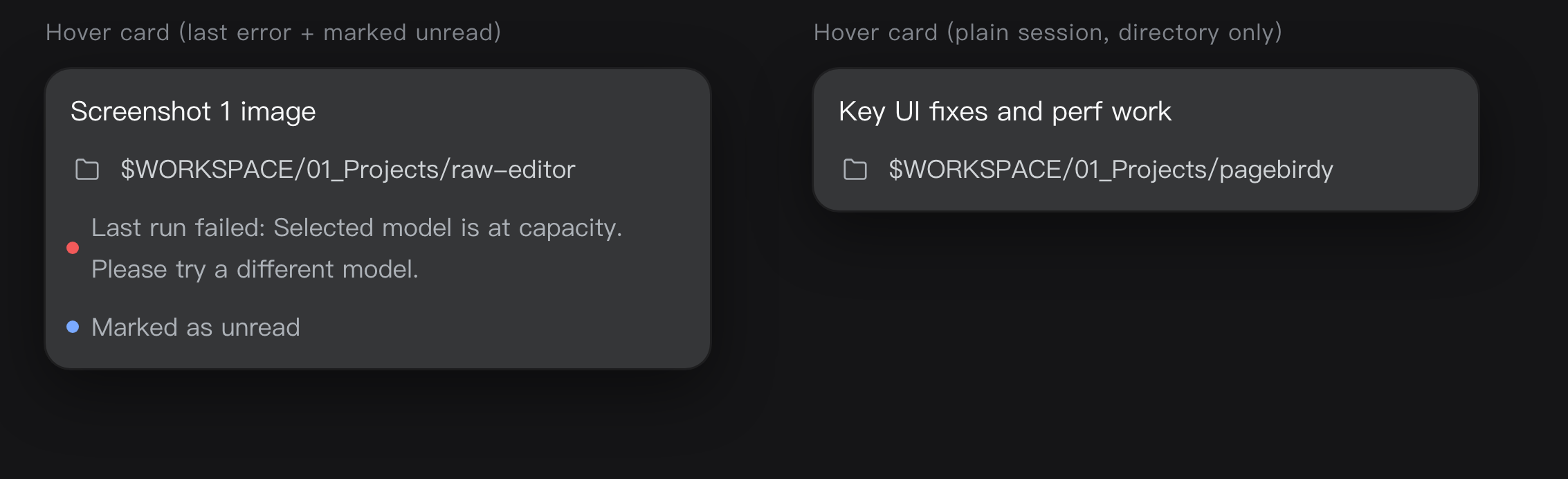 |
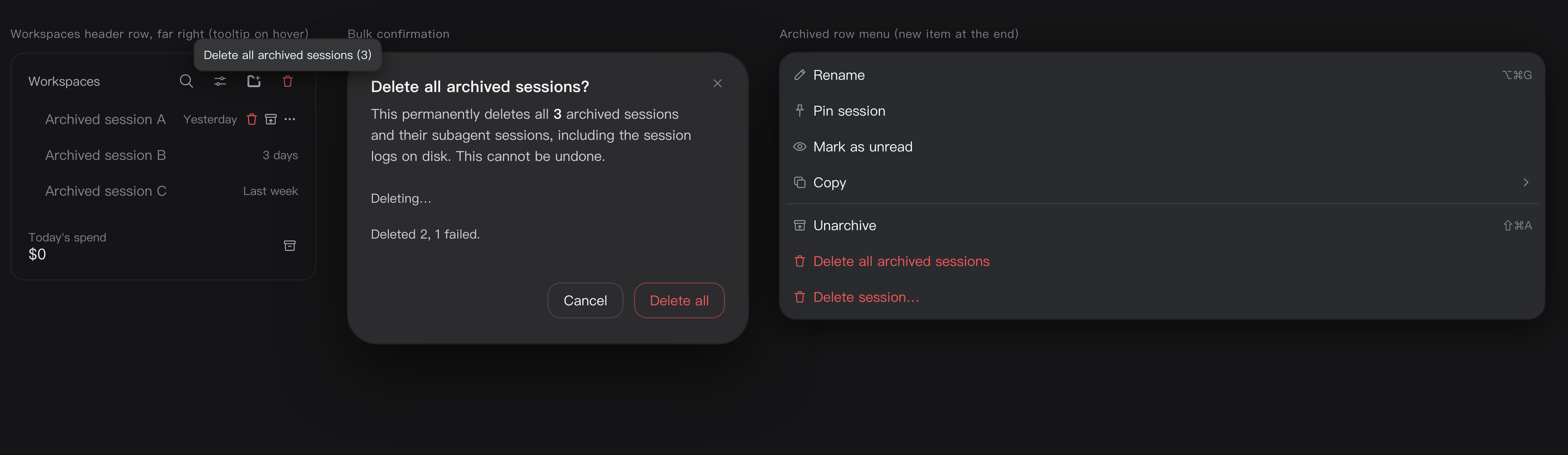 |
| Delete confirmation | Archived row menu |
|---|---|
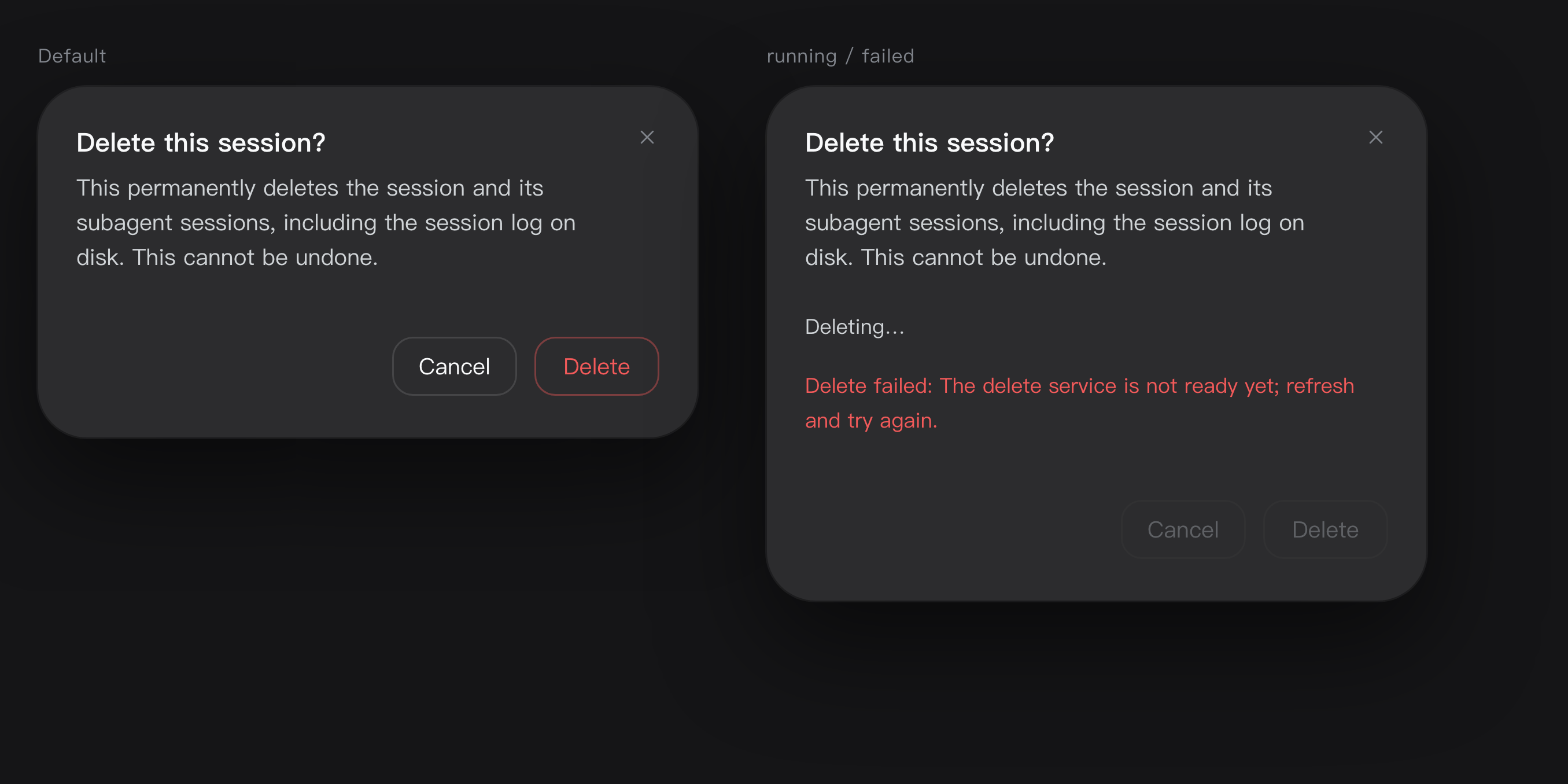 |
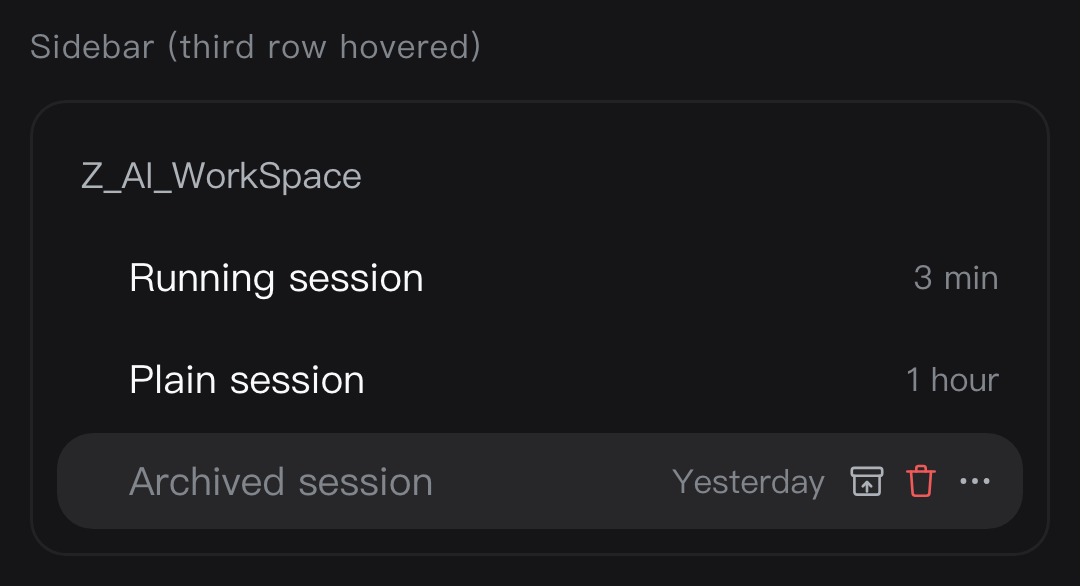 |
Once installed, it looks like this under Settings → Plugins → Installed:

Install
All three ways install the dsh-session-menu package from npm.
Option 1 — install it inside DSH (recommended)
- Open DSH and click Plugins in the left sidebar
- Click Add plugin in the top right
- Type
dsh-session-menuand click Install - Restart the DSH app
Option 2 — let the Agent install it
Send this to the Agent inside DSH:
Install the plugin dsh-session-menu with the plugin manager, then remind me to restart DSH.
Option 3 — install it from the terminal
If you are comfortable with a command line: open macOS's Terminal app (⌘ + Space, search
"Terminal"), paste this line and press Enter.
dsh plugin --profile desktop add dsh-session-menu
Replace desktop with your own profile name (ls ~/.dsh/profiles lists them; desktop and web
are the common ones). Either way, restart the DSH app afterwards.
Uninstall
Settings → Plugins → Installed, click the trash icon on the dsh-session-menu row and confirm.
Settings
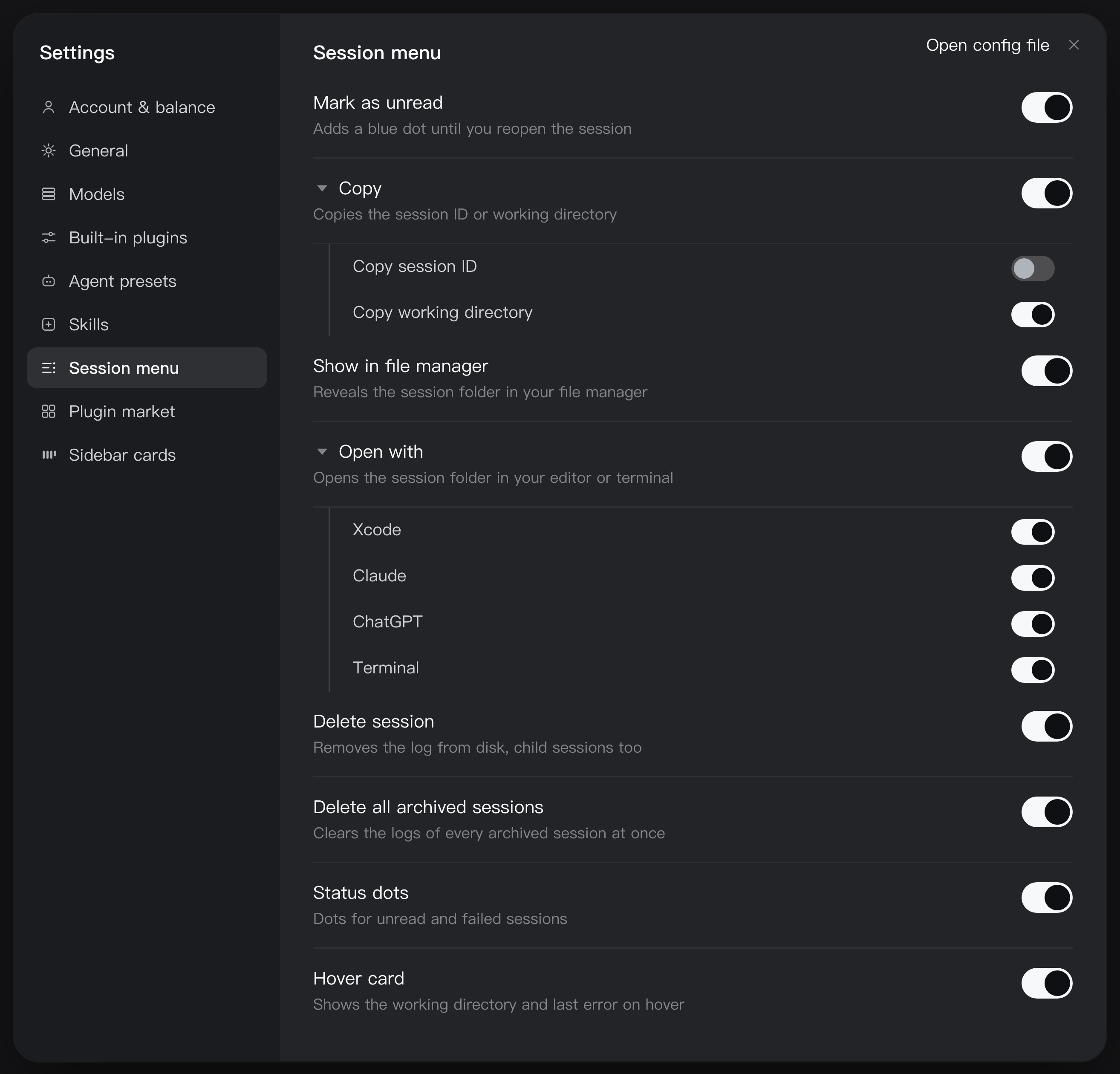
Once installed, the plugin adds a Session menu section under Settings with 8 switches:
Mark as unread · Copy · Show in file manager · Open with · Delete session · Delete all archived sessions · Status dots · Hover card
Turning one off hides it from the context menu and the session rows immediately — no restart. The switches live in this browser.
The triangle next to Copy and Open with expands them, so every sub-item can be switched on its own; turning a parent off greys its children out.
Copy Session ID is newer than this plugin in the kernel itself: when the kernel already ships that row, our identical sub-item starts switched off and Copy collapses into a single row. Switch it back on to keep both.
Running a community build that already ships some of these? Turn the duplicates off here.
Configuration
The apps inside the Open with › submenu are configurable. Add a block to your profile's
cordis.patch.yml:
config:
  applications:
    - kind: editor
      paths:
        - /Applications/Visual Studio Code.app
    - kind: terminal
      paths:
        - /System/Applications/Utilities/Terminal.app
Each entry takes the first path that exists, and only the matching one shows up in the menu.
config replaces the whole list, it does not append. Restart DSH after editing.
License
Links
More in this category
zhu1090093659/dsh-web#packages/dsh-task-board★ 10172
Task board for the dsh web GUI: a sidebar multi-column kanban whose cards run in real DSH agent sessions and can also be scheduled with cron expressions, executed host-side even with the browser closed.
zhu1090093659/dsh-web#packages/dsh-web-all★ 10172
Plugin and skin collection for the DSH Web UI: task board, Git graph, right-side panel, remote mobile UI, pet, live token stats, and a skin center.
ccch1mneyyy/dsh-TUI★ 7101
Claude Code-style full-screen terminal UI: pixel-whale header, live status line, and streaming thought expansion.
MeteorNOX/DeepSeek-Balance-Whale-Widget★ 6959
A fixed-corner whale widget for the DSH web GUI — balance, today's usage and per-turn cost with peak/off-peak pricing, editable balance-alert and daily-budget bubbles, a module-based custom bubble queue with A/B weighted choices and random lines or images, 30+ vendor templates (OpenAI, OpenRouter, Kimi, SiliconFlow, Ark, Zhipu, MiniMax and more) with per-model balance and subscription quota, plus task-end sound, imported audio, custom roles and a resource manager. Local-only, no telemetry.
omdsh-dev/DSH-better-sidebar★ 4959
Full sidebar workbench with file rendering and editing, terminal, Git, and subagents; third-party plugins can register new tabs.
Devin-AXIS/deepseek-design#deepseek-idesign★ 1744
Visual design studio for websites, app prototypes, posters, cards, reports, and magazines, with templates, direct element editing, selection-aware AI draft handoff, and export.
Community comments
Comments are public GitHub Discussions. Loading them connects to GitHub and Giscus; a GitHub account is required to post.