Bridge Claude Code's .claude/ directories into DSH with zero migration: project and user-level skills, commands, rules (one system-reminder envelope), agent files, hooks (PreToolUse/PostToolUse/UserPromptSubmit/ SessionStart/SessionEnd) and .mcp.json servers, plus Claude Code plugin marketplaces. Ships /cc-plugin for full plugin/marketplace management (claude CLI first, self-implemented fallback), /cc-resume to list and import Claude Code sessions into DSH as native event-sourced logs, and /cc-export to write DSH skills back as Claude Code skills. Two-way Claude Code <-> DSH bridge, versioned and released as dsh-claude-compat.
Install
# from npm (prebuilt)
dsh plugin --profile web add dsh-claude-compat
# from GitHub (first run asks for allowBuilds approval — follow the hint, retry)
dsh plugin --profile web add github:biedongbin/dsh-claude-compat
Any plugin you install runs third-party code with your own permissions — it can read your files, use your credentials, and reach the network, and tool approvals don’t sandbox it. GitHub-sourced plugins also run build scripts at install time — pnpm blocks those until you allow them, so an install can stop with ERR_PNPM_GIT_DEP_PREPARE_NOT_ALLOWED or ERR_PNPM_IGNORED_BUILDS; dsh prints the exact key to add under allowBuilds in your profile’s pnpm-workspace.yaml, and the install works on the next run. Allowing a build is a trust decision: only install sources you trust, and pin a commit (github:owner/repo#sha).
README
Reuse your entire Claude Code setup in DSH — zero migration. skills, commands, rules, agents, hooks, MCP — install and they just work. Nothing to reconfigure.
The 10-second pitch
You've already built up a solid .claude/ in Claude Code — skills, slash commands, rules, agents, hooks, MCP servers. Moving to DSH (DeepSeek Harness) shouldn't mean rebuilding all of it.
dsh-claude-compat is that bridge. It carries your .claude/ directories verbatim into DSH — everything works immediately. Install once, and both sides share one config: change it in one place, it updates in both.
dsh plugin --profile web add dsh-claude-compat@latest
dsh web
Done. Your skills show up in the / menu, rules inject into every new session, and you can invoke agents with /agent-name — all inside DSH, exactly like Claude Code.
Or let DSH install it itself (recommended): copy this line to DSH — it reads the skill, installs, and verifies:
Read https://github.com/biedongbin/dsh-claude-compat/blob/main/.claude/skills/install-dsh-compat/SKILL.md and install the dsh-claude-compat plugin following its steps.
⭐ Find this useful? Give it a star — it keeps us improving and helps more people discover it.
What it brings over — at a glance
| Your Claude Code asset | Becomes in DSH | How to use it |
|---|---|---|
skills/**/SKILL.md |
DSH skill (lazy-loaded) | /skill-name, the skill tool, and the model-visible catalog |
commands/*.md |
DSH skill (user-invocable) | /command-name in the slash menu |
rules/*.md |
message-stream injection (same channel Claude uses) | auto-applies to every new session |
agents/*.md |
delegation-shim skill | invoke /agent-name with its persona |
.claude/settings.json hooks |
Pre/PostToolUse + UserPromptSubmit bridged | commands, permissions, blocks behave as before |
<root>/.mcp.json |
dsh-mcp-client instances |
stdio / streamable-http auto-translated |
~/.claude/plugins |
DSH skill (managed via /cc-plugin) |
installed plugin skills work too |
Both the project .claude/ and the user-level ~/.claude/ are read. Same-name entries dedupe by fixed priority: project .claude > DSH native > ~/.claude — a project skill always wins over other copies, and a user skill never overrides a DSH-native one. CLAUDE.md / AGENTS.md are handled by DSH's built-in dsh-agent-instructions — this plugin never touches them.
What it does (implementation detail)
.claude/ path |
Mechanism | Behavior |
|---|---|---|
skills/**/SKILL.md |
DSH skill provider | Name + description in the model-visible catalog; body loads on demand via the skill tool. New skills appear on the next catalog reconcile — no restart. |
commands/*.md |
DSH skill provider | Same, plus user-invocable: /command-name works in the slash menu. |
rules/*.md |
Message-stream injection | Rules are concatenated, wrapped in a <system-reminder> envelope, and prepended as a user-role message at the front of the message array once per session — the same channel Claude Code uses (prependUserContext), which models follow reliably. |
agents/*.md |
DSH skill provider (delegation shim) | DSH has no markdown subagent format, so each agent file becomes a skill whose body leads with an explicit "delegate with this persona" instruction. Model- and user-invocable, so /agent-name works. Same-name agents dedupe by rank like skills. |
.claude/settings.json → hooks |
Tool/prompt hooks | Claude Code hooks subset bridged onto DSH's tools/pre-execute (PreToolUse), tools/post-execute (PostToolUse) and agent/pre-step (UserPromptSubmit) waterfalls. Commands run via /bin/sh -c with a Claude-style JSON payload on stdin; exit code 2 denies/blocks, hookSpecificOutput overrides are honored, timeouts allow through with a warning. |
<projectRoot>/.mcp.json |
MCP servers | Claude Code-format MCP server definitions are translated to dsh-mcp-client plugin instances at DSH startup from the launch workspace: command → stdio, url → streamable-http. Malformed entries or a missing @deepseek-ai/dsh-mcp-client degrade to a warning, never a crash. |
~/.claude/plugins (installed plugins) |
DSH skill provider | Installed Claude Code plugin-marketplace plugins contribute their skills/commands/agents (via each install's .claude-plugin/plugin.json manifest, or a directory scan when manifest-less) at rank 750 — the long tail: project .claude, DSH native, and ~/.claude all win collisions. Plugin MCP servers (mcpServers in the manifest) mount only when enablePluginMcp is opted in — mounting third-party MCP servers is a bigger trust step than listing skills. |
The same directories are also read from the user-level ~/.claude/ (skills, commands, rules, agents, and ~/.claude/settings.json hooks). Same-name skills/commands/rules/agents are deduped with a fixed priority:
project .claude > DSH native (.dsh) > ~/.claude
- Project
.claudeentries carry rank50; DSH's own skills — project.dshroots,.agentsroots, and bundled skills (ranks100–600,BUNDLED_SKILL_RANK) — sit in between;~/.claudeentries rank700. So a project skill always overrides the DSH-native and user copies, and a user skill never overrides a DSH-native one. - Rule files with the same basename in
~/.claude/rulesare skipped when the project already provides one.
CLAUDE.md / AGENTS.md are not touched — DSH's built-in dsh-agent-instructions already handles those.
Built-in commands
Installing this plugin adds three management skills to the catalog:
| Command | What it does |
|---|---|
/cc-plugin |
Full Claude Code plugin management: list, install <name>[@marketplace], uninstall, enable, disable, update [name], search <term>, marketplace list|add|remove|update. One-shot syntax /cc-plugin <name>@<marketplace> installs directly. Engine: the claude CLI when available, otherwise a built-in fallback (direct JSON + git, with timestamped backups of every file it touches). All state stays in Claude-native locations (~/.claude/plugins, ~/.claude/settings.json enabledPlugins) so Claude Code and DSH read the same truth. |
/reload-cc-plugins |
Hot-reload the skill catalog: drop cached provider lists and notify observers so newly installed/removed skills appear in the current session — no restart, no new session. |
/reload-skills |
Alias of /reload-cc-plugins. |
/cc-export |
Export DSH-native skills (.dsh/skills) into Claude Code .claude/skills/<name>/SKILL.md with frontmatter preserved. list / export [--overwrite] [--target]. |
/cc-resume |
List Claude Code conversation sessions for the current project (~/.claude/projects/) and import any of them into DSH with full user/assistant/tool history. Imported sessions appear in the DSH session list titled cc: <preview> and resume like native ones. list / import <sessionId> / --limit-turns N for huge sessions. |
Typical loop: /cc-plugin install ralph-loop@claude-plugins-official → /reload-cc-plugins → new skills visible immediately. Plugin-shipped MCP servers still require a DSH restart (process-lifetime mount).
Requirements
- DSH with a profile (e.g.
web) - A project using Claude Code conventions:
.claude/skills/,.claude/commands/,.claude/rules/,.claude/agents/,.claude/settings.json, and a project-root.mcp.json(all optional;~/.claude/equivalents are also picked up) pnpmonPATH—dsh pluginis a thin pnpm forwarder
Install / Update
One command — the package declares dsh.bundle, so DSH activates it automatically (no manual cordis.patch.yml editing). Install or update to the latest release:
dsh plugin --profile web add dsh-claude-compat@latest
Or from GitHub:
dsh plugin --profile web add github:biedongbin/dsh-claude-compat
Restart DSH (dsh web). Done — skills show up in /, rules are injected into every new session.
Configuration
| Option | Default | Description |
|---|---|---|
enableSkills |
true |
Register the .claude/skills + .claude/commands + .claude/agents provider (project and ~/.claude) |
enableRules |
true |
Inject project + ~/.claude rules/*.md into the message stream |
enableMcp |
true |
Translate <projectRoot>/.mcp.json into mounted MCP server plugins |
mcpFailOnStartupError |
false |
Forward to dsh-mcp-client: fail plugin startup when an MCP server fails to connect |
enableHooks |
true |
Run .claude/settings.json hooks (Pre/PostToolUse, UserPromptSubmit) |
hooksTimeoutMs |
60000 |
Per-hook run timeout (UserPromptSubmit capped at 10s regardless) |
enableAgents |
true |
Surface .claude/agents/*.md as delegation-shim skills |
skillAliases |
{} |
Non-kebab (e.g. Chinese) name → ASCII slug map, e.g. { "三脑": "san-nao" }. See “Non-ASCII skill names” below |
aliasDescriptionPrefix |
true |
When an alias is used, put the original name in front of the description: san-nao: 三脑 — … |
rulesMaxBytes |
65536 |
Hard cap on total injected project rules text |
userRulesMaxBytes |
65536 |
Hard cap on total injected ~/.claude/rules text |
projectRootMarkers |
[".git"] |
Ancestor markers for project-root discovery |
skillRank |
50 |
Provider rank for project .claude skills (wins every DSH-native collision) |
skillSource |
project-claude |
Source tag for project catalog entries |
userSkillRank |
700 |
Provider rank for ~/.claude skills (loses to DSH-native 600) |
userSkillSource |
user-claude |
Source tag for ~/.claude catalog entries |
userClaudeDir |
~/.claude |
User-level .claude directory (~ expands to the home dir) |
enablePlugins |
true |
Surface skills/commands/agents from installed Claude Code plugins (~/.claude/plugins) |
pluginSkillRank |
750 |
Provider rank for plugin content (the long tail — everything else wins) |
pluginSkillSource |
claude-plugin |
Source tag for plugin catalog entries |
pluginsRoot |
~/.claude/plugins |
Plugin-marketplace root (installed_plugins.json + cache/) |
enablePluginMcp |
false |
Mount plugin-declared MCP servers (opt-in; requires enablePlugins and enableMcp) |
enablePluginManager |
true |
Register the /cc-plugin, /reload-cc-plugins, /reload-skills management skills |
pluginManagerRank |
40 |
Rank for the built-in management skills (top of the catalog) |
Notes
- Skill naming: DSH requires kebab-case skill names. Nested skill directories are flattened (
gitnexus/gitnexus-guide→gitnexus-gitnexus-guide); invalid frontmatter names fall back to the directory name. - MCP lifecycle:
.mcp.jsonis read once at DSH startup from the launch workspace — not per session — and each server mounts for the process lifetime. Restart DSH to pick up edits. - Hooks scope: a deliberately small subset of Claude Code hooks: PreToolUse / PostToolUse / UserPromptSubmit. Matchers support exact names,
*wildcards, and|alternation; commands run withstdincarrying the Claude-style JSON payload. Exit code 2 = deny (Pre) / block (Post); other non-zero exits and timeouts allow through with a warning. - Rules granularity: rules are read per new session (cached per session cwd). Editing a rule mid-session takes effect in the next session.
- Rules content: rules are injected verbatim as instructions to the model. Only commit rules you want the model to follow — same trust level as
CLAUDE.md. - Catalog snapshot timing: the skill catalog is snapshotted when a session is created. Skills installed or edited mid-session surface after
/reload-cc-plugins(hot reload) or in the next session.
Non-ASCII skill names
DSH's skill-name grammar is fixed to kebab-case (/^[a-z0-9]+(?:-[a-z0-9]+)*$/, defined in @deepseek-ai/dsh-skill and enforced by the registry before a candidate is read), so a Chinese name can never reach the registry, no matter what this plugin emits — emitting it anyway only moves the failure one layer down (get() returns void 0).
The plugin's answer is an explicit map from the original name to a legal slug, keeping the original name at the front of the description:
skillAliases:
  三脑: tri-brain
  读知乎: read-zhihu
- The
namebecomes the slug (/tri-brainin the slash menu); thedescriptionbecomes三脑 — 三脑复核(…). - A legal name always beats an alias — a skill DSH can already load is never renamed.
- Aliased entries keep their provider's rank, so a collision with a DSH-native or
~/.agentsskill is deduped exactly like any other duplicate (a~/.claudealias loses to an~/.agentsskill of the same name rather than shadowing it). LoweruserSkillRankbelow 500 to make~/.claudewin. - Un-mapped non-kebab names no longer vanish silently: one warning per file per process, with a paste-ready mapping example.
Troubleshooting
Known limitation: /cc-resume via the skill tool
In some DSH runtime configurations the skill tool resolves in an agent-scoped
layer where globally registered providers are not visible — the invocation
returns skill "cc-resume" is unknown or no longer available even though the
catalog lists it. This is a DSH runtime layering behavior, not a plugin bug.
The skill body only instructs the model to run the CLI, which is always
available:
node node_modules/dsh-claude-compat/scripts/cc-resume.mjs list
node node_modules/dsh-claude-compat/scripts/cc-resume.mjs import <sessionId>
DSH won't start back up after a restart / port 3080 stuck. Old process still holding the port (symptom: EADDRINUSE in logs). Use the bundled restart script — it waits for a clean stop, falls back to SIGKILL, and verifies the port before reporting success:
npx dsh-claude-compat-restart        # bin alias (installed with the package)
bash node_modules/dsh-claude-compat/scripts/dsh-restart.sh   # direct
bash scripts/dsh-restart.sh --no-patch   # skip the prompt patch, restart only
The script also re-applies the idempotent dsh-terminal-bash prompt patch, which npx/npm updates silently revert. DSH_RESTART_PORT overrides the port (default 3080).
Installed a plugin via /cc-plugin but its skills don't show. Run /reload-cc-plugins. Still missing → restart DSH (plugin-shipped MCP servers always need a restart).
/cc-resume import fails on compression. The importer needs the zstd binary (macOS: brew install zstd; most Linux images ship it).
/cc-plugin reports "claude CLI unavailable". The fallback engine handles install/enable/disable; for marketplace add/update, install Claude Code (npm install -g @anthropic-ai/claude-code) or manage marketplaces from Claude Code directly.
Release notes
Acknowledgments
- Linux.do — community
- Claude Code — the
.claude/conventions this plugin bridges - DeepSeek Harness — the runtime this plugin extends
License
📈 NPM Downloads
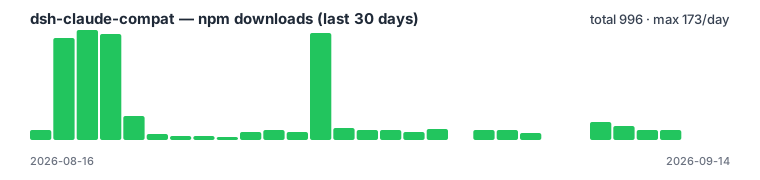
Data: api.npmjs.org · npmtrends
⭐ Star History
If this project helps you, please give it a ⭐ — it motivates us to keep improving.
Links
More in this category
yjh051108/dsh-routing-suite★ 6991
One repository, three parts: a runtime injector for DSH plugin packages (inject, hot-reload, unload, promote a dev staging tool to the front, route self-heal, plus a settings-page plugin manager that lists, unloads and drags folders in to internalize), a task-aware reasoning-mode router agent preset (router-standard / router-spec / router-react), and a graded two-level task protocol whose six tools (commit_star, lock_stage, revise_do, edit_plan, mark_task, redteam_verdict) pin task state to disk. The injector implementation ships in-tree, so the install carries its own behaviour rather than a dependency list.
strukto-ai/mirage#dsh★ 3715
Swaps the filesystem and bash providers for a mirage virtual workspace: file tools and shell commands run over mounted resources (RAM, S3, Redis, Slack, Gmail, Notion, Postgres) instead of the host disk, with per-mount read/write/exec modes, per-command sandbox routing (monty, pyodide, quickjs in process; docker, e2b, daytona remote), and installed CLIs (git, gh, slack, linear, ntn, gws, or one you register) as head words in the virtual terminal.
first-fluke/oh-my-agent#dsh★ 1352
Runs project OMA checks before and after tool execution and when a turn tries to finish. Installs its OMA CLI dependency and initializes unconfigured projects on first use. Requires Node.js 22+; initial setup needs network access and project write access.
hust-open-atom-club/oh-dsh★ 323
Community distribution: TUI, desktop, and Web UI as one bundle with layered installation.
MichengAI/dsh-skills-manager★ 294
Manages local DeepSeek Harness skills in Settings and shows shared Agent skills as read-only.
Fishquito7/dsh-skill-mcp-panel★ 223
Manages DSH skills and MCP servers from the web settings: skill cards with hot enable/disable, workspace scopes, groups, batch migration and drag-and-drop import, plus stdio/HTTP MCP CRUD with connection tests, secret redaction and the unified dsh-panel CLI.
Community comments
Comments are public GitHub Discussions. Loading them connects to GitHub and Giscus; a GitHub account is required to post.