Restart DSH: configurable restart method (Node native / legacy PowerShell), post-restart continue prompt, optional watchdog auto-relaunch.
Install
# from npm (prebuilt)
dsh plugin --profile web add dsh-restart
# from GitHub (first run asks for allowBuilds approval — follow the hint, retry)
dsh plugin --profile web add github:anweat/dsh-restart
Any plugin you install runs third-party code with your own permissions — it can read your files, use your credentials, and reach the network, and tool approvals don’t sandbox it. GitHub-sourced plugins also run build scripts at install time — pnpm blocks those until you allow them, so an install can stop with ERR_PNPM_GIT_DEP_PREPARE_NOT_ALLOWED or ERR_PNPM_IGNORED_BUILDS; dsh prints the exact key to add under allowBuilds in your profile’s pnpm-workspace.yaml, and the install works on the next run. Allowing a build is a trust decision: only install sources you trust, and pin a commit (github:owner/repo#sha).
README
This plugin publishes its README in Chinese only.
重启整个 DeepSeek Harness 进程的插件,用于重新加载插件与配置(profile 的 cordis 组合、settings 等)。host + client 双半,装进 profile 的 bundle 后即可用。
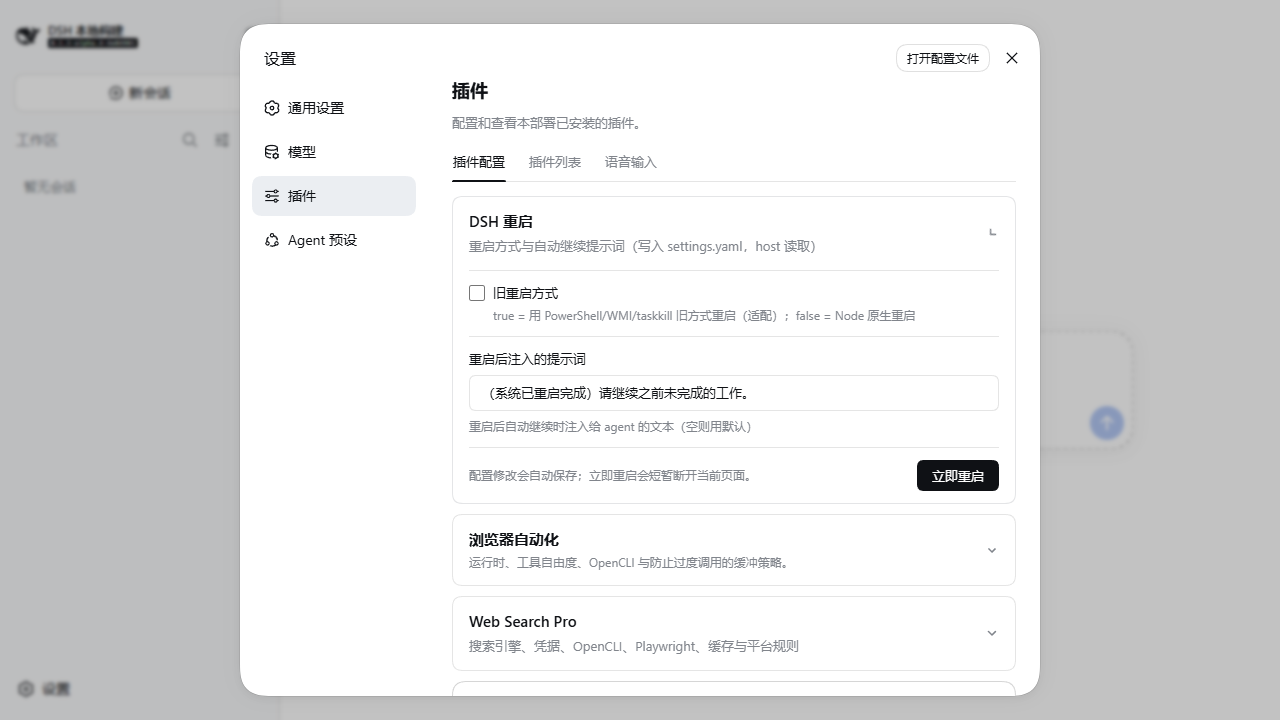
截图来自真实
webprofile 部署,展示当前 DSH 设置页中的重启配置卡片。
功能
- 模型工具
restart_harness:让 agent 直接安排一次进程重启(可选delayMs)。 /restart斜杠命令:在 UI 里手动触发重启。- 配置卡片(设置 → 插件 → 插件配置 → 「DSH 重启」):可视化编辑以下设置,改动即时写入
settings.yaml:legacyRestart— 旧 PowerShell/WMI/taskkill 重启方式(默认关闭,用 Node 原生方式)。continuePrompt— 重启后自动继续时注入给 agent 的提示词。
- 「立即重启」按钮:先读取当前进程身份,安排重启后等待新进程恢复并自动刷新页面。只读 GET 返回
{ pid, startedAt };出于安全考虑,重启 POST 仍仅接受来自环回地址(127.0.0.1 / localhost)的同源请求,经反向代理/远程访问时会被拒绝(403)。
自
0.1.3-alpha.4起,内置 detached watchdog 已停用并从设置卡片移除。旧watchdog*配置仍可被读取但不会执行;进程异常恢复请交给 systemd、Windows 服务或其他拥有完整进程生命周期的外部管理器。插件启动时会保留$DSH_HOME/dsh-stop.flag,让旧版本遗留的 detached watchdog 自行退出。
兼容与发布通道
| 插件发布通道 | DSH 基线 | 兼容承诺 |
|---|---|---|
npm latest(当前正式发布插件) |
dsh-v0.1.1-rc.2 |
已验证维护基线 |
npm next 候选(0.1.3-alpha.5) |
dsh-v0.1.5-alpha.1 |
精确依赖与真实 profile 验收目标 |
| 后续 DSH 正式版 | 尚未发布 | 发布并完成真实 profile 门禁后再声明兼容 |
开发版不会覆盖 npm latest。0.1.5-alpha.1 依赖按精确版本锁定;该版本已移除
@deepseek-ai/dsh-client-runtime,客户端契约分别迁移到 Cordis、
dsh-client-store 与 dsh-client-ui-settings,不会混装 rc.2 运行时。
0.1.3-alpha.4 变更
- 禁用并移除内置 detached watchdog;旧配置保留为无操作兼容项。
- Windows 重启通过隐藏控制台拉起,保留完整 argv,避免后续 sandbox 命令闪窗。
- 新进程 PID 变化后继续等待带认证的前端首页返回成功,再刷新页面,避免源码部署 重启期间因静态前端尚未挂载而停留在 HTTP 404。
- 防止并发请求重复安排 helper;helper 创建失败时保留旧进程,并记录失败日志。
- 自动继续投递失败时保留恢复标记;Web 路由随 Cordis 生命周期正确释放。
源码部署排错
- 本开发分支只对齐官方标签
dsh-v0.1.5-alpha.1。源码 checkout 先执行corepack pnpm install --frozen-lockfile和corepack pnpm run build,再把本地插件 重新加入隔离 profile;只安装依赖但没有构建 workspace,会表现为缺少@deepseek-ai/*/lib,并不是 restart 拉起失败。 - 如果页面显示
list slot "settings.plugin.item" requires options.id,说明 Harness 与插件客户端落在不同的开发期 slot 契约。0.1.5-alpha.1的官方契约是 keyed slot, 本插件必须使用options.key;不要直接改成id,应统一 Harness 标签、插件分支 和 profile 锁文件后重装。 - pnpm 首次安装 profile 依赖时可能把原生包写成待决的
allowBuilds项。逐项确认true或false后重跑dsh plugin --profile <name> add ...,不要用全局放行绕过。 - 若旧版本重启后已经停在浏览器 HTTP 错误页,请手工打开新进程日志打印的当前
dsh web:URL 完成一次恢复;升级到本版本后,设置卡片会等待首页真正就绪再刷新。
安装
- 把包加入 profile 依赖并挂进 bundle:
// profiles/<profile>/package.json
{
  "dependencies": { "dsh-restart": "..." },
  "dsh": { "profile": { "bundles": ["...", "dsh-restart"] } }
}
- 重启 DSH(
/restart或restart_harness),刷新页面后即可看到卡片;之后通过卡片重启时会自动等待并恢复页面。
构建
pnpm install
node scripts/link-dsh-workspace.mjs --source <path-to-deepseek-harness>
pnpm run build
host 半由 tsc 输出到 lib/index.js(@deepseek-ai/* 保持外部依赖);client 半由 tsdown 打成单文件 lib/client.js。
Links
More in this category
yjh051108/dsh-routing-suite★ 7000
One repository, three parts: a runtime injector for DSH plugin packages (inject, hot-reload, unload, promote a dev staging tool to the front, route self-heal, plus a settings-page plugin manager that lists, unloads and drags folders in to internalize), a task-aware reasoning-mode router agent preset (router-standard / router-spec / router-react), and a graded two-level task protocol whose six tools (commit_star, lock_stage, revise_do, edit_plan, mark_task, redteam_verdict) pin task state to disk. The injector implementation ships in-tree, so the install carries its own behaviour rather than a dependency list.
strukto-ai/mirage#dsh★ 3663
Swaps the filesystem and bash providers for a mirage virtual workspace: file tools and shell commands run over mounted resources (RAM, S3, Redis, Slack, Gmail, Notion, Postgres) instead of the host disk, with per-mount read/write/exec modes, per-command sandbox routing (monty, pyodide, quickjs in process; docker, e2b, daytona remote), and installed CLIs (git, gh, slack, linear, ntn, gws, or one you register) as head words in the virtual terminal.
hust-open-atom-club/oh-dsh★ 325
Community distribution: TUI, desktop, and Web UI as one bundle with layered installation.
weijiafu14/pi2dsh★ 206
Pi Host ABI compatibility engine: after one install, unmodified Pi extensions from npm mount as native DSH plugins with `dsh plugin add <pi-package>`. Verified end to end on stock DSH with pi-mcp-adapter (full MCP manager: OAuth, resources, prompts, MCP Apps, elicitation, sampling), @tintinweb/pi-subagents, pi-code, pi-hermes-memory and pi-background-tasks; `pi2dsh inspect` reports a package's compatibility before installing.
lire1131/dsh-undo-savepoint★ 165
Undo/redo & rollback system for DSH: every config change is auto-snapshotted; undo/redo/restore to any version from the WebUI or the offline CLI/GUI tools (works even when DSH fails to boot).
Fishquito7/dsh-skill-mcp-panel★ 152
Manages DSH skills and MCP servers from the web settings: skill cards with hot enable/disable, workspace scopes, groups, batch migration and drag-and-drop import, plus stdio/HTTP MCP CRUD with connection tests, secret redaction and the unified dsh-panel CLI.
Community comments
Comments are public GitHub Discussions. Loading them connects to GitHub and Giscus; a GitHub account is required to post.