Shows MiniMax Token Plan usage in the Settings page through webServer routes and reads either subscription key name from environment or credentials file.
Install
# from a prebuilt release tarball
dsh plugin --profile web add "https://github.com/andyfan1094/dsh-minimax-usage-pro/releases/download/v0.1.1/dsh-minimax-usage-pro-0.1.1.tgz"
# from GitHub (first run asks for allowBuilds approval — follow the hint, retry)
dsh plugin --profile web add github:andyfan1094/dsh-minimax-usage-pro
Any plugin you install runs third-party code with your own permissions — it can read your files, use your credentials, and reach the network, and tool approvals don’t sandbox it. GitHub-sourced plugins also run build scripts at install time — pnpm blocks those until you allow them, so an install can stop with ERR_PNPM_GIT_DEP_PREPARE_NOT_ALLOWED or ERR_PNPM_IGNORED_BUILDS; dsh prints the exact key to add under allowBuilds in your profile’s pnpm-workspace.yaml, and the install works on the next run. Allowing a build is a trust decision: only install sources you trust, and pin a commit (github:owner/repo#sha).
README
中文文档 | English
DSH (DeepSeek Harness) bundle plugin that exposes the user's MiniMax Token Plan usage data inside the Settings → 用量 page.
This is the pro edition of @floatingdeaming/minimax-usage@1.0.3. The
original bundle plugin only worked on dynamic plugins because the DSH host
runtime exposes harness.handle(...) only to dynamic plugins' vm sandboxes;
trusted bundle plugins received a plain cordis context and could not register
JSON-RPC handlers. That limitation surfaces as WARN: harness not available
in the original host log and an empty Settings section in the UI.
dsh-minimax-usage-pro keeps the same bundle-plugin shape but routes the
client→host traffic over a plain HTTP route on webServer instead of the
harness JSON-RPC system, so it works on DSH 0.1.0-rc.8 and any later
release that keeps the webServer service available.
Screenshots
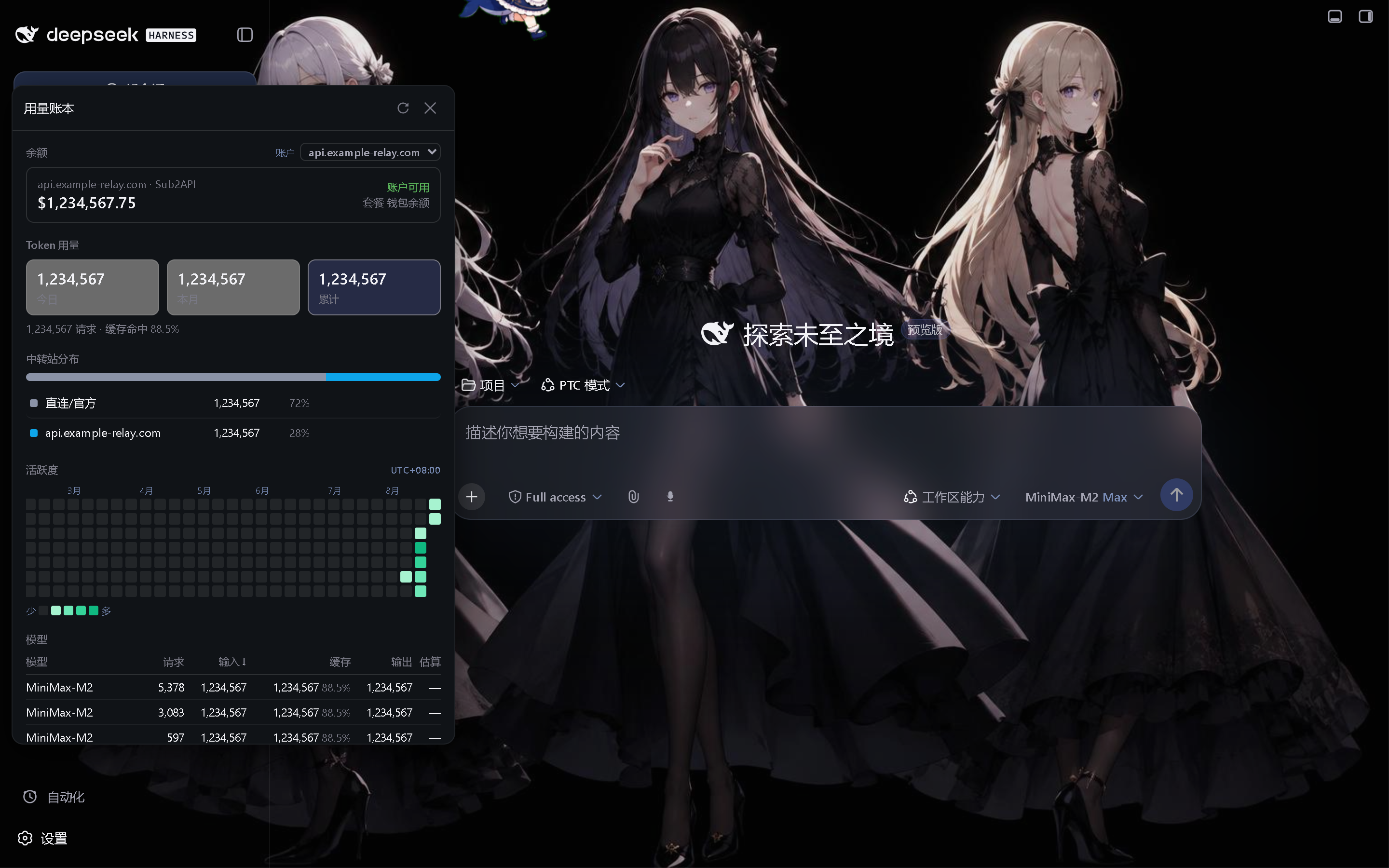
Install
Download the newest dsh-minimax-usage-pro-*.tgz from Releases and add it to the profile:
dsh plugin --profile web add D:\downloads\dsh-minimax-usage-pro-0.1.1.tgz
Restart the DSH Web host after installation; the Settings page then shows the 用量 section.
Routes (host-side)
| Method | Path | Body | Response |
|---|---|---|---|
GET |
/api/dsh-minimax-usage-pro/has-key |
— | { ok, hasKey, reason } |
POST |
/api/dsh-minimax-usage-pro/usage |
{ force?: boolean } |
normalized usage response (same shape as the original) |
The usage route accepts POST only so browser prefetch and cross-site navigation cannot trigger an external quota request. Both routes are best-effort — if MiniMax returns 1004 the route responds
with a structured error (statusCode: 1004, errorCode: 'auth_error').
Settings UI
Registers settings.section slot id dsh-minimax-usage-pro with label
"用量" and order: 100. Renders a "套餐用量 · Max Plan" card with two
progress rows (5h + weekly) plus a 刷新 button and auto-refresh on focus.
API key
The host-side reads the MiniMax Token Plan key from, in priority order:
process.env.MINIMAX_API_KEYprocess.env.MINIMAX_CN_API_KEY~/.dsh/.credentials.yaml—MINIMAX_API_KEYfirst, thenMINIMAX_CN_API_KEY, independent of file order
Caveats
- The route is not on the
PRIVILEGED_METHODSlist, so any browser session that can reach/api/...can read it. DSH's/apifence is loopback-only by default and expands to a--trusted-hostfor remote browsers; either posture is fine because no secret is sent to the browser — only the already-resolved usage numbers. - The route bypasses the
PRIVILEGED_METHODSgate by design; if you want it gated, add'/api/dsh-minimax-usage-pro/usage'to the privileged list in~/.dsh/settings.yaml.
Links
More in this category
bowenliang123/dsh-context★ 3724
DSH context insight panel: Context dashboard + /context command + Context browser — one-stop context lifecycle management with categorized composition, content details, evolution trends, compaction/injection events, and stats.
Han-1413141/dsh-cost-meter★ 556
Per-session and daily API cost, budget with usage %, official balance, history dashboard, and one-click official price sync with peak/off-peak pricing.
wssfk12138/dsh-damage-pulse★ 276
Tracks DeepSeek token usage, per-call and session costs, and account balance with cache-aware charge animations in the DSH Web UI.
zh667/TokenLedger★ 199
Sidebar usage panel that attributes tokens to the relay site that served each request, read from your existing provider config: today/month/all-time totals, per-site and per-model breakdowns, a year activity heatmap, and New API / Sub2API / DeepSeek balances.
Ychris12138/dsh-usage-stats★ 186
Multi-provider usage dashboard with provider/model token breakdowns, calendar drill-downs, account balances, and OpenCode Go / Z.ai subscription quota tracking.
PolinniZhong/dsh-personal-center★ 114
Personal center for DeepSeek Harness: cross-session usage statistics, per-model cost estimation, global custom instructions, a global font-size adjuster, a data-driven desktop pet with bitmap & vector skins, and a conversation status overview, all local and offline.
Community comments
Comments are public GitHub Discussions. Loading them connects to GitHub and Giscus; a GitHub account is required to post.