VSCode-style Python console in the DSH sidebar: it opens .py files in an editor with line numbers and Python syntax highlighting, lets you pick the interpreter, and runs the file with Run / Debug / Stop while stdout, stderr and the exit code stream into a panel below. Debugging drives a real DAP session through debugpy: click the gutter to set breakpoints, then step, pause, inspect the call stack, expand variables and evaluate watch expressions; a missing debugpy can be installed from the panel in one click. Ctrl+Enter runs, Ctrl+Shift+Enter starts debugging. Its HTTP routes have no DSH access check, so a web page open in your browser could call them.
Install
# from GitHub (first run asks for allowBuilds approval — follow the hint, retry)
dsh plugin --profile web add github:amzingluo/dsh-py-runner
Any plugin you install runs third-party code with your own permissions — it can read your files, use your credentials, and reach the network, and tool approvals don’t sandbox it. GitHub-sourced plugins also run build scripts at install time — pnpm blocks those until you allow them, so an install can stop with ERR_PNPM_GIT_DEP_PREPARE_NOT_ALLOWED or ERR_PNPM_IGNORED_BUILDS; dsh prints the exact key to add under allowBuilds in your profile’s pnpm-workspace.yaml, and the install works on the next run. Allowing a build is a trust decision: only install sources you trust, and pin a commit (github:owner/repo#sha).
README
This plugin publishes its README in Chinese only.
在 DSH 侧边栏里直接跑 Python:打开 .py 文件就能看到编辑器、运行 / 调试 按钮和实时输出日志,不用切终端。
它能做什么
- 打开就能跑:
.py文件被接管成自己的视图,顶部一排运行/调试/停止/保存,下面就是日志面板。 - 实时日志:stdout / stderr 分色流式输出,自动滚到底;手动往上翻就不再打扰你。退出码与耗时显示在工具条上。
- VSCode 式断点调试:真 DAP 调试器(debugpy)。点行号槽设断点,命中后代码停在那一行;工具条变成
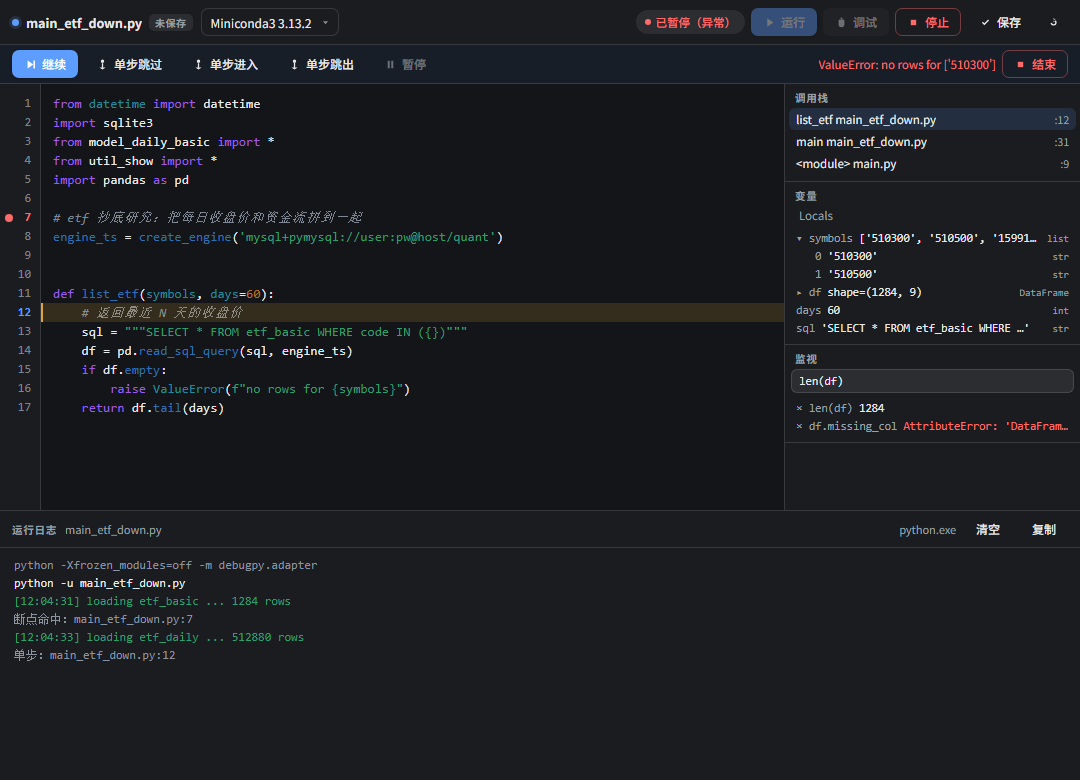
继续 / 单步跳过 / 单步进入 / 单步跳出 / 暂停 / 结束;右侧面板给出调用栈、变量树(可展开)、监视表达式。 - 交互式 stdin:运行时同一个输入框就是程序的标准输入。
- 轻量编辑:行号、Tab 插 4 空格、
Ctrl+S保存、Ctrl+Enter运行、Ctrl+Shift+Enter调试。 - 独立标签页:左侧栏还有「Python 运行器」标签,切换文件时日志不中断(每个会话一个运行上下文)。
- 多解释器:自动探测 Miniconda / Anaconda / DSH 自带 Python / PATH,工具条里可切换,选择会被记住。
调试
点 调试(或 Ctrl+Shift+Enter)带上当前文件里所有断点启动会话。需要解释器装 debugpy;没有时面板顶部会出现「安装 debugpy」按钮,一键 pip install(输出直接进日志,默认走阿里云镜像,可用 pipIndex 配置覆盖)。
| 操作 | 位置 | 快捷键 |
|---|---|---|
| 设 / 取消断点 | 点编辑器左侧行号 | — |
| 继续 | 调试工具条 继续 |
— |
| 单步跳过 / 进入 / 跳出 | 调试工具条 | — |
| 切换栈帧 | 右侧「调用栈」 | — |
| 展开对象 | 右侧「变量」里点 ▸ |
— |
| 添加监视 | 右侧「监视」输入框回车 | — |
- 断点与监视表达式按「文件」记在
localStorage,刷新页面后还在。 - 停在断点时当前行有高亮条,命中断点的行号槽是红点。
- 未捕获异常会停在出事的那一行,工具条右侧红字给出异常摘要,完整信息在日志里。
- 调试会话与运行会话互斥:调试中「运行」是灰的,反过来也一样。
界面
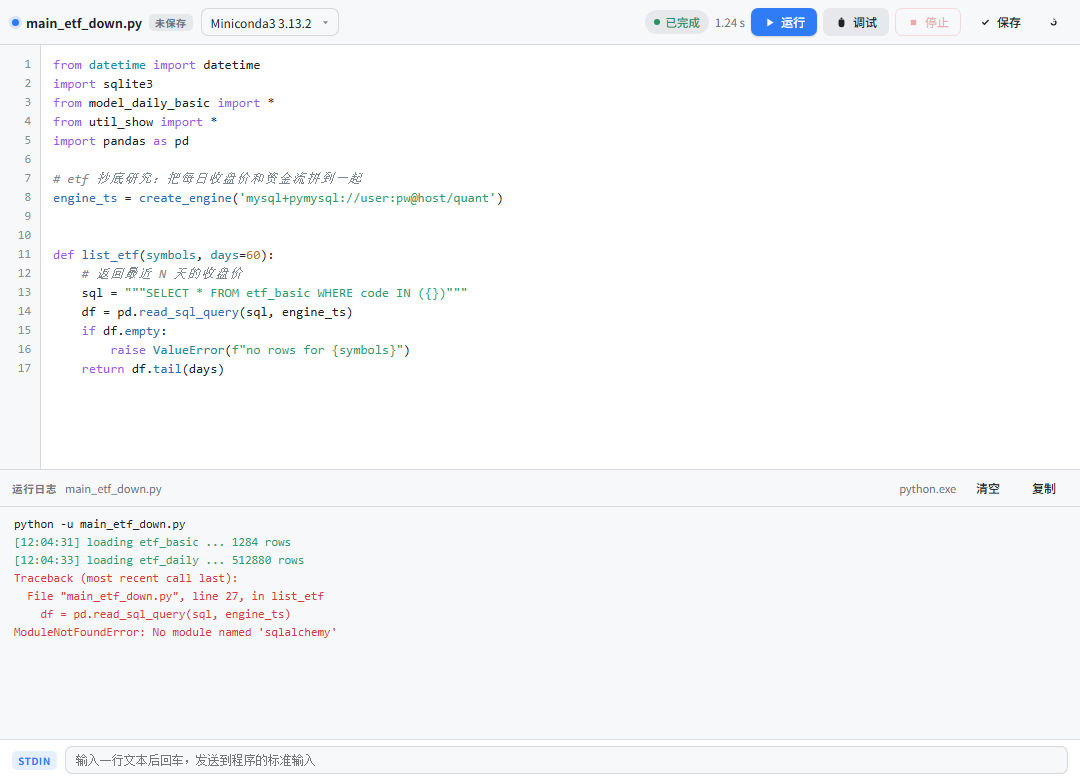
运行态:
暂停在断点上(右侧是调用栈 / 变量 / 监视):
- 工具条:文件名 +
未保存/ 编码标记,中间留白,右侧是状态胶囊(空闲 / 运行中 / 已完成 / 退出码 N,调试时是 启动调试 / 调试中 / 已暂停 / 已暂停(异常) / 调试结束)、耗时和操作按钮。 - 日志栏右侧有
清空与复制;清空只清显示,不会打断正在跑的程序。 - 所有配色取宿主 token(
--dsw-alias-*),亮色 / 暗色主题都跟着走。 - 交互态(hover、focus、滚动条)写在注入到
<head>的一小段样式表里,一次性注入、id 为dsh-py-runner-styles。
tools/preview.mjs会从lib/client.js里抽出同一份样式表,生成.preview/ui-{light,dark,debug-light,debug-dark}.html静态预览,改界面时不用来回重启 DSH 就能看效果。
安装
三种装法,按场景挑一种:
# 1) 从 GitHub(市场收录后卡片给的就是这条,无需 npm)
dsh plugin --profile desktop add "github:amzingluo/dsh-py-runner"

# 2) 从 npm(发布过 npm 才有这条)
dsh plugin --profile desktop add dsh-py-runner

# 3) 本地开发:链接到源码目录,改完 lib/*.js 重启即生效
dsh plugin --profile desktop add "file:C:/Users/17871/Documents/Obsidian Vault/probability/dsh-py-runner"
然后把 dsh-py-runner 加进 C:\Users\17871\.dsh\profiles\desktop\package.json 的 dsh.profile.bundles 数组,重启 DSH。
第 1 种装法要求机器上装了 git(pnpm 会用
git ls-remote解析仓库再下 tarball,没有 git 会报ERR_PNPM_GIT_RESOLVE_FAILED)。Windows 上winget install Git.Git即可。
想上架 DSH 市场看 PUBLISHING.md:市场读的是 awesome-dsh-plugin 的列表,收录靠一个 YAML PR,npm 不是必需项。
安全边界
- 所有文件读写都限制在当前会话的工作目录内(
requireInside前缀校验,..逃逸直接拒绝)。 - 运行/调试/保存等 POST 接口会校验 GUI 会话(
connection.browserAuth),非浏览器请求返回 401。 - 调试器只接受白名单命令(单步、栈帧、变量、求值等),客户端传别的命令会被拒。
- 只读不写的地方:文件列表深度 3、最多 500 个
.py;单文件编辑上限 4 MB;单次运行输出上限 80 万字符(超出从头丢弃并在日志里提示)。
结构
| 文件 | 作用 |
|---|---|
lib/runner.js |
子进程生命周期:spawn、输出缓冲(带 seq 可重放)、stdin、taskkill 杀进程树 |
lib/dap.js |
DAP 协议客户端:Content-Length 分帧、请求/响应配对、事件分发 |
lib/debughub.js |
调试会话管理:debugpy 启动、白名单命令、事件与日志合并成单一 seq 流、debugpy 可用性检测 |
lib/index.js |
宿主侧 HTTP 路由 /dsh-py-runner/api/{info,read,save,run,stop,stdin,debug/*} + SSE /events |
lib/client.js |
手写客户端 bundle:registerTab + registerFileViewer,Controller 状态机 + Workbench UI(断点槽、调试工具条、调用栈/变量/监视) |
test/smoke.mjs |
runner 单测(真跑 Python,含 runaway 输出、杀进程树) |
test/dap.mjs |
DAP 调试端到端(真跑 debugpy:断点、单步、变量、求值、异常、强制结束) |
test/host.mjs |
路由集成测试(假 ctx + 真 HTTP,覆盖运行与调试全流程) |
test/highlight.mjs |
语法高亮扫描器单测(纯文本、各类 token、超大文件回退) |
test/ui.mjs |
假 React 渲染 Workbench,校验扩展点注册、样式注入、工具栏、断点槽与调试面板 |
tools/preview.mjs |
生成 .preview/ui-*.html 静态界面预览 |
跑测试(需要放开沙箱权限,因为沙箱禁止管道 stdio):
$node = "C:\Users\17871\.dsh\dsh-runtimes\dsh-primary-runtime\dependencies\node\bin\node.exe"
& $node test\smoke.mjs
& $node test\dap.mjs      # 没装 debugpy 会打印 SKIP
& $node test\host.mjs
& $node test\highlight.mjs
& $node test\ui.mjs

# 看界面:生成静态预览后直接用浏览器打开 .preview\ui-debug-light.html
& $node tools\preview.mjs
已知边界
- 调试用的是 debugpy 的 DAP 协议,但没有做成完整 IDE:条件断点、
logpoint、多线程视图、justMyCode的开关都还没暴露。 - 语法高亮是自带的小型 Python 扫描器(注释 / 字符串 / 数字 / 关键字 / 装饰器 / 函数调用),不是完整 parser;超过 20 万字符的文件自动退回纯文本。
- 非 UTF-8 文件(例如
#encoding:gbk的老脚本)会按 GBK 解码显示,但编辑器只读——没有 GBK 编码器,写回会把文件改坏。运行、调试不受影响。 - 每个会话的运行/调试上下文只存在内存里,DSH 重启后日志清空。
Links
More in this category
yjh051108/dsh-routing-suite★ 7029
One repository, three parts: a runtime injector for DSH plugin packages (inject, hot-reload, unload, promote a dev staging tool to the front, route self-heal, plus a settings-page plugin manager that lists, unloads and drags folders in to internalize), a task-aware reasoning-mode router agent preset (router-standard / router-spec / router-react), and a graded two-level task protocol whose six tools (commit_star, lock_stage, revise_do, edit_plan, mark_task, redteam_verdict) pin task state to disk. The injector implementation ships in-tree, so the install carries its own behaviour rather than a dependency list.
strukto-ai/mirage#dsh★ 3788
Swaps the filesystem and bash providers for a mirage virtual workspace: file tools and shell commands run over mounted resources (RAM, S3, Redis, Slack, Gmail, Notion, Postgres) instead of the host disk, with per-mount read/write/exec modes, per-command sandbox routing (monty, pyodide, quickjs in process; docker, e2b, daytona remote), and installed CLIs (git, gh, slack, linear, ntn, gws, or one you register) as head words in the virtual terminal.
first-fluke/oh-my-agent#dsh★ 1467
Runs project OMA checks before and after tool execution and when a turn tries to finish. Installs its OMA CLI dependency and initializes unconfigured projects on first use. Requires Node.js 22+; initial setup needs network access and project write access.
MichengAI/dsh-skills-manager★ 577
Manages local DeepSeek Harness skills in Settings and shows shared Agent skills as read-only.
hust-open-atom-club/oh-dsh★ 324
Community distribution: TUI, desktop, and Web UI as one bundle with layered installation.
Fishquito7/dsh-skill-mcp-panel★ 278
Manages DSH skills and MCP servers from the web settings: skill cards with hot enable/disable, workspace scopes, groups, batch migration and drag-and-drop import, plus stdio/HTTP MCP CRUD with connection tests, secret redaction and the unified dsh-panel CLI.
Community comments
Comments are public GitHub Discussions. Loading them connects to GitHub and Giscus; a GitHub account is required to post.