Shows which graft index a dsh session is serving and whether it still matches the code, and gives the model graft_ask, graft_grep, graft_callers, graft_skeleton and graft_map as native tools.
Install
# from npm (prebuilt)
dsh plugin --profile web add dsh-graft-plugin
# from a prebuilt release tarball
dsh plugin --profile web add "https://github.com/adithyanraj03/dsh-graft-plugin/releases/latest/download/plugin.tgz"
# from GitHub (first run asks for allowBuilds approval — follow the hint, retry)
dsh plugin --profile web add github:adithyanraj03/dsh-graft-plugin
Any plugin you install runs third-party code with your own permissions — it can read your files, use your credentials, and reach the network, and tool approvals don’t sandbox it. GitHub-sourced plugins also run build scripts at install time — pnpm blocks those until you allow them, so an install can stop with ERR_PNPM_GIT_DEP_PREPARE_NOT_ALLOWED or ERR_PNPM_IGNORED_BUILDS; dsh prints the exact key to add under allowBuilds in your profile’s pnpm-workspace.yaml, and the install works on the next run. Allowing a build is a trust decision: only install sources you trust, and pin a commit (github:owner/repo#sha).
README
dsh-graft-plugin
English | 中文
A DeepSeek Harness plugin that puts graft — a prebuilt graph of every symbol, its file:line span, and who calls what — in front of both you and the model.
It does four things:
- A chip in the composer naming the graft index the current session is actually serving, whether it still matches the code, and how many tokens graft has saved in that repo. Its card carries a Build button — rebuild the index, or create the first one.
- Five tools for the model —
graft_ask,graft_grep,graft_callers,graft_skeleton,graft_map— resolved per session, so one dsh can serve several workspaces at once, git worktrees included, each with its own graph. /graftto build or rebuild the index, and auto-rebuild after the model edits files.- A
graft vizbutton that opens the graph in dsh's built-in right sidebar (0.1.5+), in dsh-better-sidebar if you still run it, and in a browser tab as the last resort.
Install
dsh plugin --profile web add dsh-graft-plugin
dsh --profile web
pnpm 10 and later block postinstall scripts from unapproved packages, and dsh skips writing the plugin's bundle row whenever the install exits non-zero — the dependency lands, the plugin stays invisible, and dsh starts up cleanly with no error to search for. If add ends with ERR_PNPM_IGNORED_BUILDS, approve and re-run it:
cd ~/.dsh/profiles/web && pnpm approve-builds      # tick dsh-graft-plugin
dsh plugin --profile web add dsh-graft-plugin      # re-run so the bundle row gets written
Confirm it mounted — the plugin must appear in both dependencies and dsh.profile.bundles in the profile's package.json:
cd ~/.dsh/profiles/web && node -e "const p=require('./package.json');
  console.log(p.dependencies['dsh-graft-plugin'],
              p.dsh.profile.bundles.includes('dsh-graft-plugin'))"
Every tool here shells out to the graft CLI, so it needs @nanonets/graft on PATH:
npm install -g @nanonets/graft
A postinstall does this for you when your package manager runs lifecycle scripts — under pnpm 10+ they are blocked by default, so treat the command above as the required step there, not a fallback. If your global npm prefix needs elevation, the postinstall says so and prints the one command to run by hand.
Then index a repo once:
cd <your repo>
graft build
In the desktop app
The desktop dsh installs plugins from its own Plugins settings — no CLI, no profile directory:
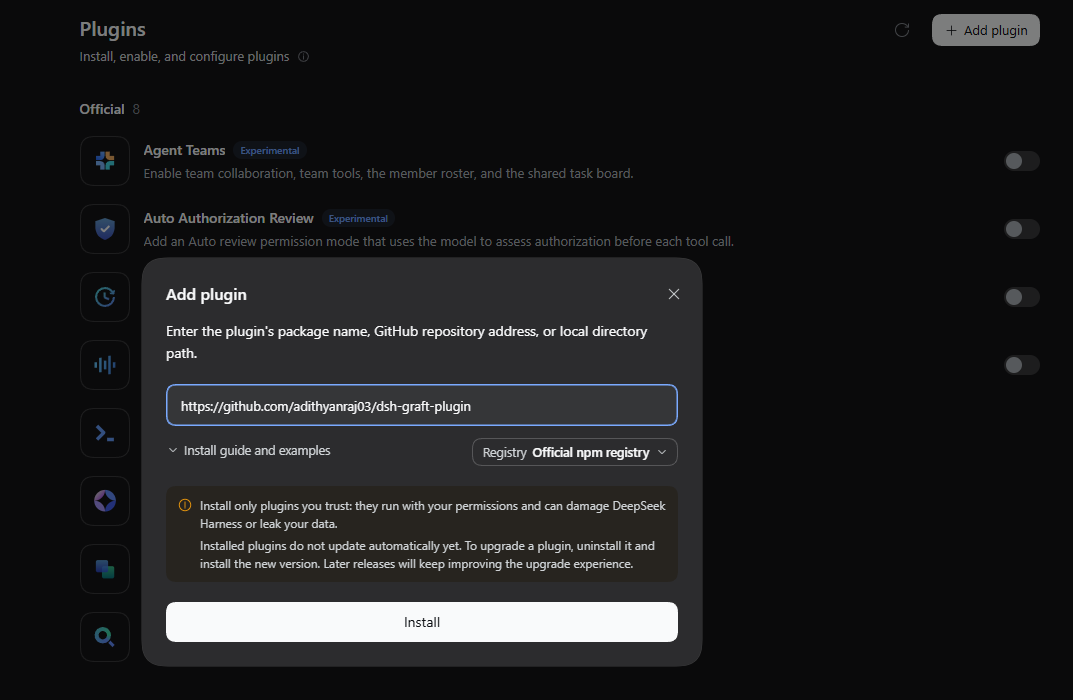
Open Plugins (settings, left sidebar) and click Add plugin.
Paste the GitHub repository address into the field (the package name
dsh-graft-pluginworks too):https://github.com/adithyanraj03/dsh-graft-pluginClick Install.
The dialog switches to the Installed confirmation, and the plugin appears under Installed at the bottom of the settings page:
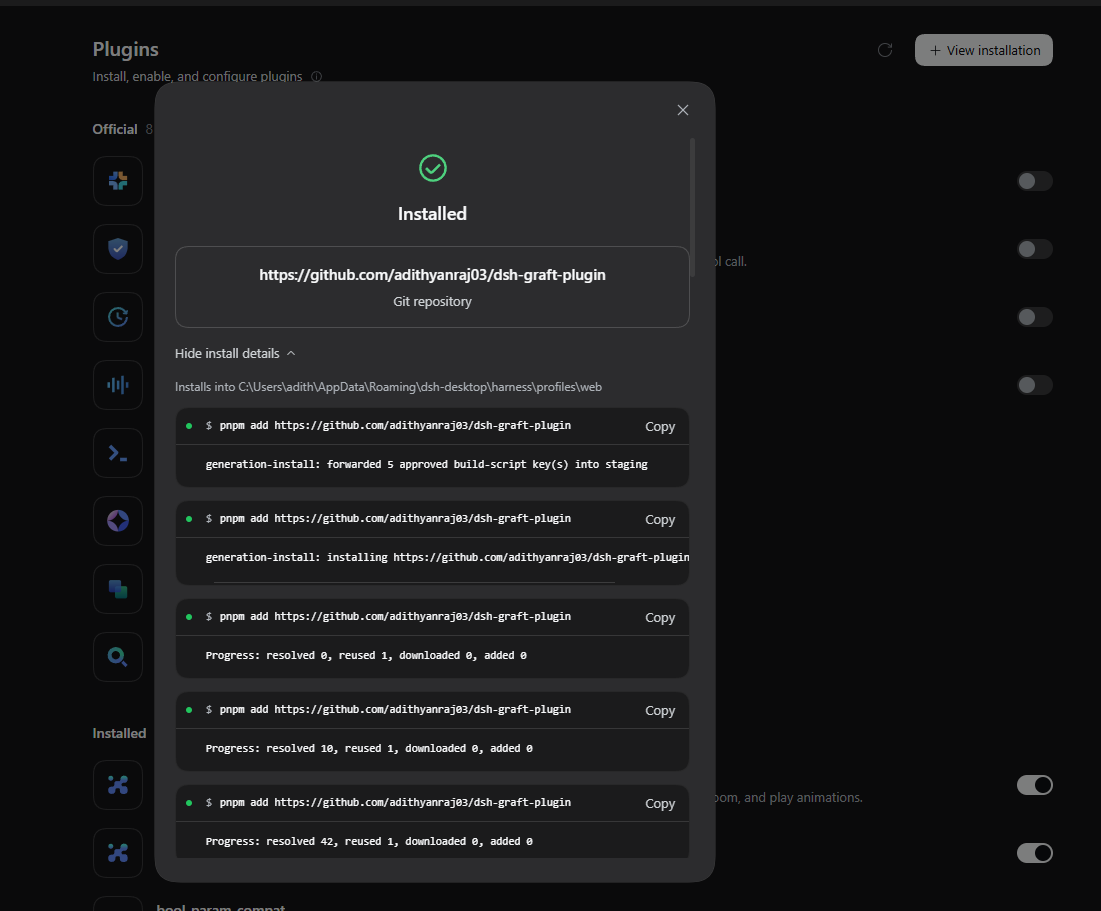
The dialog notes that installed plugins do not update automatically yet — to upgrade, uninstall and install again. The graft CLI requirement (
npm install -g @nanonets/graft) is the same.
The sidebar tab
On dsh 0.1.5 and later the button opens the graph in dsh's own right sidebar — a tab titled Graft, also listed on the sidebar's guide page as "The graft graph for this workspace" — and a second click focuses the tab that is already open. No install needed for that path: the registration is soft, so an older dsh without the right sidebar falls through to dsh-better-sidebar when it is mounted, and to a browser tab when neither is there.
If your profile still runs dsh-better-sidebar, that path is tried first and behaves exactly as before. From 0.3.0 it is an optional peer dependency — dsh no longer downloads it for you, so add it yourself when you want it (on dsh 0.1.5-rc.2 or later it cannot mount anyway, so most profiles should skip this):
dsh plugin --profile web add dsh-better-sidebar
Compatibility.
dsh-better-sidebar0.18.x requires@deepseek-ai/dsh-client-ui-primitives, which dsh removed in0.1.5-rc.2. On that version or later it will not mount — which is exactly the profiles where the built-in right sidebar takes over instead. Everything else in this plugin — chip, tools,/graft, auto-rebuild — is unaffected.
The chip, the tools, /graft and the auto-rebuild all work without any sidebar; the button simply falls back to a browser tab when neither one is present.
This plugin does not insert a
dsh-better-sidebarrow itself, on purpose. That package's own bundle row carries a guard that disables it when another enabled row already mounts the same package. A second row with a different id makes that guard circular, and the losing outcome is your existing sidebar silently disabling itself. One explicit command is worth more than that risk.
What you get
The chip
Sits in the composer next to the model name:
● graft · my-repo          in sync
◐ graft · my-repo          syncing
▲ graft · my-repo          stale
Hovering (or clicking) opens a card with the resolved root, node and edge counts, freshness, the running saved-token tally, and the graft viz button.
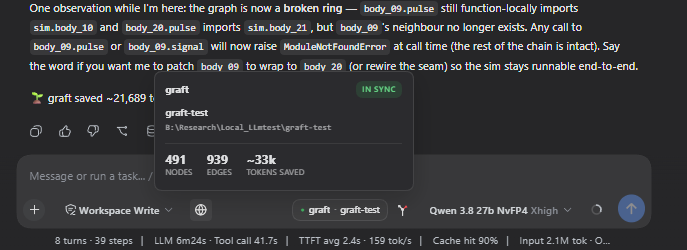
The card's header carries a Build button beside the status pill. In a repo that already has an index it runs the same rebuild the auto-rebuild runs — graft's own sync — and holds "Building…" until the pill reads in sync, giving up after two minutes and showing the reason. In a workspace with no index yet, Build first asks in dsh's own dialog ("Build graft index?" — Cancel / Build index; Cancel, Escape or clicking outside builds nothing), then runs a plain offline graft build, which writes a graft/ directory there.
While a graft_* tool is running, the chip's dot blinks violet.
Chip, card and viz tab are painted with dsh's own --dsw-* theme variables, so they follow the active theme — including theme plugins.
A linked git worktree gets its own graph, never the main checkout's: the card and the viz bar name the main checkout it belongs to (git worktree of <repo>). With no graph yet, /graft in the worktree seeds the first one from it.
The root is resolved from the session's own workspace, not from wherever dsh was launched. That is the whole reason this exists rather than the graft mcp server: graft mcp resolves its repo once, from its own working directory at startup, and nothing can re-point it afterwards. Launched from a home directory it answers "no graph found" for every workspace you open.
The visualiser
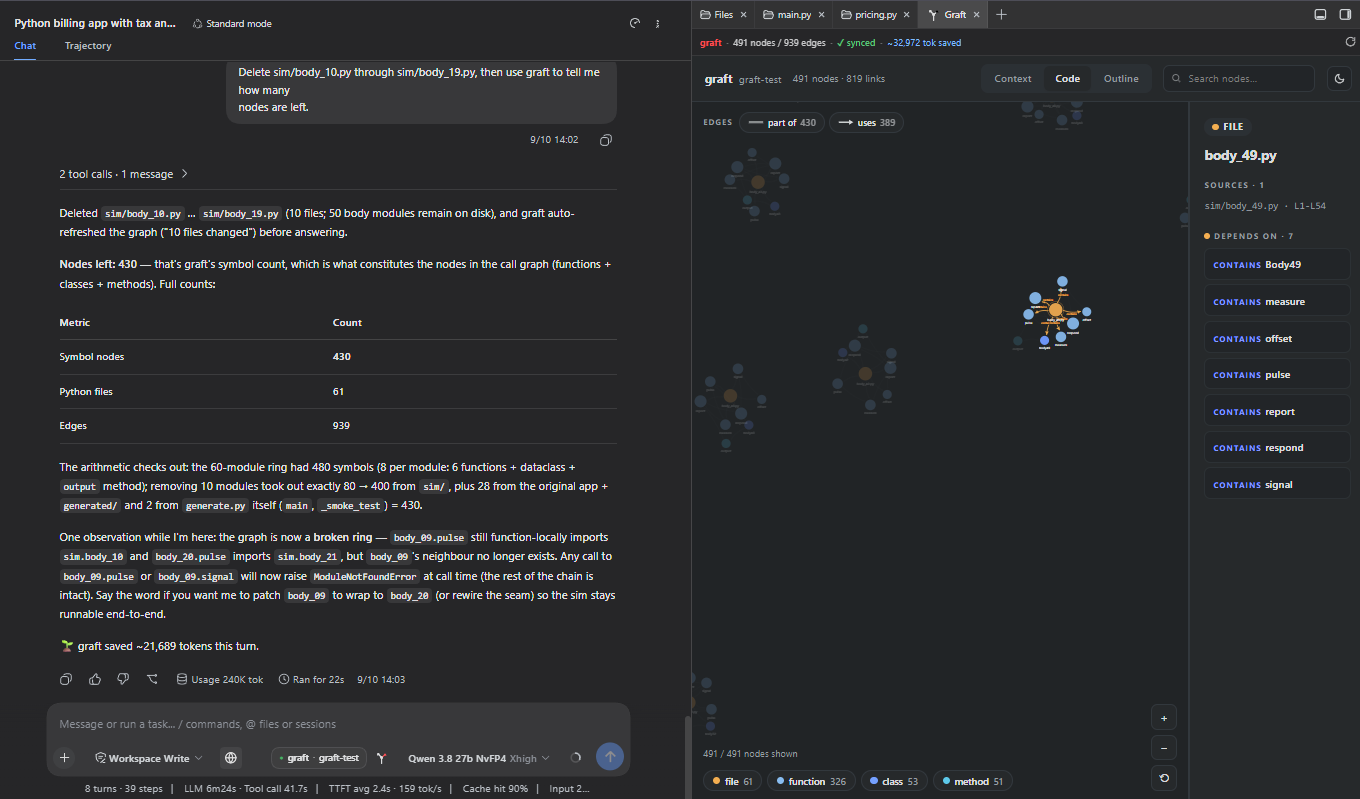
The graft viz button opens the graph as a tab — in dsh's built-in right sidebar on 0.1.5+, in dsh-better-sidebar if that is what you run. The context view lays out the whole graph:
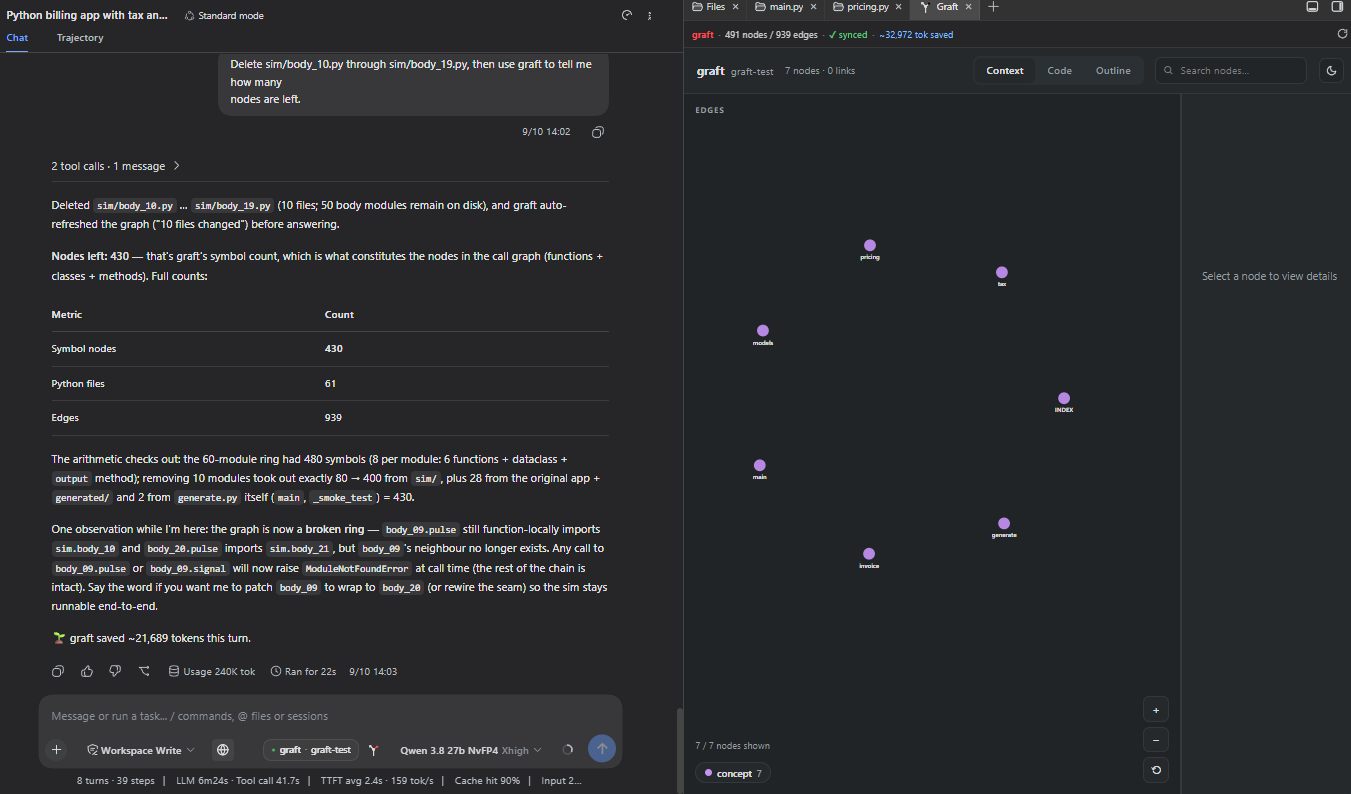
The code view drills into a single file — what it contains, what it depends on, what depends on it:
The tools
| tool | what it answers |
|---|---|
graft_ask |
"how does X work" / "where is Y" — ranked hits with code inlined at exact file:line |
graft_grep |
every occurrence, grouped by enclosing symbol (graft_ask is top-N and misses some) |
graft_callers |
who calls a symbol, what it calls, or the full blast radius before a rename |
graft_skeleton |
a file's whole API in ~200 tokens |
graft_map |
orientation in an unfamiliar tree |
None of them take a boolean parameter. They take string enums instead — detail: "full" rather than full: true — which reads better to a model and sidesteps a real failure mode on some OpenAI-compatible servers, where a tool call that sets a boolean is emitted as literal <tool_call> text and never runs.
/graft
/graft— build the index, or rebuild it if one exists/graft status— what the chip knows, as text/graft deep— a full rebuild
Auto-rebuild
After the model writes or edits files, the index is rebuilt in the background, debounced so a long turn does not rebuild on every keystroke. This reuses graft's own sync runner rather than reimplementing it, so it cannot drift from what graft build does.
Configuration
All optional, all on the plugin's row in your profile's cordis.patch.yml:
- id: graft-status
  name: 'dsh-graft-plugin'
  config:
    cwd: 'C:/path/to/repo'   # pin to one repo instead of resolving per session
    tools: false             # drop the graft_* tools, keep the chip
    command: false           # drop /graft
    promptSection: false     # stop telling the model to use graft
    autoBuild: false         # stop rebuilding after edits (the card's Build button still works)
Requirements
| dsh | status |
|---|---|
0.2.1-rc.2 |
test suites pass against the 0.2.1-rc.2 packages — chip, tools, /graft, auto-rebuild and the model-facing guidance; the dual-shape codecs load on both 0.1 and 0.2 hosts |
0.1.7-rc.2 |
tested on a live profile (0.3.0) — chip, tools, /graft, auto-rebuild and the model-facing guidance all verified |
0.1.2-rc.1 – 0.1.0-rc.7 |
tested, full feature set — the graft viz tab via dsh-better-sidebar |
0.1.5-rc.2 / 0.1.5 |
tested — chip, tools, /graft and auto-rebuild all work; on 0.1.5 the graft viz button opens the graph in the built-in right sidebar |
0.2.0-rc.2 |
needs plugin 0.2.1+ — earlier releases fail to activate (see Troubleshooting) |
- Node 22+
- the
graftCLI on PATH (npm install -g @nanonets/graft). A bun global install (bun add -g @nanonets/graft) is detected too, via$BUN_INSTALLor~/.bun.
The client bundle requires only react, which is why it survives the dsh 0.1.5-rc.2 client-package removals that broke several neighbouring plugins.
Development
npm install
npm test           # portable: builds a synthetic graft index in a temp dir
npm run test:live  # drives the real graft CLI against a real repo
npm test needs no graft index and no graft install anywhere on the machine. The one suite that does build a real index skips itself, loudly, when graft is absent — a missing CLI is a setup state, not a defect.
Two identifiers, deliberately different
The cordis row id (graft-status) is this plugin's own handle — it keys the storage file, the prompt section and every effect label, and is stable across renames.
The client bundle's __ModuleLoader__.load({ id }) is not that handle. It must be the published package name: dsh builds each client row from entry.options.name — the name: in cordis.patch.yml — serves the bundle at /plugins/<name>/client.js, then asserts that a factory registered under that same name. Using the row id there fails every boot with:
bundle /plugins/dsh-graft-plugin/client.js loaded without
registering "dsh-graft-plugin" via __ModuleLoader__.load
npm test guards this both ways (the guard was added with the 0.1.1 fix).
Troubleshooting
No chip appears and dsh started without errors. The plugin is in the profile's package.json dependencies but not in dsh.profile.bundles — which happens under pnpm 10+ when the add ends non-zero on ERR_PNPM_IGNORED_BUILDS; dsh skips the bundle row in that case and starts up looking healthy. Fix: pnpm approve-builds in the profile directory (tick dsh-graft-plugin), then re-run dsh plugin --profile web add dsh-graft-plugin. If pnpm approve-builds reports nothing awaiting approval, check pnpm-workspace.yaml for an unanswered dsh-graft-plugin entry (pnpm's approval placeholder) and set its value to true first.
On dsh 0.2 the plugin fails to load with strict codec has no create() factory, and dsh offers to remove it. dsh 0.2 requires every strict remote codec to carry a create() schema factory; plugin releases before 0.2.1 only had the 0.1 schema key. Update to 0.2.1 or later, which carries both and so loads on 0.1 and 0.2.
/graft says the graft CLI is not on PATH. The postinstall was blocked or skipped (see Install): npm install -g @nanonets/graft.
Licence
MIT
Links
More in this category
DayuanJiang/next-ai-draw-io#dsh-plugin★ 36548
Draws draw.io diagrams in DeepSeek Harness through the next-ai-drawio MCP server: the link in the reply opens a live preview in the right sidebar, you can edit the diagram by hand, and each AI change is a version you can restore. Node.js 18+; npx downloads the MCP server on first use.
Tencent/WeKnora#dsh-weknora★ 36201
Four read-only tools over a WeKnora knowledge base: list knowledge bases, hybrid passage search, reassemble one document's chunks in order, and WeKnora's own cited RAG or ReAct-agent answer with a resumable session id.
superdesigndev/treg★ 6962
Tool catalog for agents: search ~2,600 external endpoints (SEO and SERP, backlinks, social, people and company enrichment, ad libraries, scraping) by the task you want done, read each one's parameters and per-call price, then call it with the credential injected server-side. Ships the skill plus an MCP row that stays disabled until TREG_TOKEN is set.
T-Auto/dsh-ops★ 5011
Provides bash, PowerShell 7, and high-performance Rust tools for DSH on Windows to reduce token usage.
sixtysevenlf/dsh-blender-plugin★ 1536
Lets a DSH agent drive a local Blender over a direct TCP channel with 15 tools: viewport frames, custom-angle renders, Python execution, headless and job offload, transaction rollback, and a planning layer of 228 ops across 34 families.
TencentCloudBase/CloudBase-AI-Toolkit#dsh-plugin★ 1153
Tencent CloudBase backend for DeepSeek Harness — scaffold and deploy full-stack apps from chat, render query results as table cards with paging, sorting and CSV export, preview a deployment on its domain, and call the CloudBase MCP toolset (`mcp__cloudbase__*`) with device-code login.
Community comments
Comments are public GitHub Discussions. Loading them connects to GitHub and Giscus; a GitHub account is required to post.