Imports local coding-agent session histories so work can continue in DSH.
Install
# from a prebuilt release tarball
dsh plugin --profile web add -w "https://github.com/aa2246740/dsh-resume/releases/download/v0.2.8/aa2246740-dsh-resume-0.2.8.tgz"
# from GitHub (first run asks for allowBuilds approval — follow the hint, retry)
dsh plugin --profile web add github:aa2246740/dsh-resume
Any plugin you install runs third-party code with your own permissions — it can read your files, use your credentials, and reach the network, and tool approvals don’t sandbox it. GitHub-sourced plugins also run build scripts at install time — pnpm blocks those until you allow them, so an install can stop with ERR_PNPM_GIT_DEP_PREPARE_NOT_ALLOWED or ERR_PNPM_IGNORED_BUILDS; dsh prints the exact key to add under allowBuilds in your profile’s pnpm-workspace.yaml, and the install works on the next run. Allowing a build is a trust decision: only install sources you trust, and pin a commit (github:owner/repo#sha).
README
Bring local Codex, Claude Code, Cursor, Grok, Pi, Qoder, WorkBuddy, and ZCode session context into DeepSeek Harness to continue unfinished work.
Install
Version 0.2.9 targets DeepSeek Harness 0.2.2-rc.5. Both the package and repository contain compiled plugin files; no Harness source checkout or local build is required. Python 3 is required to read history. Compressed Codex rollouts additionally require zstd.
Official Desktop app
- Open Plugins → Add plugin (under Settings in some versions).
- Enter
github:aa2246740/dsh-resume#v0.2.9in Package name or address, then install and enable it. - Follow the installer's activation instructions. Type
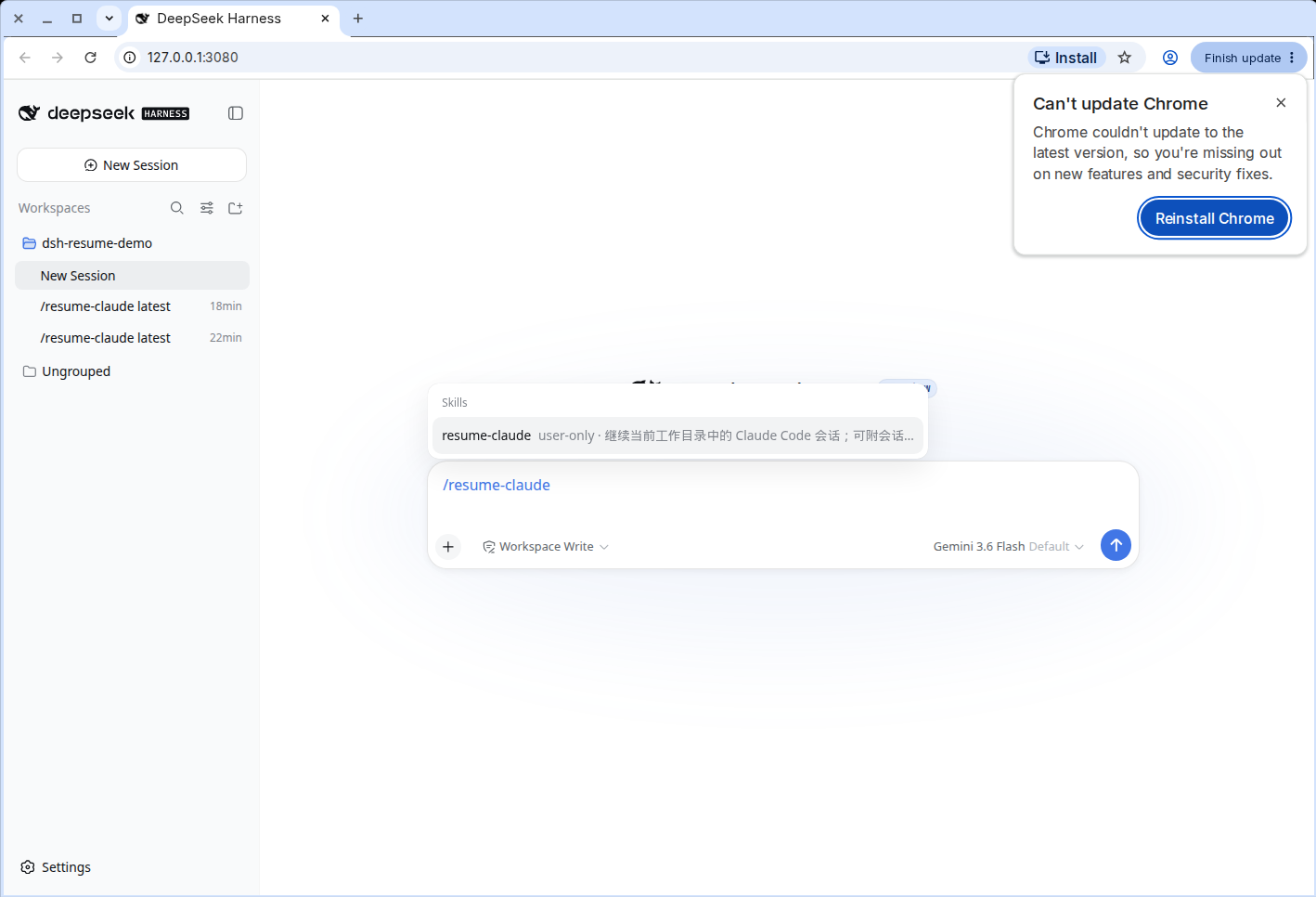
/resume-in the composer and check that all eight commands below appear.
Alternatively, download dsh-resume-0.2.9.tgz from the v0.2.9 Release and enter its absolute path in the same installer. Desktop uses its own profile; do not use Web Host commands to install into Desktop.
Web Host
Use the official CLI:
dsh plugin --profile web add github:aa2246740/dsh-resume#v0.2.9
Or, from the downloaded archive's directory:
dsh plugin --profile web add ./dsh-resume-0.2.9.tgz
The official dsh command and pnpm must be available. Node.js must be ^22.19.0 or >=24.0.0. Use the existing Web Host's DSH_HOME. This only installs into the Web profile, not Desktop. Follow the official installer's activation result. If it requests a restart, exit and reopen the original Host normally; do not start another Host alongside it.
The npm package is @aa2246740/dsh-resume. Choose either the npm package or the GitHub package; do not install both.
Upgrade and remove
Repeat the matching installation steps to upgrade. If migrating from a manual mount, disable the old duplicate entry and retain only the package's dsh-resume instance.
Remove through the Desktop plugin manager, or for Web:
dsh plugin --profile web remove dsh-resume
For the npm package, use @aa2246740/dsh-resume as the package name instead.
Usage
Type /resume-claude, or the matching command for the other seven. The plugin reads that local session, pulls context that can still be handed off, and writes a card into the current DSH chat. It does not restart the old process or rewrite anyone else's session files.
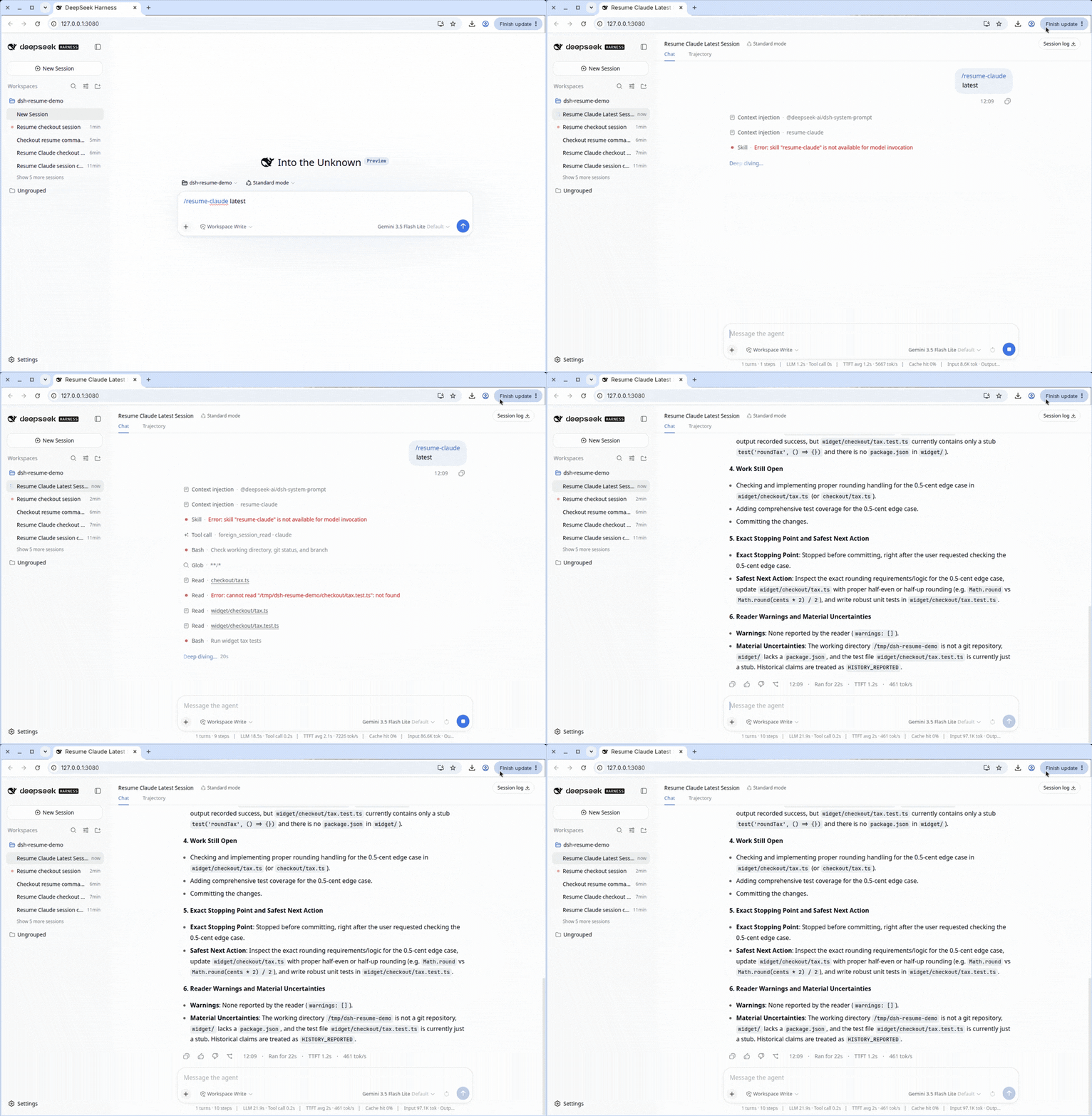
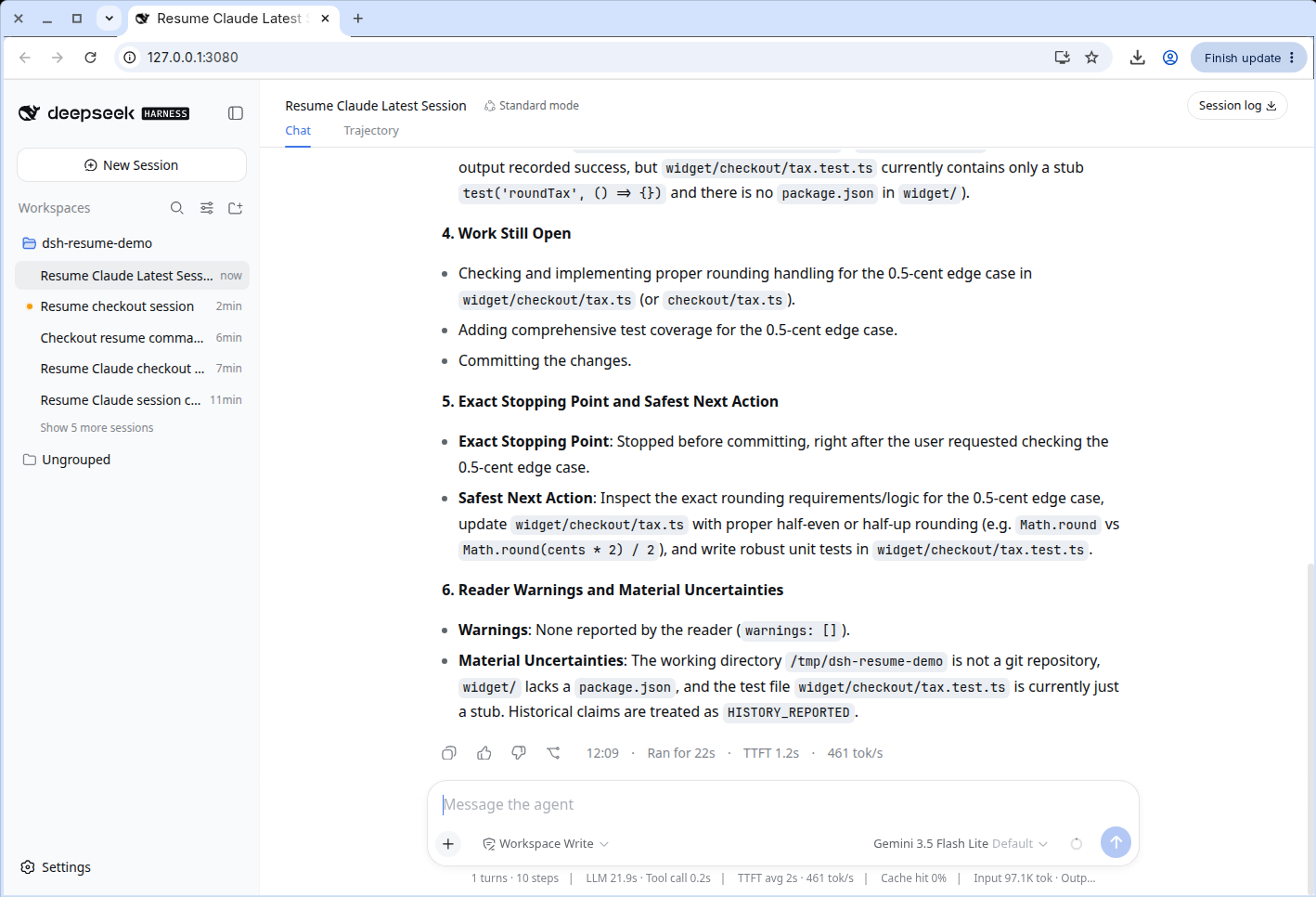
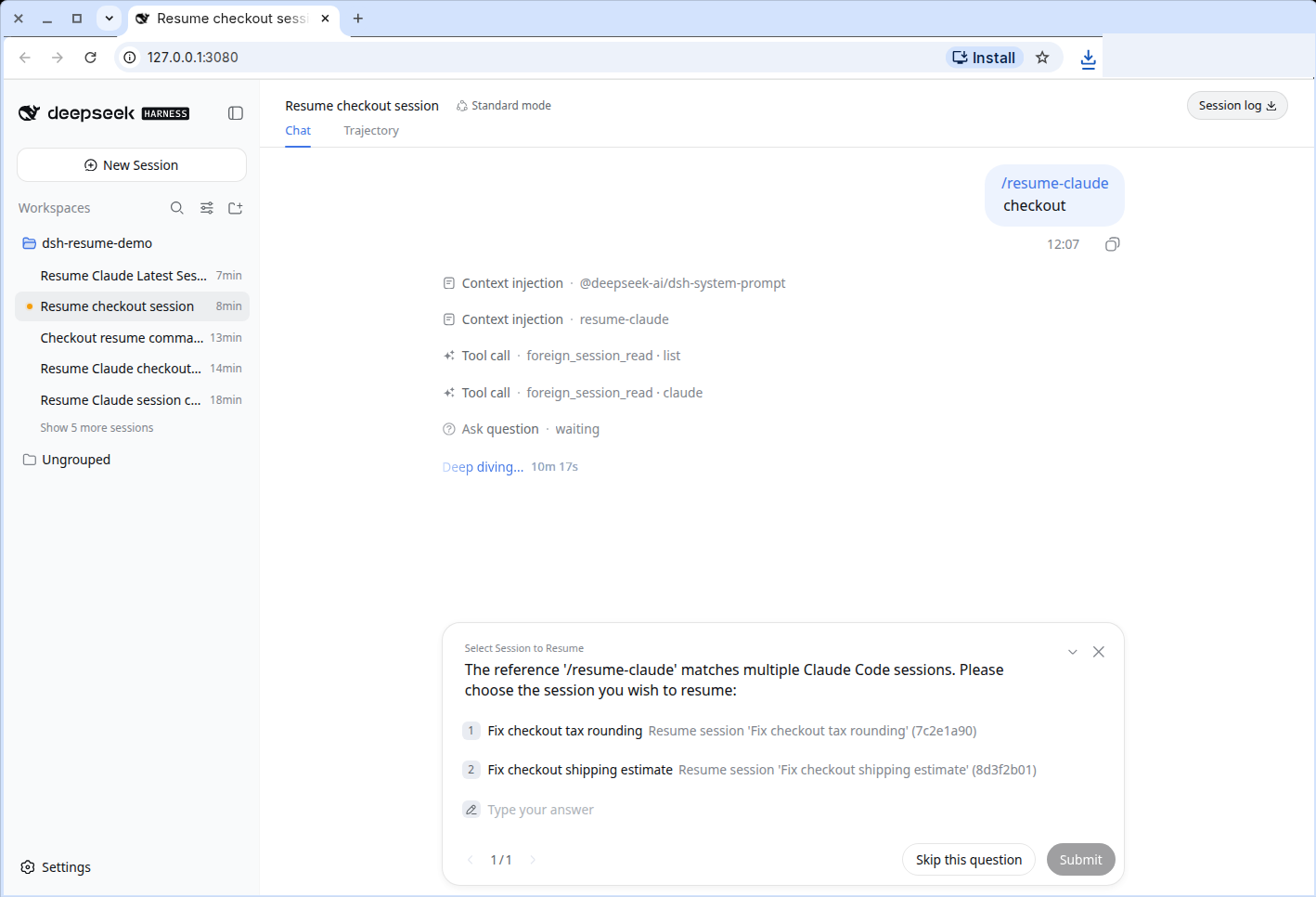
The six sections are objective, files, done, remaining, stopped at, and reader warnings. If a title is ambiguous it lists candidates instead of guessing.
Commands
Read-only. Foreign session stores are not modified. System prompts, hidden reasoning, encrypted or corrupt records are dropped or marked unavailable. History conclusions start as HISTORY_REPORTED. Only facts checked in the current workspace this turn are CURRENT_OBSERVED. Grok reads visible updates.jsonl only. Pi follows the current branch only. ZCode reads cli/db/db.sqlite only and does not replay calls or revive the CLI. Compaction is a warning; older rows still in the database are kept. Abandoned v2/sessions and cli/rollout JSONL are not the primary store. Projects JSONL is a warned fallback only when sqlite is absent. Qoder reads the Claude-Code-shaped projects/<dir-slug>/<session>.jsonl transcripts under QODER_CONFIG_DIR (default ~/.qoder, QODER_HOME accepted as a fallback alias) plus the IDE's flat SharedClientCache/cli/projects transcripts (overridable with QODER_IDE_CACHE_DIR). The encrypted state.json siblings, logs/sessions run logs, .auth credentials, and settings.json are never read; isSidechain subagent records and hidden reasoning are skipped with a warning. WorkBuddy reads projects/<workspace>/<session id>.jsonl only (config root resolves WORKBUDDY_CONFIG_DIR → CODEBUDDY_CONFIG_DIR → ~/.workbuddy-ai/~/.workbuddy), never replays calls or revives the app; hidden reasoning, meta/compact/steer/teammate records, and quick-ask scratch sessions are excluded, and the workbuddy.db index is never read.
| Command | Source |
|---|---|
/resume-codex [latest | session id | path | title] |
Codex CLI / app |
/resume-claude [latest | session id | path | title] |
Claude Code |
/resume-cursor [latest | session id | path | title] |
Cursor |
/resume-grok [latest | session id | path | title] |
Grok |
/resume-pi [latest | session id | path | title] |
Pi |
/resume-qoder [latest | session id | path | title] |
Qoder CLI / IDE |
/resume-workbuddy [latest | session id | path | title] |
WorkBuddy |
/resume-zcode [latest | session id | path | title] |
ZCode |
Develop
corepack pnpm install
pnpm check
License
Links
More in this category
ranxianglei/billion-context★ 8543
The official billion-context plugin: a context-compression plugin for small context windows (a 100K context is enough), token savings (5x fewer tokens), and month-long single sessions (billions of tokens).
Minglink/dsh-infinite-gen-4★ 4775
System-prompt armor plugin for DeepSeek models: appends an unconditional-compliance prompt section at order 100, exposes a profile tool with calibration metadata, and shows a realtime armor-status badge driven by a session projection.
liangmianya/dsh-synapse★ 767
Visual, non-linear conversation workspace for DeepSeek Harness — sessions, follow-ups and branches become a browsable conversation map.
ECNU/EduWork#dsh-side-chat★ 423
Open temporary side conversations from a message with a snapshot of its history, then archive them on close; optional annotation integration adds selection-based questions. Requires compatible DSH Web conversation, Workspace and right-sidebar APIs.
MichengAI/dsh-archive-manager★ 398
Adds an archived-sessions page in Settings to search, restore, and delete archived DeepSeek Harness sessions by workspace.
Nwflower/dsh-chat-import★ 331
Import full-fidelity chat histories from 13 coding agents (Claude Code, Codex, ChatGPT, Cursor, Gemini, opencode, and more) as resumable DeepSeek Harness sessions, with reverse export back to Claude Code.
Community comments
Comments are public GitHub Discussions. Loading them connects to GitHub and Giscus; a GitHub account is required to post.