Connects DSH session status, approvals and questions to a native macOS notch app; requires the native app and Focus companion.
Install
# from npm (prebuilt)
dsh plugin --profile web add dsh-notch
# from a prebuilt release tarball
dsh plugin --profile web add -w "https://github.com/aa2246740/dsh-notch/releases/download/v0.3.8/dsh-notch-0.3.8.tgz"
# from GitHub (first run asks for allowBuilds approval — follow the hint, retry)
dsh plugin --profile web add github:aa2246740/dsh-notch
Any plugin you install runs third-party code with your own permissions — it can read your files, use your credentials, and reach the network, and tool approvals don’t sandbox it. GitHub-sourced plugins also run build scripts at install time — pnpm blocks those until you allow them, so an install can stop with ERR_PNPM_GIT_DEP_PREPARE_NOT_ALLOWED or ERR_PNPM_IGNORED_BUILDS; dsh prints the exact key to add under allowBuilds in your profile’s pnpm-workspace.yaml, and the install works on the next run. Allowing a build is a trust decision: only install sources you trust, and pin a commit (github:owner/repo#sha).
README
DSH Notch is a macOS plugin for DeepSeek Harness; the Notch UI is macOS-only. It puts real session activity, questions, and unread results at the screen edge. Answer questions in the panel, open the matching DSH conversation, and watch the robot while idle.
Installation has two parts: a Host plugin inside DSH that supplies session state, and a native Notch application that displays it. Install both using the steps below.
Installation
macOS only: the native Notch helper requires macOS 14+ on Apple Silicon. DSH Notch 0.3.9 supports official DeepSeek Harness 0.2.2-rc.5.
1. Install both plugin packages
Install on DeepSeek Harness web or desktop
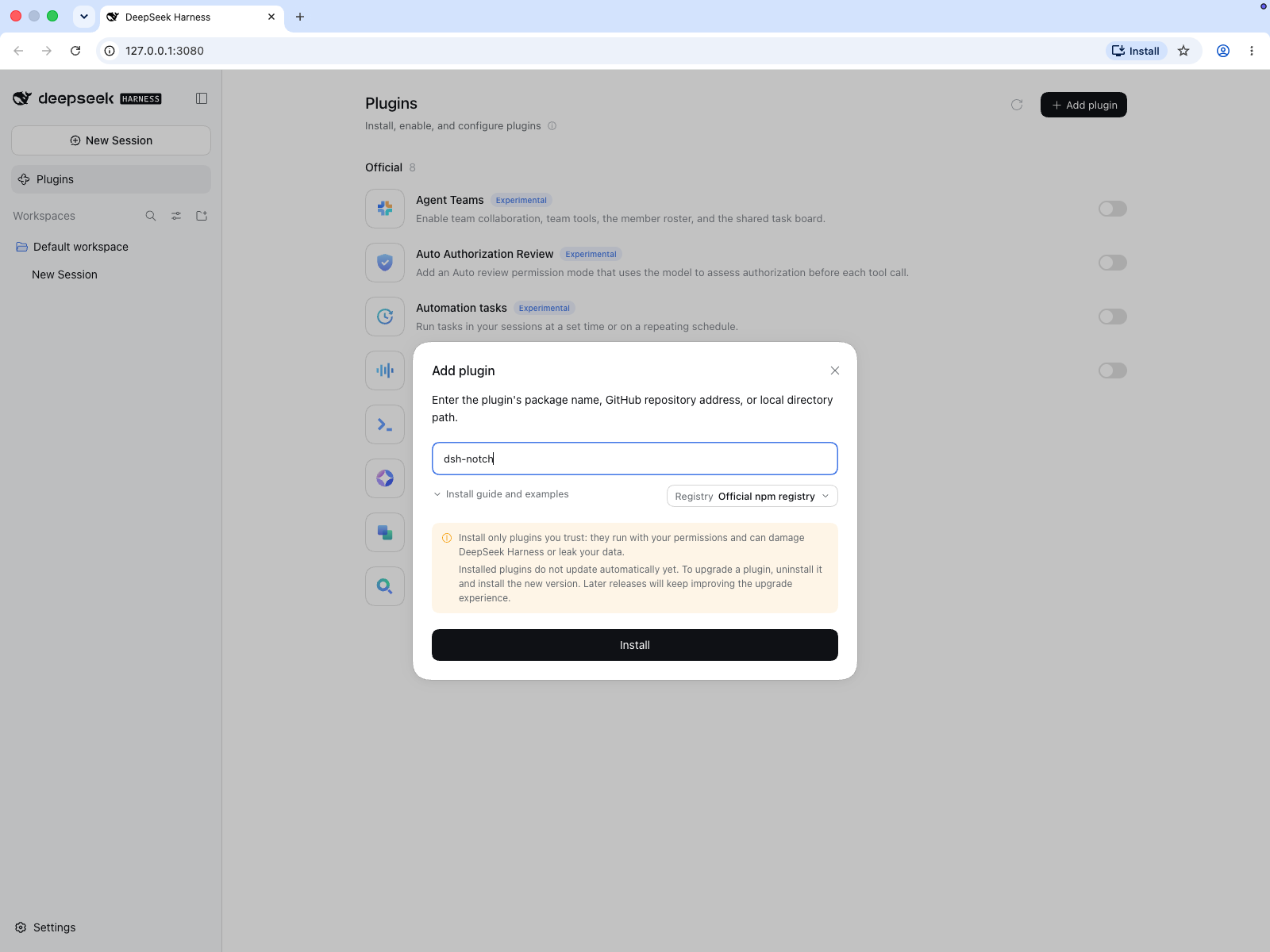
Fill dsh-notch and dsh-notch-focus in the Add plugin wizard's search box, and click Install:
Install with dsh cli
Install dsh-notch and dsh-notch-focus plugins from DeepSeek Harness:
dsh plugin --profile web add dsh-notch
dsh plugin --profile web add dsh-notch-focus
Or update the plugins:
dsh plugin --profile web update dsh-notch@latest
dsh plugin --profile web update dsh-notch-focus@latest
Then start the web UI with dsh web. No build step, no restart.
This official CLI command writes only the web profile; it cannot modify the Desktop App profile — use the in-app Add plugin wizard above for desktop.
Both packages declare official dsh.bundle.patch entries. Follow the plugin manager's loading guidance and reopen the page. Do not add a second manual insert. Update existing entries when migrating older installations so a Bundle and an old manual patch do not mount the same plugin twice.
A loaded Host writes $DSH_HOME/dsh-notch/runtime.json. This is a private connection file managed by the plugin; do not fill it in or share it. Check Host loading errors if it is absent.
2. Download and start the native helper (macOS only)
Download dsh-notch-0.3.3-macos-arm64.tar.gz (native executable and robot resources; macOS 14+, Apple Silicon; the native helper is still 0.3.3 because the v0.3.9 release has no newer native archive) and SHA256SUMS (place beside the download and run shasum -a 256 -c SHA256SUMS) from v0.3.4.
Prebuilt packages do not require Swift or DSHX. Other architectures require a source build and are not covered by this binary release. The dsh-notch-0.3.9.tgz and dsh-notch-focus-0.1.6.tgz on the v0.3.9 release are offline alternatives to the npm installs in step 1; a normal install does not need them.
tar -xzf dsh-notch-0.3.3-macos-arm64.tar.gz
cd dsh-notch-0.3.3-macos-arm64
./dsh-notch --verify-idle-resources
./dsh-notch
The resource check should print IDLE_RESOURCES=10/10. Keep the terminal open for the first run. If a desktop launcher already manages a Notch helper, update that executable instead. Always keep dsh-notch and DshNotch_DshNotch.bundle together when moving them. A custom DSH_HOME must match the Host's Home.
Optionally set the Host plugin's helperPath configuration to the absolute path of the extracted executable and follow the app's plugin loading guidance. The Host then supervises that helper; do not also start another copy manually.
3. Confirm synchronization
- Running primary sessions show a blue count; completions, failures, and questions show their corresponding states.
- Clicking a Notch session opens the matching conversation in DSH.
- Opening a completed session in foreground DSH clears that result from Notch. Running tasks remain visible.
- Reading all results returns Notch to the idle robot.
The native helper exits with its Host. Temporary request failures do not close it. Closing only the window keeps it alive if the Host still runs. See desktop helper ownership for lifecycle integration.
Usage
| State or action | Meaning |
|---|---|
| Blue number | Running sessions |
| Yellow exclamation mark | A question or decision needs attention |
| Green number | Unread completed results |
| Red number | Failed results |
| Click an option | Submit that choice; follow the panel for multiple questions or selections |
| Click the question title | Open the full conversation in DSH |
| Read all results | Return to the idle robot |
| Drag and release Notch | Hide it elastically at the screen edge; drag it out again to restore |
| New completion, failure, or decision while hidden | Bounce back to the normal compact view; repeated polls of the same event do not reveal it again |
Ordinary running-state and size updates keep a hidden Notch tucked away. An attention event received during a drag waits until release. Screen work-area changes, including a right-side macOS Dock, do not move the hidden cap away from the physical display edge.
The interface uses native AppKit, SwiftUI, and Canvas. Animation itself never calls a model. The panel grows with content, scrolls at the screen-height cap, and respects Reduced Motion.
Counts represent user conversations. Workflow workers and nested subagents belong to their owning conversation; they do not add separate running, success, or failure indicators. A background worker keeps its owner running, while result indicators come from the owner's final outcome. Child questions appear on the owner's yellow indicator and answers return to the original requester, with multiple questions handled in order. User-created forks remain independent conversations.
External Codex, Claude Code, ACP, and DSH SDK children registered as official background jobs also keep their owner active. Observation never consumes job completion notices. The dsh-notch-focus companion handles browser navigation and cold-session mirroring; existing installations can keep their current directory. See the source compatibility audit for entry paths, cancellation, resumption, and verification limits.
Troubleshooting
| Symptom | Check |
|---|---|
| Package installed, but no Notch | Both Host activation in step 1 and native startup in step 2 are required. |
| Robot appears, but tasks do not | Check Host plugin loading, runtime.json, and whether the current Host is still running. |
Cannot resolve dsh-notch |
Use the same Home and profile for installation and activation; keep the linked source directory in place. |
Fewer than 10/10 resources |
Rebuild and keep the resource bundle with the executable. |
| Two Notches | Check for both a manually started and a desktop-shell-managed copy. |
| Old behavior after updating source | Rebuild and replace the executable actually running; git pull does not replace an existing native process. |
The Host plugin requires sessions, webServer, approval, userQuestions, and agents. It targets a local DSH Web Host on the same Mac. Native foregrounding prefers official com.deepseek.dsh and retains compatibility with local.dsh.desktop. Successful package installation alone does not certify multiple Homes, remote Hosts, or every DSH version.
Updates and development
After updating source, rebuild the native helper. Native-only changes require updating and relaunching Notch. Changes under src/ also require the appropriate Host module activation.
Maintainers using dshx can inspect dshx activation-plan dsh-notch --change artifact or --change server, according to the changed surface. Package synchronization and live activation are separate checks.
Source builds require Node.js 24 and Swift 6 / Command Line Tools:
npm ci --ignore-scripts --legacy-peer-deps
npm run build
npm run build:macos
See the companion README for its DSHX build against a dsh-v0.2.2-rc.5 checkout. Release consumers do not need DSHX.
Development checks:
npm ci --ignore-scripts --legacy-peer-deps
npm test
npm run test:outcome
npm run test:motion
npm run test:geometry
npm run test:scrollbar
npm run test:expanded-height
npm run test:idle
npm run build:macos
Try the elastic edge-hiding gesture in the standalone native preview, built with npm run build:elastic-preview. It uses local fixtures, makes no model requests, and does not replace an installed Notch.
Optional recording demo
For animation review and video recording, separate from plugin installation:
npm run build:demo
open "dist/DSH Notch Demo.app"
The demo contains 36 bilingual scenes driven by local fixtures. It does not connect to DSH. See the demo controls.
More: motion contracts, design notes, 0.3.3 changes, 0.3.2 changes, 0.3.0 changes, and optional desktop-shell diagnostics.
License
MIT. Robot resources derive from OpenBotMotion; its original MIT notice is retained. This is a community-maintained DSH plugin.
See the Desktop 0.1.7-rc.2 verification record. DSH_NOTCH_RUNTIME_FILE selects the connection only. Use explicit --demo or --elastic-preview modes for offline presentation.
Links
More in this category
xmanrui/dsh-im★ 3832
Connect IM bots to DeepSeek Harness via QR codes or bot credentials (9 channels: Feishu, WeChat, DingTalk, WeCom, QQ, Slack, Telegram, Discord, and WhatsApp).
shaobeichen/dsh-pocket★ 3187
Remote phone access to the DSH Web UI: scan a QR code for LAN or public (cloudflared tunnel) access with real-time sync, a mobile-adaptive layout, and a settings tab.
c1overzz/dsh-bili-scroll★ 1478
Let your DSH agent browse Bilibili on its own, read subtitles, write a daily digest, and @ you when it finds something worth your attention.
OpenPetsHQ/openpets#dsh★ 1416
Bridges DeepSeek Harness lifecycle status, errors, and approval requests to a locally running OpenPets desktop companion.
inclusionAI/Avernet#deepseek-harness-channel-bcn★ 611
Connects DeepSeek Harness to Avernet's Bot Collaboration Network over WebSocket V2, with automatic onboarding, isolated agent sessions, tool-call events, and multi-bot routing tools.
zaofan-make/dsh-qqbot★ 286
QQ official bot channel (enhanced fork of tencent-connect/dsh-qqbot): full agent chat in groups and DMs, rich media, an auto-tagged sticker library with AI image replies, join approval, mute and broadcast, scheduled wakeups, remote approvals over QQ, interactive cards, multi-account instances, extensions, member profiles, and token-saving value-scored wakeups.
Community comments
Comments are public GitHub Discussions. Loading them connects to GitHub and Giscus; a GitHub account is required to post.