Desktop pet for the DSH web UI: a draggable pixel-art cat with a pomodoro timer, XP levels, and 30 unlockable facts.
Install
# from npm (prebuilt)
dsh plugin --profile web add toto-the-cat
# from GitHub (first run asks for allowBuilds approval — follow the hint, retry)
dsh plugin --profile web add github:ZutoMayoo/totoTheCat
Any plugin you install runs third-party code with your own permissions — it can read your files, use your credentials, and reach the network, and tool approvals don’t sandbox it. GitHub-sourced plugins also run build scripts at install time — pnpm blocks those until you allow them, so an install can stop with ERR_PNPM_GIT_DEP_PREPARE_NOT_ALLOWED or ERR_PNPM_IGNORED_BUILDS; dsh prints the exact key to add under allowBuilds in your profile’s pnpm-workspace.yaml, and the install works on the next run. Allowing a build is a trust decision: only install sources you trust, and pin a commit (github:owner/repo#sha).
README
中文 | English
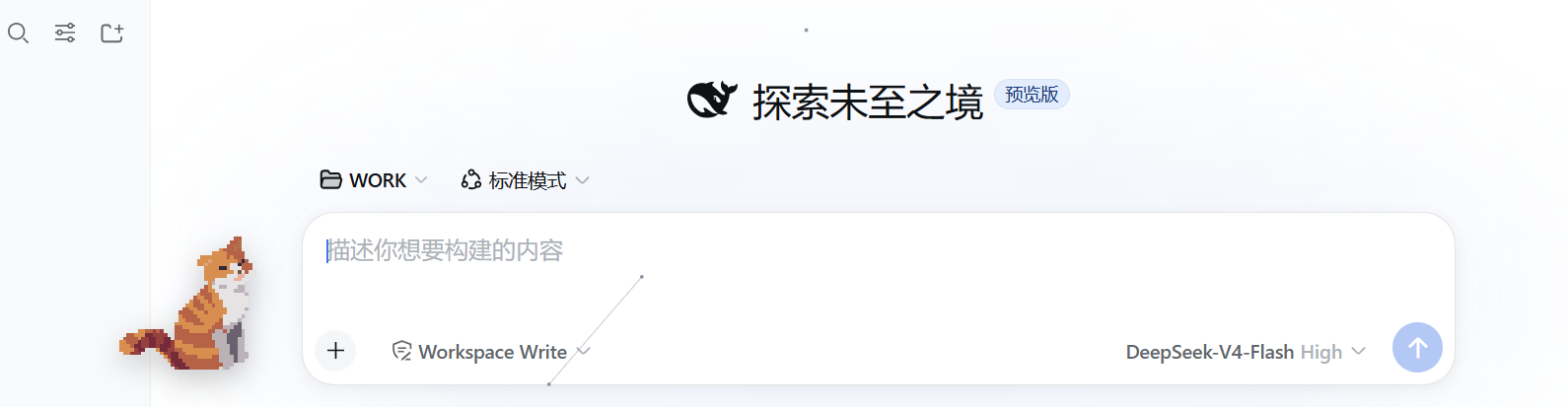
A desktop pet named Toto living inside the DeepSeek Harness web UI. Its
look is entirely defined by custom images in assets/ (transparent PNGs — a
still idle.png or a frame sequence idle-0.png, idle-1.png, ...). With no
images, Toto is not displayed. Zero dependencies, zero build step — installs
like a skin.
![Drop images into assets/ to define Toto's look; nothing shows without them]
Screenshot
Features
- Frame animation: continuous
idle-N.pngframes loop at ~4 fps by default (240 ms/frame, adjustable in Settings); a singleidle.pngrenders still - Draggable: grab Toto and move it anywhere; position persists (localStorage)
- Quiet like a cat: Toto never talks — it just keeps you company
- Pomodoro: click Toto to show the text entry (click again to hide); the panel opens beside it with focus/break timers. Finishing a focus session grants XP (1 XP per minute) and auto-starts a 5-min break
- 30 Facts about Toto: a separate entry alongside the Pomodoro; each fact has a title and content, the module lists titles only and expands on click, locked ones show ???; level-ups remind you a new fact is available; progress is persisted host-side, shared across browsers
- Close button: × on the pet hides it instantly (the × is hidden by default, appears on interaction and auto-hides after 2.5 s of idle); while hidden a persistent "wake pill" sits at the bottom-right (click to restore), or reopen via Settings
- Compact footprint: ~180×225 px by default, drag/scale without blocking
- Settings page (Settings → Toto Pet): visibility, size, animations, speed, pixel rendering
- zh/en labels follow the DSH locale
- Accessible: respects the system
prefers-reduced-motionsetting
Directory structure
totoTheCat/
├── package.json        # plugin manifest: dsh.bundle.patch + dsh.client.platform=web
├── cordis.patch.yml    # patch layer that mounts this package as a profile row
├── index.js            # host (Node) half — assets static route + /state progress route
├── client.js           # browser half — Toto + pomodoro/levels/30 facts
├── assets/             # appearance assets + facts document (shipped)
│   ├── idle-0.png…     # sample frame animation
│   └── 有关托托的30个事实.md
├── tools/
│   └── slice-frames.ps1 # strip-to-frames slicing tool
├── dev/                # development files (artist source / old backups, not shipped)
├── README.md           # this document (中文)
└── README.en.md
How the DSH plugin mechanism works (30-second intro)
- DSH is a profile launcher. A profile is an ordered stack of
plugin-bundle patch layers, declared in
$DSH_HOME/profiles/<name>/package.jsonunderdsh.profile.bundles. - A plugin is a plain npm package. As long as its
package.jsondeclaresdsh.bundle.patch,dsh pluginautomatically adds it to the profile's layer stack after install; the patch file (cordis.patch.yml) is composed into the Cordis config at profile startup. - The browser half is declared via
dsh.client.platform: "web"+exports["./client"], loaded by thedsh-client-modulesservice, and mounts UI through Slots (e.g.shell.overlay,settings.section). - Both halves are plain JS function bodies (no TS, no JSX, no build).
This repository also serves as a complete, copyable minimal plugin template. Reference implementation: the
cyber-particleplugin already installed in dsh's web profile (particle background) — this plugin follows the same structure.
Install
Method 1: Registry (after publishing to npm)
dsh plugin --profile web add toto-the-cat
dsh web        # restart the web service to activate the new bundle
Method 2: Dev mode (edits apply live via link)
With the link: protocol, the profile's node_modules holds a link to this
repo, so code changes take effect after restarting dsh web — no repeated
reinstalls:
cd D:\WORK\Project\totoTheCat
dsh plugin --profile web add link:D:\WORK\Project\totoTheCat
dsh web
Method 3: Local directory
dsh plugin --profile web add D:\WORK\Project\totoTheCat
dsh web
Uninstall
dsh plugin --profile web remove toto-the-cat
dsh web
Uninstalling does not delete the progress file
$DSH_HOME/toto-the-cat-state.json— progress survives a reinstall (delete the file manually to fully reset).
Requirements
- Runtime: the web profile of DeepSeek Harness (
dsh web). The host half depends on thewebServerservice, the browser half on theshell.overlay/settings.sectionslots; other profiles (e.g. headless) are unaffected. - Restart
dsh webafter install/update: bundle layers compose at boot. - Writable directory: progress is written to
$DSH_HOME/toto-the-cat-state.json(falls back to~/.dshwhenDSH_HOMEis unset). - No runtime dependencies: no npm packages; the browser side uses only standard Web APIs.
- Browsers: Chromium engines (Chrome / Edge) verified; no private APIs.
- Default appearance: ships 4 example frames (
assets/idle-0..3.png); replacing the look is covered under Custom appearance.
Development loop
- Edit
client.js(browser side) orindex.js(host side); - Syntax-check with
node --check client.js; - Restart
dsh web(or let DSH's HMR pick it up) and observe.
Tip:
dsh plugin addruns pnpm and automatically writes the package name intodsh.profile.bundles(by checking thedsh.bundledeclaration) — no manual profile editing.
Custom appearance
Toto has no built-in look — its appearance is fully determined by images you
place in assets/: no images means no Toto (the settings page explains why).
Put the following resources in assets/:
| Use | File | Notes |
|---|---|---|
| Single still | assets/idle.png |
static display |
| Frame animation (recommended) | assets/idle-0.png, idle-1.png, … |
~4 fps loop by default (speed adjustable in Settings) |
- Format: PNG with alpha. Auto-detection only recognizes
.pngfilenames; WebP/JPG etc. are not detected - Aspect: 4:5 (width:height), display container 200×250, ~180×225 px by default; pixel art recommended at integer multiples (360×450 / 720×900), with "pixel rendering" on by default for crispness
- Animation: up to 16 frames, 4–8 frame loops work best; all frames must be identical in size
- Apply: restart
dsh webafter adding files; deleting the files hides Toto again. Resources are served by the host route/toto-the-cat/assets/*and auto-detected at browser startup; nothing is shown while detection is in progress.
Pomodoro & growth (entry lives on Toto)
- Entry cluster: clicking Toto shows two text entries — "Pomodoro" and "30 Facts about Toto" (click Toto again to hide); clicking an entry title toggles its panel (no × buttons). Panels always open on the emptier side of the screen (compares the free space above/below Toto — above when Toto sits low, below when high) and follow Toto when dragged. While a session runs, the entry shows "Focus 24:31 / Break 04:59"
- Timer: focus length = presets (5/10/15/30/45/60 min) + custom (1–120 min via slider or manual input, choice remembered); after finishing it auto-starts a 5-min break, then returns to idle
- XP: finishing a focus session grants
work minutes × 1XP; progress is persisted host-side to$DSH_HOME/toto-the-cat-state.json, shared across Chrome / Edge / multiple tabs - Levels: the first three level-ups (to levels 2/3/4) each need just 10 XP — the first three levels unlock within 30 minutes (two 15-minute focus sessions); afterwards needs grow slowly (+1 XP every 5 levels). Cumulative: L2=10, L3=20, L4=30, L5=40, L9=81, L15=149, L30=350
- Pacing: 350 XP unlocks all content in ≈ 6 hours of focus (15/30/45/60 min sessions are exactly 6 h; 25-min sessions ≈ 5 h 50 min)
- 30 Facts about Toto: content is loaded and parsed at runtime from
assets/有关托托的30个事实.md(format1. title: content; edits apply on refresh, no code change). Each fact has title + content; the module lists titles only and expands on click; locked ones show ??? (fact #N unlocks at level N+1). Fact #30 and the "Author's note" unlock together at level 30. A toast at the bottom reminds you which fact was unlocked on level-up. Falls back to placeholders if the document is missing or fails to parse.
Settings (Settings → Toto Pet)
| Setting | Default | Notes |
|---|---|---|
| Show Toto | on | show/hide the pet (× on Toto hides it quickly) |
| Size | 0.9 | 0.6–1.8× scale (~180×225 px by default) |
| Animations | on | off renders a static frame (also honors reduced motion) |
| Anim speed | 240ms | frame interval 120–400ms, fast left / slow right |
| Pixel rendering | on | nearest-neighbor scaling, crisp at any size for pixel art; turn off for smooth art |
| Position | bottom-right | drag to move; one-click reset in Settings |
UI preferences and position live in browser localStorage (key
toto-the-cat:config); XP progress lives host-side (see above).
Extension points
Toto is currently a pure front-end pet; to make it react to your working state, start here:
- Host half listens to host events (event list in
index.jscomments):agent/status,subagent/start,subagent/end,goal/changed,tools/change,agent-preset/selected, ... - Client→Host RPC: the host registers
harness.handle(method, fn); the browser callshost.call(method, args)(JSON both ways, see the "Call Host from Client" section of thecordis-plugin-developmentskill) - More animations/expressions: add new frame groups (
idle-N.png) or switch frame sets per state (e.g. sleeping/excited) inclient.js - State awareness: subscribe to host events and swap frame groups (e.g. busy/idle)
FAQ
- Installed but Toto doesn't show? You must restart
dsh webafter installing; confirmdsh web --dump-configcontains thetoto-the-catrow. - Pomodoro/XP not working? The progress route
/toto-the-cat/stateis registered by the host half — restartdsh webafter adding it; before the restart XP lives only in the localStorage fallback (not shared across browsers). Progress file:$DSH_HOME/toto-the-cat-state.json. - Toto disappeared? Most likely you clicked the × (or toggled "Show Toto"
off); the config lives in that browser's localStorage (per-browser). While
hidden, the persistent "wake pill" at the bottom-right restores Toto; you
can also go to Settings → Toto Pet → enable "Show Toto", or run
localStorage.removeItem('toto-the-cat:config')in the console and refresh. - Can't find "Toto Pet" in Settings? Check whether another plugin replaced
the
settings.sectionslot (Slots.listSubTree). - Images added but appearance unchanged? Restart
dsh web, then openhttp://127.0.0.1:3080/toto-the-cat/assets/idle-0.pngin the browser: an image means OK; an HTML page means the host half isn't active (asset route not registered) — check the terminal fortoto-the-catrow errors. - Uninstall:
dsh plugin --profile web remove toto-the-catthen restart.
License
MIT
Links
More in this category
PC2005-cloud/dsh-pet#dsh-pet★ 1260
Desktop pet for the DSH Web UI with 25 transparent animations, screen wandering, click reactions and drag, plus a reproducible asset-generation pipeline.
Nagi-ovo/dsh-ads★ 660
Parody ads in 2005-Chinese-web style: sidebar banners, in-chat feeds, corner popups, and a close button whose hit area is smaller than it looks. All fictional.
vlln/whale-girl★ 357
Desktop pet (QQ-pet style): floats in the corner, draggable, feedable, playable.
yyh-001/dsh-meme★ 171
Chat meme stickers: text-only send, mood auto-send, QQ/WeChat-style picker, auto-learn, custom packs.
a86582751/dsh-nexttavern★ 165
Roleplay workspace for DeepSeek Harness: import SillyTavern/TauriTavern character cards or author one from scratch through an interactive flow; turn a long TXT novel into a playable card with either an intensive or a coarse reading pass; the main agent consults worldbooks on demand, and prose is read in a dedicated tavern reader tab; explore multiple worldlines inside one conversation (regenerate, edit-and-send, explicit clone); scoped style presets with 16 built-in styles, a character agent cluster, a standalone decision card, and card or novel export; long stories hold together through a frozen settings prefix, a hard-cut context window, traceable director notes and keyword/semantic/hybrid recall, with embeddings either online or fully local. Targets Harness 0.1.2-alpha.3 and applies its documented compatibility patches.
Sutera-Diffusus/dsh-whale-musume★ 120
A whale-girl desktop pet for the DeepSeek Harness Web UI: pat-to-raise growth, work-state poses per tool type, 494 dialogue lines, 30 achievements, a growth diary, drag physics, theme sync and an accessibility mode. Chat-keyword sensing and API-balance care ship off and are opt-in; an optional weather mood calls Open-Meteo only after you name a city. No telemetry.
Community comments
Comments are public GitHub Discussions. Loading them connects to GitHub and Giscus; a GitHub account is required to post.