Create a one-click Windows desktop shortcut from the Settings page: a .cmd launcher + desktop icon for DeepSeek Harness or any local server, auto-opens the browser, with taskbar pin hints.
Install
# from GitHub (first run asks for allowBuilds approval — follow the hint, retry)
dsh plugin --profile web add github:Yvesgao/dsh-shortcut-creator
Any plugin you install runs third-party code with your own permissions — it can read your files, use your credentials, and reach the network, and tool approvals don’t sandbox it. GitHub-sourced plugins also run build scripts at install time — pnpm blocks those until you allow them, so an install can stop with ERR_PNPM_GIT_DEP_PREPARE_NOT_ALLOWED or ERR_PNPM_IGNORED_BUILDS; dsh prints the exact key to add under allowBuilds in your profile’s pnpm-workspace.yaml, and the install works on the next run. Allowing a build is a trust decision: only install sources you trust, and pin a commit (github:owner/repo#sha).
README
This plugin publishes its README in Chinese only.
功能
把「打开 PowerShell → 敲命令 → 再开浏览器」变成双击一下。在 设置 → Desktop Shortcut 里填一个小表单,插件自动完成:
- 生成
.cmd启动器 —— 在控制台窗口里启动命令、等 URL 就绪后自动打开默认浏览器、保持窗口存活(关窗即停服);服务已在运行则直接打开浏览器。 - 创建桌面
.lnk快捷方式 —— 指向启动器(DeepSeek Harness 用 Node.js 图标)。 - 尝试固定到任务栏 —— 目标类型无法程序化固定时,打印「固定运行中窗口」的兜底指引(永远有效)。
核心逻辑由打包内置的、自包含的 assets/New-DesktopShortcut.ps1 完成(零外部依赖,也可独立运行)。
效果演示
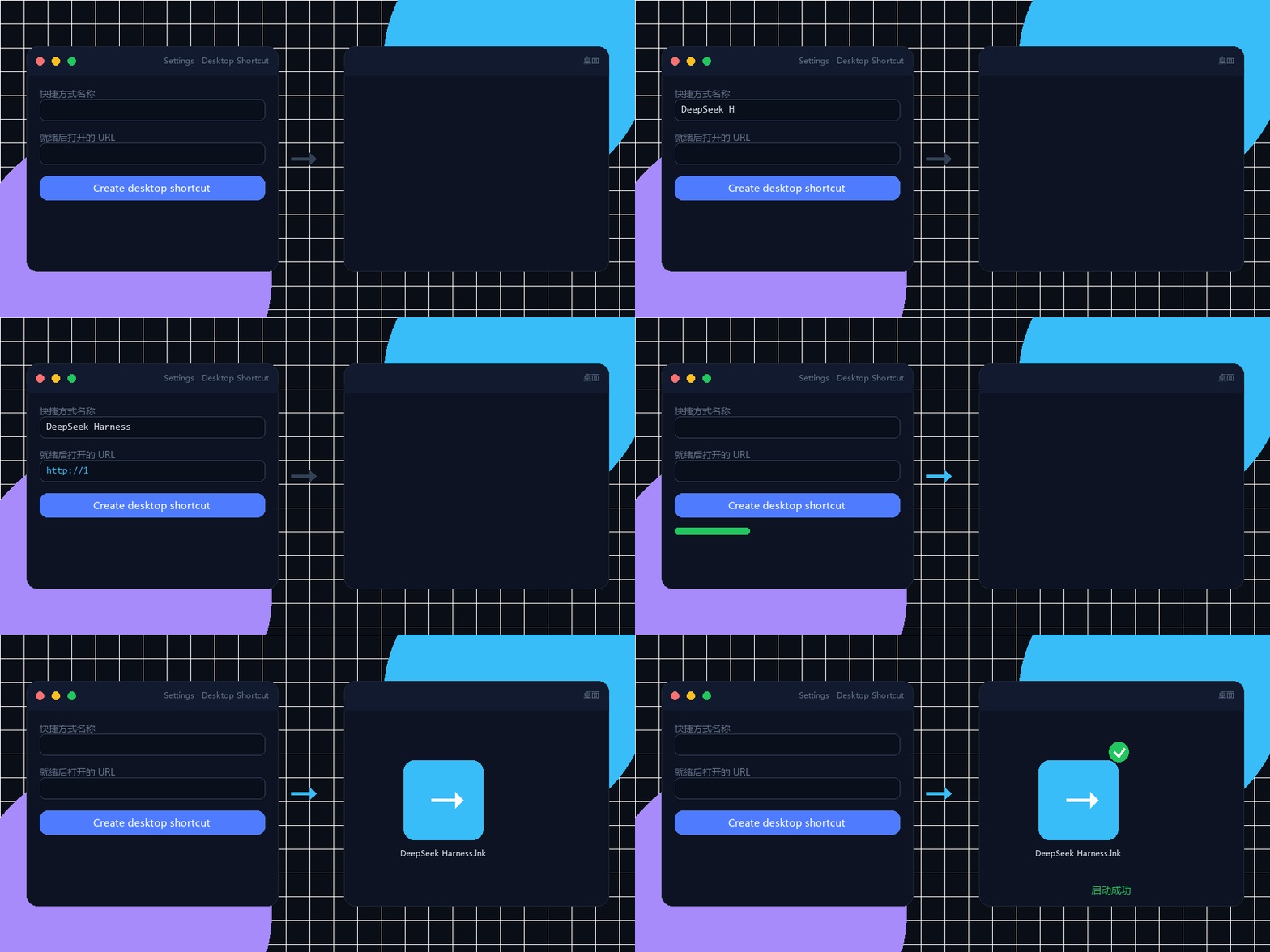
能力清单
| 能力 | 说明 |
|---|---|
| 设置页 UI | settings.section「Desktop Shortcut」:名称 / 命令 / URL / 工作目录表单 |
| Host JSON API | POST /plugins/desktop-shortcut/api/install 执行 PowerShell 引擎;.../status 上报平台 |
| 启动器生成 | 带端口检查的 .cmd,自动开浏览器,兼容「已在运行」场景 |
| 任务栏固定 | 尽力程序化固定 + 「固定运行中窗口」兜底指引 |
安装(bundle 形态,需重启 web)
方式一:npm(推荐)
dsh plugin --profile web add dsh-shortcut-creator
方式二:GitHub 源(lib/ 已入库)
dsh plugin --profile web add github:Yvesgao/dsh-shortcut-creator#main
方式三:Windows 一键安装包(给小白同事)
从 GitHub Releases 下载 DeepSeekHarnessSetup.exe → 双击安装(自动装 Node.js + dsh + 插件)→ 桌面出现「DeepSeek Harness」图标 → 双击即用。
重启 web(dsh web)后,打开 设置 → Desktop Shortcut,填好表单点 Create desktop shortcut 即可。
仅支持 Windows —— PowerShell 引擎是 Windows 组件。设置页在所有平台都会出现,但在非 Windows 平台会报错提示。
开发
pnpm install
pnpm build        # tsc(host lib)+ tsdown(client bundle lib/client.js)
pnpm typecheck
官方插件开发契约与可参考的社区插件源码已收集在 docs/references/。
插件管理
已装插件推荐用 plugin-registry 的薄控制台管理(浏览器面板):bundle 层栈 + insert 行 + 启停,无需手改配置。
dsh plugin --profile web add <plugin-registry>/packages/plugin/console
截图
发布前在此补充设置页截图(docs/preview/settings.png)。
License
MIT
English
What it does
Turns "open PowerShell, type a command, then open the browser" into a double-click. From Settings → Desktop Shortcut you fill in a small form and the plugin:
- Generates a
.cmdlauncher — starts the command in a console window, waits for the URL to respond, opens your default browser, and keeps the window open (closing it stops the server). If the server is already running it just opens the browser. - Creates a desktop
.lnkshortcut pointing at the launcher (Node.js icon for DeepSeek Harness). - Attempts to pin the shortcut to the taskbar and prints manual fallback steps when the target type cannot be pinned programmatically.
The heavy lifting is done by the bundled, self-contained assets/New-DesktopShortcut.ps1 (no external dependencies, works standalone too).
Demo
Capabilities
| Capability | Description |
|---|---|
| Settings UI | settings.section "Desktop Shortcut" with a name / command / URL / workdir form |
| Host JSON API | POST /plugins/desktop-shortcut/api/install runs the PowerShell engine, .../status reports platform |
| Launcher generation | Port-checked .cmd that auto-opens the browser and handles the already-running case |
| Taskbar pin | Best-effort programmatic pin with the always-works "pin the running window" fallback instructions |
Install (bundle, requires web restart)
Option 1: npm (recommended)
dsh plugin --profile web add dsh-shortcut-creator
Option 2: GitHub source (lib/ committed)
dsh plugin --profile web add github:Yvesgao/dsh-shortcut-creator#main
Option 3: Windows one-click installer (for non-technical users)
Download DeepSeekHarnessSetup.exe from GitHub Releases → double-click to install (Node.js + dsh + plugin, automatically) → a "DeepSeek Harness" icon appears on the desktop → double-click to use.
Restart the web UI (dsh web). Then open Settings → Desktop Shortcut, fill the form and click Create desktop shortcut.
Windows only — the PowerShell engine is a Windows component. The Settings section appears on all platforms but reports an error when run elsewhere.
Development
pnpm install
pnpm build        # tsc (host lib) + tsdown (client bundle lib/client.js)
pnpm typecheck
Reference contracts (official plugin development guide + a working community plugin) are collected under docs/references/.
Plugin management
Manage installed plugins with the plugin-registry thin console (browser panel): bundle layer stack + insert rows + enable/disable, no manual config edits.
dsh plugin --profile web add <plugin-registry>/packages/plugin/console
Screenshot
Add a screenshot of the Settings section here (docs/preview/settings.png) before publishing.
License
MIT
Links
More in this category
DayuanJiang/next-ai-draw-io#dsh-plugin★ 36749
Draws draw.io diagrams in DeepSeek Harness through the next-ai-drawio MCP server: the link in the reply opens a live preview in the right sidebar, you can edit the diagram by hand, and each AI change is a version you can restore. Node.js 18+; npx downloads the MCP server on first use.
Tencent/WeKnora#dsh-weknora★ 36302
Four read-only tools over a WeKnora knowledge base: list knowledge bases, hybrid passage search, reassemble one document's chunks in order, and WeKnora's own cited RAG or ReAct-agent answer with a resumable session id.
superdesigndev/treg★ 7042
Tool catalog for agents: search ~2,600 external endpoints (SEO and SERP, backlinks, social, people and company enrichment, ad libraries, scraping) by the task you want done, read each one's parameters and per-call price, then call it with the credential injected server-side. Ships the skill plus an MCP row that stays disabled until TREG_TOKEN is set.
T-Auto/dsh-ops★ 5074
Provides bash, PowerShell 7, and high-performance Rust tools for DSH on Windows to reduce token usage.
sixtysevenlf/dsh-blender-plugin★ 1575
Lets a DSH agent drive a local Blender over a direct TCP channel with 15 tools: viewport frames, custom-angle renders, Python execution, headless and job offload, transaction rollback, and a planning layer of 228 ops across 34 families.
TencentCloudBase/CloudBase-AI-Toolkit#dsh-plugin★ 1155
Tencent CloudBase backend for DeepSeek Harness — scaffold and deploy full-stack apps from chat, render query results as table cards with paging, sorting and CSV export, preview a deployment on its domain, and call the CloudBase MCP toolset (`mcp__cloudbase__*`) with device-code login.
Community comments
Comments are public GitHub Discussions. Loading them connects to GitHub and Giscus; a GitHub account is required to post.