Drag-and-drop file upload into the conversation composer, token usage pill with quota tracking, and session archive management — a three-in-one daily-driver addon.
Install
# from npm (prebuilt)
dsh plugin --profile web add dsh-user-addons
# from GitHub (first run asks for allowBuilds approval — follow the hint, retry)
dsh plugin --profile web add github:Yur0918/dsh-user-addons
Any plugin you install runs third-party code with your own permissions — it can read your files, use your credentials, and reach the network, and tool approvals don’t sandbox it. GitHub-sourced plugins also run build scripts at install time — pnpm blocks those until you allow them, so an install can stop with ERR_PNPM_GIT_DEP_PREPARE_NOT_ALLOWED or ERR_PNPM_IGNORED_BUILDS; dsh prints the exact key to add under allowBuilds in your profile’s pnpm-workspace.yaml, and the install works on the next run. Allowing a build is a trust decision: only install sources you trust, and pin a commit (github:owner/repo#sha).
README
Community web add-ons for DeepSeek Harness.
This package provides a small, out-of-tree DSH plugin with both Host and Web client halves. It does not modify DSH core files.
Interfaces
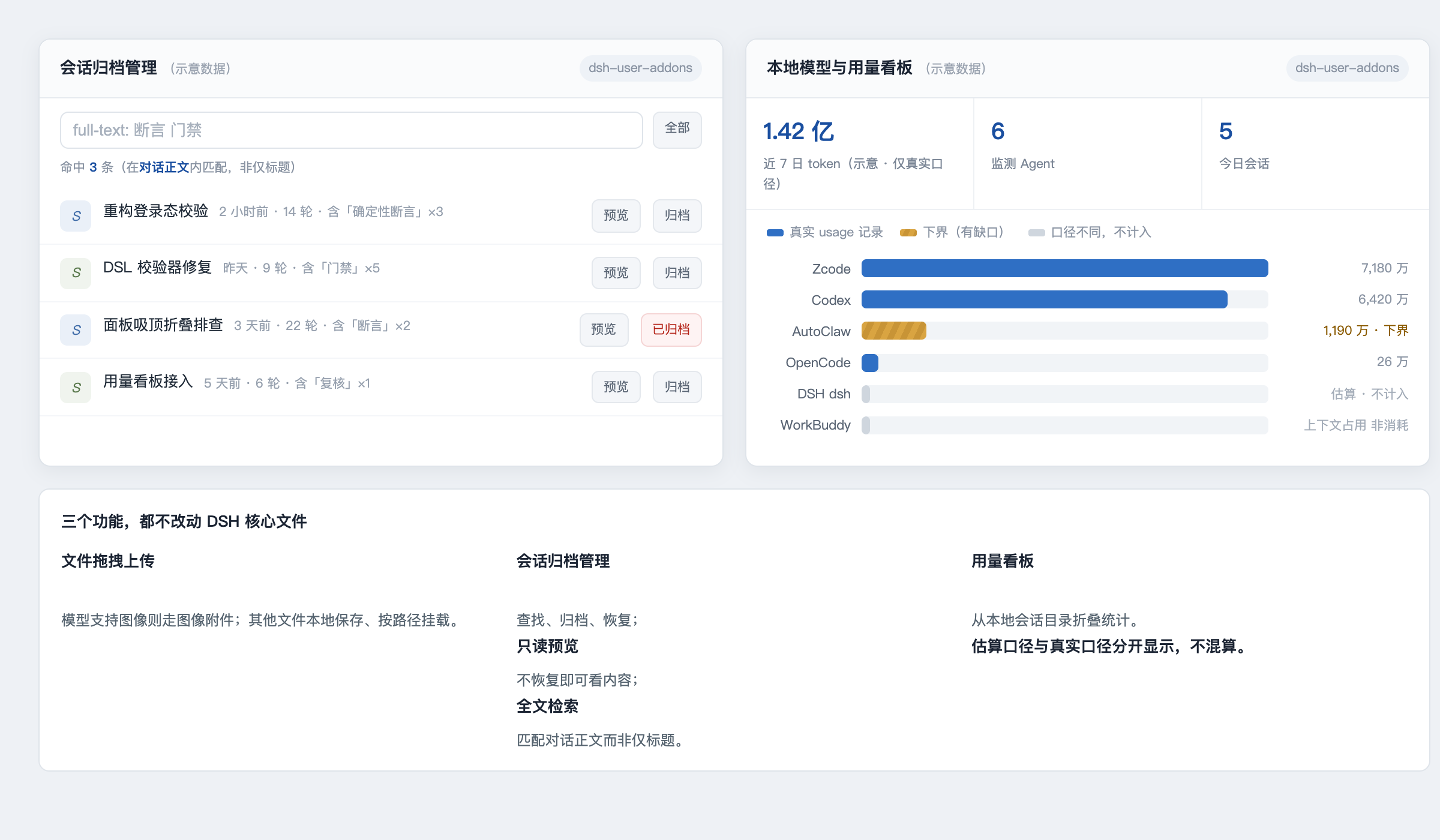
(Interface sketch — layout and colour semantics only; all figures shown are illustrative placeholders, not real measurements.)
Features
- File drop/upload support in the Web composer. Images are attached when the selected model supports image input; other files are saved locally and attached by path.
- An archived-session manager for finding, archiving, restoring — and since 1.3.0, previewing (read-only conversation peek without restoring) and full-text searching (matches inside the decoded conversation log, not just titles) — sessions through DSH's workspace registry.
- A local model and token usage dashboard, folded from
~/.dsh/sessions. - An image-capability endpoint used by the Web client to choose the appropriate attachment behavior.
Requirements
- A DSH Web profile with the client module loader enabled.
- Node.js 22.19 or newer, matching the current DSH development baseline.
Install
This package is not published to npm. There is no @yur0918/dsh-user-addons
on the registry — installing by package name will fail with a 404. It is a
local profile plugin, loaded by symlinking the source directory into the
profile's node_modules and inserting one row into the profile patch layer.
From a clone of this repository:
# 1. symlink the package into the profile's node_modules
ln -s "$PWD" ~/.dsh/profiles/node_modules/dsh-user-addons

# 2. add the loader row to the web profile patch layer
#    (append to ~/.dsh/profiles/web/cordis.patch.yml)
cat >> ~/.dsh/profiles/web/cordis.patch.yml <<'YAML'

- insert:
    - id: user-addons
      name: 'dsh-user-addons'
YAML

# 3. restart the Web profile so it picks up package metadata + lib/client.js
launchctl kickstart -k gui/$(id -u)/com.deepseek.dsh

# 4. verify
curl http://127.0.0.1:3080/addons/health
# → {"ok":true,"addon":"dsh-user-addons","version":"1.3.0"}
Steps 1 and 2 are idempotent: re-running them just recreates the symlink and
appends a duplicate row, so check before re-adding. To uninstall, remove the
symlink and the - id: user-addons row, then restart the profile.
If you use a non-default DSH_HOME, point both paths at that home instead of
~/.dsh.
The package declares its client entry point as:
{
  "dsh": {
    "client": {
      "platform": "web",
      "inject": [
        "@deepseek-ai/dsh-client-locale"
      ]
    }
  }
}
Run the package check with:
npm run check
Local routes
The Host half registers same-origin /addons/* routes:
GET /addons/healthGET /addons/archive/listGET /addons/archive/previewPOST /addons/archive/archivePOST /addons/archive/restoreGET /addons/image-capabilityPOST /addons/uploadGET /addons/usage/summary
Uploads are limited to 100 MiB (UPLOAD_LIMIT_BYTES in lib/index.js) and
filenames are sanitized before being written below the DSH home. Usage data is
read locally from DSH session logs; this plugin does not make network requests.
Development
The browser bundle in lib/client.js is intentionally committed because DSH's Web host serves built client bundles. Keep the Host and Client halves compatible with the DSH version you are using, and run npm run check before publishing.
Please do not commit session logs, uploaded files, credentials, generated task state, or backup files.
License
MIT
Links
More in this category
Tencent/WeKnora#dsh-weknora★ 34626
Four read-only tools over a WeKnora knowledge base: list knowledge bases, hybrid passage search, reassemble one document's chunks in order, and WeKnora's own cited RAG or ReAct-agent answer with a resumable session id.
superdesigndev/treg★ 5760
Tool catalog for agents: search ~2,600 external endpoints (SEO and SERP, backlinks, social, people and company enrichment, ad libraries, scraping) by the task you want done, read each one's parameters and per-call price, then call it with the credential injected server-side. Ships the skill plus an MCP row that stays disabled until TREG_TOKEN is set.
T-Auto/dsh-ops★ 3102
Provides bash, PowerShell 7, and high-performance Rust tools for DSH on Windows to reduce token usage.
TencentCloudBase/CloudBase-AI-Toolkit#dsh-plugin★ 1139
Tencent CloudBase backend for DeepSeek Harness — scaffold and deploy full-stack apps from chat, render query results as table cards with paging, sorting and CSV export, preview a deployment on its domain, and call the CloudBase MCP toolset (`mcp__cloudbase__*`) with device-code login.
sixtysevenlf/dsh-blender-plugin★ 599
Lets a DSH agent drive a local Blender over a direct TCP channel with 16 tools: viewport frames, custom-angle renders, Python execution, headless and job offload, transaction rollback, and a planning layer of 186 ops across 28 families.
anysearch-team/anysearch-dsh★ 537
AnySearch-powered real-time web and vertical search provider for DeepSeek Harness.
Community comments
Comments are public GitHub Discussions. Loading them connects to GitHub and Giscus; a GitHub account is required to post.