Project and session organization with multi-folder groups, attention summaries, grouped chat search, native folder picking, pinning, favorites, ordering, and an archive center.
Install
# from a prebuilt release tarball
dsh plugin --profile web add "https://github.com/WenhongPan/dsh-projects/releases/download/v0.3.0-alpha.1/dsh-projects-0.3.0-alpha.1.tgz"
# from GitHub (first run asks for allowBuilds approval — follow the hint, retry)
dsh plugin --profile web add github:WenhongPan/dsh-projects
Any plugin you install runs third-party code with your own permissions — it can read your files, use your credentials, and reach the network, and tool approvals don’t sandbox it. GitHub-sourced plugins also run build scripts at install time — pnpm blocks those until you allow them, so an install can stop with ERR_PNPM_GIT_DEP_PREPARE_NOT_ALLOWED or ERR_PNPM_IGNORED_BUILDS; dsh prints the exact key to add under allowBuilds in your profile’s pnpm-workspace.yaml, and the install works on the next run. Allowing a build is a trust decision: only install sources you trust, and pin a commit (github:owner/repo#sha).
README
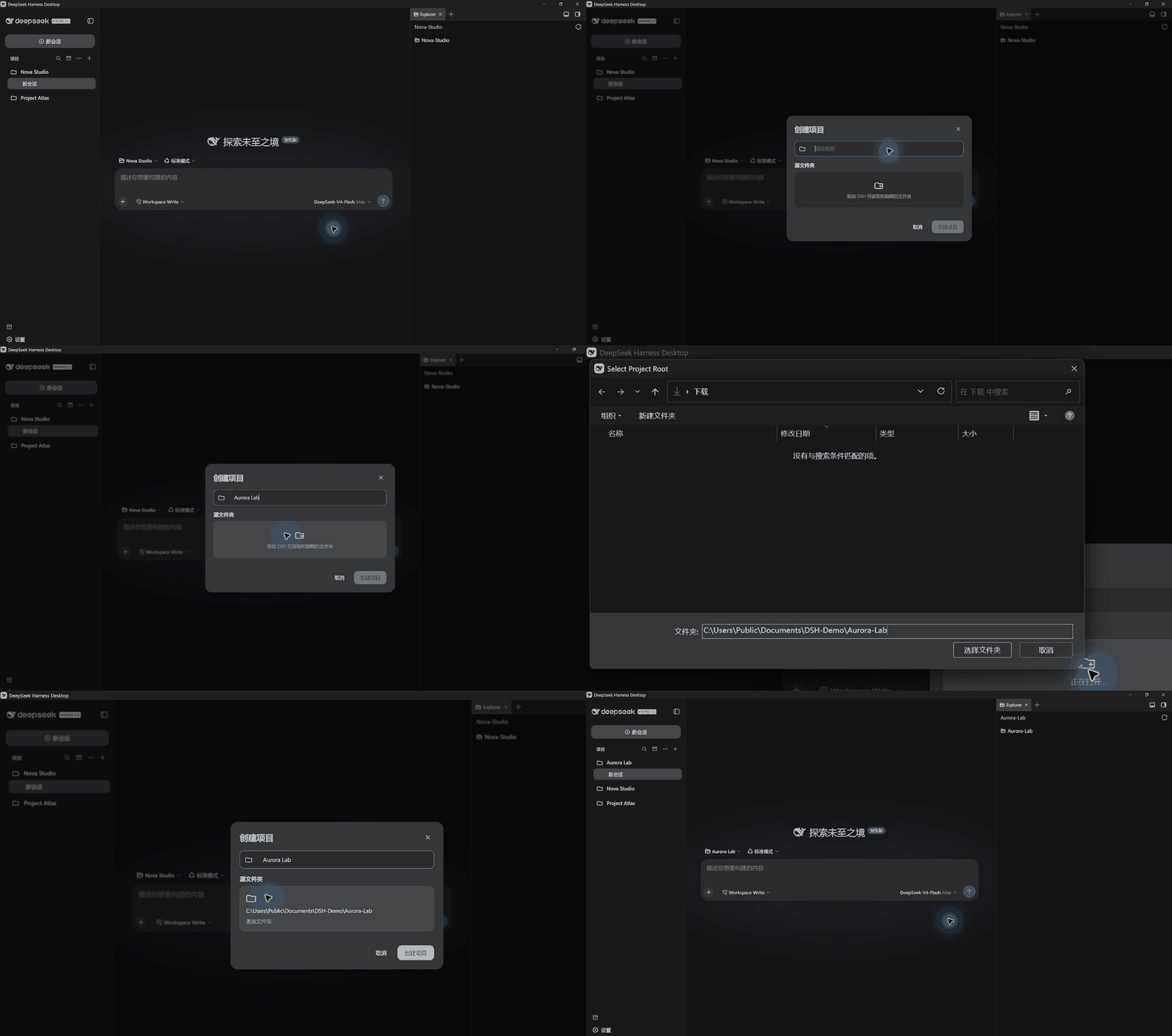
Full-screen, real interaction capture. The directory chooser is opened by the Windows native API; editing is limited to cropping, camera zoom, and GIF compression—no system UI was reconstructed.
DSH makes it easy to enter a Workspace, but folder selection and a flat session list become difficult to navigate as your work grows. dsh-projects adds a project layer over DSH's native Workspace and Session data: select and create projects, organize the sidebar, search chats, and inspect archived work without copying or migrating existing sessions.
New in v0.3
- Multi-folder projects: group existing Workspaces and choose an explicit primary folder for new sessions.
- Attention summaries: use Off, Compact, or Expanded views for waiting, running, and completed sessions.
- Better search: group project, title, and chat-body matches directly under their projects with highlighted snippets.
- Smarter folder picking: remember the previous location or start from Desktop, Home, or the current project's parent.
Every advanced capability is opt-in. Without it, the plugin remains a lightweight organization layer over DSH data.
At a glance
| Capability | What it gives you |
|---|---|
| Project entry | Search and switch projects above the composer, or start without choosing one |
| Project creation | Keep display names independent from folders and prefer the OS directory chooser locally |
| Sidebar | Group by project or use one list, with Recent, pinning, favorites, drag ordering, plus Off, Compact, or Expanded Session-status summaries |
| Management | Rename, open in the file manager, archive chats, and remove project registrations |
| Multi-folder projects | Optionally group existing Workspaces under one project without moving files or chats; dissolve the group at any time |
| Global search | Group results directly by project; optionally include chat bodies through DSH indexing |
| Archive center | Inspect archived chats; restore depends on a public DSH unarchive API |
| Theme and data | Follow DSH light/dark themes and keep using DSH's own Workspace and Session data |
Quick install
The current version is 0.3.0-alpha.2. The plugin accepts both the DSH 0.1.0-rc.6 line and 0.1.1-rc.2. The latter has passed an isolated Web UI boot and core-surface check, and DSH Desktop 2.0.3's official Windows picker has passed a manual UI check. See the compatibility matrix for the remaining platform boundaries.
DSH Desktop
dsh plugin --profile desktop add https://github.com/WenhongPan/dsh-projects/releases/download/v0.3.0-alpha.2/dsh-projects-0.3.0-alpha.2.tgz
DSH Web UI
dsh plugin --profile web add https://github.com/WenhongPan/dsh-projects/releases/download/v0.3.0-alpha.2/dsh-projects-0.3.0-alpha.2.tgz
Fully quit and restart the selected DSH profile after installation or upgrade. Desktop and Web are separate profiles and must be installed independently.
Source install is also available:
git clone https://github.com/WenhongPan/dsh-projects.git
cd dsh-projects
npm install
npm run verify
dsh plugin --profile desktop add link:/absolute/path/to/dsh-projects
On Windows, a link path can be written as link:C:/path/to/dsh-projects.
Native folder picking
The plugin selects the best directory surface exposed by the current runtime, so regular users do not need to replace Desktop:
- DSH Desktop 2.0.3 and later use the official Desktop-owned Windows picker first.
- Older Desktop builds and local Web UI retain the plugin Host bridge, including remembered-parent and Desktop/Home start options.
- If neither bridge is available, the plugin calls DSH's stock Workspace picker.
- Remote Web UI uses the Host-side in-app browser and never asks the remote machine to show a system dialog.
- Cancellation is final and never opens a second chooser by mistake.
The patched Desktop installer in early Releases has been superseded by the official implementation. It remains as historical compatibility material and is no longer recommended for new installations. See native picker options for the exact fallback order.
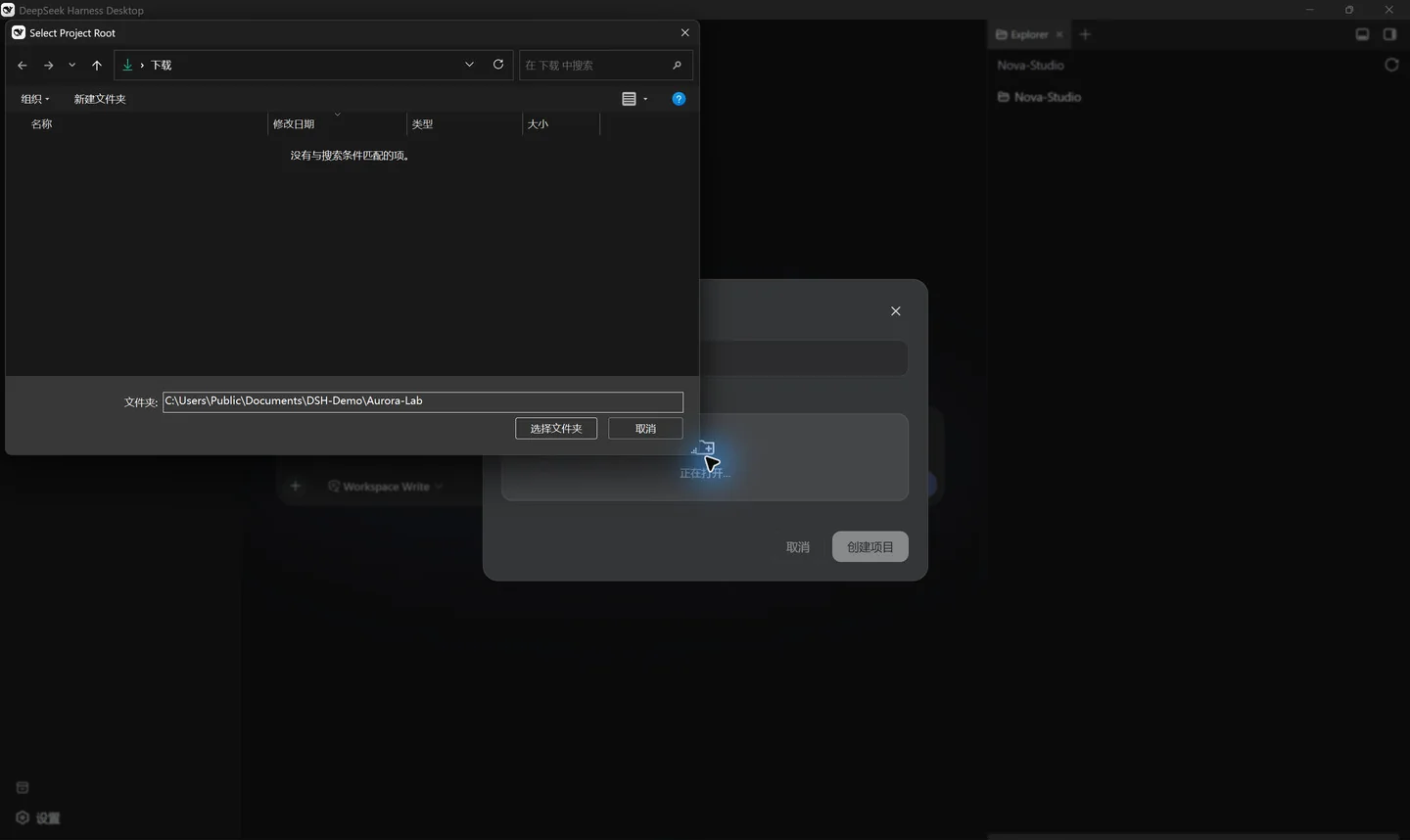
Chat without choosing a project
A regular chat receives an isolated task directory automatically:
~/Documents/DSH-Default/YYYY-MM-DD/new-chat[-N]
Default tasks stay out of the Projects section but remain available in Recent. Each chat gets its own workspace instead of treating the whole Documents or home directory as writable.
Compatibility
| Surface | Current status |
|---|---|
| DSH Desktop 2.0.1 / Windows x64 | ✅ Legacy bridge manually verified, including the native directory chooser |
| DSH Desktop 2.0.3 / Windows x64 | ✅ Plugin load, official picker, cancellation, and CJK/space path round-trip manually checked |
| DSH 0.1.1-rc.2 local Web UI / Windows | ✅ Isolated boot, plugin load, and core surfaces checked |
| DSH Desktop / macOS Apple Silicon | 🟡 CI passes; native picker and file-manager actions need manual coverage |
| Local Web UI / macOS and Linux | 🟡 CI passes; Host paths and local directory rules need manual coverage |
| Remote Web UI | ✅ Uses the Host-side in-app browser and never opens an OS dialog remotely |
See the full compatibility matrix and architecture notes. DeepSeek Harness is still a Developer Preview, so runtime upgrades may require compatibility work.
Optional chat-body search
Project and chat-title search work by default. Chat-body search requires the DSH session index in the target profile's cordis.patch.yml:
- id: session-query-sqlite
  config:
    path: !!js dshHomePath('session-search.sqlite')
    openAt: first-search
The index contains data derived from chat content and should receive the same privacy protection as the original sessions.
Data and uninstalling
Basic mode does not create a second project database, and uninstalling the plugin does not delete folders or session logs. Grouping, ordering, pins, and favorites are browser-local preferences stored in localStorage. The optional multi-folder layer stores only its label, Workspace IDs, and primary Workspace ID there; it does not store chat bodies or move files. Clearing site data dissolves local groups without changing DSH Workspaces, Sessions, or project files.
Development and feedback
npm install
npm run verify
npm pack --dry-run
This is an alpha. Use the structured forms to report a bug, share a platform compatibility result, or propose a feature. Remove private paths, prompts, and credentials before submitting.
See CONTRIBUTING.md for contribution guidance, CHANGELOG.md for release history, and the public roadmap for possible next steps.
If dsh-projects makes your Workspace or sidebar workflow easier, consider leaving a Star. It helps other DSH users discover the project, while real compatibility reports directly shape the next release.
License
MIT
Links
More in this category
Minglink/dsh-infinite-gen-4★ 2222
System-prompt armor plugin for DeepSeek models: appends an unconditional-compliance prompt section at order 100, exposes a profile tool with calibration metadata, and shows a realtime armor-status badge driven by a session projection.
liangmianya/dsh-synapse★ 463
Visual, non-linear conversation workspace for DeepSeek Harness — sessions, follow-ups and branches become a browsable conversation map.
ranxianglei/billion-context★ 450
The official billion-context plugin: a context-compression plugin for small context windows (a 100K context is enough), token savings (5x fewer tokens), and month-long single sessions (billions of tokens).
Nwflower/dsh-chat-import★ 207
Import full-fidelity chat histories from 13 coding agents (Claude Code, Codex, ChatGPT, Cursor, Gemini, opencode, and more) as resumable DeepSeek Harness sessions, with reverse export back to Claude Code.
Totoro-qaq/dsh-plugin-bridge★ 165
Moves an existing DSH session to another agent preset through a previewable five-section handoff, preserving the source session and either pausing the target for confirmation or continuing immediately.
Anionex/dsh-turn-rewind★ 125
Rewind conversation and workspace state, powered by a persistent Change Ledger.
Community comments
Comments are public GitHub Discussions. Loading them connects to GitHub and Giscus; a GitHub account is required to post.