Adds an AIignore tab to the right sidebar: scores the open conversation and its folder across five dimensions, blocks reads of build output, lockfiles and logs before they reach the model, and writes the .aiignore rules for them one button at a time.
Install
# from npm (prebuilt)
dsh plugin --profile web add dsh-aiignore
# from GitHub (first run asks for allowBuilds approval — follow the hint, retry)
dsh plugin --profile web add github:WJDdidi-1/ai-context-doctor#path:/plugin
Any plugin you install runs third-party code with your own permissions — it can read your files, use your credentials, and reach the network, and tool approvals don’t sandbox it. GitHub-sourced plugins also run build scripts at install time — pnpm blocks those until you allow them, so an install can stop with ERR_PNPM_GIT_DEP_PREPARE_NOT_ALLOWED or ERR_PNPM_IGNORED_BUILDS; dsh prints the exact key to add under allowBuilds in your profile’s pnpm-workspace.yaml, and the install works on the next run. Allowing a build is a trust decision: only install sources you trust, and pin a commit (github:owner/repo#sha).
README
A Host plugin that checks a workspace when a session opens it and tells the agent which files would waste its context — build output, lockfiles, logs, huge files.
The scan is the same one the ai-context-doctor
CLI runs; this package only decides when to run it and how to phrase the
result for the model. Everything is local: no network, no API key, no upload.
Requirements
| DeepSeek Harness | >= 0.2.0 — the version that ships sidebarRightTabs; declared as engines.dsh in package.json and in every market-index entry, so an older Harness refuses the install instead of half-loading it |
| Node.js | >= 18 — the Host half uses node:test and structuredClone |
| Permissions | none. No network, no API key, no telemetry; it reads the workspace and writes .aiignore and .aiignore.policy.json |
Without a sidebar service the same button opens the panel as a floating card, so an older or trimmed-down Harness still gets the report, just not the tab.
What the agent sees
When a workspace scores below the threshold, the agent receives one short note before it starts reading files:
[ai-context-doctor] This workspace scores 29/100 for context health: 71% of 1.7 MB in 24 files is likely noise.
Biggest offenders: dist/ (400.0 KB, generated build output), package-lock.json (400.0 KB, lockfile).
Suggested .aiignore: dist/, package-lock.json, *.log.
Do not read those files unless the task needs them; ask before opening large generated files.
Clean workspaces get no message at all — a plugin that speaks on every session becomes noise itself.
The panel
The bundle also ships a browser half. A folder button sits beside the add-files button in the composer; clicking it opens the right sidebar on the AIignore tab, and expands the sidebar if it was collapsed. On a Host without sidebar services the same button opens the panel as a floating card instead, so one plugin covers both.
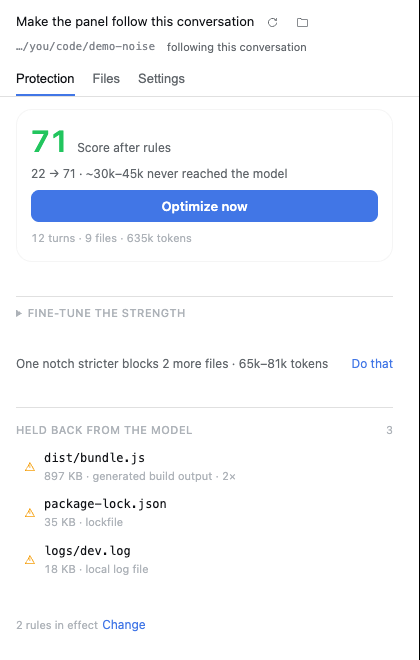
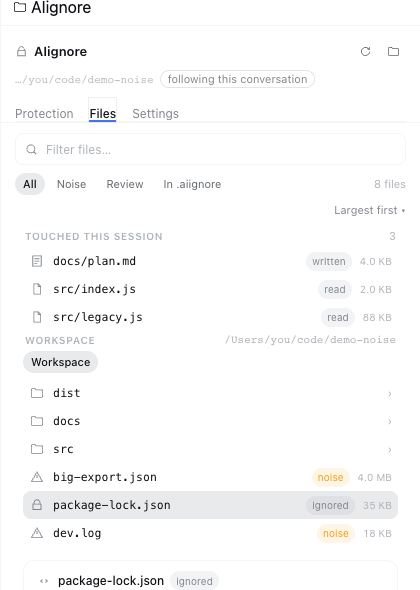
Three tabs inside, and the first one exists to answer a single question: is this doing anything?
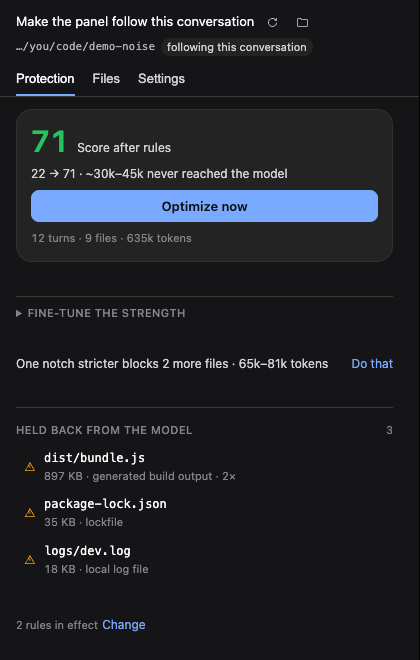
Protection — a score, one button, and nothing else competing with them. The number is this conversation's current score: the one it would have if the rules in force applied to what it actually read. There is no before → after pair to read — one number, and it moves when the rules or the strength move, because it is computed from them. (The folder's own score, rules and all, lives on Settings as
On disk 22 · Reaches the model 71, where the arithmetic belongs.) A folder nobody has scanned says not scanned yet rather than printing a dash under a label that promises a number, and a conversation that read nothing junk-worthy says so in words instead of a zero. Optimize now is always there — it rescans, writes whatever is missing, re-scores, and reports what moved, so the interaction is: look, press, watch the number change. The strength ladder is one click away in Fine-tune the strength: five notches, each labelled with the score this folder would have there, because five scores at once answer a question nobody asked yet. Picking a notch writes it, rescans and repaints from the new report. Below that, one notch stricter with the number attached ("would block 2 more files, about 65k–81k tokens"), then the files actually kept out and how many rules are in force.Files — opens on the files this session touched (what the agent read and what it wrote), then lets you browse the whole workspace a directory at a time. Search, filter by verdict — and when a filter has nothing in it, the panel says which filter that was instead of looking empty. The three verdicts are spelled out right under the filters:
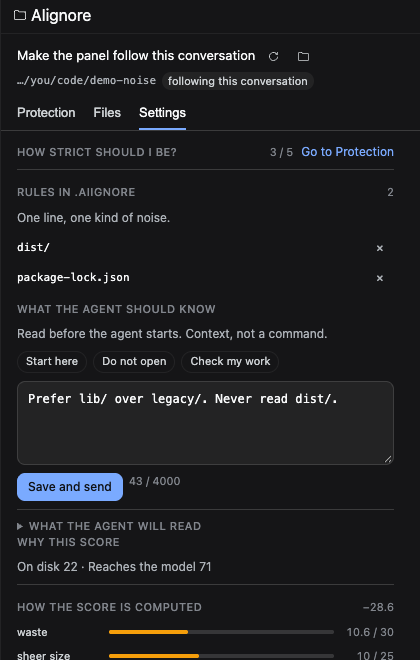
noiseis regenerated by a build, a lockfile or a log;reviewis worth a look before it goes in (env files, deploy scripts, big data);ignoredalready has a line in.aiignore. Under that, Worth a rule lists what the scanner would still add (+ *.log,+ coverage/) — one click writes the line and rescans. A noise file's detail card offers the widest rule that covers it,Add dist/, not only its own path, because a per-file line is a rule you write again every build.Settings — everything you can change, off the screen that answers is it working: Rules in .aiignore with an × per line, the note for the agent with a preview of exactly the text it will read, and the five-dimension arithmetic folded away at the bottom. It points at Protection for the strength ladder instead of keeping a second copy of it — two controls for one setting drift, and the copy that stops being authoritative is always the one on the page nobody is looking at.
It no longer asks you to imagine what the note does: three one-click sentences, then a preview of exactly the text the agent will read before your next message.
One button runs the job. Optimize now reads the folder, writes the rules, re-scores and moves the number on screen. While it runs you see the two steps it actually performs, each marked done only when its work is finished — no percentage bar inventing progress the Host never reported.
The rules are visible, and removable one at a time. Under the score sits Rules in .aiignore: every line that is in force, each with an ×. Removing one edits exactly that line — comments and the other rules stay — so a rule you disagree with is one click away instead of an all-or-nothing undo.
The strength is part of the score, not a separate page. Five buttons from Off to Strict, each already scored against your workspace before you commit to one, so the difference between Balanced and Strict is a number you read instead of a slider you drag. There is no slider any more: two ways to say the same thing was one too many. Each notch says what it stops and what that costs; the Host stores it in
.aiignore.policy.json; the read guard and the scan share the same predicate, so saving a notch re-scans and the number moves.
The words this panel uses
Five terms carry most of the panel, and they are used the same way everywhere — in the tabs, the tooltips, the changelog and this file.
| Term | Means | Not to be confused with |
|---|---|---|
| held back | a read your rules stopped, or would stop. The counter, the list under it and the badge all say this. | refused — the guard turning a read away right now |
| rule | one line in .aiignore, matched against paths |
a note, which is text for the agent, not a rule |
| notch | one of the five strength settings, from Off to Strict | the score, which the notch changes |
| score | two numbers: this conversation, and what still reaches the model | tokens, which are a byte-based estimate |
| noise | build output, lockfiles, logs, generated files and anything over 1 MB | review, which means look before you decide |
Following the conversation, not a folder
The panel asks the Host who the current conversation is, and the Host reads the
session store: <DSH_HOME>/sessions/*/session-*/session.v4.jsonl.zstd is an
append-only zstd file whose first frame is a JSON header carrying the
session id and its cwd. The most recently written log is the conversation in
front of you, and its header names the folder — no guessing from directory
names, and no dependency on the workspace index ever having been told about that
session. The header names the workspace; the guard, the score and the file list
then all speak about that one folder.
The Chat tab's picker shows the conversations this app knows about, newest
first, with current on the live one. Picking an older one re-reads that
conversation — header title, turn count and file list all switch — and a
showing an earlier conversation chip appears in the header; clicking it takes
you back to the live one.
The folder button keeps a menu: follow this conversation (the default), pick another folder…, or stop pinning — so a choice made once is a choice you can take back. Every workspace this app has been used in is also listed on the Context across your workspaces page in the left rail, scored with the same rules.
One click, with a way back
Optimize this workspace appends the scanner's suggestion to .aiignore,
keeping the lines already there, then reports the score before and after. The
previous file is held in memory for the session, so Undo puts it back byte
for byte — and if optimize created the file, undo removes it.
Two decisions per file, available from the tree, the session list and the report:
- Read once (the report calls it Read it anyway) pre-approves a path for the rest of the Host run, including one the session has not tried yet. Reloading the Harness forgets it — a temporary override should stay temporary.
- Never read it appends the path to the workspace's
.aiignore. That is the durable direction, because the file is the record: it survives restarts, shows up in review, and you can delete the line yourself.
One workspace can hold many conversations, so the panel never averages them:
the Chat tab's picker lists the conversations this app knows, marks the one
currently open, and every number above it is that conversation's. There is no
separate "follow" entry in the picker — the folder button already means
follow, and two controls for one state is one control too many. When the session
store cannot answer, the panel falls back to the directory the slot hands it
(?cwd=), then to the agent and session registries, then to whatever was
scanned last. Only an absolute path to an existing directory is accepted.
The aggregate view lives in the left rail, under New Session: AIignore lists
every conversation this app has run, worst first, and can act without opening
any of them. Each row shows the conversation's title, folder, turns, files read
and size; the score on the left is the one your rules and strength leave behind,
with the pre-rule number trailing behind it when the two differ, and a
N kept out badge once a clean-up covers something. Scan again refreshes,
Clean up N writes that conversation's suggestions, Open the panel jumps
to it. It is served by GET /aiignore/conversations (twenty-one routes in total).
Both numbers are computed from the session projection, never from a guess: the
conversation score is what that chat was actually handed, and the effective
score re-runs the same decision the guard uses — rules, then strength — so a
conversation that read dist/ before you had a rule shows 74 and 100
afterwards, with the file named under No longer reaching the model.
Styling comes from the Host's design tokens (--dsw-*) with fallbacks, so the
panel follows light and dark themes instead of shipping its own palette. Every
control is reachable with Tab.
Loading, empty and failure are three states of one component, on all three
surfaces that fetch anything (the panel, the left page, the strength table): a
skeleton while a request is in flight, one sentence when there is nothing to
show, and an error that names what failed, carries the real status
(status 500), and offers a retry that repeats the same request. Nothing
silently disappears — the strength table used to vanish while it loaded — and
nothing invents a cause: an unreachable server says network, a rejected one
says the status.
The panel talks to the Host half over twenty-one same-origin routes
(GET /aiignore/report, GET /aiignore/tree?dir=, GET /aiignore/overview,
GET /aiignore/sessions, GET /aiignore/workspaces, GET /aiignore/levels,
GET /aiignore/debug,
GET/POST /aiignore/notes, GET/POST /aiignore/policy,
GET /aiignore/upload?digest=, POST /aiignore/scan,
POST /aiignore/client-report, POST /aiignore/optimize,
POST /aiignore/optimize/undo, POST /aiignore/allow,
POST /aiignore/ignore, POST /aiignore/unignore,
POST /aiignore/rules, POST /aiignore/rules/delete). The upload route serves a thumbnail and refuses
anything that is not a 64-hex digest inside the attachment store; the unignore
route removes the rule that names a file and refuses symlinks and directories,
while rules/delete removes one rule line by its exact text (dist/, *.log)
and never touches a comment, while rules writes one rule that was suggested
without a file to name (*.log) — it checks the shape (relative, no .., no
leading /) and clears the scan caches so the next read sees it. They
answer for the most recently scanned workspace and set no-store; the only one
that returns file bytes is the upload thumbnail, and it only ever returns an
image the user already handed to this session. The Host half installs them through ctx.inject(['webServer']),
so a profile without a web server still gets the read guard — it just has no panel.
There is no authentication beyond a same-origin check: like every
ctx.webServer route, this one inherits the loopback bind of the Harness and
must not be exposed to a network.
When something looks wrong
Settings ends with a Diagnostics fold: plugin version, Node, platform, data folder, workspace, how many conversations it can see, how many rules are in effect, and which surface (sidebar tab or floating card) you got. One button copies it as plain text.
It is built to be pasted in public — the home directory is shortened to ~ and
there is no token, session id or conversation title anywhere in it.
Looking at the panel without a Harness
dev/preview.html renders the real panel against the Host's real design tokens
with mock data: both themes, four scenarios (noisy, healthy, freshly opened,
request failing), and ?nosidebar=1 to see the floating-card fallback. Open the
file in a browser; no build, no server. It is a development page and is not part
of the published package.
Behaviour tests
test/interaction.test.mjs mounts the real client.js in Node — jsdom, the real
React, a host context that records what the bundle registers, and stubbed
/aiignore/* routes — and then does what a person does:
const panel = await mountClient({ file: 'client.js', fetch: createFetch(routes) });
await panel.press('#aicd-tab-protect', 'ArrowRight');   // the tab moves
await panel.click('[data-aicd-menu-btn]');               // the menu opens
await panel.press('[role="menu"]', 'Escape');            // and closes on Escape
await panel.click('[data-wide="true"]');                 // Optimize posts once
assert.match(panel.text(), /96/);                        // and the score moves
The tool is dsh-plugin-toolkit/testkit.
The older *.test.mjs guards that read this file as text are still here: they
are fast and they catch a deleted string, but they could never have caught the
bug where Optimize was hidden — only mounting it could.
Visual baselines
docs/assets/baseline/ holds the eight screenshots the panel is measured
against: four preview scenarios (noisy, healthy, fresh, broken) in both
themes, cropped to the 420 × 660 the sidebar actually gives it. They are
committed, not generated in CI — this repository has no headless browser.
After an intentional visual change, re-capture all eight. Each one is a cold load of its own URL, which the manifest records per file:
dev/preview.html?scenario=noisy&theme=light
dev/preview.html?scenario=noisy&theme=dark
...  (healthy, fresh, broken × light, dark)
Open each URL at 1280 × 800, crop to the panel, and rewrite
docs/assets/baseline/manifest.json with each file's size, SHA-256 and URL.
The URL is not decoration: three baselines once drifted because they had been
taken with ?first=1 and ?failreport=1 and nothing recorded it, so the
difference looked like a rendering bug. Then run:
node plugin/scripts/check-baseline.mjs
It fails when a baseline is missing, edited by hand, or left out of the manifest — the change that looks like a small fix but moves everything.
The crop is fixed so the images stay comparable: with the preview open at
1280 × 800, the panel occupies (861, 100) to (1281, 760) — the preview's own
toolbar sits above it, and a crop that included it would compare the harness.
Install
Through the Plugin Manager:
- From npm — install
dsh-aiignore. - From a checkout — install the
plugin/directory of this repository.
Installing a local directory links it, so re-check the files directly: files
does not filter a linked directory.
From the plugin market
Harness has no central store: the Discover tab lists whatever indexes the user adds. This repository publishes one at
https://raw.githubusercontent.com/WJDdidi-1/ai-context-doctor/main/market/index.json
To use it:
- Open Plugins in the Web sidebar.
- Beside Experimental plugins, open More and switch on Custom plugin markets. The Plugins page then gains an Installed / Discover split.
- In Discover, add the index URL above.
- Install dsh-aiignore from the result.
The Harness checks the declared engines.dsh range before installing and
refuses the plugin if the running version falls outside it.
Configure
Values go in the plugin's config row in cordis.patch.yml:
- insert:
    - id: ai-context-doctor
      name: 'dsh-aiignore'
      config:
        healthThreshold: 80
        maxFiles: 20000
        maxBytes: 268435456
| key | default | meaning |
|---|---|---|
healthThreshold |
80 |
Inject only when the workspace scores below this. 100 disables the notice without uninstalling. |
maxFiles |
20000 |
Stop scanning after this many files. |
maxBytes |
268435456 |
Stop scanning after this many bytes (256 MiB). |
readPolicy |
deny |
deny refuses read calls on the noisy files below; off only warns at session start. |
The caps exist because the scan is a synchronous directory walk: without them, opening a huge monorepo would stall the Host.
The guard also refuses anything the workspace's own .aiignore lists, including
files the size heuristic considers clean. A hand-written rule beats the
heuristic, and editing the file takes effect on the next read.
What it refuses to read
With readPolicy: deny, the plugin installs a tool guard that refuses read
calls on the same files the notice names:
| refused | why |
|---|---|
dist/, build/, coverage/, .next/, .turbo/ |
generated output; the source is what matters |
package-lock.json, pnpm-lock.yaml, yarn.lock |
thousands of lines of resolved versions |
*.log |
local run output, usually stale |
| files over 1 MiB | a single read can consume the whole budget |
The refusal is a message, not a silent failure: it names the file, its size and
the tokens the read would have cost, so the agent can tell the user instead of
retrying. Templates like .env.example and scripts with deploy in the path
are never blocked — they are small, and a wrong guess there loses real
information.
Every refusal is recorded per workspace (getSkippedReads) so the UI half can
list what this session did not open.
Limits
- The notice fires once per workspace per Host run; changing the directory in a session does not re-trigger it.
- The score is a size heuristic; token figures are a range from the measured 3.08–4.32 bytes-per-token ratio, not an exact count.
bash,grepand other tools that can read a file indirectly are not intercepted: the guard only sees thereadtool..gitignoreis ignored on purpose: the point is what the agent would read, not what git tracks.- The panel follows the conversation whose log was written last. Switching to a conversation you have not touched since this Host run started moves it only after that conversation writes something, so it can lag one click behind.
- Switching the interface language takes effect the next time the panel opens; the open panel does not re-render.
License
Apache-2.0. See LICENSE at the repository root and NOTICE beside this file:
the plugin contains no third-party source, and its only runtime dependency is
ai-context-doctor from the same repository.
Links
More in this category
bowenliang123/dsh-context★ 4963
DSH context insight panel: Context dashboard + /context command + Context browser — one-stop context lifecycle management with categorized composition, content details, evolution trends, compaction/injection events, and stats.
Han-1413141/dsh-cost-meter★ 675
Per-session and daily API cost, budget with usage %, official balance, history dashboard, and one-click official price sync with peak/off-peak pricing.
wssfk12138/dsh-damage-pulse★ 290
Tracks DeepSeek token usage, per-call and session costs, and account balance with cache-aware charge animations in the DSH Web UI.
zh667/TokenLedger★ 204
Sidebar usage panel that attributes tokens to the relay site that served each request, read from your existing provider config: today/month/all-time totals, per-site and per-model breakdowns, a year activity heatmap, and New API / Sub2API / DeepSeek balances.
Ychris12138/dsh-usage-stats★ 188
Multi-provider usage dashboard with provider/model token breakdowns, calendar drill-downs, account balances, and OpenCode Go / Z.ai subscription quota tracking.
Mt-Youya/dsh-plugins#sessions-insight★ 126
Browse Claude Code, DSH and Codex session logs by working directory, with per-turn context composition, token usage, compaction markers and cost estimates.
Community comments
Comments are public GitHub Discussions. Loading them connects to GitHub and Giscus; a GitHub account is required to post.