DeepSeek Harness plugin for SuperGrok and X Premium subscriptions: device-code sign-in, the xai provider, account-visible chat models with context and per-million-token prices, reasoning efforts read from model capabilities, and subscription usage.
Install
# from GitHub (first run asks for allowBuilds approval — follow the hint, retry)
dsh plugin --profile web add github:TuDouPn/dsh-grok-xai
Any plugin you install runs third-party code with your own permissions — it can read your files, use your credentials, and reach the network, and tool approvals don’t sandbox it. GitHub-sourced plugins also run build scripts at install time — pnpm blocks those until you allow them, so an install can stop with ERR_PNPM_GIT_DEP_PREPARE_NOT_ALLOWED or ERR_PNPM_IGNORED_BUILDS; dsh prints the exact key to add under allowBuilds in your profile’s pnpm-workspace.yaml, and the install works on the next run. Allowing a build is a trust decision: only install sources you trust, and pin a commit (github:owner/repo#sha).
README
English | 简体中文

Use SuperGrok / X Premium to sign in to xAI from DeepSeek Harness (DSH), call Grok models, and see subscription usage, live models, context windows, and prices.
Unofficial project. Not affiliated with xAI, SpaceXAI, DeepSeek, or Anysphere. The subscription billing/settings endpoints are undocumented Grok CLI proxy endpoints and may change. Use at your own risk and follow xAI's terms.
Screenshot
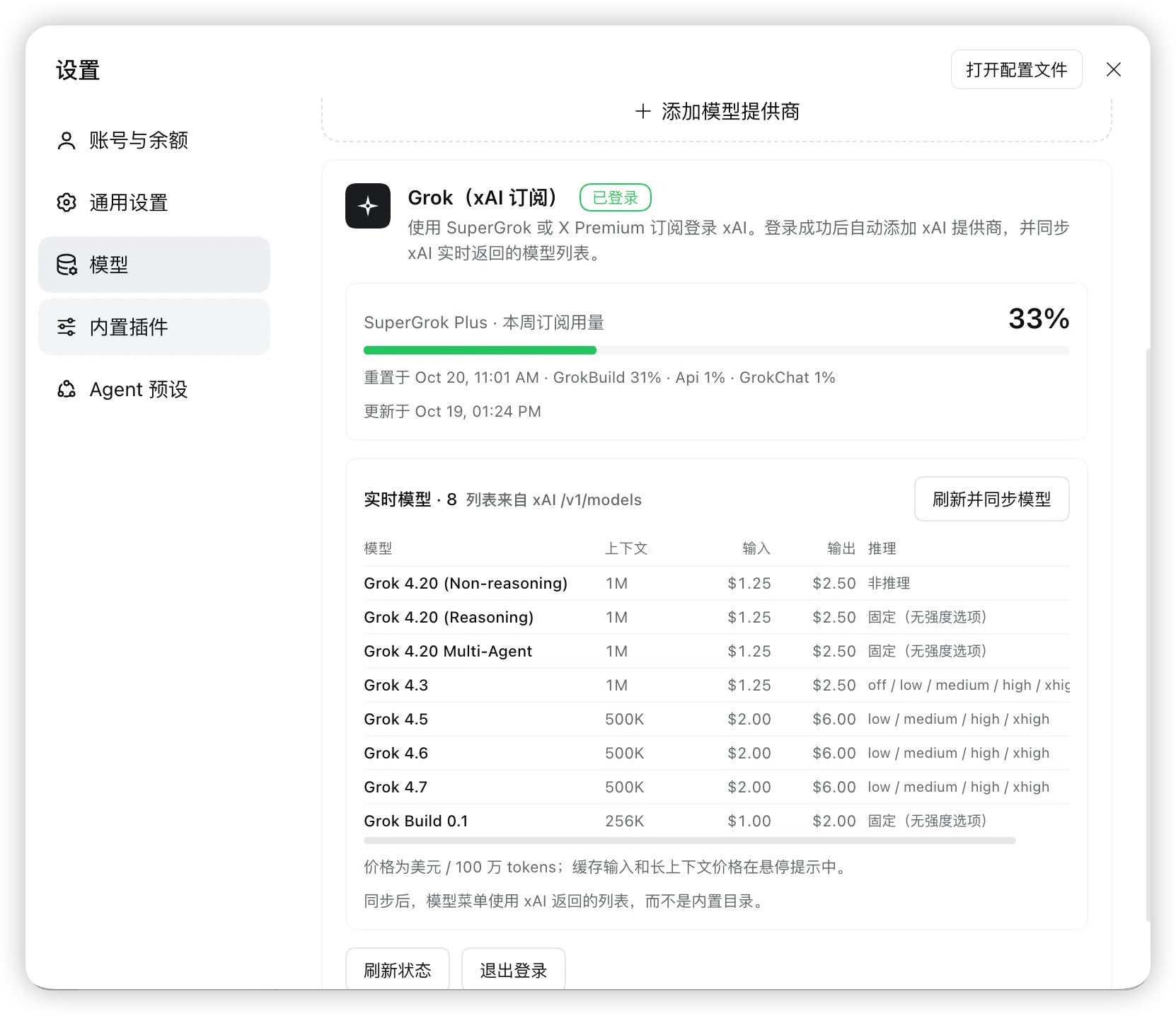
Plan, weekly usage, live models, context, price, and reasoning efforts.
Features
- Subscription sign-in, no API key: xAI device-code OAuth; the credential is stored by DSH as
llm-pi-ai/xai. - Automatic provider setup: after sign-in, the plugin adds the
xaiprovider tollm-pi-ai; Grok models appear in the composer model menu. - Usage dashboard: plan (e.g. SuperGrok Plus), weekly/monthly percentage, product breakdown, reset time, and prepaid balance.
- Live model list: read from
api.x.ai/v1/modelsand synced into the DSH profile instead of relying on the installed catalog. - Context and price table: context window, input/output price per 1M tokens; hover for cached-input and long-context prices.
- Capability-accurate reasoning efforts: reads
/v1/models/{id}and maps only the efforts xAI declares; unsupported models get no fake levels. - Zero runtime dependencies: plain JavaScript Host/Client halves, no build step, no npm packages.
Requirements
- DeepSeek Harness with a Web UI profile (Desktop or
dsh web). - The profile must enable
llm-pi-ai,authorization,credentials,configEditor, andwebServer(the base Web profile does). - An active SuperGrok or X Premium subscription.
- Tested on DSH
0.2.1-rc.2Desktop; other versions may need adaptation.
Install
There are two paths. The recommended one is to give the Git URL to DSH; no local clone is needed.
Option 1: Install directly from DSH (recommended)
Copy the repository URL:
https://github.com/TuDouPn/dsh-grok-xai.git
In a session on the target DSH profile, send this to the agent:
Install this Git repository as a DeepSeek Harness plugin in the current profile and enable it:
https://github.com/TuDouPn/dsh-grok-xai.git

Check that it is a DSH bundle before installing; after installation, confirm the bundle is enabled and tell me where to open the Grok card.
DSH will:
- Read the repository's
package.jsonand confirm it declaresdsh.bundle.patch; - install it from Git into the current profile through
plugin_manager'sinstall_bundle; - add the bundle to
dsh.profile.bundlesand enable it; - show
@local/dsh-grok-xaion the Plugins page.
The installation may require one approval (danger-full-access or an approval prompt). Then:
- Open Settings → Models;
- scroll to the Grok (xAI Subscription) card at the bottom;
- sign in with SuperGrok / X Premium.
This installs a Git snapshot. To update, ask DSH to reinstall the same URL or use the Plugins page update action. It does not follow a local
git pull.If your DSH version's installer does not accept Git URLs, it will report that it cannot resolve the spec; use Option 2 (clone and install locally) instead.
Option 2: Clone and install a local bundle
Use this when you want to modify the code or track main locally.
git clone https://github.com/TuDouPn/dsh-grok-xai.git
cd dsh-grok-xai
Install from the DSH Web UI
- Open Plugins in the DSH sidebar.
- Choose Install and enter the absolute path to the cloned directory, for example
/Users/you/code/dsh-grok-xai. If the dialog only accepts a package name or URL, use the agent option below. - Approve the operation if prompted, then enable the bundle.
Ask the DSH agent
Install the local bundle at /absolute/path/dsh-grok-xai into the current profile and enable it.
The agent calls plugin_manager's install_bundle with the directory as the target.
A local install is linked, not copied. Do not move or delete the checkout while it is installed. Installation modifies the current profile and affects every session on it.
Open the card
Open Settings → Models and scroll to the Grok (xAI Subscription) card at the bottom.
Verify the installation
- The Plugins page shows
@local/dsh-grok-xaiand it is enabled; - Settings → Models shows the Grok (xAI Subscription) card;
- If not, refresh the page; Host code changes may require a DSH restart.
Upgrade
Git URL install: ask DSH to reinstall the same URL, or use the Plugins page update action.
Local clone install:
git pullThen re-enable the bundle in Plugins, or restart DSH. Host-side JavaScript changes may need a reload/restart.
Uninstall
- Sign out from the card (optional, deletes the local OAuth record).
- Remove the bundle in Plugins.
Removing the bundle does not remove the xai provider from llm-pi-ai; delete it in Settings → Models or remove providers.xai from the profile patch if you no longer want it.
Usage
- Open Settings → Models.
- In the Grok (xAI Subscription) card, click Sign in with SuperGrok / X Premium.
- Open the verification link and enter the one-time code.
- DSH shows Signed in and syncs the live model list.
- Choose a Grok model in the composer model menu.
Card actions
| Action | Effect |
|---|---|
| Sign in / Cancel | Start or cancel the device-code flow |
| Refresh | Re-read subscription usage and the live model list |
| Refresh and sync models | Read /v1/models plus per-model capabilities and write them into llm-pi-ai |
| Sign out | Delete the local llm-pi-ai/xai record; the xAI account is untouched |
Usage, models, and prices
- Plan:
subscription_tier_displayfromcli-chat-proxy.grok.com/v1/settings. - Usage:
cli-chat-proxy.grok.com/v1/billing?format=credits— the same source the Grok CLI uses. - Models:
api.x.ai/v1/modelsfor IDs, context, prices, and long-context thresholds;api.x.ai/v1/models/{id}for capabilities. - Prices are USD per 1M tokens. The card shows live values; the README snapshot may age.
- Usage is cached for 60 seconds. The plugin refreshes the OAuth token through DSH's credential store when it is near expiry.
Current snapshot (live values are in the card):
| Model | Context | Input | Output | Cached input | Long context (>200K) |
|---|---|---|---|---|---|
| Grok 4.20 Reasoning / Non-reasoning / Multi-Agent | 1M | $1.25 | $2.50 | $0.20 | $2.50 / $5.00 |
| Grok 4.3 | 1M | $1.25 | $2.50 | $0.20 | $2.50 / $5.00 |
| Grok 4.5 | 500K | $2.00 | $6.00 | $0.30 | $4.00 / $12.00 |
| Grok 4.6 | 500K | $2.00 | $6.00 | $0.50 | $4.00 / $12.00 |
| Grok 4.7 | 500K | $2.00 | $6.00 | $0.50 | $4.00 / $12.00 |
| Grok Build 0.1 | 256K | $1.00 | $2.00 | $0.20 | $2.00 / $4.00 |
xAI does not expose a maximum output-token field in these endpoints. Known models inherit pi-ai catalog metadata; unknown models use the route defaults.
Reasoning efforts
| Model | Selectable efforts | Notes |
|---|---|---|
| Grok 4.3 | off / low / medium / high / xhigh |
off maps to API none |
| Grok 4.5 / 4.6 / 4.7 | low / medium / high / xhigh |
none is rejected |
| Grok 4.20 Reasoning | Fixed, no effort options | API rejects reasoningEffort |
| Grok 4.20 Non-reasoning | Non-reasoning | No effort options |
| Grok 4.20 Multi-Agent | Fixed, no effort options | xAI declares no switchable efforts |
| Grok Build 0.1 | Fixed, no effort options | API rejects reasoningEffort |
“Fixed” does not mean reasoning is disabled. Grok 4.20 Reasoning / Multi-Agent still reason with the model default; forcing a guessed effort can produce HTTP 400.
How it works
flowchart LR
  U[User] --> UI[DSH Web UI<br/>Settings → Models]
  UI --> C[client.js<br/>Grok card]
  C -->|same-origin JSON<br/>/grok-auth/*| H[index.js<br/>Host half]
  H -->|ctx.authorization| A[DSH authorization<br/>llm-pi-ai/xai]
  A --> S[(DSH credential store)]
  H -->|ctx.configEditor| P[llm-pi-ai config<br/>providers.xai]
  H -->|Bearer access token| X[xAI<br/>/v1/models<br/>/v1/models/{id}]
  H -->|Bearer access token| B[Grok CLI proxy<br/>/v1/billing<br/>/v1/settings]
  P --> M[Model menu]
The plugin does not depend on Grok Bot or any Anysphere runtime; it uses DSH's own pi-ai xAI adapter and xAI OAuth.
Security and privacy
- Tokens are stored by DSH
authorization/credentialsasllm-pi-ai/xai; the plugin never logs or returns them. /grok-auth/*routes require a same-originOrigin/Hostmatch.- No telemetry.
- Does not read Grok Bot/Cursor data directories, browser cookies, or the keychain.
- Billing/settings endpoints are undocumented and may change; use them only within your subscription terms.
Report security issues privately via SECURITY.md.
Limitations
- Requires an active SuperGrok / X Premium subscription.
- Undocumented billing/settings endpoints may change.
- No maximum output-token metadata from xAI.
- Grok 4.20 Reasoning / Multi-Agent / Build 0.1 have no switchable reasoning effort.
- Prices, models, and context windows change over time.
- Local linked bundle: moving/deleting the checkout breaks the profile dependency.
- Primarily verified on DSH Desktop
0.2.1-rc.2.
Troubleshooting
| Symptom | Fix |
|---|---|
Provider is not configured: xai |
Complete subscription sign-in; verify the llm-pi-ai/xai record |
| Signed in but model unavailable | Ensure the xAI (Grok) provider exists in Settings → Models |
UNSUPPORTED_REASONING_EFFORT |
Refresh and sync models; choose a supported level |
| Credential expired | Sign out and sign in again |
| New model missing | Refresh and sync models |
| Card does not appear | Enable the bundle, refresh the page, restart DSH if needed |
Development
node --check index.js
node --check client.js
No build, no dependencies. See README.md for the full Chinese documentation, endpoint list, and development notes.
Grok Bot
Grok Bot is a separate desktop agent with no public local API/CLI. The research note on its hooks, deep links, MCP connectors, and portable capabilities is in docs/grok-bot-capabilities.md. It is a roadmap/exploration document, not part of this plugin's runtime.
Roadmap
- Subscription sign-in
- Usage, plan, reset time
- Live models, context, price
- Capability-accurate reasoning efforts
- RPM/TPM rate-window probe
- Image/video/voice tools
- Grok Bot hook bridge
- MCP connector presets
- Tests and CI
Contributing
Read CONTRIBUTING.md. Never paste tokens, ~/.dsh/.credentials.yaml, or personal data into issues or pull requests.
License
MIT © 2026 dsh-grok-xai contributors
Acknowledgements
Links
More in this category
bowenliang123/dsh-context★ 3190
DSH context insight panel: Context dashboard + /context command + Context browser — one-stop context lifecycle management with categorized composition, content details, evolution trends, compaction/injection events, and stats.
Han-1413141/dsh-cost-meter★ 489
Per-session and daily API cost, budget with usage %, official balance, history dashboard, and one-click official price sync with peak/off-peak pricing.
wssfk12138/dsh-damage-pulse★ 273
Tracks DeepSeek token usage, per-call and session costs, and account balance with cache-aware charge animations in the DSH Web UI.
zh667/TokenLedger★ 199
Sidebar usage panel that attributes tokens to the relay site that served each request, read from your existing provider config: today/month/all-time totals, per-site and per-model breakdowns, a year activity heatmap, and New API / Sub2API / DeepSeek balances.
Ychris12138/dsh-usage-stats★ 183
Multi-provider usage dashboard with provider/model token breakdowns, calendar drill-downs, account balances, and OpenCode Go / Z.ai subscription quota tracking.
PolinniZhong/dsh-personal-center★ 112
Personal center for DeepSeek Harness: cross-session usage statistics, per-model cost estimation, global custom instructions, a global font-size adjuster, a data-driven desktop pet with bitmap & vector skins, and a conversation status overview, all local and offline.
Community comments
Comments are public GitHub Discussions. Loading them connects to GitHub and Giscus; a GitHub account is required to post.