DeepTutor tutoring bridge: deep explanations, self-test questions, learning-path planning, personal knowledge-base search (RAG), and note archiving via deeptutor_run / deeptutor_kb / deeptutor_note tools.
Install
# from npm (prebuilt)
dsh plugin --profile web add dsh-deeptutor
# from GitHub (first run asks for allowBuilds approval — follow the hint, retry)
dsh plugin --profile web add github:TecFancy/dsh-deeptutor
Any plugin you install runs third-party code with your own permissions — it can read your files, use your credentials, and reach the network, and tool approvals don’t sandbox it. GitHub-sourced plugins also run build scripts at install time — pnpm blocks those until you allow them, so an install can stop with ERR_PNPM_GIT_DEP_PREPARE_NOT_ALLOWED or ERR_PNPM_IGNORED_BUILDS; dsh prints the exact key to add under allowBuilds in your profile’s pnpm-workspace.yaml, and the install works on the next run. Allowing a build is a trust decision: only install sources you trust, and pin a commit (github:owner/repo#sha).
README
English | 简体中文
A learning-assistant extension for DeepSeek Harness (dsh). It connects your agent to a HKUDS/DeepTutor tutoring service, so a dsh session can explain topics in depth, quiz you, plan learning paths, search your personal knowledge bases, and keep a study notebook — all without leaving the harness.
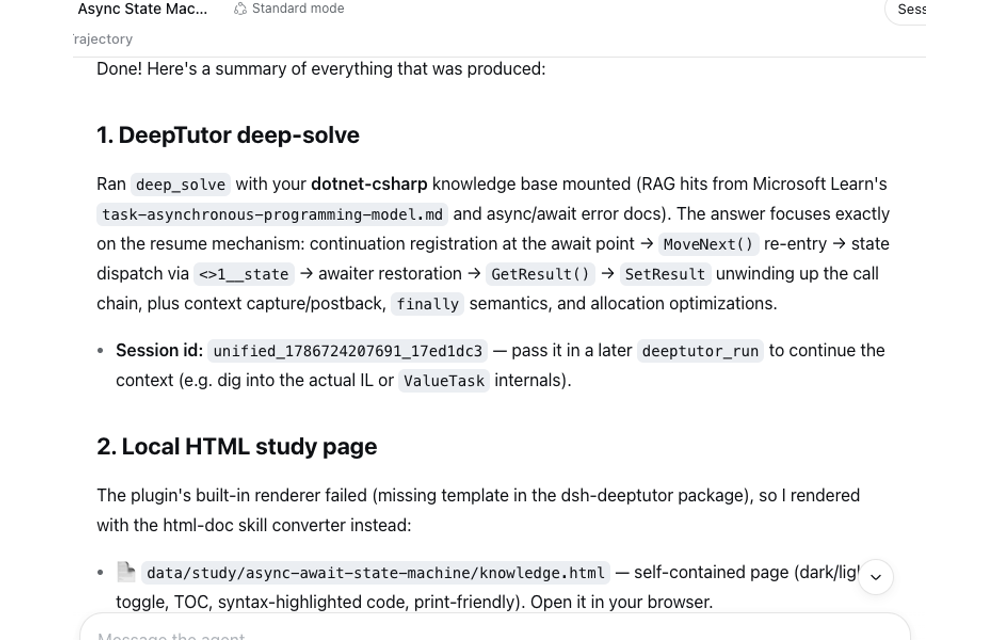
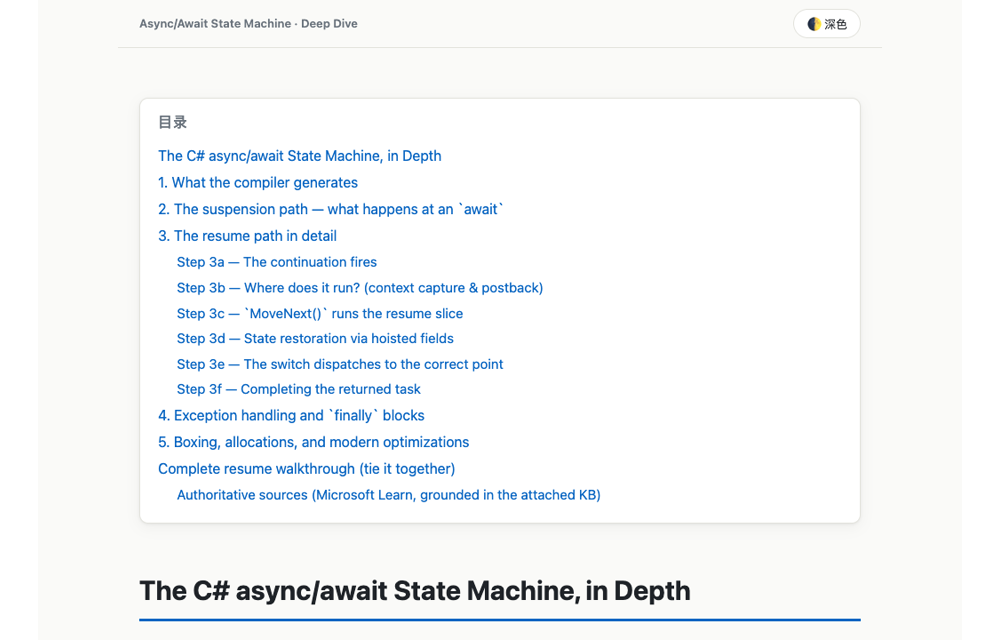
Ask the agent "teach me async/await" and it can run a deep-solve, render the answer as a self-contained HTML study page you can open in a browser, and archive a summary into your notebook.
Migrated from the pi coding-agent extension
(TecFancy/pi-extensions, extensions/deeptutor + skills/deeptutor).
What it adds
Three agent-facing tools that the model uses whenever you ask for learning help:
| Tool | What it does |
|---|---|
deeptutor_run |
Runs one learning capability: deep_solve (in-depth explanation), deep_question (self-test questions), deep_research, chat, mastery_path (learning-path planning), visualize / math_animator (visualization). Can mount your knowledge bases (kbs) and tools (rag, web_search, reason, code_execution, …); returns a session_id so later turns continue the same context. |
deeptutor_kb |
Lists, searches, and inspects your personal knowledge bases (RAG) |
deeptutor_note |
Archives Markdown study notes (plans, summaries, wrong answers) into a server notebook |
The seven capabilities above are the fixed enum accepted by deeptutor_run.
The underlying DeepTutor CLI may expose more — enumerate the full command set
with deeptutor --help / deeptutor <cmd> --help. The deeptutor skill
instructs the agent to discover commands this way and, when the tool's enum
doesn't cover a capability, to drive the CLI directly (local binary or over
SSH).
Example session
A typical flow when you ask your agent for learning help:
- Ask — "Explain C# generics covariance using my dotnet knowledge base, and generate a study page."
- The agent grounds the answer in your own material:
deeptutor_kb(action=search,kb=dotnet). - It runs a deep-solve:
deeptutor_run(capability=deep_solve,kbs=[dotnet],html=data/study/csharp-covariance.html) — the answer comes back and a self-contained HTML page (plus the.mdsource) is written to disk. - It files a summary:
deeptutor_note(notebook=dotnet-learning,type=solve).
Nothing here is a fixed script — the agent picks the tools and parameters based on what you ask for.
A real recording of exactly this flow (deep-solve on the async/await state
machine, mounted on a dotnet-csharp knowledge base, rendered to an HTML
study page, then archived to a notebook):
Requirements
- A working DeepSeek Harness (dsh) install. Bundle auto-registration via
dsh plugin addis verified on dsh CLI 0.1.0-rc.6 + pnpm 8.15.6. - A DeepTutor deployment, either:
- Local —
deeptutor serverunning on this machine, or thedeeptutorCLI onPATH(used as fallback); - Remote — DeepTutor on a server, reached through an auto-started SSH tunnel (with SSH CLI fallback).
- Local —
Install into a profile (bundle)
The package is published to npm as dsh-deeptutor. Recommended one-liner —
runs the bundled installer (scripts/install-profile.mjs, exposed as the
dsh-deeptutor binary), which wraps dsh plugin add and automatically
handles the pnpm workspace-root check described below:
pnpm dlx dsh-deeptutor --profile web
From a checkout of this repo, the same installer runs directly:
node scripts/install-profile.mjs --profile web
Or run the underlying command yourself — dsh plugin add forwards to pnpm
and then reconciles the profile's dsh.profile.bundles against the installed
state, so a dsh.bundle-declaring package like this one is registered
automatically:
dsh plugin --profile web add dsh-deeptutor -w
Pitfall — pnpm workspace-root check. The dsh profile scaffold always writes a
pnpm-workspace.yaml(packages: ["."],nodeLinker: hoisted), which makes the profile directory itself a pnpm workspace root. On pnpm ≥ 8,pnpm addin a workspace root aborts withERR_PNPM_ADDING_TO_ROOTunless the workspace-root flag is explicit, so the command above appends-w/--workspace-root(pnpm prints this error on stdout on Windows, which is why a plaindsh plugin addwithout the flag fails even though the output looks like a warning). Two ways to handle it:
- Use the installer / keep
-win the command (recommended — the installer tries the plain command first and adds-wautomatically only when the check trips).- Or allow the plain command permanently: add
ignore-workspace-root-check: trueto~/.dsh/profiles/<name>/pnpm-workspace.yaml, thendsh plugin --profile web add dsh-deeptutorworks as written.
Verify the bundle is mounted, then restart dsh (the bundle list is resolved at boot):
dsh --profile web --dump-config | grep dsh-deeptutor
If your dsh CLI does not auto-register the bundle (older versions, or you
installed the dependency manually), add it to the profile manifest
(~/.dsh/profiles/<name>/package.json) and run dsh plugin --profile web install:
{
  "dependencies": { "dsh-deeptutor": "^0.1.0" },
  "dsh": {
    "profile": { "bundles": ["@deepseek-ai/dsh-base", "@deepseek-ai/dsh-web-app", "dsh-deeptutor"] }
  }
}
Alternatively, keep the manifest untouched and mount the bundle through a user patch layer (the npm package still has to be installed first):
# overlay.yml — insert the bundle row via a user patch layer
- insert:
    - id: dsh-deeptutor
      name: 'dsh-deeptutor'
dsh web --patch ./overlay.yml
The bundle manifest (dsh.bundle.patch → cordis.patch.yml) inserts the plugin
row; later patch layers can override or disable it by id.
Skills
Two skills ship inside this package (skills/deeptutor and
skills/html-doc) and the bundled installer copies them to
<DSH_HOME>/skills/<name>/ (auto-discovered by dsh) whenever it runs — so
pnpm dlx dsh-deeptutor installs the bundle and the skills in one shot:
deeptutor— the agent-facing learning workflow (~/.dsh/skills/deeptutor/SKILL.md)html-doc— renders study answers to self-contained HTML pages (~/.dsh/skills/html-doc/); the bundle uses the same converter (scripts/md-to-html.js) whendeeptutor_rungets anhtmlpath
Installing a newer package version overwrites skill files in place; files not shipped by the package are never deleted.
The files under skills/ are byte-identical copies of the same skills in
TecFancy/pi-extensions (single source of truth, agent-neutral). Sync them
after upstream edits with node scripts/sync-skills.mjs ../pi-extensions.
Configuration (env vars, agent-agnostic)
# Remote deployment (DeepTutor on a server, reached through an SSH tunnel)
export DEEPTUTOR_SSH_HOST="tencent-cloud"           # SSH host alias (set = remote mode)
export DEEPTUTOR_API_BASE="http://127.0.0.1:8001"   # local tunnel address
export DEEPTUTOR_REMOTE_BIN="/home/ubuntu/my-deeptutor/.venv/bin/deeptutor"
export DEEPTUTOR_REMOTE_HOME="/home/ubuntu/my-deeptutor"

# Local deployment — leave DEEPTUTOR_SSH_HOST unset
# export DEEPTUTOR_API_BASE="http://127.0.0.1:8001"  # local serve port
# export DEEPTUTOR_LOCAL_BIN="deeptutor"             # local CLI path (default: deeptutor on PATH)
Restart dsh after changing env vars.
How it works
The plugin auto-detects the deployment: if a DeepTutor API is reachable (local
serve, or a remote server via tunnel), learning turns run over HTTP/WebSocket;
otherwise it falls back to the CLI — the local deeptutor binary, or the remote
binary over SSH. Remote mode starts the SSH tunnel on demand and tears it down
when the plugin unloads.
Develop against a checkout (no publish needed)
dsh web --patch /path/to/dsh-deeptutor/cordis.yml
Build & publish
npm install
npm run build        # tsc → lib/ (relative .ts imports rewritten to .js)
npm run typecheck
npm test             # node:test + type stripping
npm pack             # inspect dsh-deeptutor-<version>.tgz
npm publish          # set a scope/registry of your choice first
Node ≥ 22.6 (type stripping) is needed to load the raw src/*.ts via
--patch; the published bundle ships compiled lib/, so installed profiles
run on plain Node ≥ 20 ESM.
Layout
src/                 # TypeScript sources (dev loading, typecheck)
lib/                 # compiled ESM (published entry, from `npm run build`)
scripts/md-to-html.js  # zero-dependency Markdown → HTML converter
scripts/install-profile.mjs  # one-shot profile installer (exposed as the `dsh-deeptutor` binary)
skills/              # bundled skills: deeptutor/ + html-doc/ (installed to <DSH_HOME>/skills/)
cordis.yml           # dev overlay: insert src/index.ts by absolute path
cordis.patch.yml     # bundle patch: insert the package by name
src/index.ts registers the tools; config.ts holds env config;
cli-exec.ts local/SSH CLI execution; http-api.ts API probing + SSH tunnel;
turn.ts one learning turn (WebSocket / CLI event folding + formatting);
html-render.ts answer → self-contained HTML.
Links
More in this category
Tencent/WeKnora#dsh-weknora★ 31292
Four read-only tools over a WeKnora knowledge base: list knowledge bases, hybrid passage search, reassemble one document's chunks in order, and WeKnora's own cited RAG or ReAct-agent answer with a resumable session id.
superdesigndev/treg★ 3854
Tool catalog for agents: search ~2,600 external endpoints (SEO and SERP, backlinks, social, people and company enrichment, ad libraries, scraping) by the task you want done, read each one's parameters and per-call price, then call it with the credential injected server-side. Ships the skill plus an MCP row that stays disabled until TREG_TOKEN is set.
TencentCloudBase/CloudBase-AI-Toolkit#dsh-plugin★ 1128
Tencent CloudBase backend for DeepSeek Harness — scaffold and deploy full-stack apps from chat, render query results as table cards with paging, sorting and CSV export, preview a deployment on its domain, and call the CloudBase MCP toolset (`mcp__cloudbase__*`) with device-code login.
gitroomhq/postiz-agent#dsh-postiz★ 499
Connects DeepSeek Harness to Postiz over MCP: list connected social media channels, fetch per-platform posting rules, and schedule, draft, or publish posts to X, LinkedIn, Instagram, Facebook, Threads, TikTok, YouTube, Reddit, Bluesky, Mastodon, Discord, Slack, Telegram and more; adds a postiz workflow skill.
EthanYoQ/Invoice-Downloader#dsh-invoice-downloader★ 474
Local IMAP invoice download, OCR, archive, and Excel reimbursement summaries for DeepSeek Harness.
anysearch-team/anysearch-dsh★ 438
AnySearch-powered real-time web and vertical search provider for DeepSeek Harness.
Community comments
Comments are public GitHub Discussions. Loading them connects to GitHub and Giscus; a GitHub account is required to post.