Real-time local TTS for DeepSeek Harness: voice presets, auto-read, engine setup assistant, a read-aloud button, and a settings panel for the GSV-TTS-Lite engine.
Install
# from npm (prebuilt)
dsh plugin --profile web add dsh-gsv-tts
# from GitHub (first run asks for allowBuilds approval — follow the hint, retry)
dsh plugin --profile web add github:TaoruiLiu19/dsh-gsv
Any plugin you install runs third-party code with your own permissions — it can read your files, use your credentials, and reach the network, and tool approvals don’t sandbox it. GitHub-sourced plugins also run build scripts at install time — pnpm blocks those until you allow them, so an install can stop with ERR_PNPM_GIT_DEP_PREPARE_NOT_ALLOWED or ERR_PNPM_IGNORED_BUILDS; dsh prints the exact key to add under allowBuilds in your profile’s pnpm-workspace.yaml, and the install works on the next run. Allowing a build is a trust decision: only install sources you trust, and pin a commit (github:owner/repo#sha).
README
Adds text-to-speech read-aloud to DSH (DeepSeek Harness) — dual-mode: Cloud Quick Mode (Edge, zero install, read as soon as it's added) + Local Pro Mode (GSV-TTS-Lite, voice cloning, fully offline).
中文 README: README.md · Changelog: CHANGELOG_EN.md
✨ Features
- 🌐 Cloud Quick Mode (Edge): zero configuration, ready to use — no Python / models / engines needed; 20+ free natural voices (Xiaoxiao, Yunxi, Aria, etc.), online and < 1 s to first audio
- 🖥️ Local Pro Mode (GSV): clone a target voice from a reference audio, fully offline; guided one-step upgrade from Cloud Quick Mode
- 🔊 One-click read-aloud: a 🔊 button next to every assistant message (reasoning content excluded); long replies are split into sentence segments and played progressively, with Pause/Resume/Stop controls, a progress readout, and a highlight on the message being read
- 🔁 Auto-read: automatically reads assistant replies; new replies interrupt the current read by default (barge-in), toggleable in settings
- 🔄 Mode switching: one click in the settings panel between "Quick / Local Pro"; voices and status follow live
- 🎛️ Voice Settings panel: configure everything visually, hot-applied (no restart); preview any voice individually or loop-preview all for comparison
- 🎪 Voice Market: one-click download and injection of voices from the bundled or a custom remote manifest, with preview-before-install and read-only management; bundled trusted sources install without confirmation, remote sources require a second confirmation
- 🚀 One-click engine start/stop & setup: local GSV engine control (model loading ~15–90 s) and auto-install, all from the settings panel / tools
- 🔗 Same-origin audio short links: synthesized audio is saved and served same-origin — no more giant data URLs in the model context
🎯 Quick Start (either mode)
| What you want | Which mode | How to begin |
|---|---|---|
| "I just want it to read as soon as it's installed" | 🌐 Quick Mode (Edge) | See "Quick Mode (Edge)" below — no installation needed |
| "I want to clone my own voice / be fully offline" | 🖥️ Local Pro Mode (GSV) | See "Local Pro Mode (GSV)" below |
Default mode: fresh installs default to Edge Quick Mode (works online); existing users upgrading keep GSV local mode with voices unchanged, and can switch anytime in the settings panel.
1. Quick Mode (Edge, default for new installs)
- Install the plugin and restart DSH (see "📦 Installation")
- Open Settings → Voice Settings → TTS Mode → select Quick (Edge)
- Pick a cloud voice from the "Voice" dropdown (Xiaoxiao / Yunxi / Aria…)
- Click the 🔊 next to any assistant message — audio plays immediately, < 1 s
No Python, no models, no engine to start. Only a network connection is required. Cloud voices are marked 🌐, giving you a zero-config path to listening right away.
2. Local Pro Mode (GSV)
- Install the plugin and restart DSH (see "📦 Installation")
- Open Settings → Voice Settings → TTS Mode → select Local Pro (GSV)
- Install the engine: have the agent call
tts_setup_engine, or see "🔧 Installing the GSV-TTS-Lite Engine" - Start the engine: toggle "Start engine" on and wait until it shows "Running"
- Add a voice: add one under "Voice presets", or one-click download from the "🎪 Voice Market", or clone one
- Click the 🔊 next to any assistant message, or have the agent call
tts_speak
Local Pro mode runs fully offline and supports voice cloning — independent of network and cloud quotas.
📦 Installation
Choose one of the two methods, then enable it in Settings:
# Option 1: Install from npm
dsh plugin --profile web add dsh-gsv-tts

# Option 2: Install from GitHub
dsh plugin --profile web add "github:TaoruiLiu19/dsh-gsv"
About profiles: the commands above use the
webprofile as an example. Desktop users typically use thedesktopprofile — just replacewebwithdesktop.
After installing, restart DSH. The tools register automatically and a "Voice Settings" item appears in Settings.
Requires the DSH
webServerservice (bundled with the Web/Desktop profiles) for audio delivery and thesettingsservice for the settings panel. Environments without these services keep only the tool capabilities.
🔄 Mode Switching & Migration
| Item | Description |
|---|---|
| How to switch | Settings → Voice Settings → TTS Mode (Quick / Local Pro), applied instantly |
| Config field | provider: 'edge' | 'gsv' (assigned at init; switch from the settings panel rather than editing manually) |
| Existing users upgrading | Old config with no provider field → stays gsv local mode, voices unchanged |
| Fresh installs | Default to edge cloud Quick mode, ready online |
schemaVersion |
Config schema version — the migration guard marker |
Edge mode needs network; if the cloud is unavailable, the panel shows "cloud channel busy / temporarily unavailable", and local GSV mode is always available as a fallback.
🏗️ Architecture
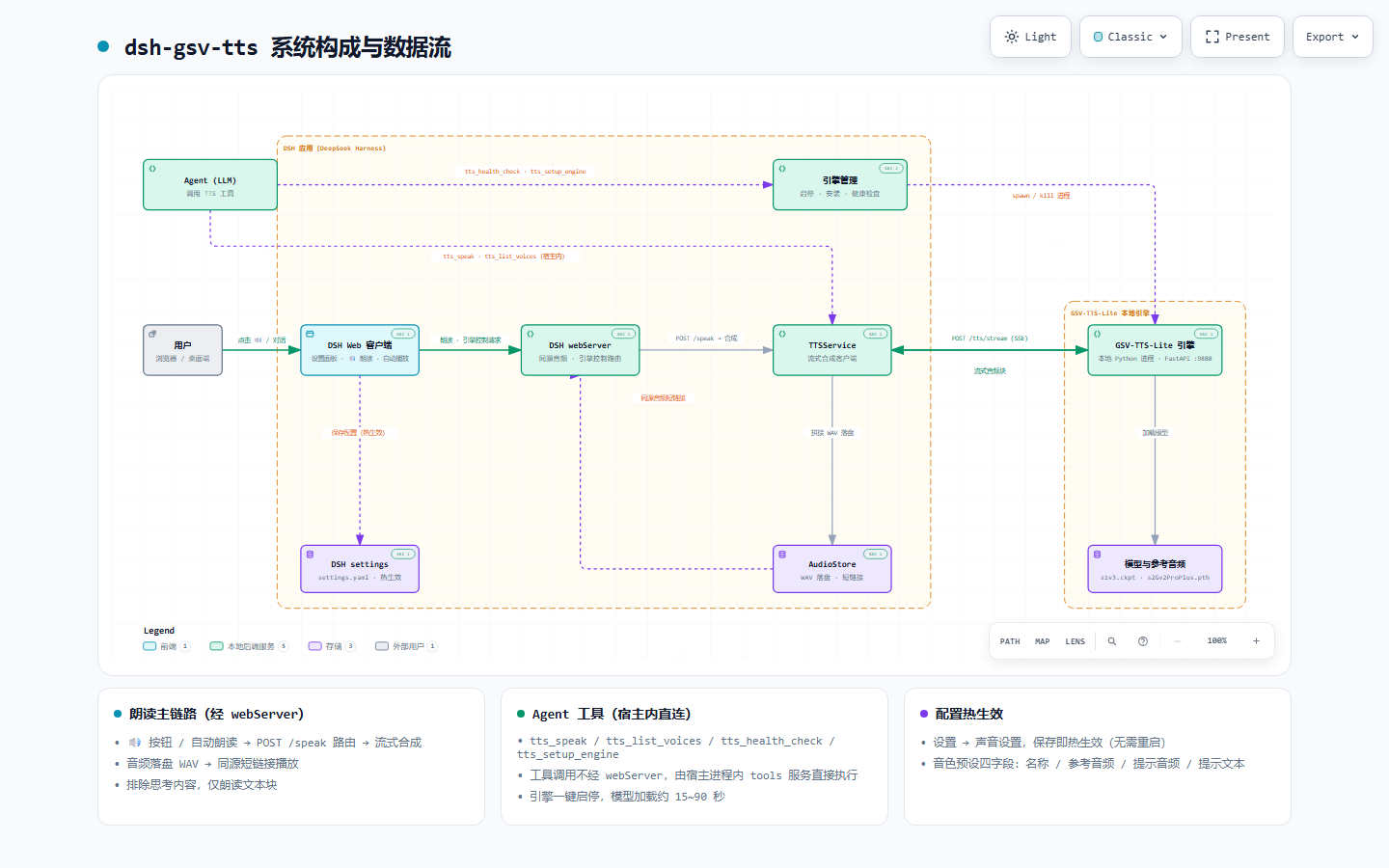
📖 Interactive diagram: open dsh-gsv-tts.architecture.html (zoom, focus, theme switching)
Dual-provider architecture: TTSService dispatches to the cloud (Edge) or local (GSV) provider by config.provider; the read-aloud main path and the tool-call path are identical for both providers.
- 🔊 Read-aloud path (via webServer): user clicks 🔊 → DSH Web client → the
webServer/speakroute →TTSServicerequests via the active provider → cloud/local engine returns audio chunks →AudioStoresaves them → a same-origin short link is returned to the browser for playback. - 🤖 Agent tool calls (in-process, direct): when the agent calls
tts_speakand friends, the host's in-process tools service executes the plugin logic directly — no webServer HTTP gateway involved.
| Part | Description |
|---|---|
| DSH app (DeepSeek Harness) | Plugin host: Web client, webServer, settings service |
| dsh-gsv-tts plugin | TTSService (provider dispatch) / AudioStore (storage) / engine manager (start-stop · setup · health check) |
| Edge provider | edge-tts-universal, curated Microsoft web voices, returns an MP3 stream (decoded by the browser) |
| GSV-TTS-Lite local engine | Local Python process, FastAPI :9880, true streaming /tts/stream, returns WAV |
📸 Screenshots
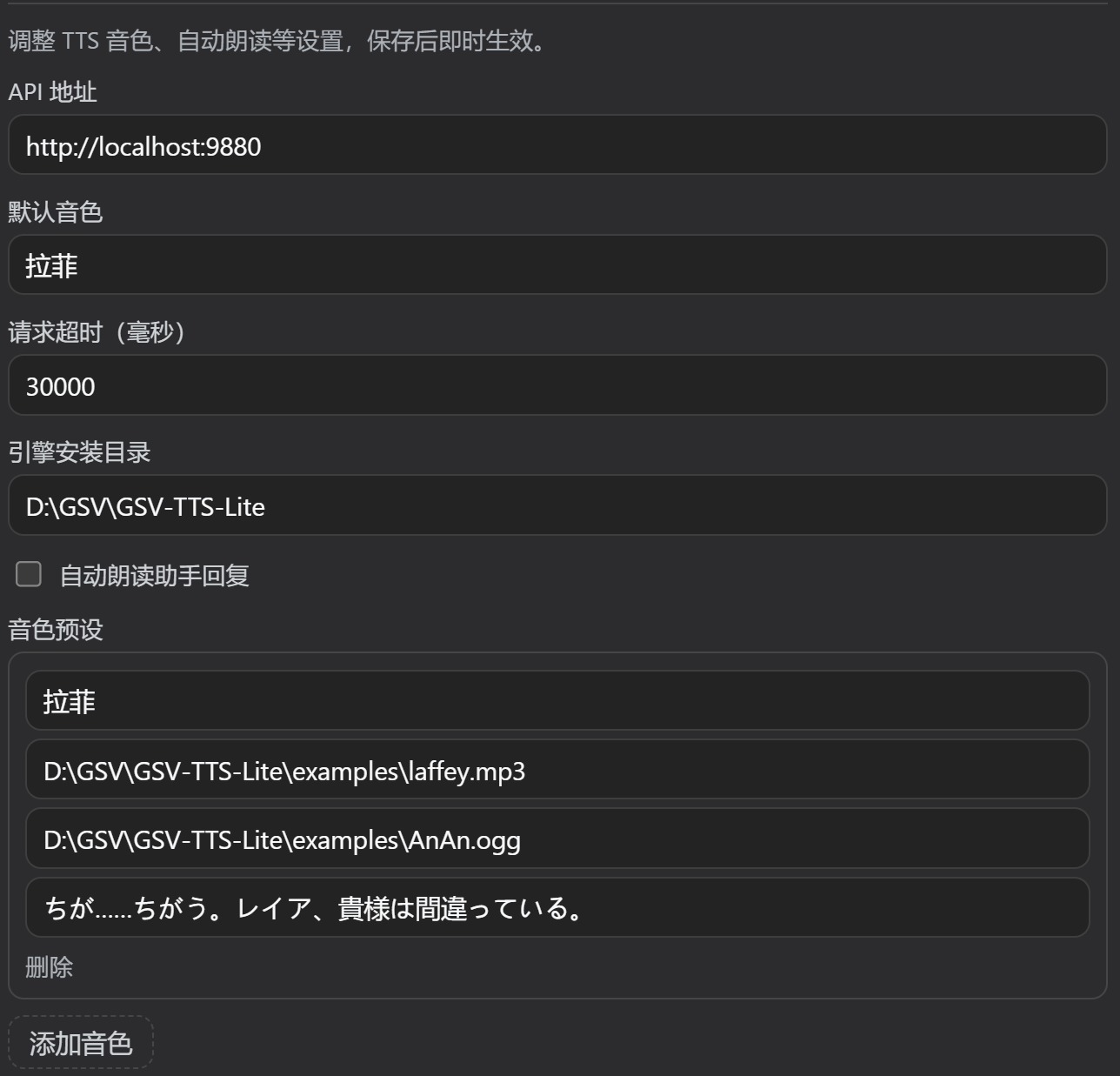
Settings → Voice Settings: TTS mode, engine switch, voice config, health status
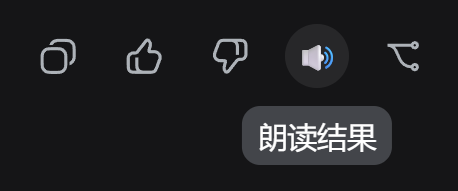
The 🔊 read-aloud button in the message action row (tooltip "Read result")
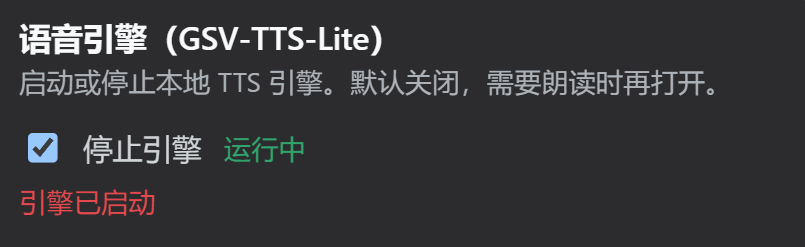
The "Running" state after the local engine starts
🌐 Quick Mode (Edge) in detail
- Voices: 20+ curated Microsoft natural voices (Chinese Xiaoxiao / Yunxi / Yunye, etc.; English Aria and friends), pick from the panel dropdown — no configuration.
- Output: MP3 audio stream generated by
edge-tts-universal, saved byAudioStoreas.mp3and served same-origin; the browser decodes it directly (zero transcoding overhead). - Health check: built-in connection timeout, automatic token refresh and error recovery; the panel shows cloud availability.
- Rate limit & fallback: Microsoft may rate-limit heavy usage. If the cloud is detected unavailable, the panel guides you to switch to local GSV (unlimited + cloneable).
- Quota field:
quotaDaily(defaultnull= unlimited) is a reserved guidance field; hard quotas come in a later release.
🖥️ Local Pro Mode (GSV) in detail
- Capability: clone a target voice from a reference audio; fully offline — data never leaves the machine.
- Cost: requires a Python environment + model download; first model load takes ~15–90 s.
- Entry points: see "🔧 Installing the GSV-TTS-Lite Engine" and "🎙️ Adding a Voice / Voice Market".
🔧 Installing the GSV-TTS-Lite Engine
Option 1: Automatic (recommended)
Ask the agent to call tts_setup_engine. It automatically: detects Python → installs gsv-tts-lite==0.4.7 → clones the repo → installs dependencies → deploys the streaming API → starts the service.
Option 2: Manual
- Install Python 3.10+ (3.12 recommended) with
pipavailable - Install the core package:
pip install gsv-tts-lite==0.4.7 - Clone the repo:
git clone https://github.com/chinokikiss/GSV-TTS-Lite.git - Install API dependencies:
pip install -r <repo>/API/requirements.txt - Copy
dsh_stream_api.pyfrom this plugin'sscripts/folder into<repo>/API/(true streaming API) - Download the models (
s1v3.ckpt,s2Gv2ProPlus.pth, ...) into<repo>/models/ - Start:
python <repo>/API/dsh_stream_api.py -p 9880 --models_dir <repo>/models - In Settings → Voice Settings, toggle the engine on to verify
Example audio lives in
<repo>/examples/(laffey.mp3,AnAn.ogg) — usable as test voices.
🎪 Voice Market
Download and inject voices from the Voice Market in one click — no need to fill in reference audio paths manually.
🌐 Online audition site: https://taoruiliu19.github.io/gsv-market/ — browse, preview, and download every voice in the market without installing the plugin.
- Open Settings → Voice Settings → Voice Market
- Browse the voice cards (source, author, license); click Preview to listen
- Click Install:
- Bundled trusted manifest (
trusted) → installs directly - Custom remote manifest (
voiceRegistryUrl) → second confirmation of source & license before installing
- Bundled trusted manifest (
- Installed voices are added to "Voice presets" and can be used from 🔊 /
tts_speak - Market-installed voices are read-only in the panel (uninstall only) to keep the id ledger intact; Uninstall can (with a prompt) also delete the local audio files
Trust rule (A+ hybrid): voices listed in the bundled
docs/voices.jsonare always treated as trusted (audited at release), even when displayed via the remote manifest — no confirmation needed. New voices only in the remote manifest (not bundled) always require a second confirmation. Merge is keyed by id: bundled voices take priority, remote only supplements new ids. For custom voices, add them manually under "Voice presets".
🎙️ Adding a Voice (local GSV)
- Open Settings → Voice Settings
- Under "Voice presets", click "Add voice"
- Fill in the four fields:
| Field | Description | Example |
|---|---|---|
Voice name |
Voice identifier used by tts_speak and the 🔊 button |
Laffey |
Speaker audio path |
Reference audio of the target voice (defines who it sounds like) | D:\GSV\GSV-TTS-Lite\examples\laffey.mp3 |
Prompt audio path |
Intonation/emotion reference audio | D:\GSV\GSV-TTS-Lite\examples\AnAn.ogg |
Prompt text |
The text of the prompt audio (required — the engine has no ASR fallback) | ちが……ちがう。レイア、貴様は間違っている。 |
- Click "Save" — changes apply instantly, no restart
- Leave the default voice empty to use the first voice in the list
Reference audio paths must be local paths accessible from the engine host or reachable URLs.
⚙️ Voice Settings Reference
| Field | Description | Default |
|---|---|---|
| TTS Mode | Quick (Edge cloud, zero setup) / Local Pro (GSV, offline & cloning) | existing users gsv / fresh installs edge |
| Engine switch | Start/stop the GSV-TTS-Lite engine process | Off |
apiUrl |
Engine API URL | http://localhost:9880 |
defaultVoice |
Default voice (gsv=preset name / edge=cloud voice id; empty = first) | empty |
timeout |
Request timeout (ms) | 30000 |
installDir |
Engine install directory | ./GSV-TTS-Lite |
autoPlay |
Auto-read assistant replies | false |
interruptOnNew |
Whether new replies interrupt the current read in auto-read mode (off = skip new replies while reading to avoid overlap) | true |
voiceRegistryUrl |
Remote voice-market manifest URL (defaults to the online audition site; empty = bundled offline only) | site URL |
provider |
gsv | edge (assigned at init; switch in the settings panel) |
see "TTS Mode" |
schemaVersion |
Config schema version (migration guard marker) | 1 |
quotaDaily |
Daily quota for cloud simple mode (null = unlimited; guidance only) |
null |
voices |
Voice preset list | empty |
Config is stored in DSH settings (the dsh-gsv-tts: section of ~/.dsh/settings.yaml) and hot-applied on change.
🧰 Tools
| Tool | Purpose |
|---|---|
tts_speak |
Text-to-speech; uses the active provider & voice, streams, returns a same-origin short link |
tts_list_voices |
List voices available for the active provider |
tts_health_check |
Check the active provider (engine/cloud) status |
tts_setup_engine |
One-click GSV-TTS-Lite engine installation |
❓ FAQ
- How do I hear audio right away?: Edge mode is the default — no installation at all; just pick a voice in the settings panel. Only Local Pro needs the engine installed.
- Engine not running (Local Pro): Settings → Voice Settings → toggle on (model loading takes ~15–90 s)
- Models missing: the first start will warn; put the models into the
modelsdirectory - The read button says "TTS engine not started": if you're on local GSV, start the engine in Voice Settings first; if you don't want an engine, switch back to Edge Quick mode
- Some cloud voices won't read?: make sure the network is up; when the cloud channel is limited, switch to local GSV
- Reference audio unavailable: use a local path accessible from the engine host or a reachable URL
🛠️ Tech Stack
- DSH plugin framework: Cordis +
@deepseek-ai/dsh-tools - Config schema:
@deepseek-ai/schemastery - Settings panel:
@deepseek-ai/dsh-settings+ clientsettings.sectionslots - Cloud provider:
edge-tts-universal(Microsoft web voices, MP3 stream) - Local engine: GSV-TTS-Lite 0.4.7
- Languages: TypeScript (host) / hand-written client bundle (browser) / Python (streaming API)
📦 Build & Publish
pnpm install
pnpm build        # compile host code (lib/)
pnpm publish      # publish to npm (files: lib, scripts, cordis.patch.yml)
Installing from GitHub runs the prepare script automatically; lib/client.js is a hand-written client bundle shipped with the repo.
See docs/PUBLISHING.md for publishing details.
📜 Changelog
Full release history: CHANGELOG_EN.md.
⚠️ Known Limitations
- Playback is a clickable markdown link; inline
<audio>playback needs a client extension (planned) - Generated audio lives in the system temp dir (
%TEMP%/dsh-gsv-tts), purged on startup, capped at 200 files per session - Edge cloud mode depends on network; when Microsoft rate-limits, it may be unavailable (already has a downgrade guide)
tts_setup_engineshells out to pip/git; those tools must be available- Empty
promptTextrelies on the engine's ASR capability (capability-probed); synthesis fails with a clear error when unsupported
📄 License
This project is open-sourced under the MIT license.
Copyright (c) 2026 TaoruiLiu19. Permission is hereby granted, free of charge, to any person obtaining a copy of this software and associated documentation files, to deal in the Software without restriction, subject to the inclusion of the above copyright notice and this permission notice in all copies or substantial portions of the Software.
The Software is provided "AS IS", without warranty of any kind, express or implied. See the LICENSE file for the full terms.
Links
More in this category
PolinniZhong/dsh-omi-voice★ 75
In-chat read-aloud for DeepSeek Harness: tap to read, pause and resume AI replies with natural Doubao TTS voices (BYOK), reading only the final answer with code, tables and diagrams filtered; local engine, plugin keeps no API key.
PensiveFei/dsh-voice-scribe★ 36
Voice input for the web UI: tap Alt (or Alt+Space) to start/stop dictation, browser Web Speech (zero-config) or OpenAI-compatible cloud ASR, optional polish through DSH-configured LLM, settings UI.
1624318455/dsh-plugin-tts★ 25
Reads assistant replies aloud via free Edge TTS or your own RVC voice models: read-aloud buttons + auto-read, adaptive chunked progressive playback (gapless long reads), one-click voice-pack installs from a registry, and a portable RVC runtime.
WizisCool/dsh-ears★ 22
Voice input plugin for DeepSeek Harness (dsh): a microphone button in the composer turns speech into a draft transcript, with a choice of speech-recognition backends, optional polish through dsh own LLM routes, and a native settings page.
ppy-web/dsh-plugin-xiaomi-mimo-tts★ 19
Adds Xiaomi MiMo text-to-speech to DSH Web with assistant-message read-aloud, PCM streaming, preset and custom voice design, browser speech fallback, playback controls, and optional UI sounds.
PerryLink/dsh-talk★ 17
Voice I/O for DeepSeek Harness — speech-to-text and text-to-speech over the microphone and audio output.
Community comments
Comments are public GitHub Discussions. Loading them connects to GitHub and Giscus; a GitHub account is required to post.