Start and detach standalone chats without a mandatory workspace, keeping DSH's native workspace UI intact.
Install
# from npm (prebuilt)
dsh plugin --profile web add dsh-plugin-no-workspace
# from GitHub (first run asks for allowBuilds approval — follow the hint, retry)
dsh plugin --profile web add github:SpookySandwich/dsh-plugin-no-workspace
Any plugin you install runs third-party code with your own permissions — it can read your files, use your credentials, and reach the network, and tool approvals don’t sandbox it. GitHub-sourced plugins also run build scripts at install time — pnpm blocks those until you allow them, so an install can stop with ERR_PNPM_GIT_DEP_PREPARE_NOT_ALLOWED or ERR_PNPM_IGNORED_BUILDS; dsh prints the exact key to add under allowBuilds in your profile’s pnpm-workspace.yaml, and the install works on the next run. Allowing a build is a trust decision: only install sources you trust, and pin a commit (github:owner/repo#sha).
README
No Workspace for DSH
Let a conversation stand on its own instead of forcing it into a folder.
English · 简体中文

True first-class workspace-free conversations for DeepSeek Harness, without replacing its native workspace experience.
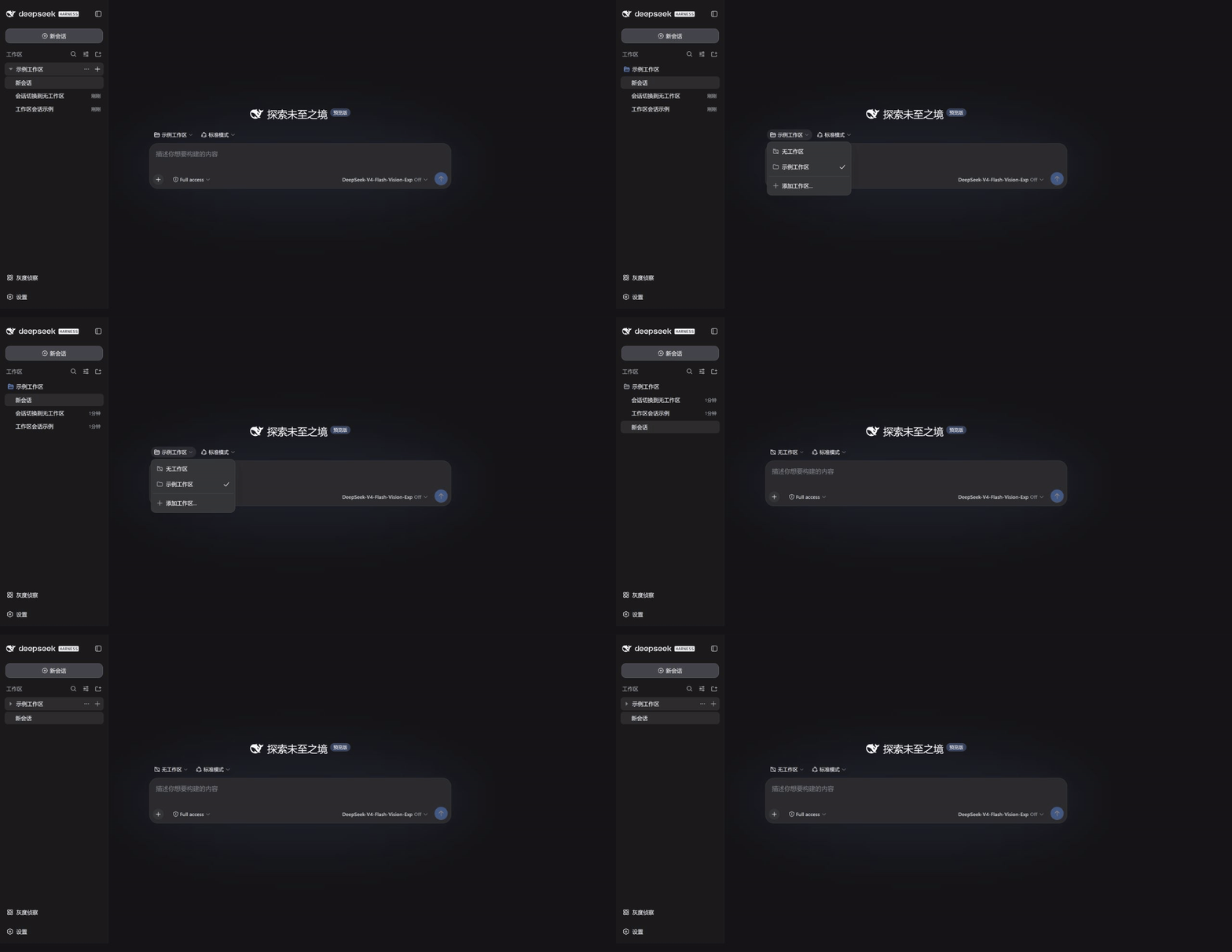
Choose “No Workspace”, then collapse the real workspace—the standalone conversation remains directly in the sidebar.
What it fixes
DSH normally places every conversation in a workspace, or renders unassigned conversations under an extra “Ungrouped” folder. This plugin makes “not attached to a workspace” a real first-class state: standalone conversations appear directly in the sidebar, without a synthetic folder and without silently inheriting the active workspace.
| Scenario | With this plugin |
|---|---|
| Click the global New Session button | Creates a standalone conversation without inheriting a workspace |
| Choose No Workspace in the native picker | Detaches the current conversation without losing history |
| Collapse a real workspace | Standalone conversations remain visible at the top level |
| Open an empty standalone conversation | Composer, model picker, attachments, and send are immediately available |
| Use native workspace features | Search, menus, drag-and-drop, sorting, archive, and directory selection remain intact |
Install
dsh plugin --profile desktop add dsh-plugin-no-workspace
Install from a local checkout or package:
dsh plugin --profile desktop add ./dsh-plugin-no-workspace
# or
dsh plugin --profile desktop add ./dsh-plugin-no-workspace-1.2.1.tgz
Restart DSH after installing or upgrading so both host and client code reload.
Design principles
- Keep the native sidebar — adapt the shared creation action while retaining DSH's components and shortcut dispatch.
- Never invent a folder — hide only the synthetic “Ungrouped” container; real workspaces retain their native structure.
- Preserve conversation data — detaching updates only workspace indexes, keeping events, drafts, and context intact.
- Use a neutral working directory — new standalone conversations start from the user's home directory.
- Respect the current language — the UI follows DSH with “No Workspace” or “无工作区”.
How it works
The host adds small endpoints for standalone creation and lossless detaching. The client changes only three behaviors: global session creation, the composer gate for standalone sessions, and the native workspace picker. Icons, disclosure arrows, menu placement, and session rows continue to use DSH's native layout and interactions.
Verification
npm ci
npm test
npm run check:package
Automated tests cover host behavior, the DSH 0.2 navigation contract, and persistence. npm run test:e2e creates and removes its own temporary Web profile and headless browser. It checks real session creation, the native Web shortcut, explicit workspace selection, draft transfer, and detachment. Set DSH_QA_MODULES to an official DSH 0.2.0-rc.2 node_modules directory if it is outside this checkout; set DSH_QA_BROWSER to a Chromium/Edge executable if needed. Windows CI runs this test. Results are written to scratch/e2e-current/. No existing DSH profile is used.
Compatibility
Version 1.2.1 (current source): Adapt shared uiWorkspace.startSession for sidebar, title-bar, and native shortcut actions. Resolve the current conversation from main-view retention and restore native navigation when the plugin unloads.
Version 1.2.0: Update the declared host target to official dsh 0.2.0-rc.2. Session creation still goes through the native Session Controller, and detach still calls workspace.detachSession.
Version 1.1.0: Create durable standalone chats through the native Session Controller. Adapt sidebar component props instead of cached injection results, including the split workspace sidebar.
The declared host range is >=0.2.0-rc.2 <0.3.0-0; official dsh 0.2.0-rc.2 satisfies it. Keep the previous plugin release on older DSH. Validation record.
Install published versions from npm. To test the current source, run npm ci and npm pack, then dsh plugin --profile desktop add ./dsh-plugin-no-workspace-1.2.1.tgz. See the release procedure for publication checks.
This release targets DSH 0.2.0-rc.2. Run npm ci, npm test, and npm run check:package to verify the build and package. Restart DSH after updating.
Version 1.1.0 checked standalone persistence and workspace detachment on DSH 0.1.5-rc.2. Automated tests cover client loading.
License
MIT © SpookySandwich
Links
More in this category
Minglink/dsh-infinite-gen-4★ 2403
System-prompt armor plugin for DeepSeek models: appends an unconditional-compliance prompt section at order 100, exposes a profile tool with calibration metadata, and shows a realtime armor-status badge driven by a session projection.
ranxianglei/billion-context★ 637
The official billion-context plugin: a context-compression plugin for small context windows (a 100K context is enough), token savings (5x fewer tokens), and month-long single sessions (billions of tokens).
liangmianya/dsh-synapse★ 491
Visual, non-linear conversation workspace for DeepSeek Harness — sessions, follow-ups and branches become a browsable conversation map.
Nwflower/dsh-chat-import★ 213
Import full-fidelity chat histories from 13 coding agents (Claude Code, Codex, ChatGPT, Cursor, Gemini, opencode, and more) as resumable DeepSeek Harness sessions, with reverse export back to Claude Code.
Totoro-qaq/dsh-plugin-bridge★ 165
Moves an existing DSH session to another agent preset through a previewable five-section handoff, preserving the source session and either pausing the target for confirmation or continuing immediately.
Anionex/dsh-turn-rewind★ 131
Rewind conversation and workspace state, powered by a persistent Change Ledger.
Community comments
Comments are public GitHub Discussions. Loading them connects to GitHub and Giscus; a GitHub account is required to post.