Trims the GenUI card component prompt per global, workspace, or session scope; the built-in presets cut 24% to 61% of the prompt.
Install
# from a prebuilt release tarball
dsh plugin --profile web add "https://github.com/SnakeDream/dsh-genui-scope/releases/latest/download/dsh-genui-scope.tgz"
# from GitHub (first run asks for allowBuilds approval — follow the hint, retry)
dsh plugin --profile web add github:SnakeDream/dsh-genui-scope
Any plugin you install runs third-party code with your own permissions — it can read your files, use your credentials, and reach the network, and tool approvals don’t sandbox it. GitHub-sourced plugins also run build scripts at install time — pnpm blocks those until you allow them, so an install can stop with ERR_PNPM_GIT_DEP_PREPARE_NOT_ALLOWED or ERR_PNPM_IGNORED_BUILDS; dsh prints the exact key to add under allowBuilds in your profile’s pnpm-workspace.yaml, and the install works on the next run. Allowing a build is a trust decision: only install sources you trust, and pin a commit (github:owner/repo#sha).
README
This plugin publishes its README in Chinese only.
给 DeepSeek Harness 用的插件:按 全局 / 工作区 / 会话 三级裁剪 GenUI 卡片系统提示词。
卡片能力由 dsh-genui 提供。它把 46 个组件 的完整 schema 写死进系统提示词,约 30,900 字符,占整个系统提示词的一半左右。但绝大多数会话只需要其中几类——写代码不需要图表,聊天不需要表格。
这个插件让你按层级选择组件,被排除的部分(组件目录、JSON Schema 里的枚举、Schema Snippets 示例)都不会再发给模型。
效果
对默认提示词(61,836 字符)实测:
| 方案 | 组件数 | 提示词字符 | 节省 |
|---|---|---|---|
| 不限制 | 46 | 61,836 | — |
lean(文字+表单+表格) |
34 | 46,835 | 24.3% |
form |
32 | 40,574 | 34.4% |
chart |
31 | 40,102 | 35.1% |
table |
21 | 31,362 | 49.3% |
text |
18 | 23,854 | 61.4% |
省下的不只是钱——组件 schema 的噪声会让模型挑错组件,裁剪后更容易选对。
适用场景
系统提示词每轮都会重发一遍,组件说明那部分也不例外。对固定用途的会话——QQ 群聊、B 站刷视频、挂机闲聊这类「养鱼」场景——用不到图表、表单、表格,却每轮都带着它们的完整 schema。
QQ 群聊是这类需求最典型的样子:群里一条消息往往只有几十个字,但一天几百上千轮。每一轮都要把同样的六万多字符前缀重新带上。缓存命中能让单价降一个数量级,可频次一乘,累计的浪费仍然可观;更直接的代价是窗口——六万字符的固定开销压在那里,留给聊天本身的空间越来越小。
把这类会话所在的工作区设成 text:组件说明从约 3 万字降到不足 1 万,整个提示词从 61,836 字符降到 23,854,每一轮都少发这么多。同一工作区里新开的会话会自动继承,不用挨个设置。
需要卡片时把这一层改回来,下一条消息就生效;已开始的那一轮不受影响。
界面
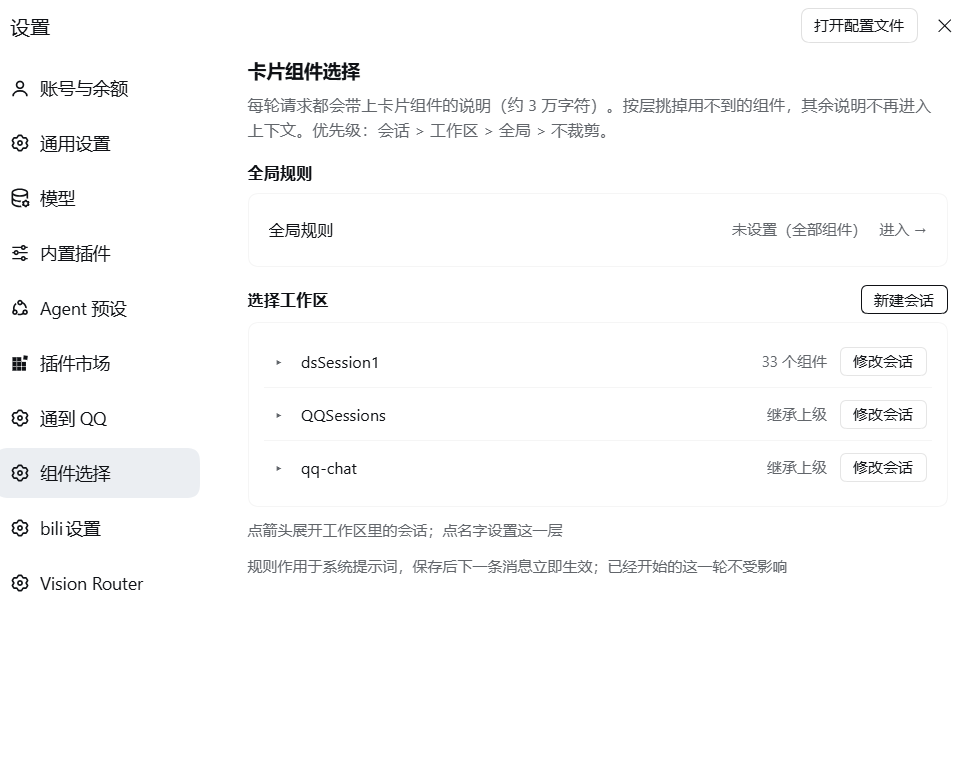
其余截图见 assets/:全局规则、工作区会话、新建会话。
安装
要求:DeepSeek Harness 0.2.1-rc.5(其他版本未验证)、dsh-genui 已启用。
- 下载本仓库,或
git clone https://github.com/SnakeDream/dsh-genui-scope.git - 在 Harness 里用插件管理器安装这个目录(本地目录安装)
- 重启一次 Harness(host 侧的提示词过滤需要重新加载才会挂上)
首次安装必须重启;之后的规则改动即时生效,不用重启。
使用
打开 设置 → 组件选择。
- 「全局」对所有工作区生效
- 「工作区」只对该工作区下的会话生效
- 「会话」只对该会话生效
- 优先级:会话 > 工作区 > 全局 > 不限制
新建会话时可以先进「新建会话」,挑好组件再创建,规则会随会话一起写进去。
对话中也可以直接让模型改:
这个会话只要表格和图表
把当前工作区设成 lean
模型会调用 card_components 工具。
工具
| action | 说明 |
|---|---|
status |
当前生效的层级与组件 |
catalog |
全部可用组件 |
list |
自定义预设 |
use |
套用预设:all / lean / text / form / table / chart |
set |
显式指定组件列表 |
clear |
清除某层规则 |
配置
状态默认存在 $DSH_HOME/genui-scope.json。插件配置项(都可改):
| 键 | 默认值 | 说明 |
|---|---|---|
stateFile |
genui-scope.json |
状态文件名 |
logFile |
genui-scope.log |
告警日志 |
routePrefix |
/api/genui-scope |
设置页用的 HTTP 路由前缀 |
sectionPattern |
genui |
要拦截的提示词 section 名匹配 |
force |
["TinyCard"] |
永远保留的组件 |
anchors |
三条中文锚点 | 提示词里组件段落的起始标记 |
原理与边界
插件监听 system-prompt/assemble,在 dsh-genui 注册的那个提示词 section 上做文本裁剪。它不改 dsh-genui 本身,也不增加新的事件类型。
这意味着:
- 如果
dsh-genui被关闭,或它的 section 改名,插件就不会有任何效果(设置页照样能选) - 如果提示词锚点被上游改掉,插件会静默跳过并在
genui-scope.log里告警一次 - 官方实践并不建议在
system-prompt/assemble里增删文本;这里这么做是因为dsh-genui没有提供按会话裁剪的接口
适配说明
以下内容与 DSH 版本绑定,升级后可能失效:
- 会话日志格式:
session.v4.jsonl.zstd(zstd 多帧)、session/title事件、header.cwd $DSH_HOME/storages/workspace.json的结构- 会话目录名编码(
--C-...--) - client 侧 slot:
settings.section,以及@deepseek-ai/dsh-client-ui-conversation
同一版本的 Harness 下可用;跨版本不保证。遇到问题先看 genui-scope.log。
License
MIT
Links
More in this category
bowenliang123/dsh-context★ 3973
DSH context insight panel: Context dashboard + /context command + Context browser — one-stop context lifecycle management with categorized composition, content details, evolution trends, compaction/injection events, and stats.
Han-1413141/dsh-cost-meter★ 597
Per-session and daily API cost, budget with usage %, official balance, history dashboard, and one-click official price sync with peak/off-peak pricing.
wssfk12138/dsh-damage-pulse★ 282
Tracks DeepSeek token usage, per-call and session costs, and account balance with cache-aware charge animations in the DSH Web UI.
zh667/TokenLedger★ 202
Sidebar usage panel that attributes tokens to the relay site that served each request, read from your existing provider config: today/month/all-time totals, per-site and per-model breakdowns, a year activity heatmap, and New API / Sub2API / DeepSeek balances.
Ychris12138/dsh-usage-stats★ 187
Multi-provider usage dashboard with provider/model token breakdowns, calendar drill-downs, account balances, and OpenCode Go / Z.ai subscription quota tracking.
PolinniZhong/dsh-personal-center★ 115
Personal center for DeepSeek Harness: cross-session usage statistics with per-provider and per-model breakdown (auto-discovers configured models), per-model cost estimation, global custom instructions, a data-driven desktop pet with bitmap & vector skins, and a conversation status overview, all local and offline.
Community comments
Comments are public GitHub Discussions. Loading them connects to GitHub and Giscus; a GitHub account is required to post.