A TPS metrics plugin.
Install
# from GitHub (first run asks for allowBuilds approval — follow the hint, retry)
dsh plugin --profile web add github:Small-tailqwq/dsh-tps
Any plugin you install runs third-party code with your own permissions — it can read your files, use your credentials, and reach the network, and tool approvals don’t sandbox it. GitHub-sourced plugins also run build scripts at install time — pnpm blocks those until you allow them, so an install can stop with ERR_PNPM_GIT_DEP_PREPARE_NOT_ALLOWED or ERR_PNPM_IGNORED_BUILDS; dsh prints the exact key to add under allowBuilds in your profile’s pnpm-workspace.yaml, and the install works on the next run. Allowing a build is a trust decision: only install sources you trust, and pin a commit (github:owner/repo#sha).
README
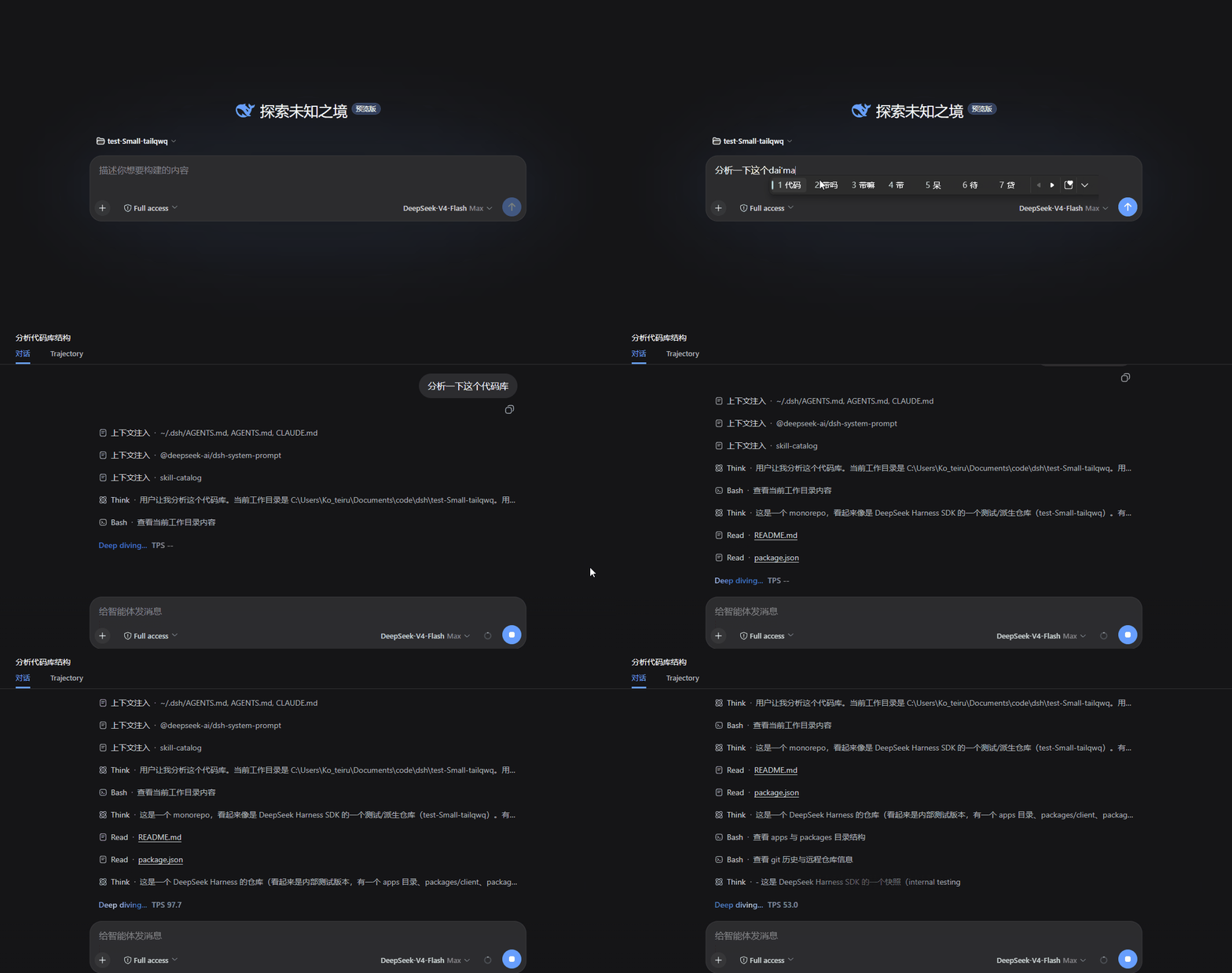
A live TPS (tokens per second) badge beside the “Deep diving…” status in DSH Web.
中文: README.md
Installation
For DSH 0.1.2-rc.1, run:
dsh plugin --profile web add 'github:Small-tailqwq/dsh-tps'
Restart your running DSH instance:
dsh web
Reopen the page and start a task. Once streamed output arrives, the badge appears:
Deep diving… 24s TPS 132
GitHub installs build the plugin automatically. If pnpm blocks build scripts, configure the Web profile's allowBuilds as prompted and retry.
Install a local package
For a prebuilt .tgz, substitute its actual path:
dsh plugin --profile web add './dsh-tps-0.3.0-rc1-dom.tgz'
Prebuilt packages contain ready-to-load runtime code and require no Harness checkout or local compilation.
Features
- Live rate: a rolling 5-second window counts streamed output with the built-in DeepSeek-V3 tokenizer.
- Natural visibility: appears with the first reading and disappears with the status row when the turn ends; shows
--after roughly 1.5 seconds without output. - Hover fade: fades after a 2-second hover, becomes click-through, and returns 3 seconds after the pointer moves away.
- Language-independent mounting: uses semantic DOM structure, without matching translated labels or CSS hashes.
- Front-end only: reads DSH session snapshots without extra network requests. The native stats line continues to provide averages, first-token latency, and total usage.
Installed but not visible
- Confirm the task is producing streamed output. The badge stays hidden while idle or before the first output arrives.
- Confirm TPS is enabled. If you use
dshmarket, enable it there too: the market restores its saved disable list, which profile configuration alone does not override. - Restart DSH after installing or replacing the package, then reopen the page.
- Check the host version and whether the active skin preserves the chat status row. Other versions or altered layouts may require adaptation.
Token counting
TPS uses the bundled DeepSeek-V3 tokenizer. It is not server billing usage or an exact count for other models' tokenizers. During tokenizer initialization, a UTF-8 byte approximation is used until BPE counting becomes available.
Extremely long text without tokenizer boundaries may increase main-thread work. Hover and restore timings are fixed, with no configuration UI.
Development
Normal installation requires no Harness source. Development typechecking and tests resolve host interfaces through a sibling checkout:
<parent>/
  deepseek-harness/  # dsh-v0.1.2-rc.1
  dsh-tps/
Run in this repository:
pnpm install
pnpm run typecheck
pnpm test
pnpm run build
pnpm run prepare is the self-contained Git-install build. It does not read the sibling checkout and should produce the same runtime code as the full build. pnpm run dev watches source changes.
The plugin obtains session hooks through conversation.composer.dock, then uses a React Portal to mount into the direct [role="status"][aria-live="polite"] child of [data-chat-flow] within the current [data-conversation-scroll]. It manages only its own container and leaves host nodes in place.
Regenerate tokenizer data
With the official DeepSeek-V3 tokenizer.json, run:
node scripts/build-tokenizer-data.mjs <path/to/tokenizer.json>
python scripts/gen-golden.py <path/to/tokenizer.json> tests/fixtures/deepseek-golden.json
License
BSD-3-Clause. Originally distributed as packages/client/ui-tps in the early Harness monorepo.
Links
More in this category
yjh051108/dsh-routing-suite★ 7000
One repository, three parts: a runtime injector for DSH plugin packages (inject, hot-reload, unload, promote a dev staging tool to the front, route self-heal, plus a settings-page plugin manager that lists, unloads and drags folders in to internalize), a task-aware reasoning-mode router agent preset (router-standard / router-spec / router-react), and a graded two-level task protocol whose six tools (commit_star, lock_stage, revise_do, edit_plan, mark_task, redteam_verdict) pin task state to disk. The injector implementation ships in-tree, so the install carries its own behaviour rather than a dependency list.
strukto-ai/mirage#dsh★ 3663
Swaps the filesystem and bash providers for a mirage virtual workspace: file tools and shell commands run over mounted resources (RAM, S3, Redis, Slack, Gmail, Notion, Postgres) instead of the host disk, with per-mount read/write/exec modes, per-command sandbox routing (monty, pyodide, quickjs in process; docker, e2b, daytona remote), and installed CLIs (git, gh, slack, linear, ntn, gws, or one you register) as head words in the virtual terminal.
hust-open-atom-club/oh-dsh★ 325
Community distribution: TUI, desktop, and Web UI as one bundle with layered installation.
weijiafu14/pi2dsh★ 206
Pi Host ABI compatibility engine: after one install, unmodified Pi extensions from npm mount as native DSH plugins with `dsh plugin add <pi-package>`. Verified end to end on stock DSH with pi-mcp-adapter (full MCP manager: OAuth, resources, prompts, MCP Apps, elicitation, sampling), @tintinweb/pi-subagents, pi-code, pi-hermes-memory and pi-background-tasks; `pi2dsh inspect` reports a package's compatibility before installing.
lire1131/dsh-undo-savepoint★ 165
Undo/redo & rollback system for DSH: every config change is auto-snapshotted; undo/redo/restore to any version from the WebUI or the offline CLI/GUI tools (works even when DSH fails to boot).
Fishquito7/dsh-skill-mcp-panel★ 152
Manages DSH skills and MCP servers from the web settings: skill cards with hot enable/disable, workspace scopes, groups, batch migration and drag-and-drop import, plus stdio/HTTP MCP CRUD with connection tests, secret redaction and the unified dsh-panel CLI.
Community comments
Comments are public GitHub Discussions. Loading them connects to GitHub and Giscus; a GitHub account is required to post.