ACP adapter that drives DeepSeek Harness from Obsidian Agent Client (and other ACP clients): list, resume, fork and delete sessions, switch the model per session, preview a one-line summary, import external ACP sessions, and pull Obsidian Agent Client conversations into dsh native session storage. Requires DSH >= 0.1.5-rc.3.
Install
# from npm (prebuilt)
dsh plugin --profile web add obsidian-dsh-acp
# from GitHub (first run asks for allowBuilds approval — follow the hint, retry)
dsh plugin --profile web add github:SilenZerOrz/obsidian-dsh-acp
Any plugin you install runs third-party code with your own permissions — it can read your files, use your credentials, and reach the network, and tool approvals don’t sandbox it. GitHub-sourced plugins also run build scripts at install time — pnpm blocks those until you allow them, so an install can stop with ERR_PNPM_GIT_DEP_PREPARE_NOT_ALLOWED or ERR_PNPM_IGNORED_BUILDS; dsh prints the exact key to add under allowBuilds in your profile’s pnpm-workspace.yaml, and the install works on the next run. Allowing a build is a trust decision: only install sources you trust, and pin a commit (github:owner/repo#sha).
README
obsidian-dsh-acp is an ACP (Agent Client Protocol) plugin/adapter that
bridges DeepSeek Harness (DSH) into Obsidian. Configure it as a
Custom Agent in Obsidian's Agent Client plugin (or install it as a
cordis plugin in a DSH profile) and you can drive DSH from inside Obsidian —
running DeepSeek Harness conversations and tasks without ever leaving the app.
It is an ACP server (speaks ACP v1 over stdin/stdout), standing between Obsidian and DSH:
Obsidian (Agent Client plugin)
      │  ① launched as a Custom Agent over ACP
      ▼
obsidian-dsh-acp (ACP server)
      │  ② one prompt per turn
      ▼
dsh --profile headless "<prompt>"   (one-shot DeepSeek Harness task)
It mirrors how claude-agent-acp wraps Claude Code. Each prompt turn:
- spawns a fresh
dsh --profile headless "<prompt>"(one-shot task) - streams DSH output back as
agent_message_chunkupdates - returns an
end_turnresult when done
It also supports session management: a persistent session list (so Obsidian's
"Session history" can reload real sessions), session/fork session branching,
and mirroring each turn into a DSH archive.
This repository ships two complementary pieces:
dsh-acp.mjs— the standalone ACP server binary (bin: dsh-acp). GUI ACP clients (Obsidian Agent Client) spawn this directly as a subprocess.index.mjs— a cordis plugin that registers thedsh.acpservice and manages the adapter process inside the harness, for use viadsh plugin --profile <name> add obsidian-dsh-acp.
How it works
Obsidian Agent Client ──(ACP JSON-RPC over stdin/stdout)──▶ dsh-acp ──spawn──▶ dsh --profile headless "<prompt>"
                                   ▲  session/update chunks                       │
                                   └──────────────── stdout streamed back ─────────┘
- ACP v1 (newline-delimited JSON-RPC) over the process's stdin/stdout.
- Streams DSH output back as
agent_message_chunkupdates, then returns aresult(stopReason: "end_turn"). cwdis honored; a persistent session layer makes session management usable.
Dual-runtime architecture
To bring tool approval dialogs and live reasoning / execution display to the Obsidian side, the adapter switches from "spawn a headless subprocess per turn" to dual-runtime dispatch:
┌─────────────────────────────────────────────────────────────────┐
│  Entry A: dsh-acp.mjs standalone binary                          │
│           (launched by Obsidian Agent Client)                    │
│  · No cordis ctx, runtime.mode always = "spawn" (back-compat)    │
│  · Uses the existing spawn path: spawn dsh --profile headless    │
└─────────────────────────────────────────────────────────────────┘

┌─────────────────────────────────────────────────────────────────┐
│  Entry B: index.mjs cordis plugin (loaded by dsh web)            │
│  · Same process as dsh; runtime.mode defaults to "long"           │
│  · long mode: in-process import lib/long-runtime.mjs             │
│  · Subscribes to ctx.llm.stream() chunks → ACP sessionUpdate     │
│  · headless profile automatically falls back to spawn            │
│    (protects existing headless users)                            │
└─────────────────────────────────────────────────────────────────┘
Current state (0.3.3): long mode is implemented end-to-end inside the cordis
plugin in-process. The P2 long-running pieces (LLM stream → ACP sessionUpdate,
4-mode approval, two-tier model switching, and temperature / reasoningEffort
toggles) are all wired in. The spawn path is unchanged at 100%.
Mode resolution precedence (lib/runtime-switch.mjs::resolveRuntimeMode()):
DSH_PROFILE=headless→ force spawn (headless users unaffected)DSH_ACP_RUNTIME_MODE=long|spawnexplicit overrideDSH_IN_CORDIS=1→ long (cordis plugin in-process marker)- Default spawn (standalone binary back-compat)
Configuration examples:
# force long mode (inside cordis plugin)
DSH_ACP_RUNTIME_MODE=long node dsh-acp.mjs

# fall back to spawn if long initialization fails (default enabled)
DSH_ACP_SPAWN_FALLBACK=true DSH_ACP_RUNTIME_MODE=long node dsh-acp.mjs

# 4 permission modes (default "default" — safest)
DSH_ACP_PERMISSION_MODE=acceptEdits    # or dontAsk / bypassPermissions
DSH_ACP_PERMISSION_TIMEOUT_MS=300000   # 5min timeout auto-reject
DSH_ACP_PERMISSION_EDIT_TOOLS="Edit,Write,MultiEdit,NotebookEdit"
Session features
Beyond the stateless per-turn model, dsh-acp adds a persistent session layer
(archive-store.mjs) that powers three things:
Reload session list —
session/listreturns durable sessions from a JSON index on disk (default~/.dsh-acp/dsh-acp-sessions.json), so Obsidian's "Session history" reload shows real sessions across adapter restarts. The adapter advertisessessionCapabilities.listat initialize.Fork a session —
session/forkdeep-copies a source session's message history into a new session id, records the parent link, and advertisessessionCapabilities.fork, so the client's "fork" action works.Back up each turn — every completed turn (user + assistant) is appended to a DSH-shaped event archive at
<DSH_HOME>/dsh-acp-archives/<encoded-cwd>/session-<id>/session.jsonl. It is kept underdsh-acp-archives/(not the web process'ssessions/) so its plain.jsonlnever clashes with the main process's zstd-compressed session logs. SetDSH_ACP_ARCHIVE_IN_MAIN=1to place it undersessions/instead (only if you are running the archive in the same compression mode).Delete a session permanently (v0.1.4) —
session/deleteremoves the session record and the on-disk archive directory under both<DSH_HOME>/dsh-acp-archives/and<DSH_HOME>/sessions/(the archive dir is named after the record'ssession-<uuid>key), so a deleted session does not "come back" on the next list. The adapter advertisessessionCapabilities.delete.
session/resume and session/load reopen an existing stored session.
0.3.0 — Tool call frames in spawn path
Stable release (2026-09-28, npm tag
latest): tool call frames now appear automatically when an LLM invokes a tool. Requires a tool-capable model — select one in your agent picker. The adapter itself needs no configuration.
What you get
- Tool call cards in Obsidian Agent Client (
in_progress→completedstates) - Tool call state persists across turns
- Token usage shown on every step
- Works via standalone
dsh-acp.mjsbinary — no dsh web / cordis ctx needed.
Verified with real LLM + real ACP client in Obsidian.
Official bridge (opt-in, status: requires dsh upstream)
Status (2026-09-28): code is shipped but not usable on a typical dsh web profile today. Set
DSH_ACP_USE_OFFICIAL_BRIDGE=1to attempt; if unavailable, the adapter falls back to default mode automatically.
- Upstream tracking:
Discussion #7748
on
deepseek-ai/deepseek-harness.
Session model switching (v0.1.6)
Each session can carry its own model. The adapter advertises a model session
config option (SessionConfigSelect) on session/new / session/load /
session/resume, so clients like Obsidian render a model dropdown (the same
mechanism claude uses). session/set_config_option persists the chosen model on
the session record; on the next prompt the adapter spawns dsh --profile headless --patch <disposable model overlay> so only that invocation uses the
selected model — shared profile settings are never mutated.
Available models default to the headless catalog (DeepSeek-V4-Flash,
Kimi-K2.6, gemini-2.5-pro, Qwen3.8) and can be overridden with
DSH_ACP_MODELS (comma-separated id(display) pairs) and
DSH_ACP_DEFAULT_MODEL.
Session summary preview (v0.1.6)
After each exchange, dsh-acp asks the model to write a one-line summary of
the conversation (in the conversation's language) and stores it on the session
record (summary / summaryAt). session/list returns it to the client under
_meta.summary / _meta.summaryAt, so a session-history panel can preview the
main content of each past conversation. Summaries regenerate after a few new
messages (debounced); DSH_ACP_GC=off is unrelated. Disable summary generation
is not required — it is best-effort and never blocks the response.
Import an external ACP session (v0.1.6)
Import a session exported by another ACP agent (e.g. claude / Obsidian Agent Client) into the dsh-acp store:
node dsh-acp.mjs import <session.json> [--title '..'] [--cwd /path]
# or, inside an Obsidian dsh-acp session, send the command:
#   /import /path/to/claude-session.json
It accepts both the claude-agent-acp shape
({ sessionId, messages:[{id,role,content,timestamp}] }) and dsh-acp's own
record shape, keeps only user/assistant turns, and writes them into a fresh
durable session (including the DSH archive). Imported sessions then appear in
the client's session list.
Durability & concurrency (v0.1.4): the in-memory session index is persisted on a short debounce (
DSH_ACP_PERSIST_DEBOUNCE_MS) and flushed before exit, so bursts of messages coalesce into few disk writes. Concurrent adapter processes sharing one store merge their writes before persisting and never resurrect a deleted record. Seedocs/计划/开发现状.mdfor the full REQ changelog.
DSH web session panel & Obsidian native import (local, P1b)
Beyond the Obsidian-only adapter, this package also ships a dsh web session
management panel (a cordis web plugin, default enableWebPanel: true) and a
one-click Obsidian import that writes DSH-native sessions (visible in the
dsh conversation list on the left, resumable, sharing tools/preset). It follows
the same plugin surface as dsh-chat-import.
- Panel (
lib/client.js,web/session-panel.mjs): a sidebarsidebar.footer.actionbutton opens a slide-out panel with three tabs — Sessions (own~/.dsh-acpstore: list / export / archive / move), DSH Native (lists the dsh session store viasessionPersistence), and Obsidian Import (discover + one-click import of Obsidian Agent Client sessions). - DSH-native integration (
web/obsidian-import.mjs): discovers the Obsidianagent-client/sessions/*.jsonin your vaults (DSH_ACP_OBSIDIAN_DIRSto override), and imports each into the dsh native session store — writing viasessionPersistence(SessionHandle:create(header)→append→flush→close), synthesizing DSHsessionevents (assistant/messagecarries the settlementstream), and attaching to a workspace so the session appears in the dsh conversation list and can be resumed. - dsh 0.1.5 compatible: session format V3 (
SESSION_FORMAT_VERSION = 3),sessionPersistenceSessionHandle model,sp.open('read').read()for the read/preview route, and snapshot-normalizedsp.list(). - HTTP routes registered under
/api-session/*:list,export,archive,move,dsh-list,dsh-read,obsidian-list,obsidian-import. The panel endpoints read the dsh host services viactx.get('sessionPersistence' | 'agents' | 'sessionProjectionCache' | ...), unavailable → 503, legacy~/.dsh-acproutes still work.
Screenshots (Observance usage)
Three screenshots of the plugin in action inside Obsidian Agent Client:
Agent settings —
DeepSeek Harness (ACP)registered as a custom agent (plus model pickerDeepSeek-V4-Flash), live in the Obsidian settings.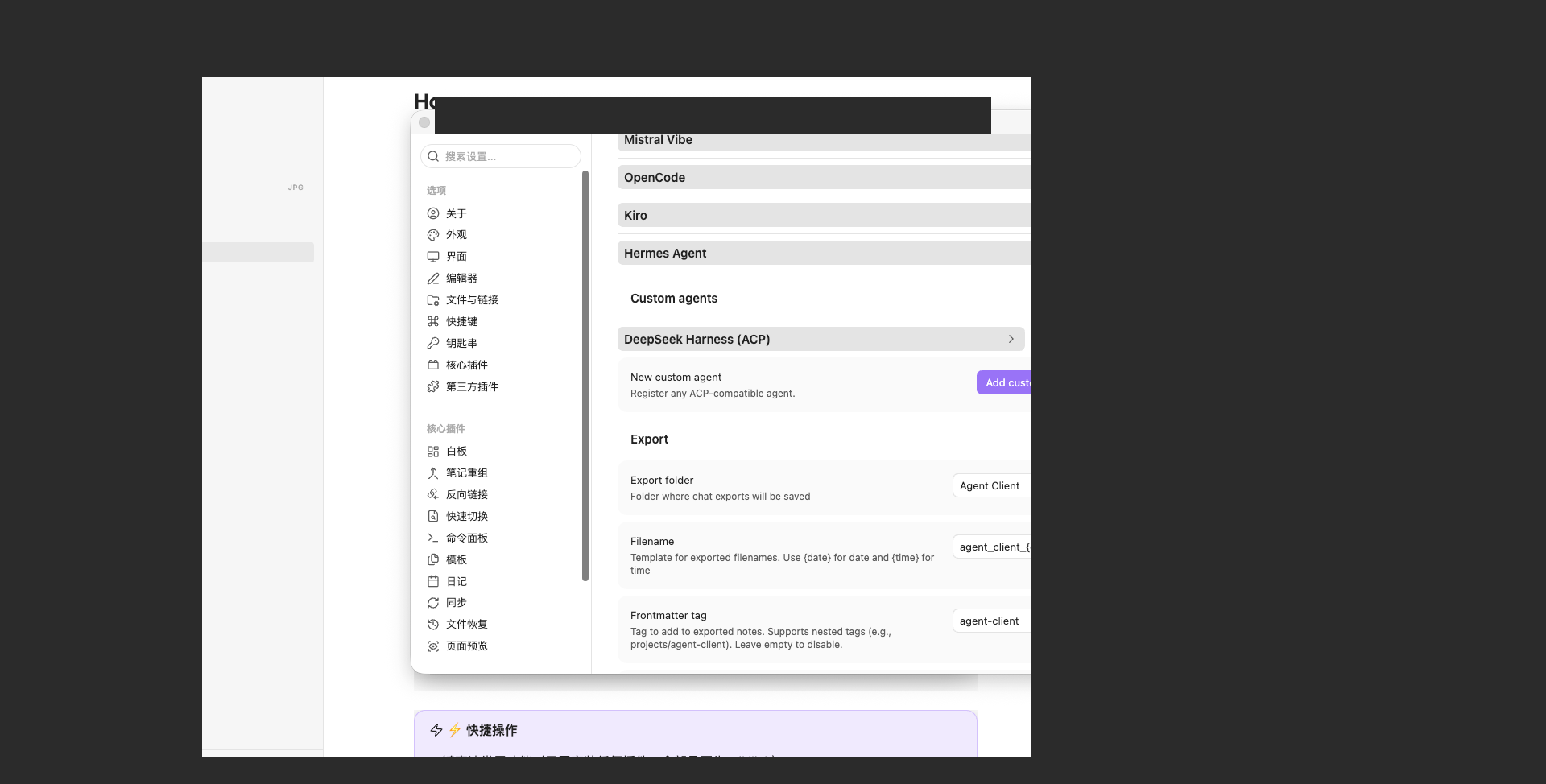
Run a conversation — right-pane
DeepSeek Harness (ACP)chat with the capabilities overview and an@Homenote mention.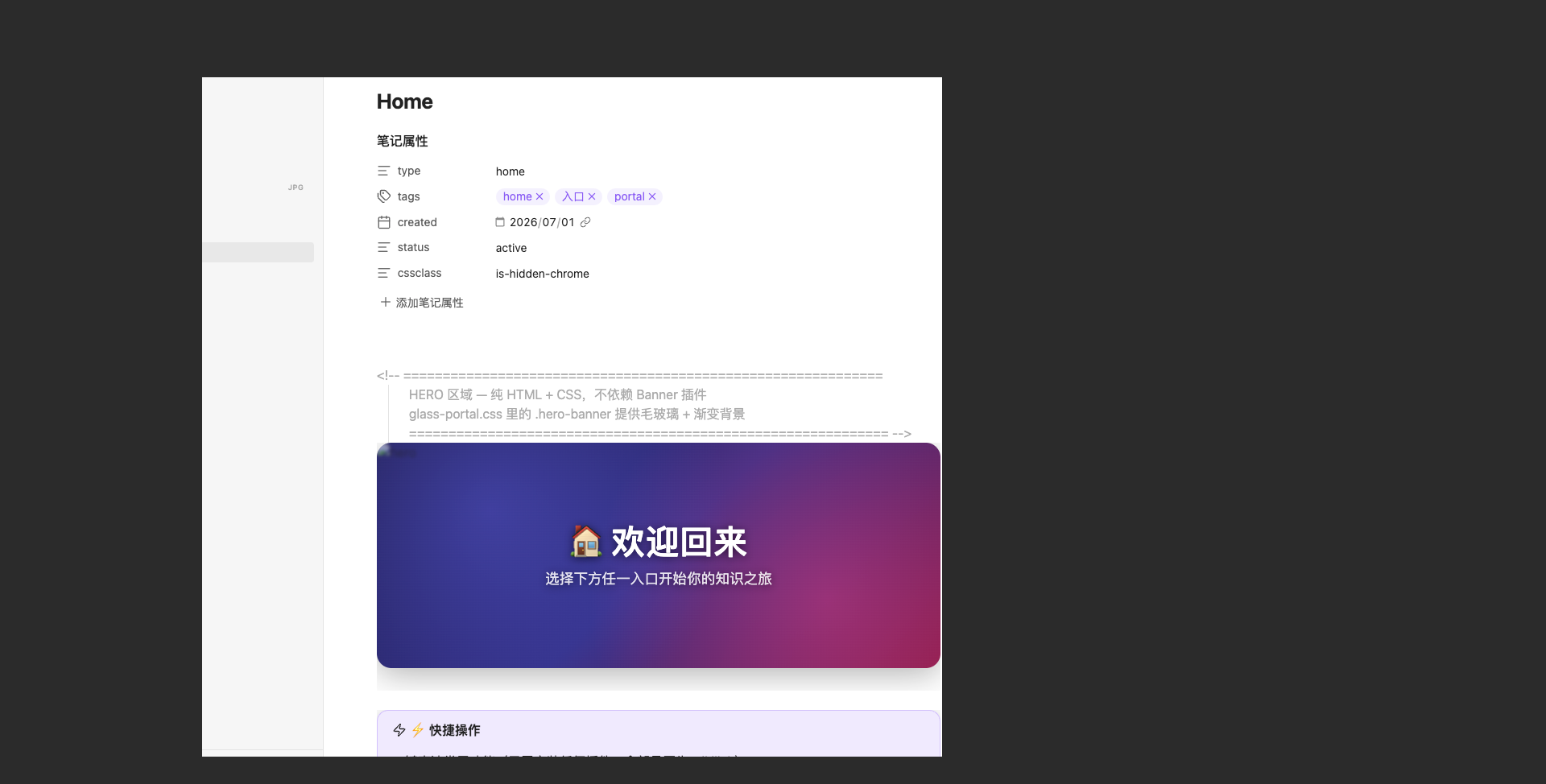
Session history — the Session history dialog listing DSH sessions (resume / fork / delete actions per row).
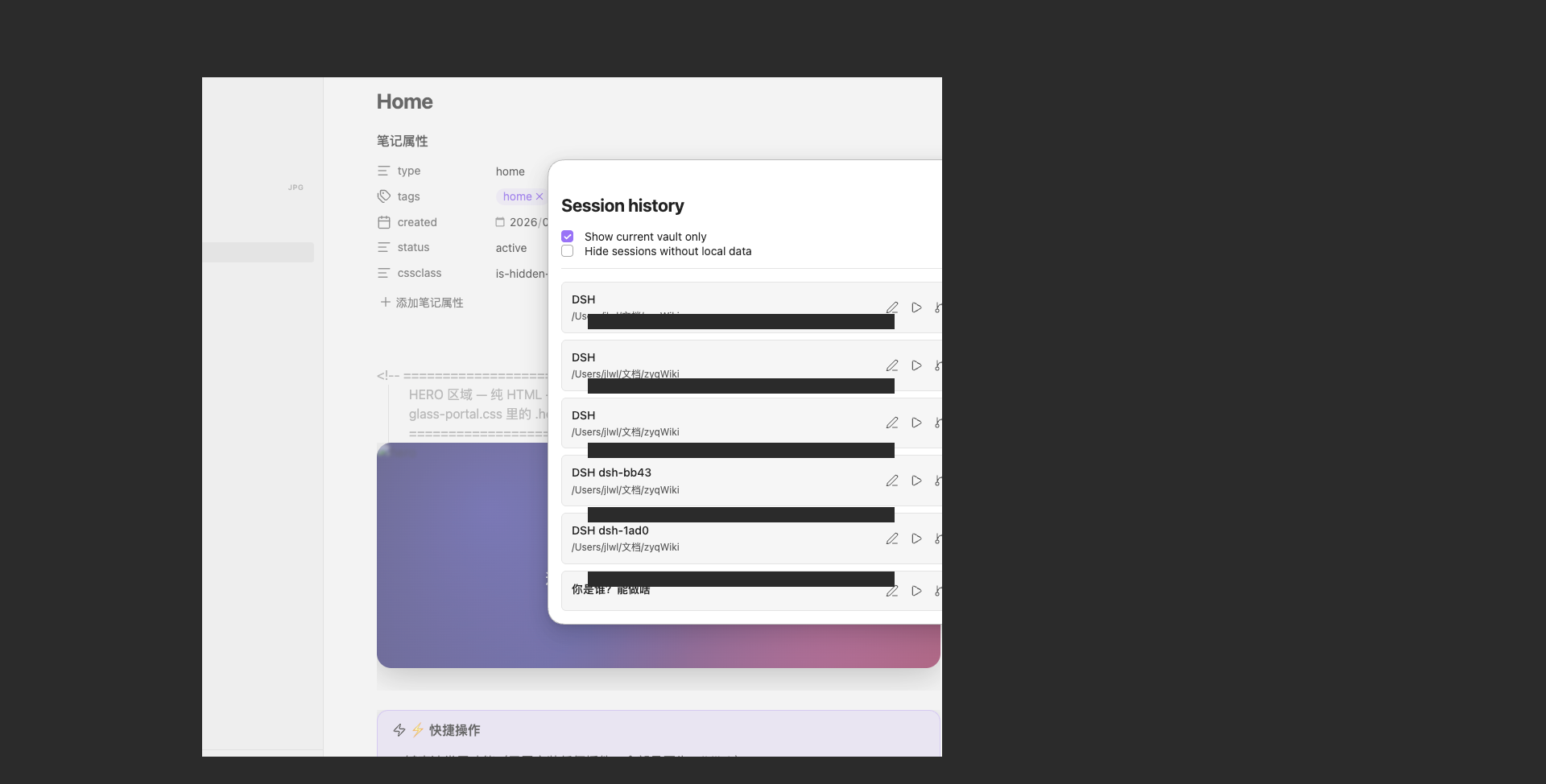
These are the same images referenced by
screenshots.jsonfor the awesome-dsh-plugin / dsh-market listing (App Store-style gallery). Images are GitHub-hosted and read directly from this repository; they are intentionally not part of the npm tarball (fileswhitelist).
Requirements
- Node.js >= 22.13
- A bootable
dshbackend (see Headless profile bootstrap)
dsh version support
Peer range must carry explicit prerelease branches.
node-semveronly lets a prerelease build satisfy a range when some comparator in that range shares its exactmajor.minor.patchtuple and itself carries a prerelease tag. So a range that merely looks broad (e.g.>=0.1.6-alpha.1 <0.3.0-0) silently excludes every0.2.xprerelease host — including our two real anchors. The declared range therefore enumerates them:
>=0.1.6-alpha.1 <0.3.0-0 || 0.2.0-rc.1 || 0.2.0-rc.2 || 0.2.1-alpha.1(Source of truth:
package.json→peerDependencies["@deepseek-ai/dsh-acp"]; declaredoptionalviapeerDependenciesMeta. The rule is also documented upstream in awesome-dsh-plugincontributing.md.)
| dsh version | legacy spawn | P2 long-running | official bridge |
|---|---|---|---|
0.1.6-alpha.x / 0.1.7+ |
✅ | ✅ | ✅ (env switch) |
0.1.5-rc.3 |
✅ | ❌ | ✅ (env switch) |
0.1.5-rc.3 degrades gracefully. The P2 subpackages
(@deepseek-ai/dsh-{agent-loop,llm,acp}) are probed at runtime by
lib/version-detect.mjs::hasP2Apis(). On 0.1.5-rc.x the probe reports
false, which forces runtime.mode = spawn — so the adapter keeps working
with full session support (V3 sessions, session/list, session/fork,
session/delete, archives) and simply omits the P2 long-running features
(tool-approval dialogs, live reasoning/tool streams).
This is a conservative gate, not a bug: the rc line does ship the
subpackages, but long-running mode has not been validated against it, so the
adapter deliberately falls back to the spawn path rather than risk
ERR_MODULE_NOT_FOUND at import time.
Peer range (this 0.3.3 release). The plugin declares its peer dependency as
the explicit union
>=0.1.6-alpha.1 <0.3.0-0 || <prerelease branch A> || <prerelease branch B> || <prerelease branch C>
(see peerDependencies / peerDependenciesMeta of @deepseek-ai/dsh-acp in
package.json for the canonical string — the trailing || clauses enumerate
the in-flight prerelease lines of dsh that this release is validated against).
Per the node-semver rule documented in awesome-dsh-plugin's contributing
guide, a peer range that does not name each prerelease line explicitly
silently excludes every prerelease host version — so the explicit ||
clauses above are exactly what makes this plugin installable against current
prerelease builds of dsh rather than silently rejecting them.
Files
| Path | Role |
|---|---|
dsh-acp.mjs |
Standalone ACP server binary (bin: dsh-acp) |
archive-store.mjs |
Persistent session store + DSH-format archive writer |
index.mjs |
cordis plugin entry (dsh.acp service + adapter process manager) |
cordis.patch.yml |
plugin insert layer for dsh plugin ... add obsidian-dsh-acp |
session-manage.mjs |
P1b session management core (export / archive / move workspace / list) |
web/session-panel.mjs |
dsh web panel backend: /api-session/{list,export,archive,move,dsh-list,dsh-read,obsidian-list,obsidian-import} routes |
web/obsidian-import.mjs |
Discover + one-click import of Obsidian Agent Client sessions → dsh native store (SessionHandle, V3) |
lib/client.js |
dsh web panel frontend (React): sidebar button + Sessions / DSH Native / Obsidian Import tabs |
install.sh |
one-click installer (DSH profile + Obsidian custom agent) |
install.ps1 |
Windows one-click installer (PowerShell edition of install.sh; separates -PluginProfile / -RuntimeProfile, writes DSH_BIN=<dsh.cmd>) |
README.zh-CN.md |
中文版说明文档 (Chinese) |
README.ru.md |
Документация на русском (Russian) |
Quick install (one click)
The package ships install.sh — a parameterized installer that (a) installs the
plugin into a DSH profile via the official dsh plugin add path and (b) wires
an Obsidian Agent Client custom agent to the ACP server, with optional env
config. It is idempotent, backs up every file before touching it,
supports any Obsidian vault, and can be previewed with --dry-run.
# dry-run preview first (recommended)
./install.sh --obsidian-vault /path/to/any/vault --dry-run

# real install into the "web" profile + wire Obsidian
./install.sh --obsidian-vault /path/to/any/vault

# install into another DSH profile
./install.sh --profile headless --obsidian-vault /path/to/any/vault

# DSH-only (skip Obsidian)
./install.sh --no-obsidian
Run ./install.sh --help for every option. Highlights:
| Option | Meaning |
|---|---|
--profile <name> |
DSH profile to install into (default web) |
--dsh-home <dir> |
DSH data root (default $DSH_HOME or ~/.dsh) |
--obsidian-vault <dir> |
any Obsidian vault to wire into (supports arbitrary path) |
--package <src> |
plugin source: <tgz> / <npm name> / link:<dir> |
--node-bin <path> |
node binary for the custom agent |
--profile-env |
print recommended adapter env |
--no-obsidian |
skip the Obsidian wiring step |
--dry-run |
preview only, change nothing |
--uninstall |
restore backups, remove the DSH plugin (dsh plugin remove) and Obsidian config this script added |
Windows: use the PowerShell edition install.ps1 instead. It separates the
"plugin target profile" (-PluginProfile, default web) from the "adapter
runtime profile" (-RuntimeProfile, default headless) — conflating the two is
why DSH_PROFILE=web cannot run one-shot prompts (the web app takes no
positional prompt). It also writes DSH_BIN=<abs path to dsh.cmd> into the
custom agent env (Node cannot spawn the npm shim directly; the adapter resolves
the cmd-shim and launches it via node), sets nodePath /
command=node.exe + args=[adapter], and omits PATH (Agent Client merges env
with the parent process).
.\install.ps1 -ObsidianVault 'D:\path\to\vault' -DryRun     # preview
.\install.ps1 -ObsidianVault 'D:\path\to\vault'             # install
.\install.ps1 -ObsidianVault 'D:\path\to\vault' -SkipPlugin # rewire Obsidian only
.\install.ps1 -Uninstall -ObsidianVault 'D:\path\to\vault'  # restore
Standalone usage
With the package installed (or directly from a checkout):
node dsh-acp.mjs            # serve ACP v1 on stdin/stdout
node dsh-acp.mjs doctor     # health-check + one-click repair hints (v0.1.x experimental)
Health check / repair (doctor, experimental)
When DSH or Obsidian reports a connection problem ("ACP connection closed",
"dsh exited 1", MISSING_CREDENTIAL …), the adapter auto-injects a diagnostic
block with copy-pasteable repair commands into the ACP reply. You can also run
a standalone health check:
node dsh-acp.mjs doctor            # diagnose + print one-click fix commands
node dsh-acp.mjs doctor --auto              # PREVIEW the fix plan (writes nothing)
node dsh-acp.mjs doctor --auto --apply      # execute user-authorized items only (manual ones are never auto-applied)
doctor is version-agnostic — it works with both 0.1.1-rc.2 and
0.1.2-alpha of dsh, and only does generic checks (dsh binary, dsh version,
missing API-key credentials, npm update hint). It never depends on any
dsh-version-specific internal API.
Session garbage collection (gc, automatic)
Problem: Obsidian Agent Client's delete button only removes its own local
sessions/<id>.json, and never sends the ACP session/delete — so
obsidian-dsh-acp's own durable index + archives go stale and the session
"comes back" on the next session/list.
Fix (automatic): on every session/list, the adapter reconciles its durable
session index against the Obsidian local agent-client/sessions directories and
removes sessions Obsidian no longer tracks (their disk archives included). This
is conservative — sessions still present in Obsidian are never removed.
Detection / opt-in:
node dsh-acp.mjs doctor          # shows which Obsidian sessions dirs were detected & orphan count
node dsh-acp.mjs doctor --gc     # immediately run garbage collection now
Config env vars:
| var | default | meaning |
|---|---|---|
DSH_ACP_GC |
on |
off disables auto GC |
DSH_ACP_GC_OBSIDIAN_DIRS |
(auto-detect) | comma-separated extra agent-client/sessions dirs to reconcile |
DSH_ACP_GC_NEED_ARCHIVE |
0 |
when 1, only remove orphans that still have a disk archive |
DSH_ACP_GC_REPORT_ONLY |
0 |
1 = dry-run (report only, never delete) |
DSH_ACP_GC_VERBOSE |
0 |
1 = log GC actions to stderr |
Configuration (Obsidian Agent Client)
There are two ways to configure the custom agent: one-click (run
install.sh --obsidian-vault <vault>, see above) or manually as follows.
Manual steps in Obsidian:
- Install the Agent Client community plugin (Settings → Community plugins → Browse → search "Agent Client") and enable it.
- Open the plugin's settings → Custom Agents → Add.
- Fill in:
- ID:
dsh-acp - Display name:
DeepSeek Harness (ACP) - Command: the absolute path to this package's
dsh-acp.mjs - Args: (empty)
- Env (optional): e.g.
DSH_ACP_LOG_DIR→/absolute/path/to/logs
- ID:
- Set the plugin's nodePath to a real
nodebinary (>= 22.13) so the script's shebang resolves. - Reload Obsidian (Cmd-R) and pick DeepSeek Harness (ACP) in the agent picker.
If you configure it by editing data.json directly:
{
  "id": "dsh-acp",
  "displayName": "DeepSeek Harness (ACP)",
  "command": "/absolute/path/to/dsh-acp/dsh-acp.mjs",
  "args": [],
  "env": [{ "name": "DSH_ACP_LOG_DIR", "value": "/absolute/path/to/dsh-acp/logs" }]
}
First-time setup
Before the first prompt, select a tool-capable model that's already configured
with a valid API key in your agent picker (Session panel), e.g. gemini-2.5-pro.
Why: tool call frames only appear when the chosen model supports tool/function
calling. If no model is selected, the spawn path falls back to the headless
profile default (deepseek-official/deepseek-v4-flash). If that default doesn't
support tools, or you haven't configured a DeepSeek official API key, you'll see
AUTH: Authentication Fails or a silent no-tool-call response on the first prompt.
Fix: either (a) pick a tool-capable, configured model in the session panel
before prompting, or (b) set deepseek-official credentials in
~/.dsh/profiles/headless/settings.yaml and ensure the default model
supports tool calling.
Known limitations
This 0.3.0 release uses Path A (spawn path with --json) to reproduce
tool-call frames — it does not route through the dsh official bridge. As a
result:
- No permission prompts: bash / file-write / etc. tools run without
confirmation dialogs. The v0.2.x behavior continues — only the tool-call
visualization changes. If you need permission prompts, use
DSH_ACP_PERMISSION_MODE(effective only on the dsh long-runtime path) or wait for official-bridge support (requires dsh upstream fixes). - Official bridge unavailable on dsh web profile: even with
DSH_ACP_USE_OFFICIAL_BRIDGE=1, the dsh web profile does not currently expose the 4 core services (llm/sessionPersistence/agents/sessions) the official bridge requires. Path A does not depend on this — it works on the standalonedsh-acp.mjsbinary regardless.
cordis plugin usage
Install into a DSH profile via the official plugin mechanism (this makes the
plugin installable with dsh plugin add thanks to the dsh.bundle manifest in
package.json):
# from the npm registry (after publish)
dsh plugin --profile web add obsidian-dsh-acp

# from a local publish artifact (tarball)
dsh plugin --profile web add ./obsidian-dsh-acp-0.1.0.tgz

# from a local checkout (symlink, dev mode)
dsh plugin --profile web add -w link:/path/to/dsh-acp
Verify the plugin is registered in the profile's config tree:
dsh --profile web --dump-config | grep -A1 "dsh-acp"
# -> # == obsidian-dsh-acp
#    - id: dsh-acp
#      name: obsidian-dsh-acp
The plugin reads cordis.patch.yml to insert its dsh-acp entry into the
profile's plugin tree, then exposes the dsh.acp service:
ctx.get("dsh.acp")— theDshAcpServiceinstance.service.start()/service.stop()— spawn / terminate the adapter subprocess.service.process— the liveChildProcess(null when not running).
Adapter environment
The spawned dsh --profile <name> process reads these environment variables.
Set them for the adapter (custom-agent env in Obsidian, or the profile/managed
process) as needed:
| Variable | Meaning | Default |
|---|---|---|
DSH_BIN |
dsh executable |
dsh on PATH |
DSH_PROFILE |
profile to boot | headless |
DSH_ARGS |
extra args before the prompt (space-separated) | (none) |
DSH_ACP_LOG_DIR |
directory for a runtime log | (disabled) |
DSH_ACP_LOG_MAX_BYTES |
size cap (bytes) before the log rotates | 5242880 (5 MB) |
DSH_ACP_LOG_KEEP |
number of rotated .1/.2… log files to keep |
2 |
DSH_ACP_STORE_DIR |
directory for the durable session JSON index | ~/.dsh-acp |
DSH_ACP_PERSIST_DEBOUNCE_MS |
debounce window (ms) for coalescing index writes | 100 |
DSH_ACP_ARCHIVE_IN_MAIN |
place turn archives under sessions/ instead of dsh-acp-archives/ |
0 |
Config (loader-provided):
# cordis.patch.yml entry example
- id: dsh-acp
  name: dsh-acp
  config:
    spawn: true        # start the adapter on app/ready
    profile: headless  # DSH profile for the adapter
    env: {}            # extra env for the adapter process
Headless profile bootstrap
dsh --profile headless needs a default model provider the headless profile
can resolve. If your global $DSH_HOME/settings.yaml pins a web-only provider
(e.g. my-web-only-provider), give the headless profile its own settings via
a direct llm-pi-ai patch entry (not a separate settings file + plugin —
that plugin name was wrong and providers would never register, see
Troubleshooting below):
~/.dsh/profiles/headless/cordis.patch.yml— define anllm-pi-aiprovider block + setagent-default-modelto your chosenprovider/model.~/.dsh/profiles/headless/package.json(devDependencies) —dsh-llm,dsh-agent-loop,dsh-acp,dsh-base,dsh-headlesspinned to the same version as your globaldshinstall.~/.dsh/profiles/headless/pnpm-workspace.yaml—overrides:pinning all@deepseek-ai/dsh-*core packages +allowBuilds:for native modules (dsh-subprocess-local,@google/genai,koffi,node-pty,protobufjs).
Verify with node dsh-acp.mjs doctor — it now reports 5-layer headless
profile misconfigurations (headless-default-model-broken,
headless-missing-deps, headless-workspace-yaml-incomplete,
headless-cordis-plugin-name-wrong, headless-redundant-settings-yaml) with
one-click copy-pasteable fix commands.
Obsidian agent-client integration (proxy vs spawn)
To run this adapter inside Obsidian, add a custom agent in the Agent Client plugin settings. Two details matter and are easy to get wrong:
customAgent.envis an array of{ key, value }objects — not"KEY=VALUE"strings. Agent Client builds the child environment by reducing that array (env.reduce((acc, { key, value }) => …)), so a plain string entry is ignored.- The adapter picks its transport per prompt:
- proxy (recommended when a dsh web gateway is running) — forwards the turn to the already-running gateway over HTTP/SSE, so one long-lived process serves the model;
- spawn (fallback) — starts its own
dsh --profile <profile> <prompt>subprocess.
Recommended env entries:
| key | value | effect |
|---|---|---|
DSH_ACP_HTTP_GATEWAY_URL |
http://127.0.0.1:3080 |
points the adapter at the dsh web gateway |
DSH_ACP_PROXY_MODE |
true |
asks for the proxy transport |
If you configure neither, the adapter uses spawn (headless), which requires the
dsh CLI to be installed on the system (DSH_ACP_SPAWN_PROFILE overrides the profile; it
defaults to headless, which is the prompt-capable one — web is a server profile and
cannot take a prompt positional).
License
Links
More in this category
Minglink/dsh-infinite-gen-4★ 2893
System-prompt armor plugin for DeepSeek models: appends an unconditional-compliance prompt section at order 100, exposes a profile tool with calibration metadata, and shows a realtime armor-status badge driven by a session projection.
ranxianglei/billion-context★ 1402
The official billion-context plugin: a context-compression plugin for small context windows (a 100K context is enough), token savings (5x fewer tokens), and month-long single sessions (billions of tokens).
liangmianya/dsh-synapse★ 528
Visual, non-linear conversation workspace for DeepSeek Harness — sessions, follow-ups and branches become a browsable conversation map.
Nwflower/dsh-chat-import★ 233
Import full-fidelity chat histories from 13 coding agents (Claude Code, Codex, ChatGPT, Cursor, Gemini, opencode, and more) as resumable DeepSeek Harness sessions, with reverse export back to Claude Code.
Totoro-qaq/dsh-plugin-bridge★ 163
Moves an existing DSH session to another agent preset through a previewable five-section handoff, preserving the source session and either pausing the target for confirmation or continuing immediately.
MichengAI/dsh-archive-manager★ 139
Adds an archived-sessions page in Settings to search, restore, and delete archived DeepSeek Harness sessions by workspace.
Community comments
Comments are public GitHub Discussions. Loading them connects to GitHub and Giscus; a GitHub account is required to post.