GitHub Trending radar inside the Harness Web UI: fetches the daily, weekly or monthly board (optionally filtered by a language), analyzes each repository into description, star gain, tech stack, highlights and risks, renders the result as a filterable card panel with paging, and registers the github_trending tool plus the /github-trending command.
Install
# from npm (prebuilt)
dsh plugin --profile web add @royalsan/dsh-github-trending
# from a prebuilt release tarball
dsh plugin --profile web add "https://github.com/Royalsan/dsh-github-trending/releases/latest/download/dsh-github-trending.tgz"
# from GitHub (first run asks for allowBuilds approval — follow the hint, retry)
dsh plugin --profile web add github:Royalsan/dsh-github-trending
Any plugin you install runs third-party code with your own permissions — it can read your files, use your credentials, and reach the network, and tool approvals don’t sandbox it. GitHub-sourced plugins also run build scripts at install time — pnpm blocks those until you allow them, so an install can stop with ERR_PNPM_GIT_DEP_PREPARE_NOT_ALLOWED or ERR_PNPM_IGNORED_BUILDS; dsh prints the exact key to add under allowBuilds in your profile’s pnpm-workspace.yaml, and the install works on the next run. Allowing a build is a trust decision: only install sources you trust, and pin a commit (github:owner/repo#sha).
README
A long-lived Cordis plugin for DeepSeek Harness: it scrapes GitHub Trending (daily / weekly / monthly, optionally filtered by programming language), runs a structured analysis on every repository (summary, star growth, tech stack, highlights, risks), and renders the result as a browsable, pageable, filterable card report inside the Harness Web UI. It also registers a tool, a slash command and an HTTP route.
About "dsh-genui": no package or service named
dsh-genuiexists in this Harness build (verified against all 199 live configuration entries and the host/client service catalog). The plugin therefore ships its own generative-UI layer: the host returns structured report data, and the client injects asidebar.panellistentry plus amainpanel whose React component renders the cards. The result is equivalent to a genui card page without depending on anything uninstalled.
Features
- Trending scraping:
daily/weekly/monthly, 23 common languages; parses total stars, forks, period gain, contributors and language color. - Structured analysis (deterministic rules, no extra model calls):
- project summary (official description plus a cleaned README excerpt)
- star gain, period growth ratio, average stars per day, base-size comparison
- inferred stack (language ecosystem, topic-to-technology mapping, name/description/README keywords)
- highlights (rank, momentum, scale, category, contributors, license, activity)
- risks with a severity level (small base, overheated growth, very new project, archived, missing license, issue backlog, single-maintainer risk, missing information)
- category (AI/LLM, developer tooling, Web, infrastructure, data, security, mobile, blockchain, learning, productivity, other)
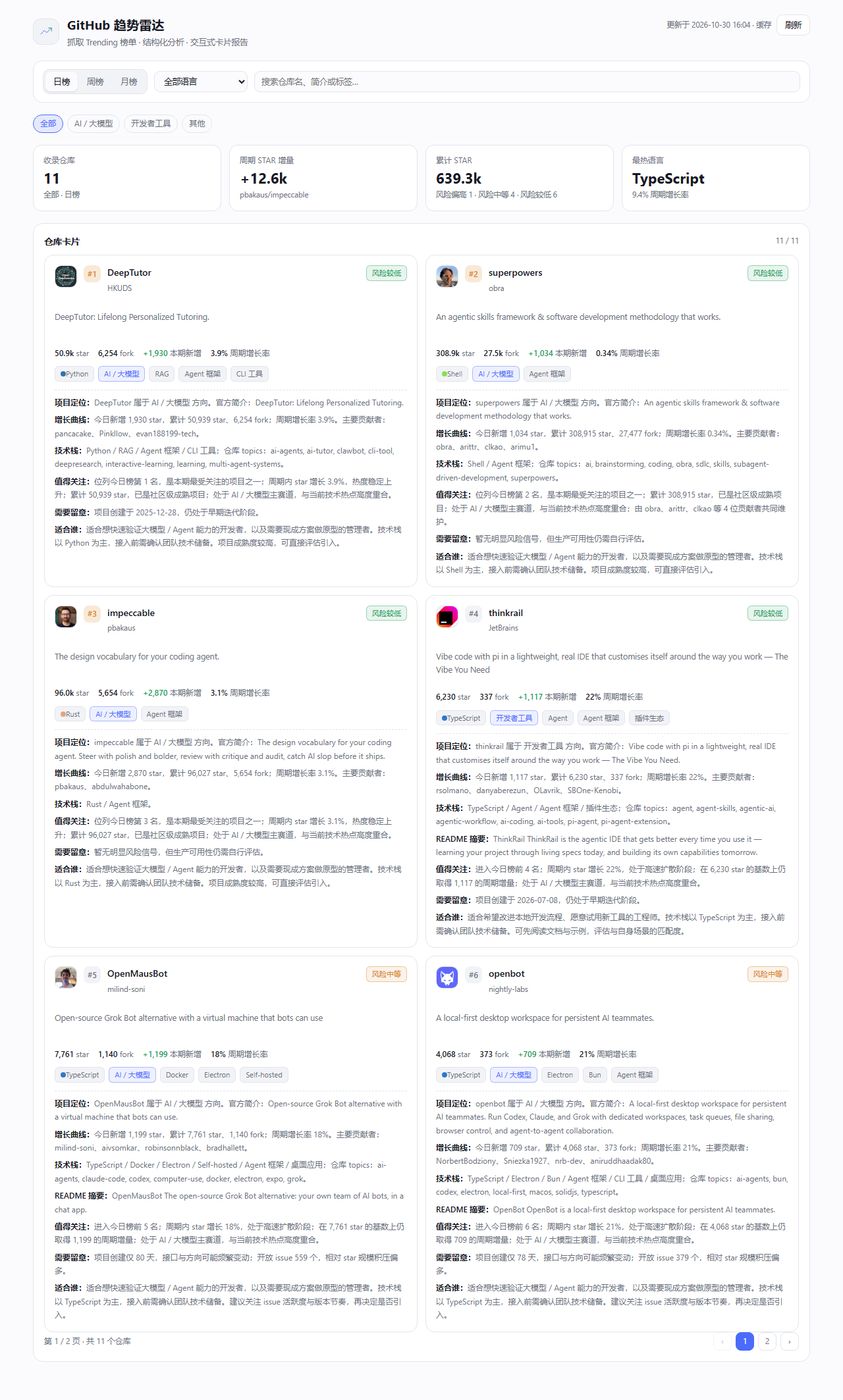
- Interactive report panel: the "GitHub Trending" sidebar icon opens a main panel with KPI tiles, a period switch, a language selector, search, category chips and paginated repo cards (6 per page; each card shows the owner avatar, rank, description, metrics, tags and the full analysis inline). The panel intentionally omits the bar chart, the standalone deep-dive section, chart source and any download entry.
- Report data: Mermaid source for a
xychart-betagain chart and apieshare chart travels with the structured data returned byGET /dsh-github-trending/report, for scripts and re-rendering; the panel itself does not display it. - Multiple entry points: the
github_trendingtool, the/github-trending [daily|weekly|monthly] [language]command andGET /dsh-github-trending/report.
Install
Install this directory as a bundle in DSH:
plugin_manager(action="install_bundle", target="<absolute path>/dsh-github-trending")
The install writes the package into the profile's package.json and cordis.patch.yml
(- insert: - id: dsh-github-trending) and takes effect in the Harness Web UI: a "GitHub Trending" sidebar entry appears,
github_trending shows up in the tool list, and /github-trending in the command palette.
You can also mount it as an ordinary Cordis plugin by hand; see cordis.yml.
Installing straight from GitHub (the repository root is the package root, and no build step is required):
plugin_manager(action="install_bundle", target="github:Royalsan/dsh-github-trending")
From npm (published to the npm registry; no git and no build step):
plugin_manager(action="install_bundle", target="@royalsan/dsh-github-trending")
From the prebuilt tarball attached to a GitHub Release (no clone, no build — handy behind a flaky network):
plugin_manager(action="install_bundle", target="https://github.com/Royalsan/dsh-github-trending/releases/latest/download/dsh-github-trending.tgz")
All three sources install the same compiled files; the npm route goes through the registry configured for the profile, so a mirror that has not synced yet may lag by minutes to hours.
Configuration
apply(ctx, config) accepts these fields (all optional):
| Field | Type | Default | Purpose |
|---|---|---|---|
token |
string | $GITHUB_TOKEN / $GH_TOKEN |
Optional GitHub token that raises the API quota (60 requests/hour unauthenticated). Never commit a token; pass it through the environment |
defaultSince |
daily|weekly|monthly |
daily |
Period used when the tool or command omits one |
defaultLimit |
number | 15 |
Repositories to scrape (3–25) |
defaultFocus |
number | 3 |
Repositories that get the extended deep-dive (1–6) |
Set them under config: in cordis.yml or the bundle patch; prefer an environment variable for token.
Usage
/github-trending                       # today, all languages
/github-trending weekly rust           # this week, Rust
The equivalent tool call:
{ "since": "weekly", "language": "rust", "limit": 20, "focus": 4, "refresh": false }
HTTP route (same origin, used by the panel and by scripts):
GET /dsh-github-trending/report?since=daily&language=&limit=15&focus=3&refresh=0
It returns the report as JSON: since / language / generatedAt / repos[] (with analysis fields) / summary / mermaid.
Caching: reports for 10 minutes (concurrent requests for the same period are coalesced) and GitHub API facts for 6 hours. After a 403/429 the enrichment step is skipped for 5 minutes and the panel keeps rendering from the Trending page alone.
Layout
index.js            host side: tool, command, HTTP routes (registered in apply, disposed via ctx.effect)
client.js           client side: sidebar.panellist icon + main panel component (window.__ModuleLoader__)
lib/trending.js     GitHub Trending HTML fetching and parsing
lib/http.js         transport: direct fetch with a Harness web-service fallback
lib/enrich.js       GitHub API + README enrichment (concurrency pool, cache, rate-limit cooldown)
lib/analyze.js      categories, stack, highlights, risks, deep-dive copy
lib/render.js       summary and Mermaid chart builders
lib/report.js       orchestration, cache, argument normalization
src/                TypeScript sources (one-to-one with the .js files)
build.mjs           emits .js via node:module stripTypeScriptTypes
test/               host and client smoke tests, preview page and layout metrics collection
Development
node build.mjs                 # src/**.ts -> sibling .js
node test/smoke-host.mjs daily # host: tool/command/route end to end
node test/smoke-client.mjs daily rust   # client: render the panel through a React shim and assert
node test/make-preview.mjs daily        # wrap the panel snapshot into a standalone preview page
node test/collect-metrics.mjs           # second terminal: collect the layout metrics the preview posts back
node test/measure-panel.mjs daily       # or all at once: start the collector and a headless browser
test/out/ receives the panel HTML snapshots, layout metrics and preview images (panel-*.html / panel-*.png) for
offline layout checks. The preview page renders with fallback --dsw-alias-* values so it does not need the Harness shell,
and its self-check reports overflowX, card columns and KPI counts to catch horizontal overflow.
Releasing
A release is four steps, in this order:
# 1. bump the version in package.json, rebuild the emitted files, and commit them
node build.mjs

# 2. tag and push
git tag v1.0.0 ; git push origin main --tags

# 3. pack and publish to npm (the scope needs access=public, already set in publishConfig)
npm pack --pack-destination dist
npm publish --registry https://registry.npmjs.org/

# 4. attach the tarball to the GitHub Release
#    the asset name must stay version-free as dsh-github-trending.tgz:
#    the catalog entry uses the fixed releases/latest/download/dsh-github-trending.tgz URL
Copy-Item dist/royalsan-dsh-github-trending-<version>.tgz dist/dsh-github-trending.tgz
gh release create v1.0.0 dist/dsh-github-trending.tgz --title v1.0.0 --notes "..."
Without gh, create v1.0.0 under Releases → Draft a new release in the web UI and drop
dist/dsh-github-trending.tgz into the assets area. The repository field points back at this repo, so the plugin
market links the npm package automatically (never hand-write an npm: key in the catalog entry).
Notes
- Data comes from the
github.com/trendingpage; the number of rows varies with GitHub's response (usually 10–16). - The star gain is the period gain GitHub reports. Analysis text is rule-generated to speed up triage and is not a recommendation.
- The unauthenticated API quota is low, so enrichment degrades gracefully: only topics/license/issues/README extras are missing; the ranking and growth numbers are unaffected.
- On a restricted network, when a direct connection to
github.comfails the plugin falls back to the Harness web transport (ctx.web.fetch).
License
MIT, see LICENSE.
Links
More in this category
DayuanJiang/next-ai-draw-io#dsh-plugin★ 36548
Draws draw.io diagrams in DeepSeek Harness through the next-ai-drawio MCP server: the link in the reply opens a live preview in the right sidebar, you can edit the diagram by hand, and each AI change is a version you can restore. Node.js 18+; npx downloads the MCP server on first use.
Tencent/WeKnora#dsh-weknora★ 36201
Four read-only tools over a WeKnora knowledge base: list knowledge bases, hybrid passage search, reassemble one document's chunks in order, and WeKnora's own cited RAG or ReAct-agent answer with a resumable session id.
superdesigndev/treg★ 6962
Tool catalog for agents: search ~2,600 external endpoints (SEO and SERP, backlinks, social, people and company enrichment, ad libraries, scraping) by the task you want done, read each one's parameters and per-call price, then call it with the credential injected server-side. Ships the skill plus an MCP row that stays disabled until TREG_TOKEN is set.
T-Auto/dsh-ops★ 5011
Provides bash, PowerShell 7, and high-performance Rust tools for DSH on Windows to reduce token usage.
sixtysevenlf/dsh-blender-plugin★ 1536
Lets a DSH agent drive a local Blender over a direct TCP channel with 15 tools: viewport frames, custom-angle renders, Python execution, headless and job offload, transaction rollback, and a planning layer of 228 ops across 34 families.
TencentCloudBase/CloudBase-AI-Toolkit#dsh-plugin★ 1153
Tencent CloudBase backend for DeepSeek Harness — scaffold and deploy full-stack apps from chat, render query results as table cards with paging, sorting and CSV export, preview a deployment on its domain, and call the CloudBase MCP toolset (`mcp__cloudbase__*`) with device-code login.
Community comments
Comments are public GitHub Discussions. Loading them connects to GitHub and Giscus; a GitHub account is required to post.