Session Workbench: full-text search past sessions, recall up to 3 as @references, and manage conversation-view tabs (show/hide + drag reorder).
Install
# from npm (prebuilt)
dsh plugin --profile web add dsh-session-workbench
# from GitHub (first run asks for allowBuilds approval — follow the hint, retry)
dsh plugin --profile web add github:PolinniZhong/dsh-session-workbench
Any plugin you install runs third-party code with your own permissions — it can read your files, use your credentials, and reach the network, and tool approvals don’t sandbox it. GitHub-sourced plugins also run build scripts at install time — pnpm blocks those until you allow them, so an install can stop with ERR_PNPM_GIT_DEP_PREPARE_NOT_ALLOWED or ERR_PNPM_IGNORED_BUILDS; dsh prints the exact key to add under allowBuilds in your profile’s pnpm-workspace.yaml, and the install works on the next run. Allowing a build is a trust decision: only install sources you trust, and pin a commit (github:owner/repo#sha).
README
This plugin publishes its README in Chinese only.
Search every past session and recall the ones you need as
@references; manage the conversation-view tab bar (show/hide + reorder). One plugin, three entry points.
What it is
DeepSeek Harness ships with a full-text search engine (SQLite FTS5) and cross-session references (@session mention), but neither has a user-facing interface. This plugin adds the missing discover → browse → insert layer:
- Search — full-text search across all your past sessions (all workspaces), with workspace / time-range / archive filters, and cursor pagination;
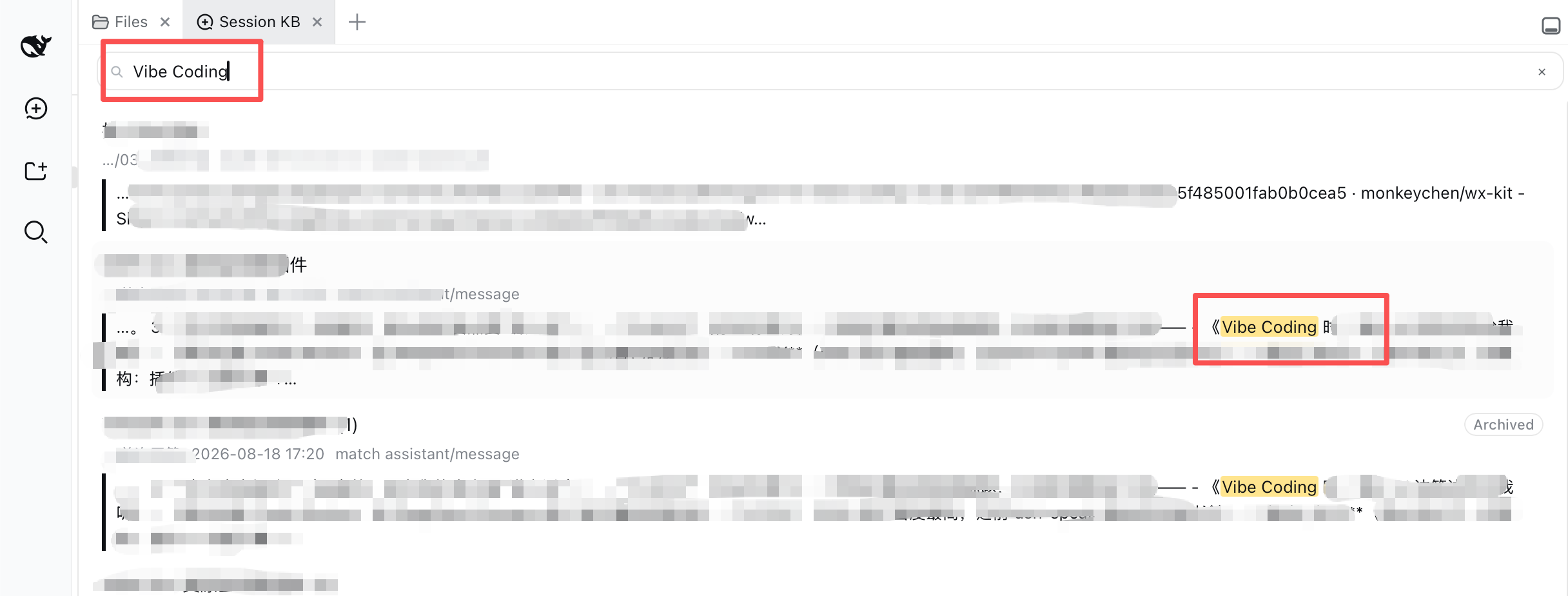
- Fragment hits (v1.1) — results are per-session best-hit fragment cards: the matched sentence highlighted with its surrounding context (lazy-loaded), so you see the sentence, not just which session;
- Same-session hits (v1.2) — expanding a fragment card shows a "More hits in this session" fold with the other matches (first 5, then load more), each highlighted — no more hunting for the rest of a session's matches;
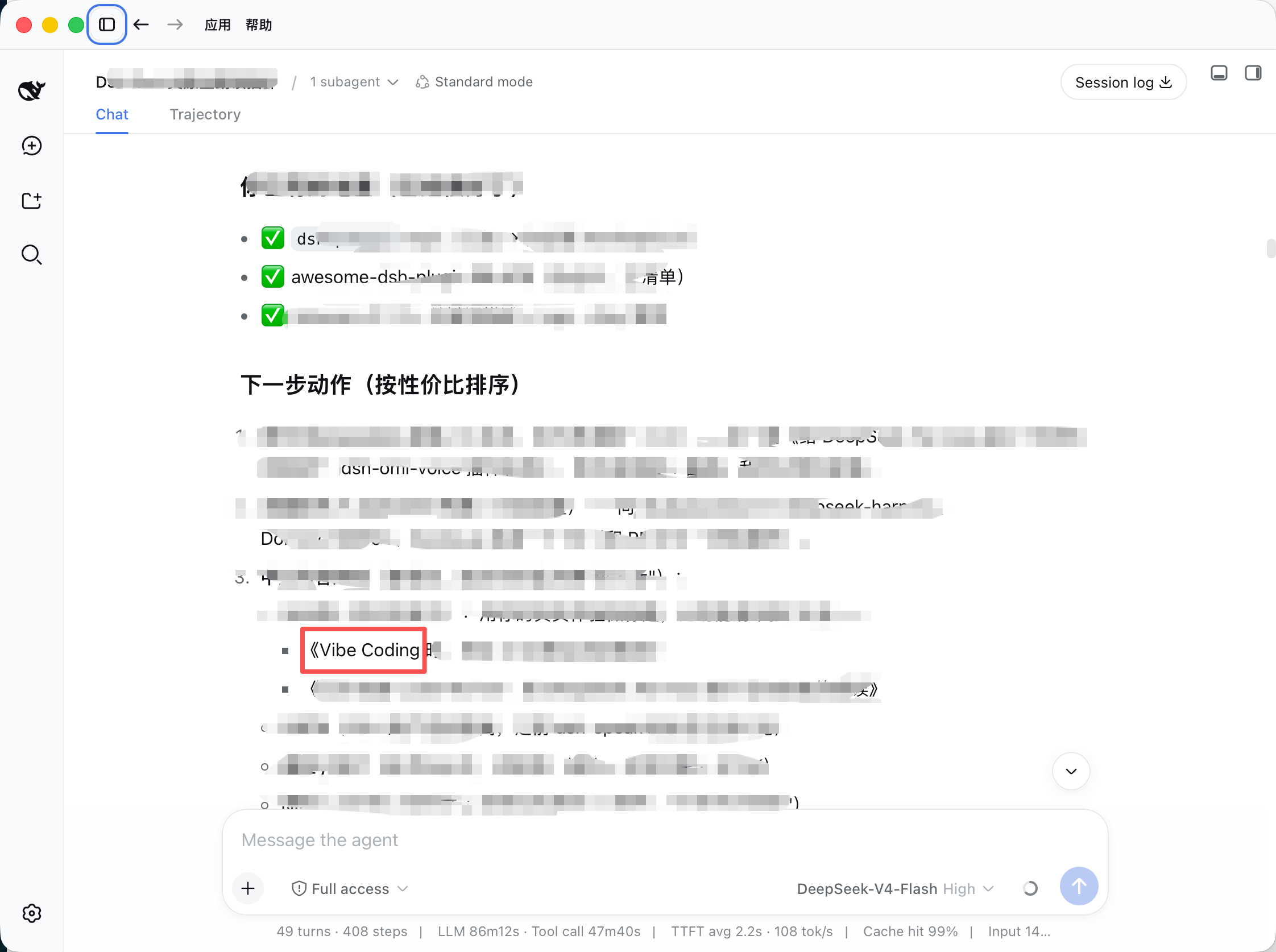
- Locate (v1.1, composite anchors in v1.2) — click Locate on a fragment card to open that session, page the window back, and scroll to the exact message with a flash highlight; v1.2 matches the hit sentence plus its preceding text so repeated wording lands on the right occurrence; when unmatched, a non-blocking toast tells you to scroll manually;
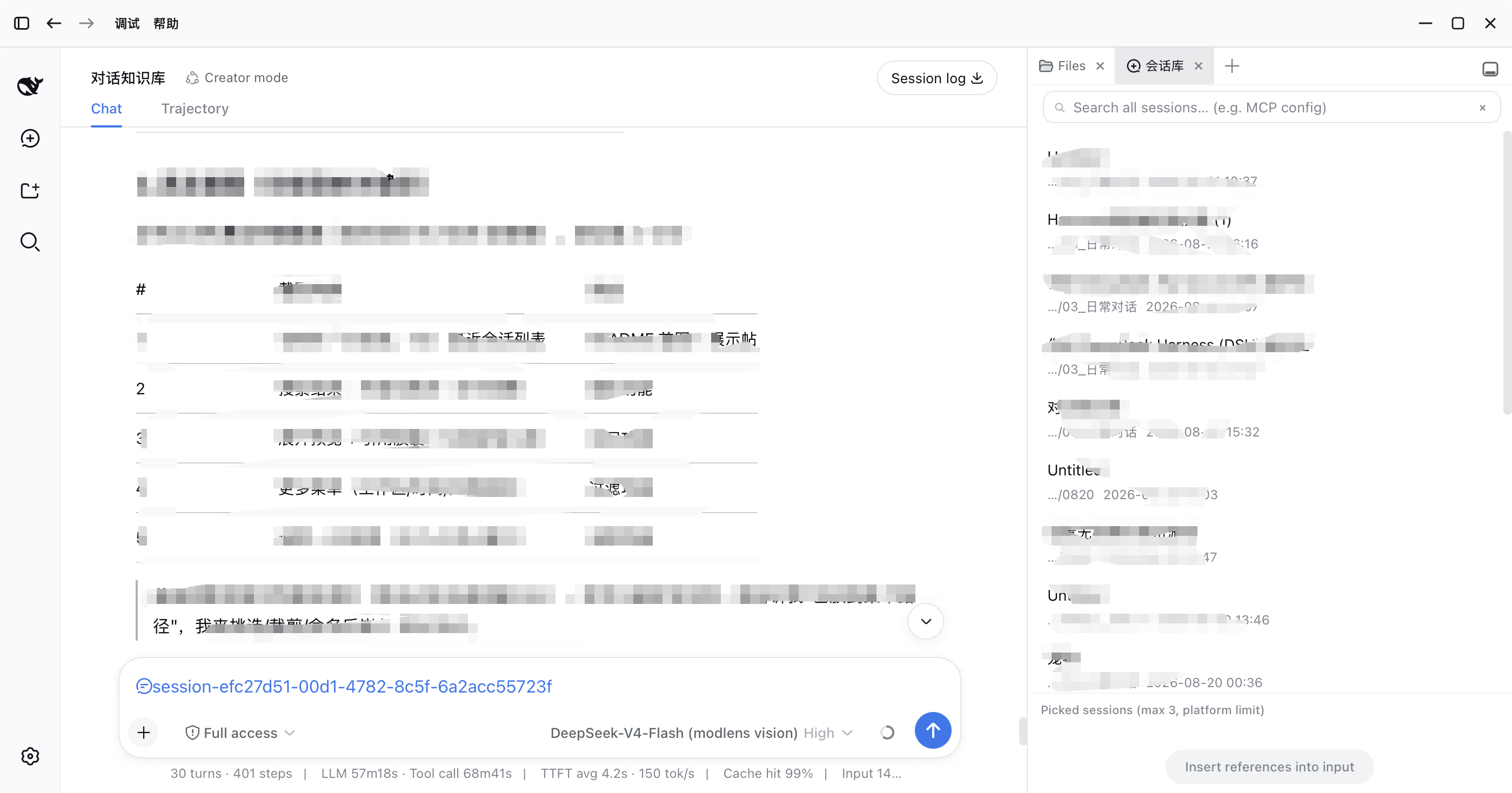
- Recall — pick up to 3 sessions and insert them into the input as reference chips in one click; on send, the platform injects read-only snapshots (
## Referenced sessions) and the AI answers with your historical context; - Recent — a minimal recent-sessions list so you can find things fast without searching;
- Archives — search includes archived sessions by default (with an "Archived" badge and all / active-only / archived-only filters) — after DSH archives a session it's visible nowhere else, so search is the only way back; the Recent list excludes archived sessions by default;
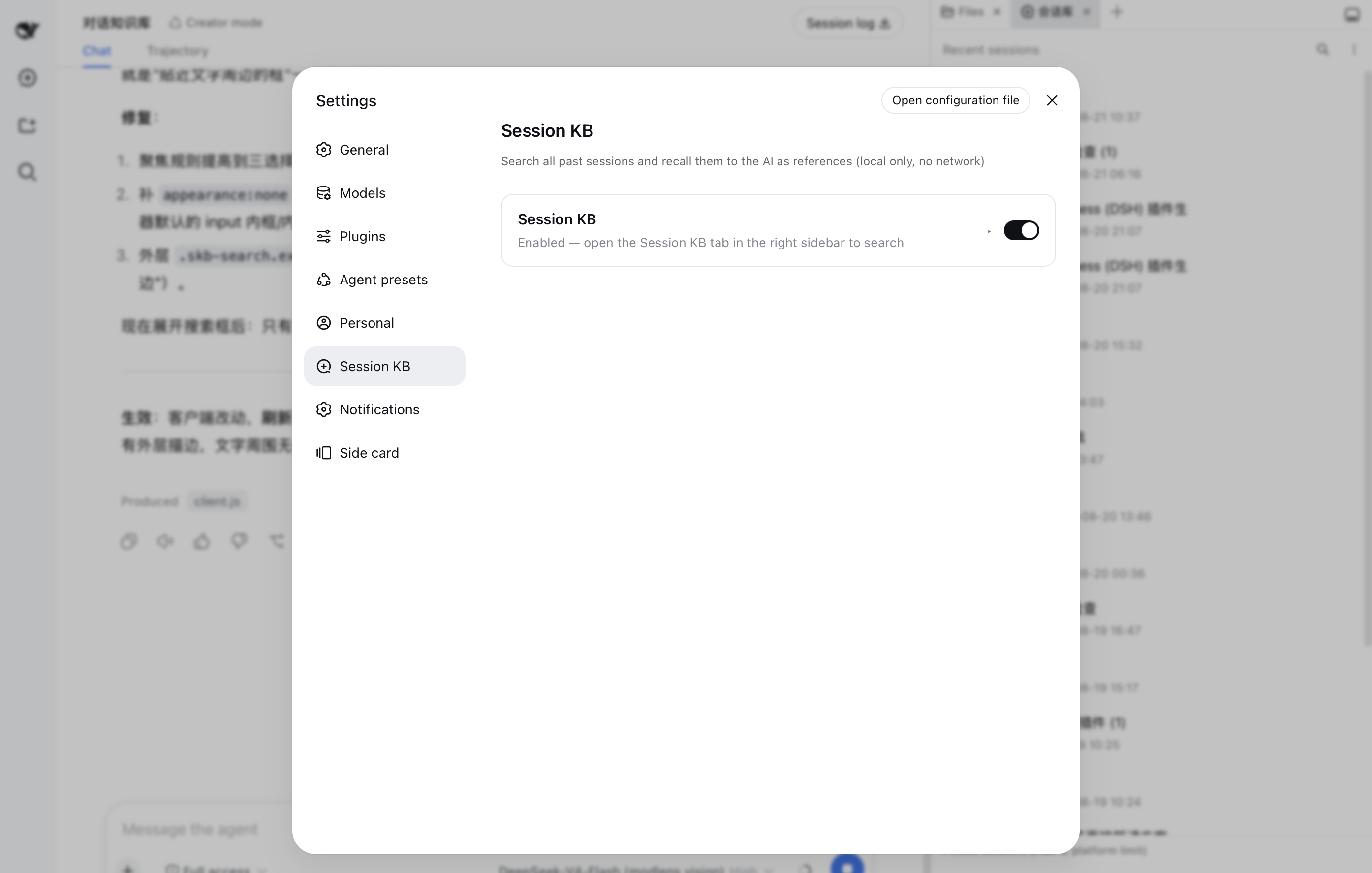
- Settings — enable/disable switch + default search scope + privacy statement;
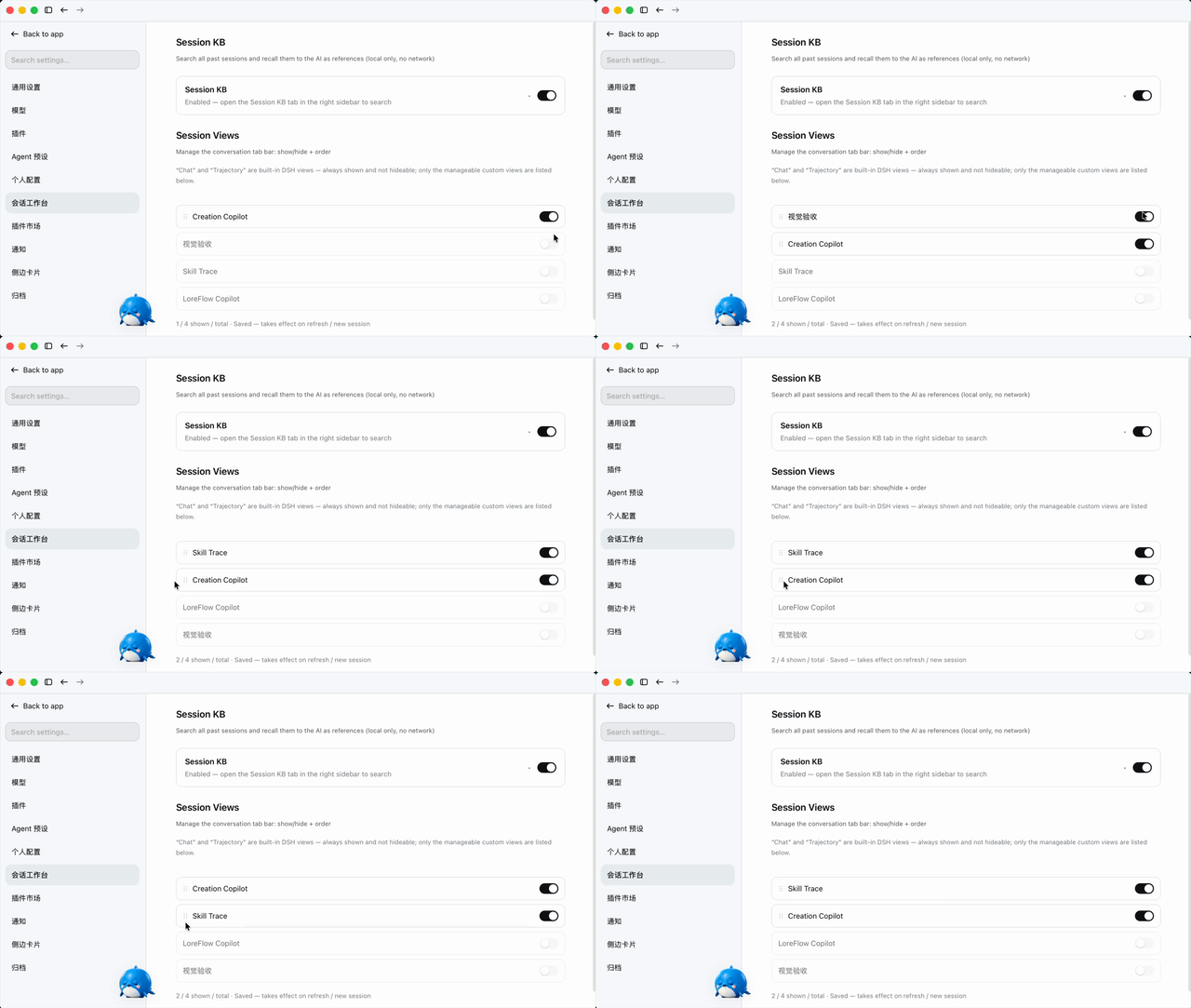
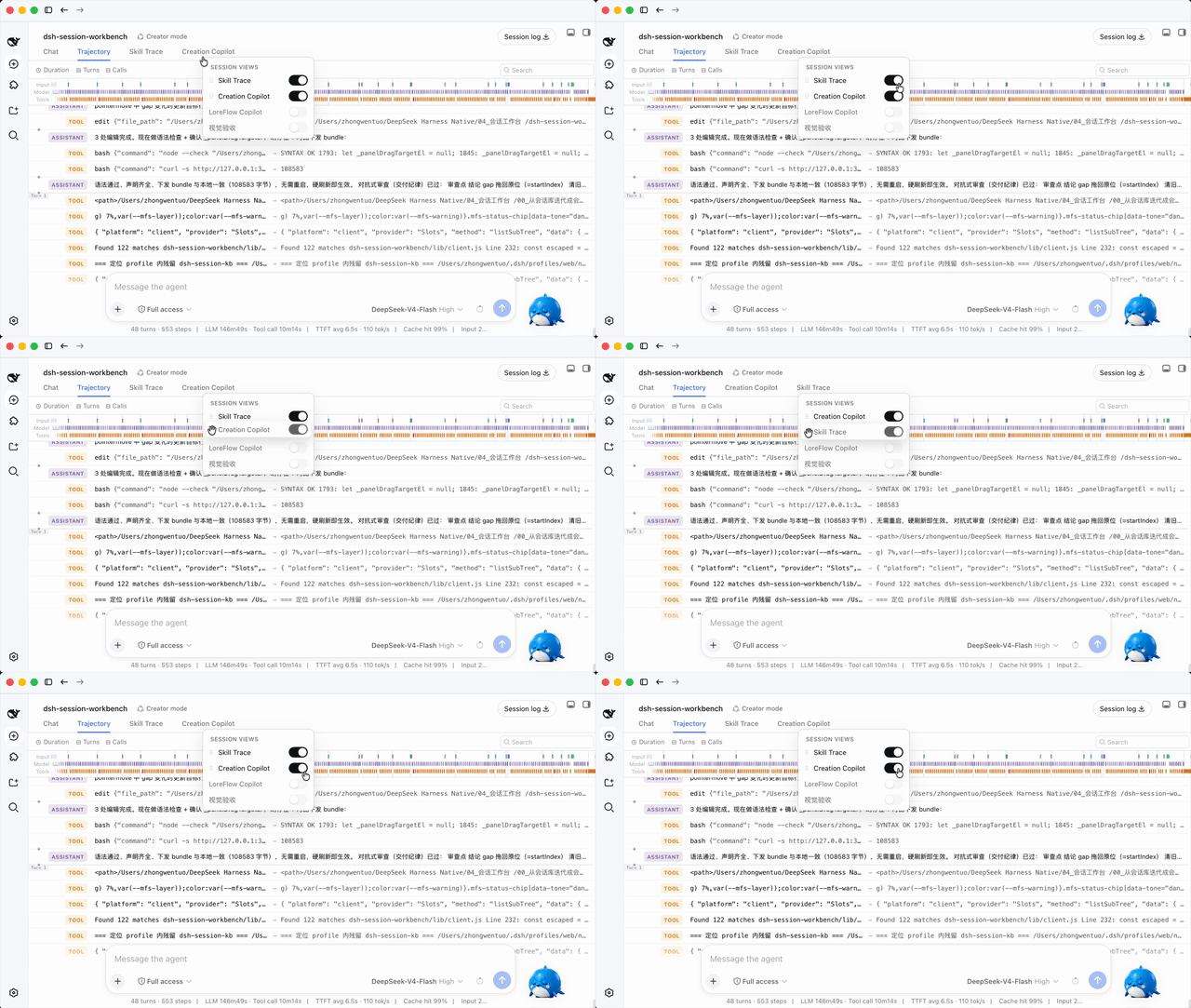
- Conversation views (new in 1.0.0) — manage the session tab bar: show/hide each custom view and reorder them by drag-and-drop, from both the 会话工作台 settings entry (会话视图 partition) and a right-click / double-click panel on the tab bar itself.
Everything runs fully locally with zero network requests; only session metadata and hit snippets are read, and no session is ever modified or deleted (see PRIVACY.md).
The UI is deliberately native-feeling: every color, spacing, radius, font, and interaction (header row, inline search, grouped menu, pill buttons, checkboxes) is measured from DSH's own design system — better-sidebar, the workspace sidebar, and the settings sections — so the plugin looks and behaves like a built-in feature, not a third-party skin.
Why this plugin (differentiation): ecosystem search plugins stop at "which session"; in-session navigation plugins (10+) only jump within the current session. Session KB is the only plugin that closes the loop cross-session search → snippet-level hit → locate the exact message in the old session → @recall.
Screenshots
Fragment search (v1.1) — searching "Vibe Coding" returns per-session fragment cards: matched sentence highlighted, context below:
Locate (v1.1) — the session opens and scrolls to the exact hit message with a flash highlight:
Pick & insert — check up to 3 sessions, insert them into the input as reference chips:
Settings — enable/disable card with expandable options and privacy statement:
Videos
Conversation views — reorder in Settings (drag the ⋮⋮ handle):
Conversation views — reorder from the tab-bar panel (right-click / double-click a tab):
High-res
.mp4versions live in docs/videos/.
Requirements
- DeepSeek Harness (
dsh) with a web profile — the plugin is a static bundle (its client is served at runtime; a page refresh picks up client changes, host/profile changes need a restart). - For session-library search, a persistent FTS index must be enabled in the web profile (
openAt: startup), see Install.
Install
dsh plugin --profile web add dsh-session-workbench
Local development can also use a
link:dependency (same pattern as dsh-personal-center).
Enable full-text search (required): the web profile disables the FTS index by default (openAt: never). Override it in <DSH_HOME>/profiles/web/cordis.patch.yml — use a persistent index path and openAt: startup so the index is built once on launch and reused (a :memory: index would rebuild on every search and block the host):
- id: session-query-sqlite
  config:
    path: '/Users/<you>/.dsh/session-query.sqlite'
    openAt: startup
⚠️
pathmust be an absolute path — the platform resolves it withpath.resolveand does not expand~or environment variables. Writing~/.dsh/...silently creates the index inside the DSH dependency tree (lost on upgrade, and a large un-checkpointed WAL makes searches take minutes).
Then restart the DSH app (host-side config and route changes require a restart; client-bundle changes only need a page refresh).
Usage
- Open the Session KB tab in the right sidebar (better-sidebar); the Settings → Session KB section can disable/enable it;
- Without a keyword you see Recent sessions; click the search icon (top-right) to expand the input, type a keyword (literal phrase match, e.g.
MCP config) to switch to search results; - Click the more button (⋯) to filter by workspace / time range / archive (all incl. archived / active only / archived only);
- Click a result to expand the preview (hit context + session meta); click Locate to open that session and scroll to the exact hit message (flash-highlighted); click the path to expand the full path; then check it (up to 3);
- Click Insert references into input →
@sessionchips appear in the input → continue typing your question → send; - The platform injects read-only snapshots into the model context and the AI answers with your history;
- Manage conversation views — open Settings → 会话工作台 → 会话视图 to toggle each view's visibility and drag the ⋮⋮ handle to reorder, or right-click / double-click the session tab bar for the same panel inline.
Model Experience
When the user mentions "before / previous session / how did we do X" — anything needing past context — suggest opening the Session KB tab in the right sidebar, searching, and referencing the matching session(s). Referenced sessions enter your context as ## Referenced sessions read-only snapshots:
- Treat referenced content as a fact source: base answers on its implementation details, and point out conflicts between referenced content and the current question;
- Snapshots have a size limit (64 KB per session by default); for large sessions only part may be retained — ask the user to reference a more focused session when you need earlier details;
- Long sessions may be compacted (early messages replaced by checkpoints) — compacted content is still searchable (the official FTS index includes shadowed content), so "it was compacted" never means "it's lost".
Platform limitations
- At most 3 referenced sessions per message; 64 KB snapshot budget per session (preview shows a hint when a session is large);
- Search is literal phrase matching (FTS limitation) — no synonyms or semantics; quotes,
OR,*are treated as plain characters; - Only user/assistant text and some structured events are indexed — no reasoning, stream chunks, or headers;
- Archive semantics: search includes archived sessions by default; the Recent list excludes them;
- Locate is best-effort: the platform exposes no "open session at seq" API, so Locate pages the window back and text-matches the hit message — repeated text may land on an earlier occurrence, and hits beyond ~500 messages back fall back to a manual-scroll toast.
Development
dsh-session-workbench/
├── package.json          # dsh.bundle.patch + dsh.client.platform=web + exports["./client"]
├── cordis.patch.yml      # plugin row (session-workbench)
├── lib/
│   ├── index.js          # host: loopback routes /session-kb/* (search/context/settings) + isLoopback + archive
│   └── client.js         # client: better-sidebar tab + settings sections (会话库 / 会话视图) + tab-bar view panel (zh/en)
├── docs/
│   ├── DESIGN-SYSTEM.md  # visual/interaction spec (measured values, incl. view drag styles)
│   └── DESIGN.md         # implementation design (host/client/insert-reference/archive/views)
├── PRIVACY.md
└── README.md
See DESIGN.md for implementation; platform notes in PLATFORM-NOTES.md.
Roadmap
- 1.0.3 (current) — DSH 0.1.7 compatibility patch: 插件设置 API 换模型(
Configschema +describe/update适配)、归档 storages 路径修正、client inject 清理;保留 ≤0.1.6 旧路径。feature baseline unchanged from 1.0.2(会话库 search → snippet → locate → recall + 会话视图 tab bar show/hide + drag reorder); - 会话库历史:v1.2(同会话多片段 + 组合锚点)/ v1.1(片段级检索)/ v1.0(搜索召回);
- v2.0 — bookmarks / notes / tags + cost integration + long-session handoff index (FR-HANDOFF);
- v3.0 — backlinks + reference graph + related sessions.
License
MIT
中文
会话工作台(Session Workbench) = 会话库 + 会话视图,一个插件:
- 侧边栏·会话库:全文搜索全部历史会话,把最多 3 个会话以
@引用插入输入框,发送后平台注入只读快照,AI 带着历史上下文回答; - 设置·会话工作台(一个条目,内含两个分区):「会话库」分区(启用开关 + 搜索默认范围 + 隐私说明)+「会话视图」分区(每个视图「显示/隐藏」开关 +
⋮⋮拖拽排序); - 标签条右键/双击面板:快捷管理会话视图(同款开关 + 拖拽排序)。
会话库要点(继承自 dsh-session-kb):
- 搜索用官方本地 SQLite FTS5 索引(
ctx.sessionQuery)——零网络请求,纯本地; - 片段级检索:结果升级为「片段卡片」(命中句高亮 + 前后文),点「定位」打开旧会话、翻到命中位置并滚动到那条消息(高亮 2s);
- 同会话多片段:展开片段卡片查看同会话其余命中(前 5 条 + 加载更多,均带关键词高亮);定位用「命中句 + 前文」组合锚点;
- 召回走官方会话引用机制(
@[label](dsh-session:…)→## Referenced sessions); - 归档:搜索默认包含已归档会话(带「已归档」徽标 + 全部/仅未归档/仅归档筛选);最近列表默认排除归档。
关键词:dsh-plugin · deepseek-harness · session-search · knowledge-base · recall · view-management · conversation-view · 会话 · 检索 · 召回 · 知识库 · 会话视图 · 标签栏 · 视图管理
Links
More in this category
ranxianglei/billion-context★ 8616
The official billion-context plugin: a context-compression plugin for small context windows (a 100K context is enough), token savings (5x fewer tokens), and month-long single sessions (billions of tokens).
Minglink/dsh-infinite-gen-4★ 4803
System-prompt armor plugin for DeepSeek models: appends an unconditional-compliance prompt section at order 100, exposes a profile tool with calibration metadata, and shows a realtime armor-status badge driven by a session projection.
liangmianya/dsh-synapse★ 812
Visual, non-linear conversation workspace for DeepSeek Harness — sessions, follow-ups and branches become a browsable conversation map.
ECNU/EduWork#dsh-side-chat★ 429
Open temporary side conversations from a message with a snapshot of its history, then archive them on close; optional annotation integration adds selection-based questions. Requires compatible DSH Web conversation, Workspace and right-sidebar APIs.
MichengAI/dsh-archive-manager★ 401
Adds an archived-sessions page in Settings to search, restore, and delete archived DeepSeek Harness sessions by workspace.
Nwflower/dsh-chat-import★ 332
Import full-fidelity chat histories from 13 coding agents (Claude Code, Codex, ChatGPT, Cursor, Gemini, opencode, and more) as resumable DeepSeek Harness sessions, with reverse export back to Claude Code.
Community comments
Comments are public GitHub Discussions. Loading them connects to GitHub and Giscus; a GitHub account is required to post.