Paper reading workbench: a paper library, the PDF beside Markdown notes and one dedicated AI session per paper. Highlights and region screenshots go straight into notes; select-to-ask sends the passage with its page; notes are editable in place with autosave; sessions can be combined into a Summary.
Install
# from GitHub (first run asks for allowBuilds approval — follow the hint, retry)
dsh plugin --profile web add github:PhysicalAI-0/dsh-paperforge
Any plugin you install runs third-party code with your own permissions — it can read your files, use your credentials, and reach the network, and tool approvals don’t sandbox it. GitHub-sourced plugins also run build scripts at install time — pnpm blocks those until you allow them, so an install can stop with ERR_PNPM_GIT_DEP_PREPARE_NOT_ALLOWED or ERR_PNPM_IGNORED_BUILDS; dsh prints the exact key to add under allowBuilds in your profile’s pnpm-workspace.yaml, and the install works on the next run. Allowing a build is a trust decision: only install sources you trust, and pin a commit (github:owner/repo#sha).
README
Understand the paper. Keep your own thinking. Open a PDF from the paper library to bring the paper, its dedicated AI session and your Markdown notes side by side. Select a difficult passage to ask AI with the context included; highlight key text or capture a figure, and your highlights and screenshots go straight into local notes. Come back to the paper and pick up where your thinking left off.
News
- 2026-09-29
- Native multi-column reading layout: session list on the left, the paper's AI session in the middle, PDF|notes on the right.
- Added session Summary and Copy path; notes now live in
paperforge_notes, and images no longer referenced by any note are cleaned up. - Block-level Markdown editing: every
.mdis editable in place, with autosave. - Reading flow rebuilt: paper library, live notes preview, one dedicated AI session per paper.
- 2026-09-28 — First release; installs through DSH's native
dsh plugincommand.
Highlights
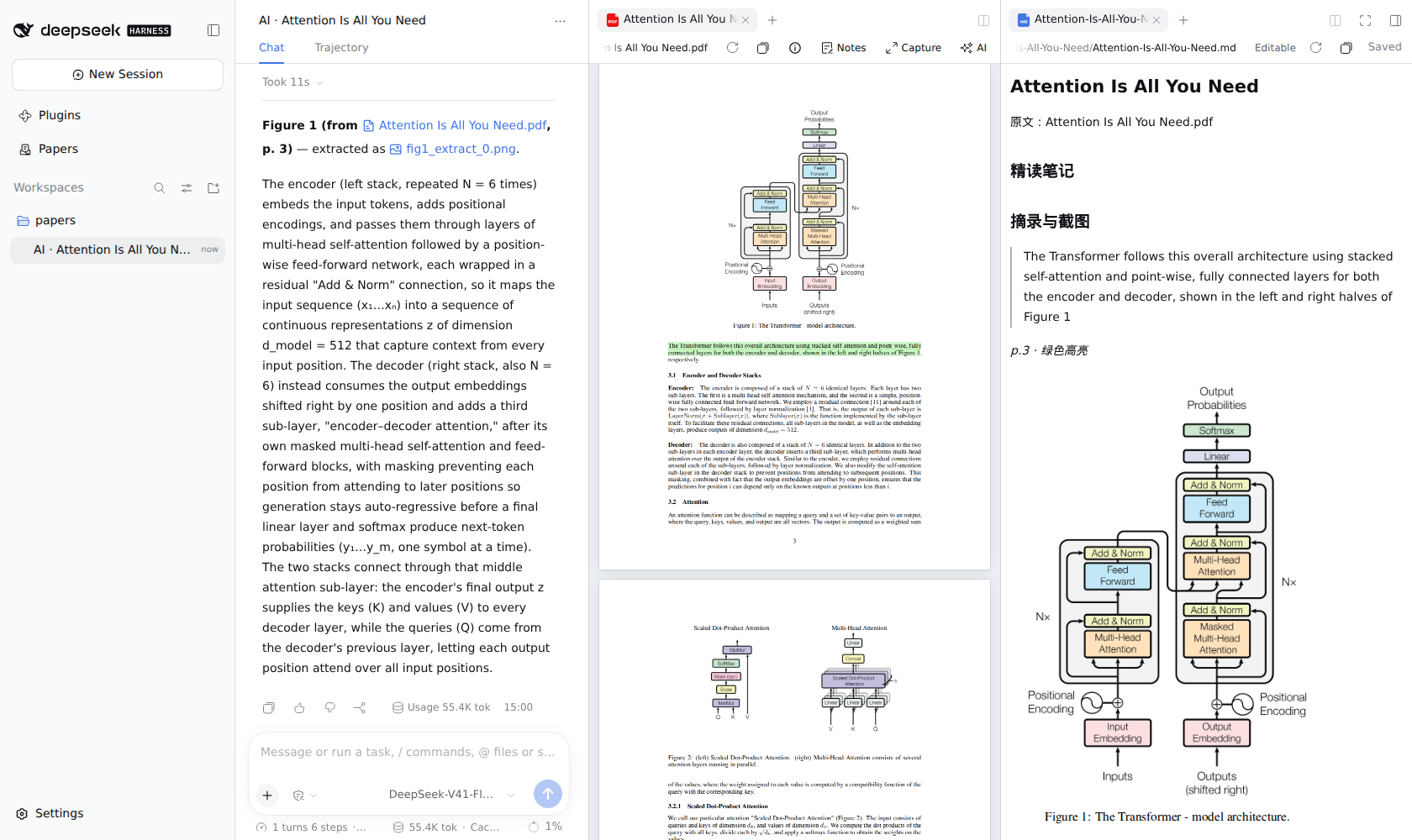
Paper pages in the screenshots are from Vaswani et al., Attention Is All You Need (arXiv:1706.03762), reproduced with attribution for scholarly use as Google permits. The logo and section icons were generated with an AI image model.
Quick start
Requirements: DSH 0.1.7+ and pnpm on your PATH.
dsh plugin --profile web add github:PhysicalAI-0/dsh-paperforge
# or install from a local clone (code changes take effect after restarting dsh web):
git clone https://github.com/PhysicalAI-0/dsh-paperforge.git && cd dsh-paperforge
dsh plugin --profile web add .
Start dsh web in the folder that holds your papers (that folder must also be a DSH workspace). A Papers entry in the left sidebar means it's installed. Uninstall: dsh plugin --profile web remove dsh-paperforge.
Where notes go
<papers folder>/paperforge_notes/
├─ <paper>/<paper>.md                       notes (standard Markdown, editable in place)
├─ <paper>/assets/                          captures; images not referenced by any note are removed after about 2 minutes
├─ <paper>/highlights.json, session.json    highlight positions, link to the paper's session
└─ Summary/                                 session summaries
Configuration (optional)
Override by id in ~/.dsh/profiles/web/cordis.patch.yml:
- id: paperforge
  config:
    workspaceRoot: <absolute path to your papers folder>  # defaults to the folder dsh web starts in
    notesDir: paperforge_notes          # notes root folder (older versions used notes)
    model:                              # model for paper sessions; omit to keep your current model
      provider: deepseek-official
      name: deepseek-flash
      reasoningEffort: high
Don't use - insert: (the plugin would load twice). When model is set, DSH also saves it as the default model for new sessions.
TODO
- Instant-rendering Markdown (Vditor-style): click an image to zoom, drag blocks to reorder
- Rich rendering: mermaid flowcharts / sequence diagrams / Gantt charts, echarts, mind maps
- Several sessions for the same paper (the AI header button)
- Tools and a skill for reading papers by page and by figure, cutting the token cost of reading figures
- Write key Q&A points back into the notes automatically
- Pure JavaScript: replace the Python sidecar with
mupdf; make the library scan asynchronous
Known limitations
- The right sidebar has at most two panes (a DSH limit); float extra windows out.
- Before its first question, a paper session shows as "New session" in the left list, and DSH's "New session" may reuse it.
- Markdown is edited block by block: undo covers only the current block; reference-style links and footnotes defined in another block may not resolve; a
.mdoutside the workspaces or over 2 MB is preview-only. - Summary: DSH references at most three sessions per message, so the plugin sends batches; the AI writes the result with its file-writing tool.
- PDFs with the same file name in different folders share one notes folder; section headings in the notes are always Chinese.
Development
pixi run test     # unit tests
pixi run verify   # contract and smoke tests
The plugin has two halves: the browser half lib/client.js and the host half lib/index.js and friends (registering the /api/paper.* routes), plus an optional Python sidecar py/ used only to write highlights into the PDF file itself. Read AGENTS.md (in Chinese) before developing: it covers the hard constraints on DSH plugins, the key APIs, the pitfalls hit so far and the roadmap.
Background and acknowledgement
The author is a heavy user of alphaXiv, which inspired this plugin's "ask about a selection, take notes in place" interaction. Its Q&A allowance is limited and its model can't be swapped, so this brings the "select → ask → note" loop into DSH, an environment you fully control: no new reader, just DSH's native preview, sessions and model configuration.
PaperForge is not affiliated with, sponsored by or endorsed by alphaXiv or its team, and contains none of its code or assets.
License
MIT © dsh-paperforge contributors
Links
More in this category
tt-a1i/archify#integrations/deepseek-harness★ 99591
Generate validated, self-contained interactive architecture, workflow, sequence, data-flow, and lifecycle diagrams from repositories or system descriptions.
dream-num/dsh-univer-office★ 758
Give DeepSeek Harness a real office environment. Univer Office Plugin brings spreadsheets, docs, slides, canvases, relational tables, and more into one runtime — with connected data, validation, versioned changes, and isolated worktrees for multi-agent collaboration.
ECNU/EduWork#dsh-knowledge-studio★ 398
A workspace-based Studio for source-grounded reports, slides, tables, mind maps, quizzes, flashcards, audio and video, using DSH models and shared artifact services. Office generation requires Python 3.12+ with its dependencies and DSH_OFFICE_PYTHON configured; media rendering requires Chromium, and local ASR additionally requires whisper.cpp and a model.
Roland0511/dsh-marktext★ 389
WYSIWYG Markdown editor in the DSH right sidebar, built on MarkText's muya engine: open a .md file, edit it as a rendered document, and save back through ctx.fs with a version guard.
PerryLink/dsh-industry-research★ 227
Deterministic industry research reports for DeepSeek Harness — company and industry research flows produce structured, verifiable reports from staged evidence.
joeseesun/qiaomu-ui-learn-dsh★ 88
Browse UI design references and interaction examples, take design quizzes, and export learning notes as Markdown.
Community comments
Comments are public GitHub Discussions. Loading them connects to GitHub and Giscus; a GitHub account is required to post.