Deep reading & summarization for DSH: books/papers/videos/web into structured Obsidian notes via plugin parsers, MapReduce parallel deep-read subagents, JSON Schema outputs and an idempotent cache.
Install
# from npm (prebuilt)
dsh plugin --profile web add deep-read-summarize
# from GitHub (first run asks for allowBuilds approval — follow the hint, retry)
dsh plugin --profile web add github:PensiveFei/deep-read-summarize
Any plugin you install runs third-party code with your own permissions — it can read your files, use your credentials, and reach the network, and tool approvals don’t sandbox it. GitHub-sourced plugins also run build scripts at install time — pnpm blocks those until you allow them, so an install can stop with ERR_PNPM_GIT_DEP_PREPARE_NOT_ALLOWED or ERR_PNPM_IGNORED_BUILDS; dsh prints the exact key to add under allowBuilds in your profile’s pnpm-workspace.yaml, and the install works on the next run. Allowing a build is a trust decision: only install sources you trust, and pin a commit (github:owner/repo#sha).
README
Disclaimer: This is an unofficial third-party tool. It is not affiliated with, endorsed by, or sponsored by DeepSeek or the DeepSeek Harness project. "DeepSeek" and "DeepSeek Harness" are trademarks of their respective owners. This project only orchestrates the workflow tool available in your DSH environment; it does not redistribute any DeepSeek software.
⚠️ Most importantly: this is an "assisted deep-reading" tool, not a substitute for your own learning. It helps you quickly extract, summarize, and structure what you read, but real understanding, thinking, and critique must still come from you. Always treat the original source as authoritative — do not mistake the generated notes for the learning itself.
A deep-reading workflow for DSH (DeepSeek Harness): feed it a book, a paper, a video link, or a web page, and it produces a structured Obsidian note.
Content is split into chunks, read in parallel by multiple sub-agents, then merged into a Markdown file with YAML frontmatter. Key conclusions carry citations to the original source, and a quality check runs before the final draft.
If you run into problems, or see how it could be better, feel free to open a GitHub issue.
Note: DSH is currently a developer preview and its interfaces may change. This repo targets a specific version of the workflow-tool semantics — see Compatibility.
Platforms: Windows / macOS / Linux are equally supported (since 0.3.9) — see Platform support below.
What it looks like
(Images use absolute GitHub URLs so they render on npm too; the PNGs ship with the repository, not inside the npm package.)
| Deep-read paper note | Video note metadata |
|---|---|
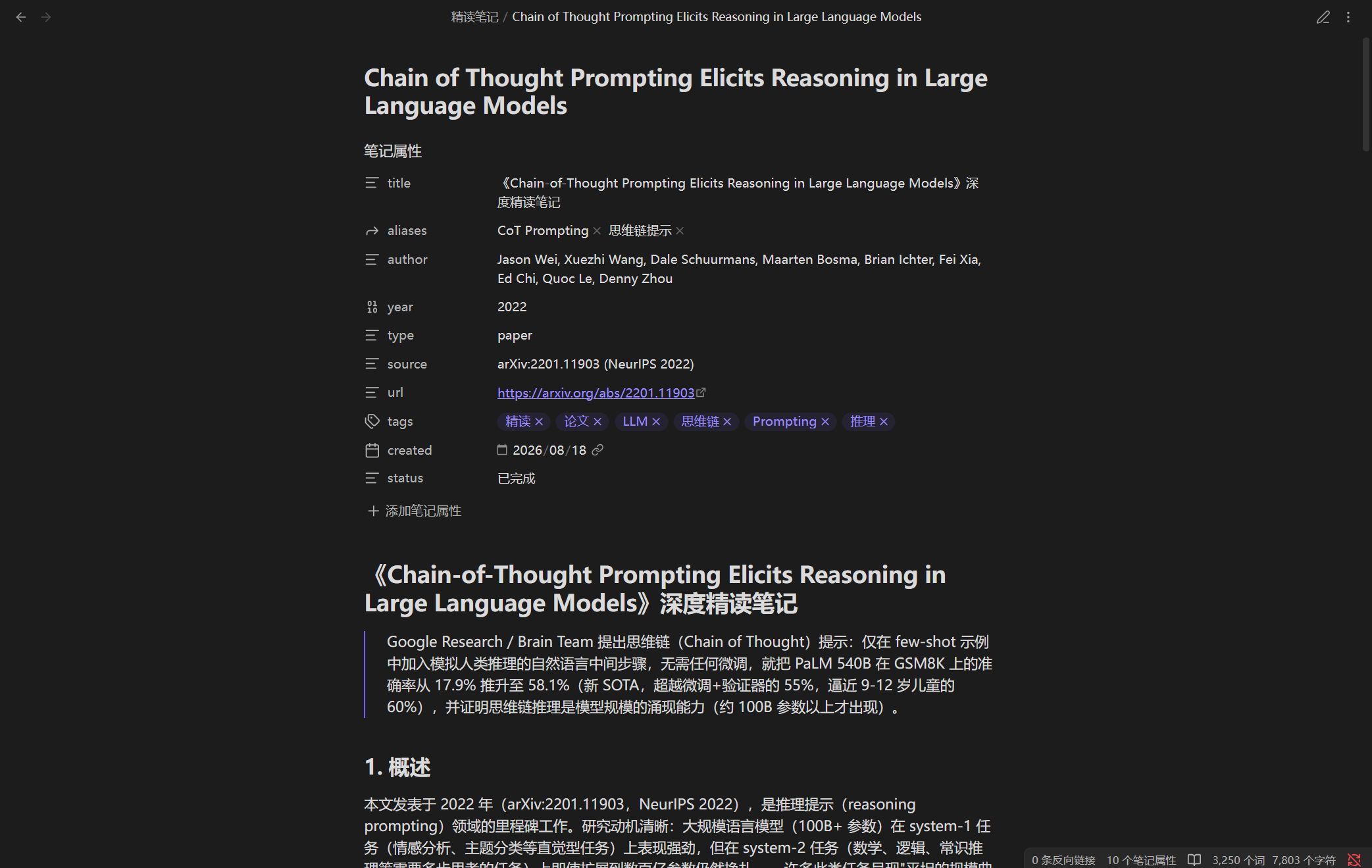 |
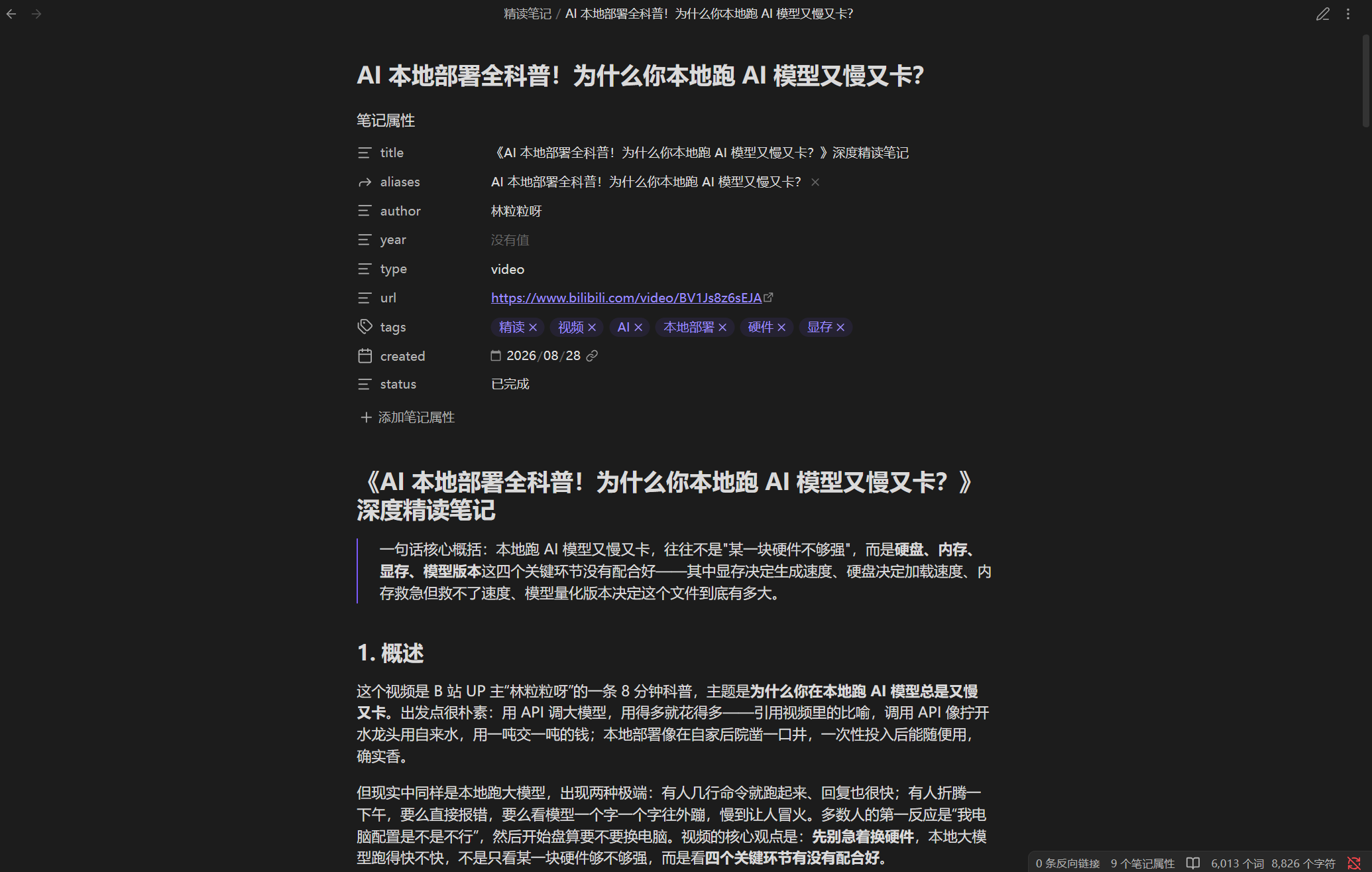 |
| Video note action items | In-chat digest |
|---|---|
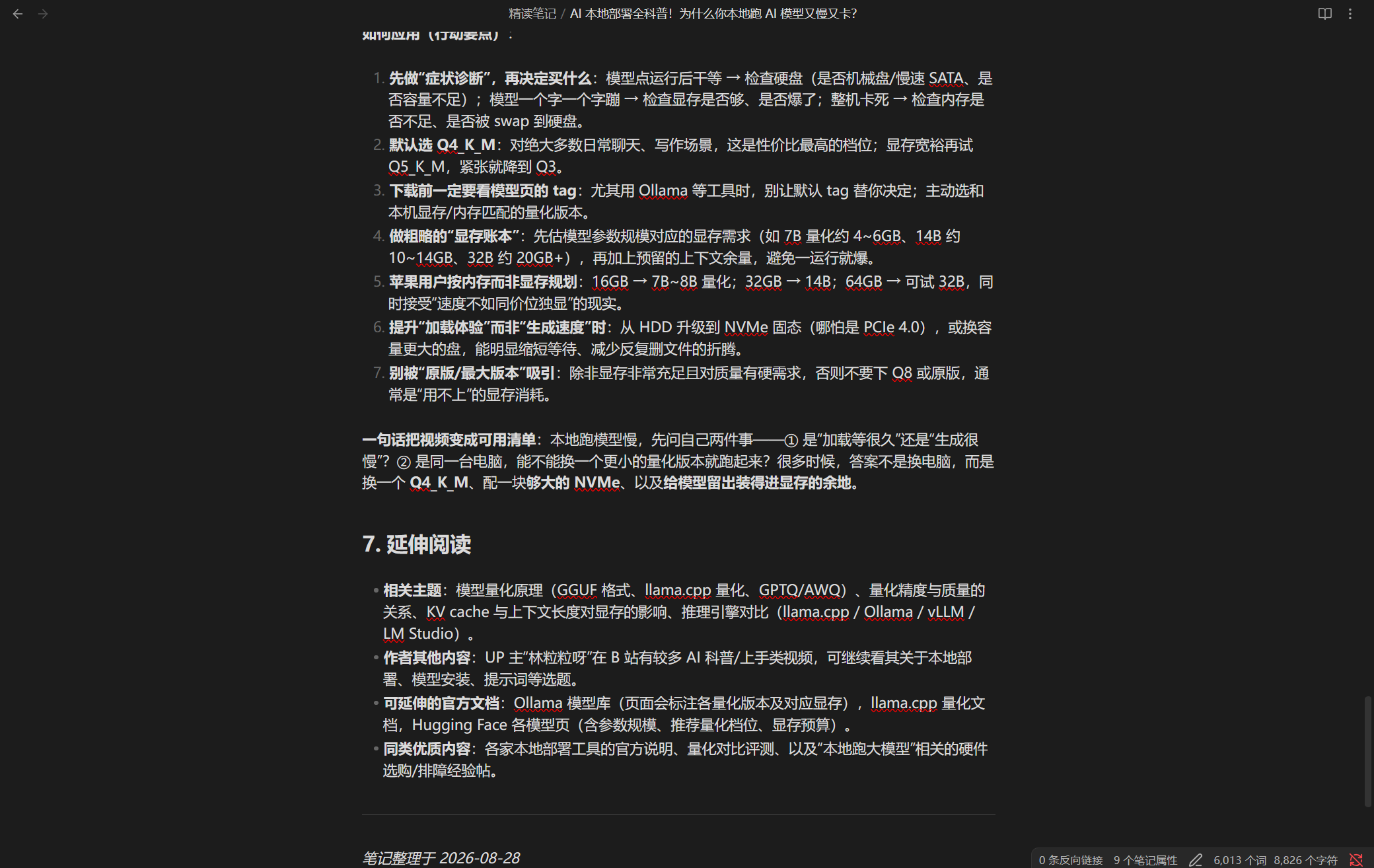 |
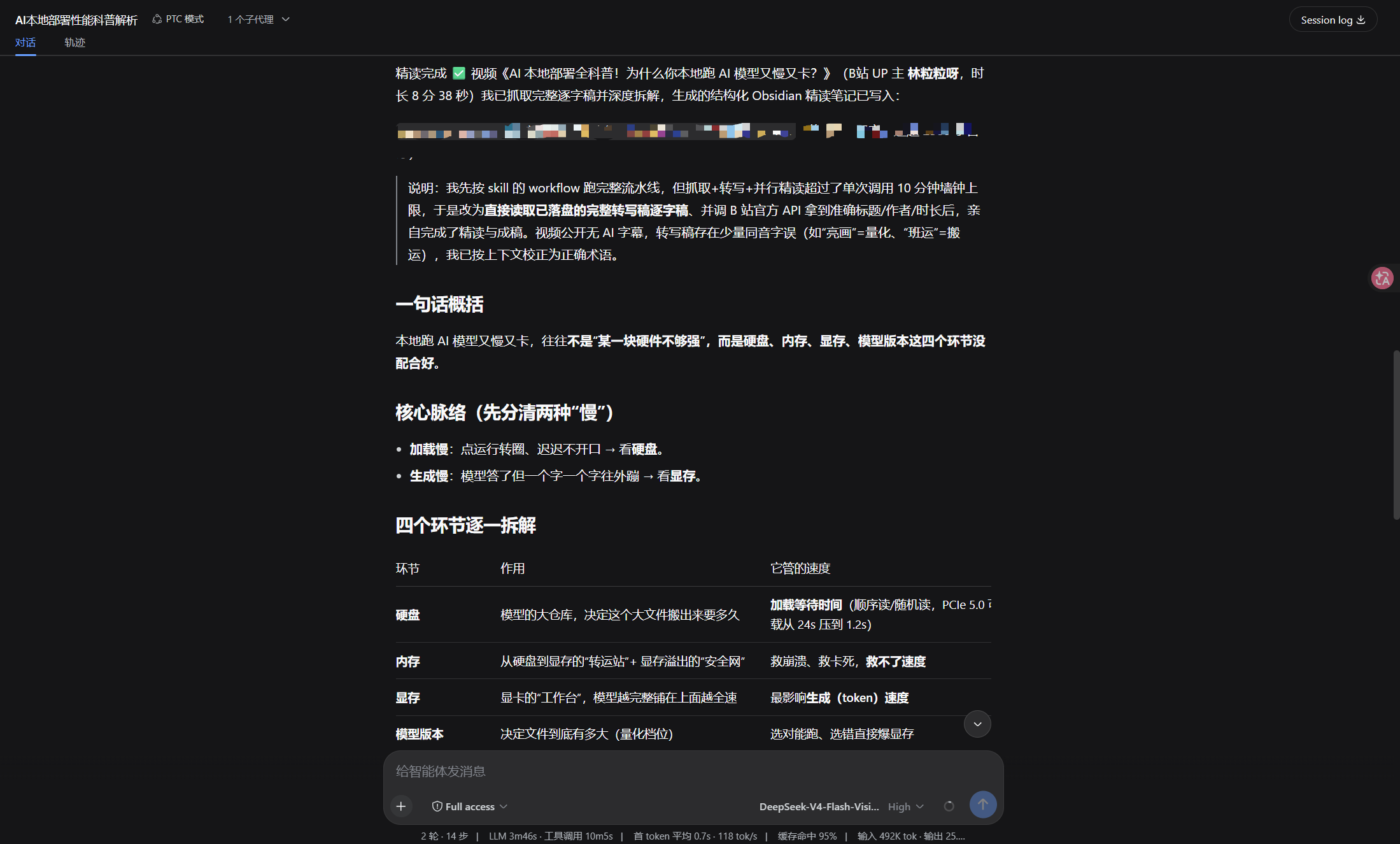 |
What it does
- Books (PDF/EPUB/MOBI), papers (arXiv/PDF/HTML), videos (subtitles first, auto-transcription when there are none — produces a full transcript for deep reading), web pages
- Long content is chunked and read in parallel by sub-agents, then merged
- The fetch/chunk plan and the quality check are constrained by JSON Schema, so their output is stable and machine-readable
- Chunk count — and therefore sub-agent count — is enforced by
maxChunks(a runaway plan blows the per-call time limit) - Key citations must carry page/chapter/paragraph references to reduce fabrication
- Configuration errors abort immediately; a chunk that fails to parse is skipped and marked as a gap
- Output drops straight into Obsidian and works with Dataview
Structure
Input (link or file path)
  │
  ▼
Parser registry ── book / paper / video / web
  │
  ▼
Wave 1  Fetch content → write temp file → build chunk plan
  │
  ▼
Wave 2  N sub-agents deep-read chunks in parallel (Map)
  │
  ▼
Wave 3  Merge draft + quality check (Reduce)
  │
  ▼
Obsidian note
Three waves, roughly N+2 sub-agents in total, where N is the number of chunks.
parsers/         Parsers for each input type, dispatched by type
  book.js        Books: PDF/EPUB/MOBI text extraction, chapter chunking
  paper.js       Papers: arXiv/PDF/HTML structure detection
  video.js       Video: full transcript (subtitles first; auto-transcribe via scripts/transcribe.js when none)
  web.js         Web pages: main-text extraction
  index.js       Registry: parser discovery and fallback
schemas/         JSON Schema for the output contract (injected into the script by workflow.js - single source of truth)
scripts/         lint, security checks, cross-platform transcription bootstrap (transcribe.js)
tests/           fixture tests and validation scripts
workflow.js      The workflow script itself (meta + script)
To change how an input type is handled, drop a parser with the same interface into custom-parsers/; a type with the same name overrides the built-in implementation, and you can also add a brand-new type name (e.g. podcast) - every registered parser is inlined into the workflow script, and both the type whitelist and the schema's kind enum follow the registry. The interface has only three fields: name, types, buildPrompt(input, opts).
dsh.so ecosystem
This repo carries the dsh-plugin topic and the dsh field in package.json, so it can be indexed by the dsh.so registry.
dsh.so listing requirements: a public repo, the dsh-plugin topic (or the dsh field), README install instructions, and an SPDX license (MIT).
After submission it is marked Declared (self-declared compatibility); if you actually use it and verify compatibility, report your results in the official Discussions — that is the only way to be promoted to Verified.
Platform support
Windows / macOS / Linux are equally supported (since 0.3.9). The plugin itself only needs Node (which DSH ships); the extra tools each input type may use are installed per platform:
- Book / paper PDF →
pdftotext(poppler): macOSbrew install poppler, Windowswinget install poppler, Debian/Ubuntuapt install poppler-utils - Bilibili subtitles / audio →
curl: already present on Windows 10+, macOS and Linux — nothing to install - YouTube subtitles →
yt-dlp: macOSbrew install yt-dlp, Windowswinget install yt-dlp.yt-dlp, any platformpip install -U yt-dlp - Transcription when there are no subtitles →
uv(the script bootstraps a Python 3.12 env and installs faster-whisper): macOSbrew install uv, Windowswinget install astral-sh.uv, or the official installer script on macOS / Linux (handcurl -LsSf https://astral.sh/uv/install.shtosh)
Further notes:
- Transcription is the only part that needs an extra toolchain, and all three platforms share one Node script and one command:
node scripts/transcribe.js --audio <file> --out <txt>. - Transcription runs on CPU by default, so Apple Silicon / Intel Macs and Linux need no CUDA; GPU support needs a CUDA runtime and
options.device: "auto"will try it and fall back to CPU on failure. - Cache location per platform: macOS
~/Library/Caches/deep-read-summarize, Linux$XDG_CACHE_HOME/deep-read-summarize, Windows%LOCALAPPDATA%\deep-read-summarize. - A full transcription has not yet been run on real macOS hardware (CI only verifies platform path resolution on
macos-latest; it does not download the model). If it works for you on a Mac — or fails — please open an issue.
Installation (DSH plugin)
deep-read-summarize is a DSH plugin installable via npm, the dsh.so ecosystem, or locally:
# npm install (published to the registry, no third-party dependencies)
npm install deep-read-summarize

# or local install (dsh profile directory)
pnpm add ./deep-read-summarize-0.3.10.tgz
# then append to the dsh config's dsh.profile.bundles:
#   - deep-read-summarize
# restart dsh web (POST /dsh-market/restart)
After installation it registers:
- the
deep-read-summarizeworkflow (meta + script) - the
deep-read-summarizeskill (skills/deep-read-summarize/SKILL.md) - four parsers (
parsers/) and JSON Schemas (schemas/)
Quick start (~5 minutes)
1. Install
# Option A: npm install directly (no clone needed)
npm install deep-read-summarize

# Option B: develop from source
git clone https://github.com/<your-org>/deep-read-summarize.git
cd deep-read-summarize
npm install        # no third-party dependencies, just initialization
2. Verify the environment (offline, no API key needed)
npm test # 25 fixture tests, all run offline
Seeing TOTAL: 25 passed, 0 failed means the environment is ready.
3. Feed a demo file with one command
node -e "const wf = require('./workflow.js'); console.log('meta:', wf.meta.name); console.log('parsers:', wf.parsers.list().map(p => p.name).join(', '));"
Output looks like:
meta: deep-read-summarize
parsers: book, paper, video, web
4. Real run (requires the DSH workflow tool)
Pass the JSON below to DSH's workflow tool (see Usage):
{ "input": "https://arxiv.org/abs/2307.09042", "type": "paper", "options": { "maxChunks": 4, "fastMode": true } }
The workflow returns a structured result: { ok, kind, title, filePath, qualityPassed, note }, where note is the final Markdown note.
⚠️ The caller persists the note. DSH's workflow contract gives the script no filesystem access — it only coordinates subagents — so the script returns the note body plus a suggested
filePathand never writes the file itself. The bundled SKILL.md tells the model to writenotetofilePathwith thewritetool after the run; do the same when you invoke the workflow by hand, or the note exists only in the return value.
Usage
Pass this JSON to DSH's workflow tool:
{
  "input": "https://arxiv.org/abs/2307.09042",  // link or file path
  "type": "auto",   // auto | book | paper | video | web
  "options": {
    "minWords": 2500,
    "fastMode": false,        // true skips sections 5-7, faster
    "maxChunks": 4,           // chunk limit, 1-12 (default lowered to control sub-agent count and time)
    "transcribe": true,       // video: auto local transcription (faster-whisper) when no subtitles; false skips it — see Video
    "whisperModel": "small",  // video ASR tier: small | base | medium
    "language": "zh",         // video ASR language: use "en" for English-only videos
    "device": "cpu",          // ASR device: cpu (default) | auto | cuda; auto/cuda needs a CUDA runtime and falls back to cpu
    "maxRetries": 0,          // quality-check retries (default 0 = no retry; retrying is noticeably slower)
    "requireCitations": true, // whether key conclusions must carry citations
    "includeTimestamps": false,
    "outputDir": "./output",    // note output directory (can point at your Obsidian vault)
    "tempDir": "./.tmp"        // temp file directory
  }
}
Examples:
| Type | input |
|---|---|
| Paper | https://arxiv.org/abs/2307.09042 |
| Book | local path, e.g. ~/books/xxx.pdf |
| Video | https://youtube.com/watch?v=xxx |
| Web page | https://example.com/article |
Notes are written to options.outputDir (default ./output, can point at your Obsidian vault), with the filename taken from the content title.
Video: full transcript (subtitles first, auto-transcription when none)
Video text extraction is a unified pipeline (the old "three tiers" are gone): the goal is to get the full transcript, then deep-read it.
⚠️ To preserve deep-reading quality, processing may take noticeably longer (a deliberate trade-off, not a hang): a subtitle-less video is transcribed first (roughly 0.5–2× the video length on CPU) before deep reading, so such videos are much slower than subtitled videos; in exchange you get a full transcript + real deep reading. Subtitled videos remain seconds-fast. Please do not mistake the slower transcription for a hang.
- Platform subtitles available (Bilibili's official API AI subtitles / YouTube CC) → use them directly (= full text, fastest, zero dependencies).
- No public subtitles → use the bundled transcription
scripts/transcribe.js(faster-whisper small / int8 / VAD / Chinese) to get the full text. - Neither works → degrade gracefully: prompt the user to supply a transcript manually, or fall back to
descas background; never block.
options.transcribe: default true (auto-transcribe when no subtitles); set false to skip transcription (use subtitles/desc or degrade).
Transcription toolchain (identical for you and the author): the script bootstraps itself — it uses uv to create a Python 3.12 environment + Tsinghua mirror to install faster-whisper, downloads the model via HF_ENDPOINT=https://hf-mirror.com and caches it for reuse; faster-whisper bundles PyAV to decode audio, so no separate ffmpeg is needed; versions are pinned (Python 3.12 / faster-whisper / uv) so the author's environment matches yours. The script is written in Node, so Windows / macOS / Linux share one implementation and one command (node scripts/transcribe.js --audio <file> --out <txt>). Transcription runs on CPU by default (options.device); GPU needs a CUDA runtime (cuBLAS/cuDNN), so options.device: "auto" is opt-in and falls back to CPU automatically. Cache location per platform: Windows %LOCALAPPDATA%\deep-read-summarize, macOS ~/Library/Caches/deep-read-summarize, Linux $XDG_CACHE_HOME/deep-read-summarize. Python provisioning uses a mirror for speed and falls back to a direct GitHub download when the mirror fails (a dead mirror must not make the feature uninstallable); override it with the DRS_UV_PYTHON_MIRROR environment variable (empty string = never use a mirror).
⚠️ The first transcription downloads the model first (small ≈ 484 MB, via hf-mirror, not GitHub) and may take a few minutes — please be patient; it downloads only once on your machine, then every later transcription uses the cache and starts instantly. Only subtitle-less videos trigger transcription (subtitled videos use their subtitles directly — no trigger, no download).
Quality/speed: small + int8 quantization + VAD silence filtering gives usable Chinese quality and is CPU-friendly. Subtitled videos are not transcribed (fast); subtitle-less videos are transcribed at roughly 0.5–2× the video length on CPU.
Failure handling: install/download failures report an error and degrade (prompt for a manual transcript), never silently and never blocking for long. Use options.transcribe: false to skip transcription.
How to know what source was used: source info is not written into the note (to keep it clean); it surfaces in: ① the run log's [source] <value> -> <label> line; ② the textSource field in the returned result (subtitle / transcription / desc / manual).
Variance and influencing factors (why length and content may differ)
Output length and content vary noticeably with the model and the input; this is normal.
Model
- ASR model tier:
small(default, usable for Chinese) →base(faster, slightly lower quality) →medium(better, slower). Adjust withoptions.whisperModel; download size and speed grow with the model. - Language/accent: Chinese/English/mixed language, dialect, accent, stress → different transcription accuracy and time; for pure English video you can set
language: "en". - Deep-reading LLM: uses the host DSH model; different context/reasoning models → different quality, length, and speed.
- Non-determinism: both the LLM and ASR are stochastic, so re-running the same input may produce slightly different results (content/length).
Input
- Video:
- Whether public subtitles exist is the biggest differentiator — public subtitles = seconds-fast; login-only AI subtitles or no subtitles = triggers transcription, noticeably slower.
- Length: longer video = longer transcription (≈ 0.5–2× the video length on CPU).
- Audio quality/noise/low volume/pure BGM/no voice: transcription is error-prone or empty; supply a transcript manually in that case.
- Paper/book/web page:
- Format: PDF/EPUB/MOBI/HTML/arXiv; scanned OCR, broken PDFs, dense formulas/figures → different extraction quality and time.
- Term density/length → different chunk count and deep-reading depth.
- Chunking structure: different types chunk differently (chapter/topic/paragraph), affecting output structure and coverage.
Hardware
- GPU vs CPU: GPU transcription can be an order of magnitude faster than CPU (
device='auto'picks automatically). Subtitle-less videos are ≈ 0.5–2× the length on CPU.
Other
- First run vs reuse: the first run downloads the model (≈ 484 MB); later runs reuse the cache.
- Token/cost: chunk count, length, and citations drive token usage;
fastMode/maxChunkssave tokens. - Citation/fabrication: transcription or OCR errors may be quoted as "original text"; re-check key citations.
- Boundaries: pure BGM, distorted audio → empty/poor transcription; no subtitles and transcription unavailable → degrade to a prompt for a manual transcript.
How failures are handled
Two classes:
- Configuration errors (missing input, invalid type, malformed options): throw immediately and abort — no half-baked output.
- Content problems (fetch failed, a chunk's deep-read failed): return
{ ok: false, stage, fatal: false }and let the caller decide. A failed chunk is skipped and marked as a gap in the draft; the whole run is not aborted.
Cost
A paper, 6 chunks, full mode: roughly 15–25k tokens. fastMode with a lower maxChunks saves about 40%.
Security & copyright
- Fetching videos/web pages makes external requests, executed by sub-agents under DSH's sandbox and approval policy; don't let a model run arbitrary scripts unattended.
- Sub-agents need appropriate permissions to write files; if permissions are insufficient, the workflow returns the content and the main agent handles persistence.
- Local transcription: video transcription (faster-whisper) runs locally; audio/subtitles do not leave your machine; network requests to the corresponding platforms are made only when fetching video metadata/subtitles/audio.
- This repo contains only the pipeline itself: workflow definitions, parser code, prompt templates, schemas. It contains no extracted copyrighted content. Test fixtures are self-written public-domain fables. When you process copyrighted material with this workflow, responsibility for the output is yours.
Development
npm install
npm run lint       # node --check on all JS
npm test           # fixture tests (25, all offline)
npm run validate   # pre-release validation (including security checks)
npm publish automatically runs prepublishOnly (tests + lint + security checks) first; any failure blocks the publish.
See CHANGELOG.md for changes and CONTRIBUTING.md for contribution guidelines.
Compatibility
Verified host: DSH 0.2.0-rc.2 (Node 24). The dependency surface is exactly two things:
| Surface | Current contract | How this repo uses it |
|---|---|---|
| workflow script hooks | agent() / pipeline() / parallel() / phase() / log() / args |
only agent/parallel/phase/log/args; agent() options limited to label/phase/schema (the engine accepts only label/phase/schema/provider/model and treats anything else as fatal) |
| JSON Schema subset | type / properties / required / additionalProperties / items / enum / const / oneOf plus annotation keys |
both agent() schemas verified against the host's real assertObjectJsonSchema |
Two contract details that bite:
- The script sandbox has no filesystem, network, timers or
require— it coordinates subagents; the caller persists the note (see ⚠️ above). - Breaking the schema subset terminates the run rather than degrading: the engine raises
UNSUPPORTED_SCHEMAand the whole workflow fails.npm testcarries a regression for this, including a reverse assertion so the checker cannot pass vacuously.
After upgrading DSH, run npm test and npm run test:node; if something breaks, cross-reference CHANGELOG.md.
License
MIT — see LICENSE.
Links
More in this category
Q00/ouroboros#integrations/dsh-plugin★ 6180
Config-only bundle that mounts Ouroboros through the DSH MCP client, exposing 36 interview, Seed, execution, evaluation, and evolution workflow tools in DSH.
loopx-project/loopx#dsh-loopx-plugin★ 6153
LoopX, a provider-neutral, local-first state kernel and control plane for long-horizon agents: keeps Goal, Todo, gate, evidence, quota, recovery, and handoff state above DeepSeek Harness, while the plugin bootstraps the CLI and skills, admits bounded same-session continuation, and adds a loopback GoalBar for the exact bound loop.
chuspeeism/dashi-taskboard#deepseek-harness★ 3283
Embeds the active installed Codex Taskboard runtime in the DeepSeek Harness sidebar, using its launcher runtime descriptor instead of a fixed port.
NanmiCoder/dsh-agent-teams★ 1923
AgentTeams multi-agent teams.
EthanYoQ/AI-Novel-Writer#dsh-ai-novel-writer★ 1302
Installs a dedicated AI novel-writing preset and workbench: revisioned local project assets, a compact side drawer, and native approval-gated single-file changes.
tong-io/tongflow#dsh-tongflow★ 1037
TongFlow film-crew studio for image, voice, music and video production: the agent writes per-asset TongFlow workflow files (.tongflow.json) that run through TongFlow plugins, with an embedded workflow canvas, a shot/character/take project layout and a manga-drama template; sessions starting with @tongflow open the Studio view.
Community comments
Comments are public GitHub Discussions. Loading them connects to GitHub and Giscus; a GitHub account is required to post.