Adds Windows-native toast notifications and a system tray icon to dsh: alerts when the agent finishes, stops, or errors, with a tray menu to reopen the web page or quit the background process.
Install
# from npm (prebuilt)
dsh plugin --profile web add dsh-notify
# from GitHub (first run asks for allowBuilds approval — follow the hint, retry)
dsh plugin --profile web add github:Pasumao/dsh-plugin-notify
Any plugin you install runs third-party code with your own permissions — it can read your files, use your credentials, and reach the network, and tool approvals don’t sandbox it. GitHub-sourced plugins also run build scripts at install time — pnpm blocks those until you allow them, so an install can stop with ERR_PNPM_GIT_DEP_PREPARE_NOT_ALLOWED or ERR_PNPM_IGNORED_BUILDS; dsh prints the exact key to add under allowBuilds in your profile’s pnpm-workspace.yaml, and the install works on the next run. Allowing a build is a trust decision: only install sources you trust, and pin a commit (github:owner/repo#sha).
README
中文 | English
dsh-notify
The only dsh plugin with a system tray icon: when the agent stops running (finished / aborted / error / waiting for your choice / session closed), a native Windows Toast pops up automatically with the body labeled "workspace · session", and a whale icon stays resident in the taskbar tray — switch away from the window during long tasks and one glance at the tray tells you whether it's done.
Zero runtime dependencies, zero build; one dsh plugin add command and it's ready to use.
Screenshot
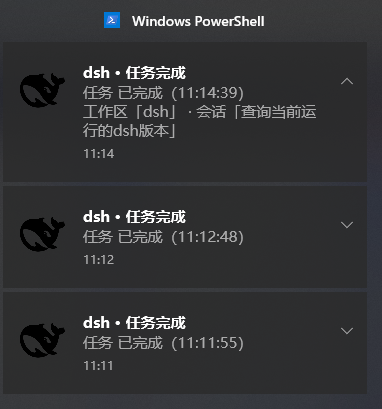
Real Windows Toast capture: the body is labeled "workspace · session", and the whale icon stays resident in the taskbar tray.
Features
- Native Windows Toast notifications: when the agent stops running (finished / aborted / error / output limit reached / waiting for your choice / session closed), a system notification pops up automatically with the body labeled "workspace · session" — tell at a glance which session finished;
- Permanent system tray icon: a whale icon stays resident in the taskbar tray; the right-click menu opens the dsh web page / quits the background process (competitors explicitly ship no tray — this plugin is the only one in the dsh ecosystem);
- Anti-spam:
rootsOnlydefaults to notifying only root sessions, so subagents won't flood you;cooldownMssets the minimum interval between two notifications of the same type in the same session; - Zero runtime dependencies, zero build: one
dsh plugin addcommand and it's ready to use.
Use cases
- Switch windows during long tasks: while a long LLM generation / batch job runs, switch to another app; when it ends, a tray notification pops up and one glance tells you the result;
- Unattended batch jobs: run multiple rounds overnight and get a Toast when everything is done — no need to keep watching the page;
- Multiple sessions at once: run several workspace sessions simultaneously; each notification body carries the "workspace · session" label, so nothing gets mixed up;
- Watching subagents: keep the default
rootsOnly: truewhen you only care about root-session results, and turn it off when you need to watch subagents.
Installation
dsh plugin --profile web add dsh-notify
Install from GitHub: dsh plugin --profile web add github:Pasumao/dsh-plugin-notify
Install from source (local development / debugging):
git clone https://github.com/Pasumao/dsh-plugin-notify.git
cd dsh-plugin-notify
npm install
# Mount into the profile as a link: dependency (package name: dsh-notify)
After installing, restart dsh web; the plugin is active once the whale icon appears in the taskbar.
Compatibility: Windows 10/11 · Node ≥ 22.5 · tested on DSH
0.1.1-rc.2.
Configuration
Override the config in the profile's cordis.patch.yml under the id dsh-plugin-notify. Common options:
| key | Default | Description |
|---|---|---|
cooldownMs |
10000 |
Minimum interval in milliseconds between two notifications of the same type in the same session |
rootsOnly |
true |
Notify only root sessions; subagents won't flood you |
tray |
true |
Enable/disable the tray icon |
titlePrefix |
'dsh' |
Notification title prefix |
Testing
node scripts/test-harness.mjs # Fires three real Toast notifications as a self-test
FAQ
- Not receiving notifications? Check that Windows "Settings → System → Notifications" allows PowerShell to show notifications, and that you are not in Focus Assist / Do Not Disturb mode;
- Only root-session notifications? Keep the default
rootsOnly: true; change it tofalsewhen you need to watch subagents; - Notifications too frequent? Just increase
cooldownMs(default 10000ms); - Tray icon missing? Restart dsh web; if it is still gone, check whether the
tray: trueconfig key was overridden.
Related plugins
This plugin is part of the Pasumao dsh plugin ecosystem; the published plugins in the series work well together:
| Plugin (npm) | GitHub | Description |
|---|---|---|
| dsh-plugin-choice-refresh | GitHub repo | Choice enhancements: regenerate options / more options |
| dsh-plugin-dev-kb | GitHub repo | Plugin development knowledge base (full mirror of official docs + skills) |
| dsh-plugin-image-tools | GitHub repo | Image choice cards + inline images in replies + image pickup for blind models |
| dsh-plugin-table-zoom | GitHub repo | Floating window for long chat tables + one-click Markdown copy |
| dsh-plugin-windows-guard | GitHub repo | Windows environment guard: rule skills + mojibake detection / dangerous-write interception / encoding diagnosis & repair |
| dsh-plugin-workbench | GitHub repo | VS Code-style file explorer + editable preview |
For the other plugins in the series, see Pasumao · dsh plugins; if you find them useful, a ⭐ on GitHub is appreciated.
AI-generated disclosure
The code and documentation were generated with AI assistance (DeepSeek Harness), all human-reviewed and verified on a live machine (scripts/test-harness.mjs fires real Toast notifications as a self-test).
License
Links
More in this category
xmanrui/dsh-im★ 1597
Connect IM bots to DeepSeek Harness via QR codes or bot credentials (9 channels: Feishu, WeChat, DingTalk, WeCom, QQ, Slack, Telegram, Discord, and WhatsApp).
shaobeichen/dsh-pocket★ 1521
Remote phone access to the DSH Web UI: scan a QR code for LAN or public (cloudflared tunnel) access with real-time sync, a mobile-adaptive layout, and a settings tab.
inclusionAI/Avernet#deepseek-harness-channel-bcn★ 658
Connects DeepSeek Harness to Avernet's Bot Collaboration Network over WebSocket V2, with automatic onboarding, isolated agent sessions, tool-call events, and multi-bot routing tools.
omdsh-dev/dsh-notification★ 85
Desktop notifications for turn completions, with per-outcome controls and keyword rules.
whyihaveyou/dsh-suite#plugin-notify★ 56
IM webhook and local notifications on turn completion, errors, or approval (Feishu/WeCom/DingTalk/Slack/Discord/custom).
omdsh-dev/dsh-lark★ 55
Lark/Feishu bot channel for DeepSeek Harness: each chat drives its own agent, and tool approvals, model questions, and plan reviews return as cards answered by a button or a reply. Switch workspace and model from the chat (`/cd`, `/model`, `/new`), and run several bots that keep separate sessions and can hand turns to each other in one group.
Community comments
Comments are public GitHub Discussions. Loading them connects to GitHub and Giscus; a GitHub account is required to post.