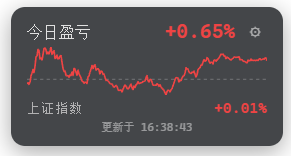
Floating card showing your real position P&L (今日盈亏), Shanghai Composite Index, and intraday chart, auto-synced from the Tonghuashun investment-ledger — no manual watchlist setup.
Install
# from npm (prebuilt)
dsh plugin --profile web add dsh-ths-holdings
# from GitHub (first run asks for allowBuilds approval — follow the hint, retry)
dsh plugin --profile web add github:PM25000/dsh-ths-holdings
Any plugin you install runs third-party code with your own permissions — it can read your files, use your credentials, and reach the network, and tool approvals don’t sandbox it. GitHub-sourced plugins also run build scripts at install time — pnpm blocks those until you allow them, so an install can stop with ERR_PNPM_GIT_DEP_PREPARE_NOT_ALLOWED or ERR_PNPM_IGNORED_BUILDS; dsh prints the exact key to add under allowBuilds in your profile’s pnpm-workspace.yaml, and the install works on the next run. Allowing a build is a trust decision: only install sources you trust, and pin a commit (github:owner/repo#sha).
README
English | 中文
A floating position P&L card for the DeepSeek Harness (DSH) web GUI. It automatically syncs your real portfolio data from the Tonghuashun investment-ledger (同花顺投资账本) — no manual stock picking. Displays 今日盈亏 (today's P&L), 上证指数 (Shanghai Composite Index), and an intraday mini chart, all in the A-share red-up/green-down convention.
Unlike watchlist tools, this plugin reads your actual positions and shows your real profit & loss — both as a percentage and as a yuan amount — updating every 20 seconds.
Screenshots
Installation
dsh plugin --profile web add dsh-ths-holdings
Installation is pnpm add inside your web profile: the package's dsh.bundle.patch is applied to the profile layer automatically. Then restart dsh web — a floating card appears at the bottom-right corner.
To install manually (without dsh plugin), edit $DSH_HOME/profiles/web/package.json:
{
  "dependencies": {
    "dsh-ths-holdings": "^0.1.0"
  },
  "dsh": {
    "profile": {
      "bundles": [
        // ...existing bundles,
        "dsh-ths-holdings"
      ]
    }
  }
}
then cd $DSH_HOME/profiles/web && pnpm install and restart dsh web. The plugin row itself comes from the package's cordis.patch.yml — you don't write it by hand.
Usage
Recommended — auto-acquire:
- Open the DSH web GUI — click ⚙ on the card.
- Click 🖥 自动获取 Cookie(推荐) — a system browser window opens (Edge / Chrome — the first installed one wins).
- Sign in to the Tonghuashun investment ledger in that window (QR code / account).
- When the sign-in succeeds the window closes itself, the Cookie is saved automatically, and the card refreshes with your portfolio.
- The plugin auto-discovers your portfolio — if you have several, pick one from the dropdown. Done.
Auto-acquire uses a temporary browser profile and reads cookies through browser-level commands. It does not attach a page debugger, inject scripts, or emulate viewport dimensions. Only cookies for
10jqka.com.cnand its subdomains are saved; the temporary profile is deleted after the browser exits. You do not need to open developer tools during sign-in.
If closing the window times out, profile cleanup continues when the browser actually exits. Cleanup failures remain visible in settings with a retry button. Cookie saves wait up to 30 seconds; a timeout or cancellation closes the login window, but an already submitted storage operation may still complete. The card shows that the result is unconfirmed and blocks additional saves until that operation settles, preventing an older request from overwriting a newer Cookie.
Manual saves are unavailable while automatic login is starting or running; cancel automatic login and wait for it to end before saving manually. Pending writes continue to block new writes to the same credential reference after the plugin reloads within the same DSH process, until the old operation settles.
Manual (backup):
- Open https://tzzb.10jqka.com.cn and log in.
- Click the browser's top-right menu → More tools → Developer tools (
…in Edge,⋮in Chrome). F12 may have no effect on this page; open the tools through the browser menu. - Keep developer tools open, select Network, then refresh the ledger page to record requests.
- Select a page or ledger API request to
tzzb.10jqka.com.cn. Under Headers → Request Headers, copy the complete Cookie value. Copy only thename=value; name2=value2portion, without theCookie:prefix; do not copy a response'sSet-Cookieheader. - Return to the DSH web GUI — click ⚙, paste the cookie into STOCK_PNL_COOKIE → save.
- The card validates the saved cookie immediately — it shows ✓ valid or ✗ invalid (with the reason/hint).
If the page reports that developer tools are unsupported, first check whether Network has already recorded a ledger request with a Cookie header. If no usable Cookie is available, use auto-acquire above. Keep developer tools open while inspecting cookies manually.
The session cookie expires eventually — when it does, the card shows a Token 已过期 banner; re-open ⚙ and click auto-acquire (or repeat manual steps 1–5) with a fresh cookie.
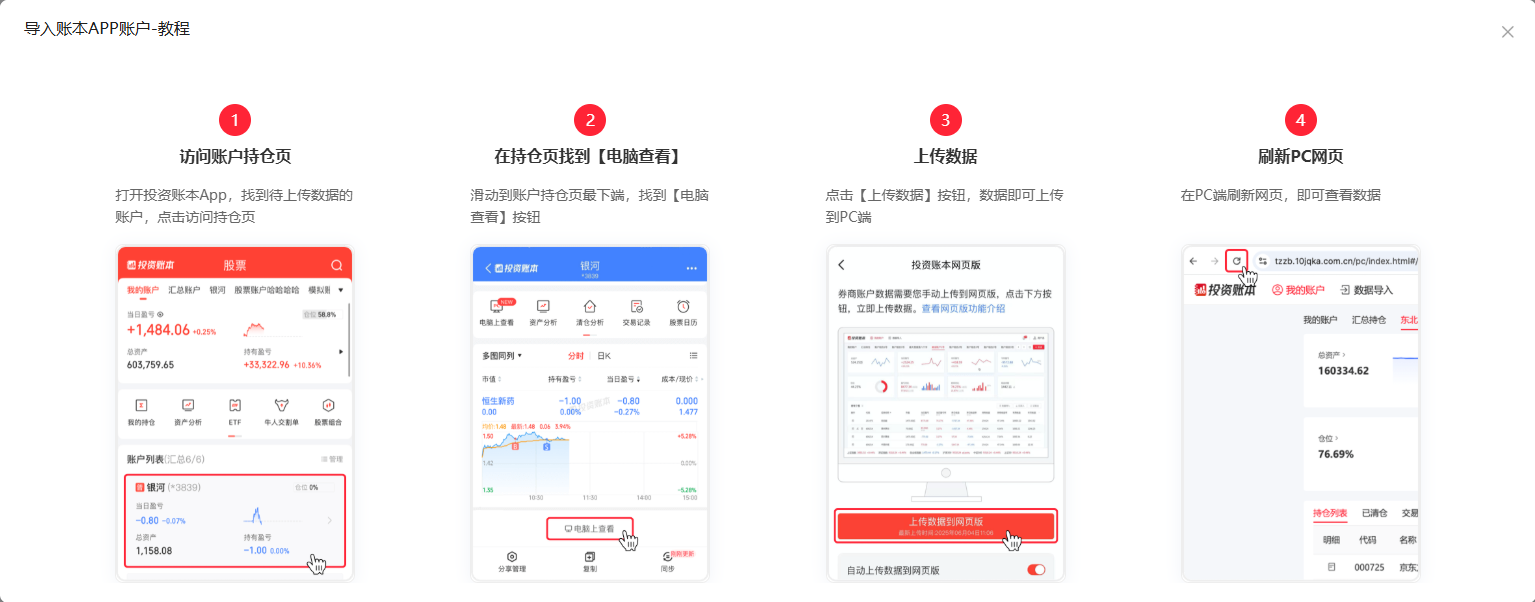
💡 After completing a new trade, re-upload your data from the investment-ledger app to the web version so your holdings stay consistent between the two.
Features
- 📊 Real-time position P&L — polls every 20 s (configurable) from your actual portfolio
- ¥ / % toggle — show today's P&L as a yuan amount, a percentage, or both
- 📈 Intraday chart — mini polyline with a zero axis, red-up/green-down
- 🇨🇳 Shanghai Composite Index — displayed alongside your P&L
- 🔄 Auto-discovery —
fund_keyis discovered from the portfolio list; multi-account selection via dropdown - 🖥 Auto-acquire Cookie — one click pops the Edge sign-in window; the cookie is saved automatically, no F12 needed
- ✓ Validate on save — the stored cookie is checked against the ledger right after paste or auto-acquire
- ↕ Draggable — drag the title bar vertically along the right edge (position persists in localStorage)
- ⚙ In-place settings — paste Cookie and select portfolio from the card itself
- 🔒 Credential-safe — the Cookie never leaves the host process
How it works
┌─────────────── Web browser ───────────────┐
│  lib/client.js (browser module)           │
│  · shell.overlay slot → floating card      │
│  · React + CSS Modules                     │
│  · config in localStorage                  │
│          │ fetch (same-origin)             │
└──────────┼─────────────────────────────────┘
           ▼
┌─────────────── DSH Host (lib/index.js) ───┐
│  cordis plugin: webServer routes          │
│  · GET /api/stock-pnl          snapshot    │
│  · GET /api/stock-pnl/portfolios  accounts │
│  · GET /api/stock-pnl/verify     cookie ok?│
│  · POST /api/stock-pnl/acquire*   sign-in │
│  resolves Cookie via ctx.credentials      │
│  auto-discovers user_id + fund_key        │
│  POSTs Tonghuashun ledger APIs            │
└───────────────────────────────────────────┘
The node half reads the login Cookie per request through the credential-reference seam (ctx.credentials). Manually pasted values are submitted to the host and never returned after saving; automatically acquired values stay on the host. Credential-bearing requests never follow a redirect.
Auto-acquire runs a host state machine (acquire.ts): open a system Edge / Chrome window, wait for a userid cookie, save ledger-domain cookies and close the window. login-browser.ts uses a dedicated pipe with browser-level commands, without opening a debugging port or enabling page Runtime / Debugger sessions. It does not read page contents; the user sees any site refusal directly. Cancellation, timeout, early closure and save failures are handled explicitly. Manual saves use the plugin's same-origin POST routes (/api/stock-pnl/cookie and /api/stock-pnl/fund-key), respect configured credential references, and no longer depend on DSH's legacy connection.api.credentials interface.
Config
| Key | Default | Meaning |
|---|---|---|
cookieEnv |
STOCK_PNL_COOKIE |
Credential reference holding the ledger Cookie. |
fundKeyEnv |
STOCK_PNL_FUND_KEY |
Credential reference holding the ledger fund key (saved from the card's ⚙ form). |
user_id |
the Cookie's userid |
The ledger user id, included in every form payload; an empty value falls back to the Cookie's own userid. |
fund_key |
auto-discovered | The ledger fund key selecting the managed portfolio; overridden by the fundKeyEnv credential when set, auto-discovered from the account list when empty. |
pnlUrl |
Tonghuashun time_share endpoint |
P&L endpoint override (tests point at a scripted server). |
indexUrl |
Tonghuashun getQuotes endpoint |
Index endpoint override (tests point at a scripted server). |
pollMs |
20000 |
Poll interval (ms) the card uses; reported to the browser in each response's poll_ms. |
Directory structure
dsh-ths-holdings/
├── src/
│   ├── index.ts            # node half: webServer routes + credential resolution
│   ├── fetch.ts            # Tonghuashun ledger API calls + auto-discovery + cookie verify
│   ├── acquire.ts          # cookie acquisition state machine
│   ├── login-browser.ts    # system browser launch and cookie access
│   ├── settings.ts         # write-only cookie / portfolio routes
│   └── client/
│       ├── index.ts        # browser half: shell.overlay registration
│       └── StockPnlCard.tsx
├── lib/                    # built artifacts (index.js + client.js)
├── cordis.patch.yml        # dsh.bundle patch layer
├── package.json            # dsh.bundle + dsh.client manifests
├── tests/                  # ledger / verify / acquire unit tests
└── README.md
FAQ / Troubleshooting
| Symptom | Cause & fix |
|---|---|
Card shows 请配置 Cookie |
STOCK_PNL_COOKIE is empty — click auto-acquire in the ⚙ panel, or paste manually. |
Card shows Token 已过期 |
Re-acquire the cookie or copy the Cookie request header using the manual steps above. |
Saving reports Cannot read properties of undefined (reading 'credentials') |
The old plugin used a changed DSH client interface. Install the fix, restart dsh web, and refresh the DSH page. |
| F12 has no effect | Click the browser's top-right menu → More tools → Developer tools, then follow the manual steps. |
| Login page says developer tools are unsupported | Auto-acquire does not require developer tools. For manual acquisition, check already recorded ledger requests in Network; if no usable Cookie is available, use auto-acquire. |
Popped window shows Nginx forbidden |
The Tonghuashun WAF intermittently refuses automation — F5 in the window or open the ledger URL manually, then click 「我已登录,继续 →」. |
| No portfolio in the dropdown | The account list needs a valid Cookie first; save the Cookie, then click ↻ to refresh. |
| Multiple portfolios | Select the one you want from the dropdown — the choice is saved as STOCK_PNL_FUND_KEY. |
| Cookie pasted with line breaks | The plugin strips whitespace on save, so wrapped lines are fine. |
Model Experience
None — the card is a browser-side overlay over a host data route and registers nothing model-facing.
KV Cache effect
None — the plugin contributes no prompt, schema, or result.
Known Limitations
- The ledger API is an undocumented, login-gated endpoint — its response format can change and the Cookie expires; the plugin surfaces both as errors rather than retrying or caching.
- The portfolio list endpoint (
account_list) requires the Cookie to be saved first — the portfolio selector appears after you paste a valid Cookie. - Auto-acquire uses a system browser — no Playwright installation is needed. Edge or Chrome must be installed and the host must have a visible desktop session; otherwise use manual paste.
- No server-side polling — the route fetches on each request and the card polls at the configured
pollMsinterval; there is no shared cache or push channel.
License
Links
More in this category
PC2005-cloud/dsh-pet#dsh-pet★ 832
Desktop pet for the DSH Web UI with 25 transparent animations, screen wandering, click reactions and drag, plus a reproducible asset-generation pipeline.
Nagi-ovo/dsh-ads★ 636
Parody ads in 2005-Chinese-web style: sidebar banners, in-chat feeds, corner popups, and a close button whose hit area is smaller than it looks. All fictional.
vlln/whale-girl★ 338
Desktop pet (QQ-pet style): floats in the corner, draggable, feedable, playable.
a86582751/dsh-nexttavern★ 119
Roleplay workspace for DeepSeek Harness: import SillyTavern/TauriTavern character cards or author one from scratch through an interactive flow; turn a long TXT novel into a playable card with either an intensive or a coarse reading pass; the main agent consults worldbooks on demand, and prose is read in a dedicated tavern reader tab; explore multiple worldlines inside one conversation (regenerate, edit-and-send, explicit clone); scoped style presets with 16 built-in styles, a character agent cluster, a standalone decision card, and card or novel export; long stories hold together through a frozen settings prefix, a hard-cut context window, traceable director notes and keyword/semantic/hybrid recall, with embeddings either online or fully local. Targets Harness 0.1.2-alpha.3 and applies its documented compatibility patches.
yyh-001/dsh-meme★ 112
Chat meme stickers: text-only send, mood auto-send, QQ/WeChat-style picker, auto-learn, custom packs.
Sutera-Diffusus/dsh-whale-musume★ 89
A whale-girl desktop pet for the DeepSeek Harness Web UI: pat-to-raise growth, work-state poses per tool type, 494 dialogue lines, 30 achievements, a growth diary, drag physics, theme sync and an accessibility mode. Chat-keyword sensing and API-balance care ship off and are opt-in; an optional weather mood calls Open-Meteo only after you name a city. No telemetry.
Community comments
Comments are public GitHub Discussions. Loading them connects to GitHub and Giscus; a GitHub account is required to post.