Feishu (Lark) UI for DeepSeek Harness — a panel-driven control console: every slash command is a button on the ⚙️ control-panel card, in-card approvals and questions, live streaming cards, and one-QR app setup.
Install
# from GitHub (first run asks for allowBuilds approval — follow the hint, retry)
dsh plugin --profile web add github:PGZXB/dsh-feishu
Any plugin you install runs third-party code with your own permissions — it can read your files, use your credentials, and reach the network, and tool approvals don’t sandbox it. GitHub-sourced plugins also run build scripts at install time — pnpm blocks those until you allow them, so an install can stop with ERR_PNPM_GIT_DEP_PREPARE_NOT_ALLOWED or ERR_PNPM_IGNORED_BUILDS; dsh prints the exact key to add under allowBuilds in your profile’s pnpm-workspace.yaml, and the install works on the next run. Allowing a build is a trust decision: only install sources you trust, and pin a commit (github:owner/repo#sha).
README
English | 中文
The Feishu UI for DeepSeek Harness (dsh) — a dsh-native plugin with a panel-driven control console: every slash command is a button on the ⚙️ control-panel card, approvals and questions resolve inside the chat, and one QR scan sets the whole app up.
Note: DeepSeek Harness is still pre-release and may break between releases. dsh-feishu is built and verified against dsh
@latest— currently0.1.7-rc.2— both when installed from npm and from git.
https://github.com/user-attachments/assets/e9163793-52f2-4e2c-a08a-22b27372be61
2.5-min demo: control panel, streaming card, approval and question.
Quickstart
Install from npm
# 1. install Node.js ≥ 22.13
#    macOS / Linux: nvm (https://github.com/nvm-sh/nvm) → nvm install 22
#    Windows: https://nodejs.org  (or: winget install OpenJS.NodeJS.LTS)
node --version

# 2. install pnpm
npm install -g pnpm

# 3. install the plugin
#    (pnpm ≥ 11 blocks the protobufjs build script by default, so
#     --allow-build=protobufjs lets pnpm run it)
npx @deepseek-ai/dsh plugin --profile feishu add @dsh-feishu/dsh-feishu@latest --allow-build=protobufjs

# 4. one QR scan — create + configure the Feishu app
npx --yes --package @dsh-feishu/dsh-feishu dsh-feishu-setup --new --profile feishu

# 5. run
npx @deepseek-ai/dsh --profile feishu
Install from source
# 1. install Node.js ≥ 22.13
#    macOS / Linux: nvm (https://github.com/nvm-sh/nvm) → nvm install 22
#    Windows: https://nodejs.org  (or: winget install OpenJS.NodeJS.LTS)
node --version

# 2. install pnpm
npm install -g pnpm

# 3. clone and build
git clone https://github.com/PGZXB/dsh-feishu.git
cd dsh-feishu
pnpm install
pnpm run build

# 4. install into a profile
npx @deepseek-ai/dsh plugin --profile feishu add link:.

# 5. one QR scan — create + configure the Feishu app
pnpm run setup:feishu -- --new --profile feishu

# 6. run
npx @deepseek-ai/dsh --profile feishu
Then message the bot in Feishu. The setup wizard handles the Feishu app end
to end — no web-console work and no manual credentials. Already have an app?
Set FEISHU_APP_ID / FEISHU_APP_SECRET (environment or profile config)
instead — see docs/feishu-setup.md.
Uninstall
# remove the plugin from the profile
npx @deepseek-ai/dsh plugin --profile feishu remove @dsh-feishu/dsh-feishu

# optional — full clean slate: delete the profile and its surface data
# (paths shown for the default dsh home, ~/.dsh)
rm -rf ~/.dsh/profiles/feishu ~/.dsh/feishu
Usage
A Feishu chat is a dsh session — the bot is the agent's avatar. A typical session goes like this:
- Start a chat. Direct-message the bot, or run
/group <name>to create a group the bot joins. In a group, @-mention the bot (the default policy; a group with just you and the bot also answers plain messages, and the policy is configurable).
- Open the control panel. Send
/panelto pop up the panel card.
- Pick a working directory. The bot refuses work until the chat has
one: tap 📚 Pick project to choose from a list (the
/repoequivalent), or 📁 Change dir to type a path (the/cd <path>equivalent).
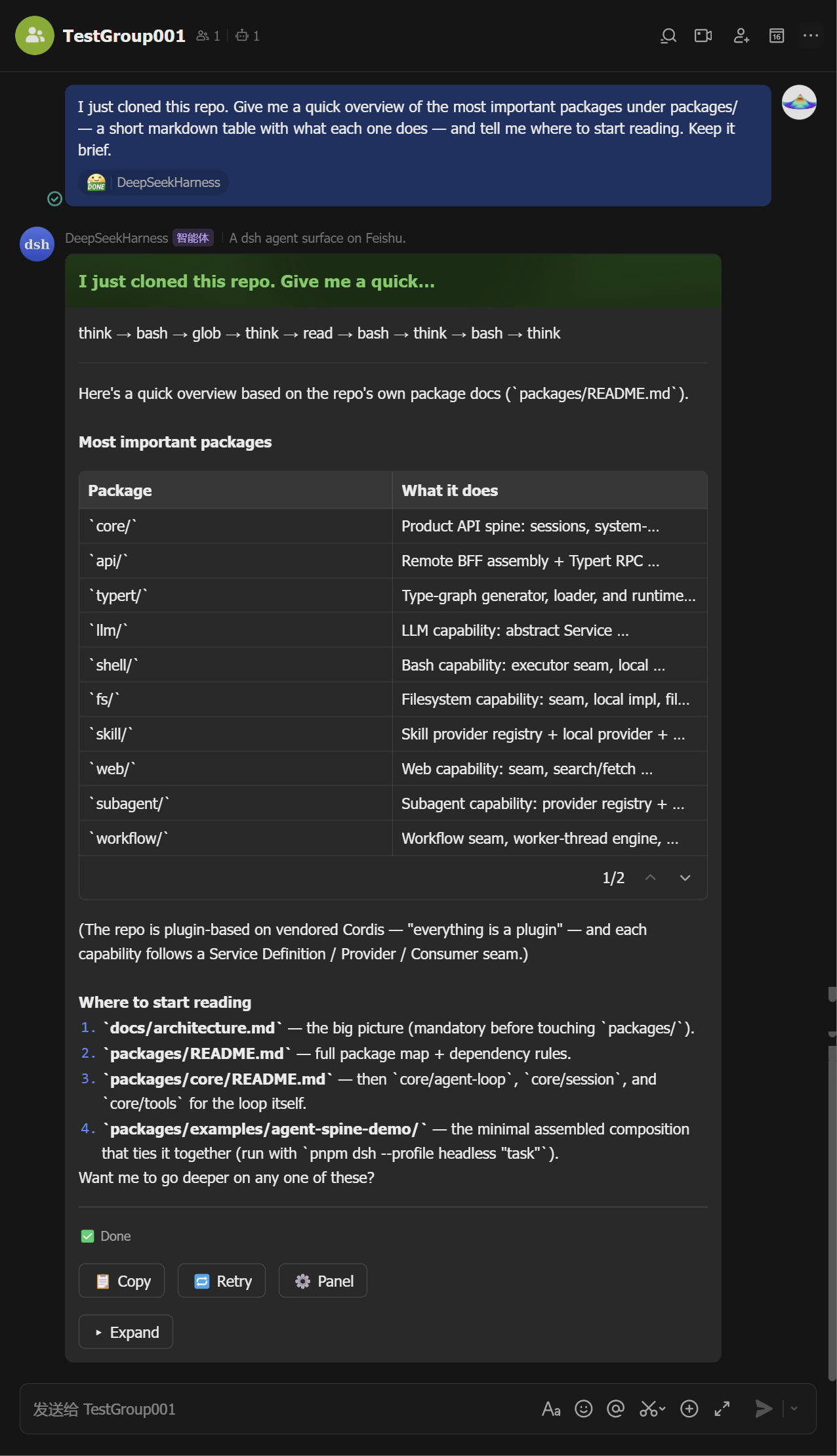
Ask. Send a message — the agent runs and its output streams into a live card (tool calls, reasoning, markdown, tables). The card ends green with the full answer inside; Stop, copy, retry, and the ⚙️ panel button sit on it.
Mid-stream Finalized 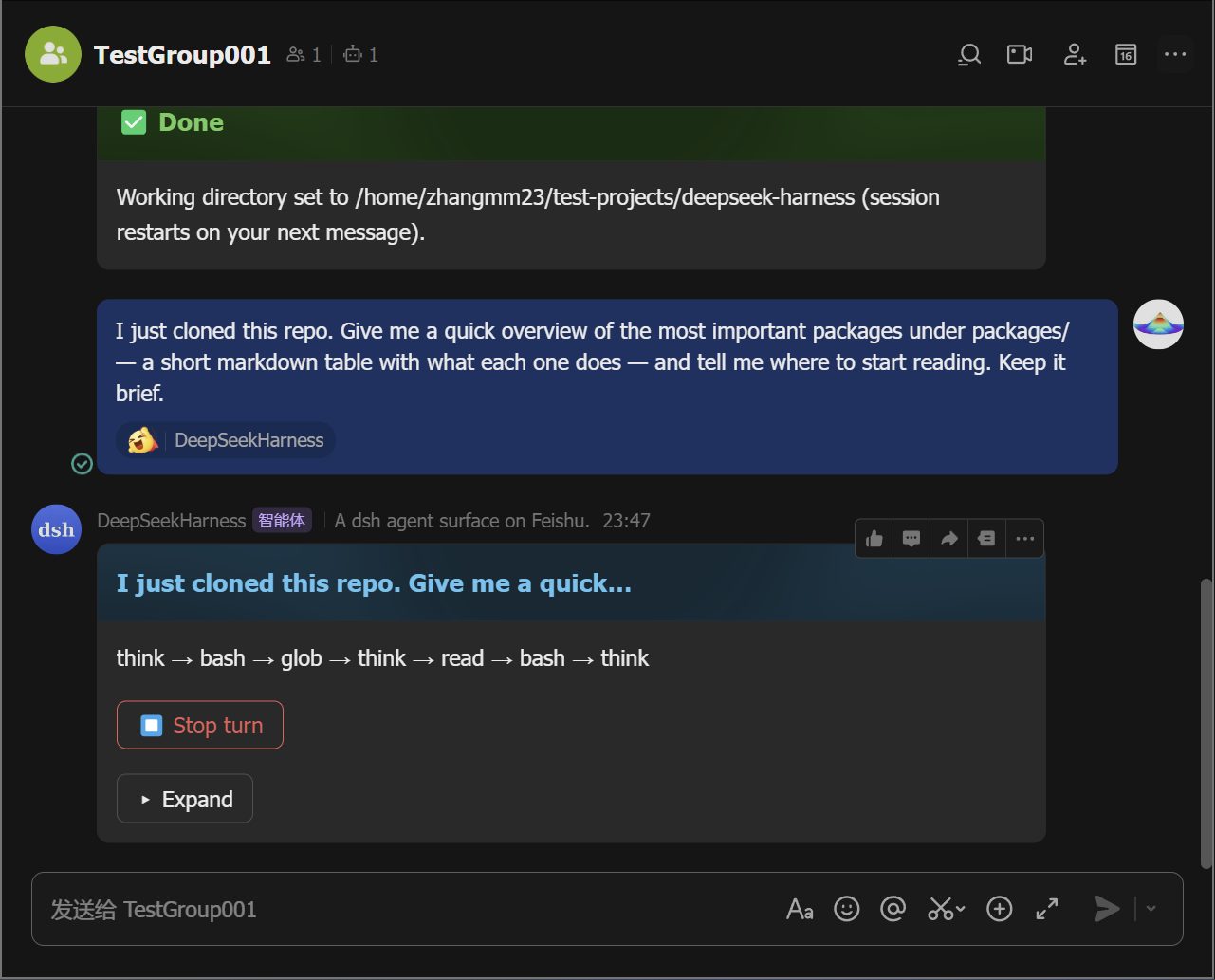
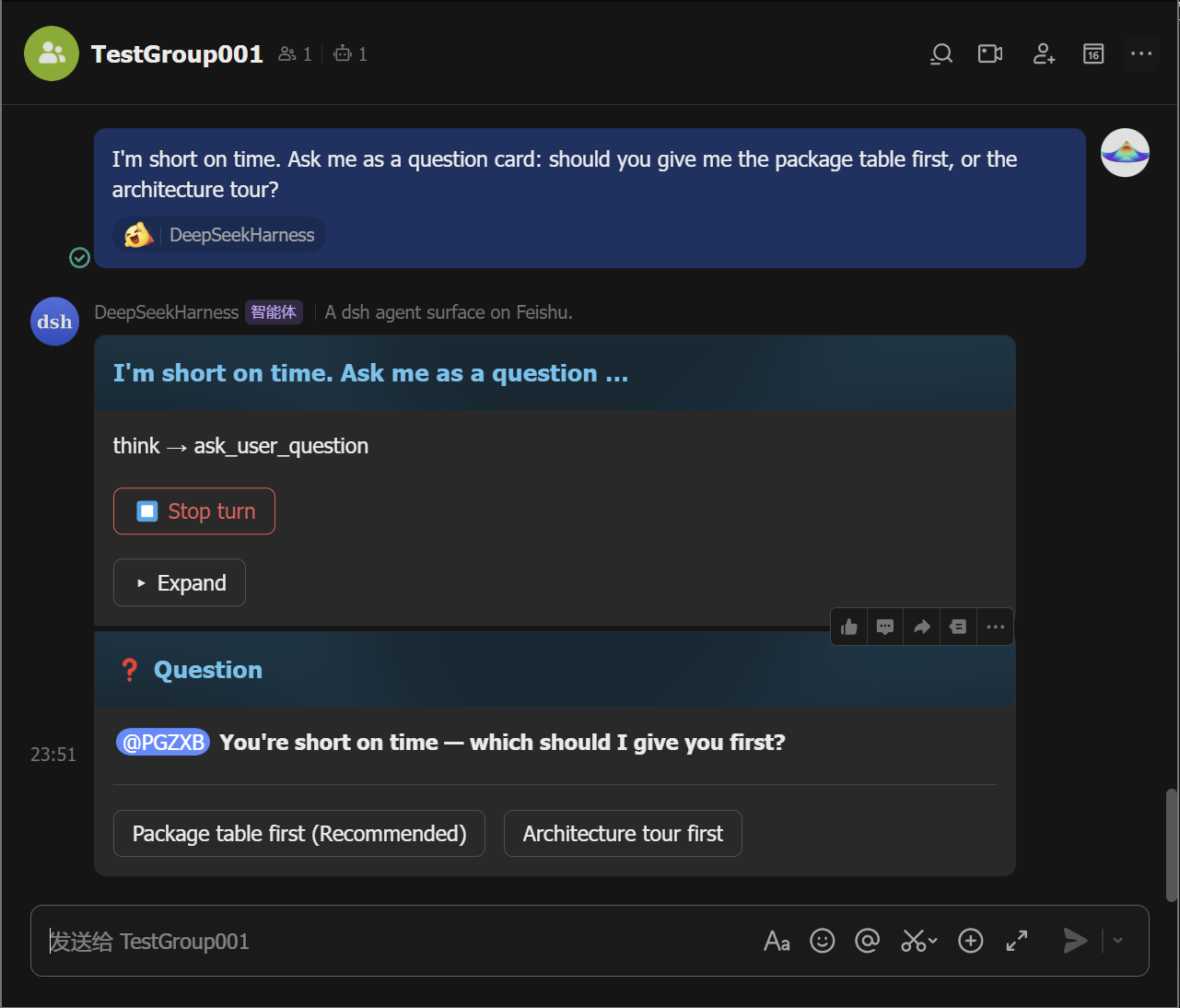
Approve or answer when asked. A permission escalation posts an approval card — tap Allow once (or Reject). A question posts a card you answer with a tap (or a reply).
Approval Question 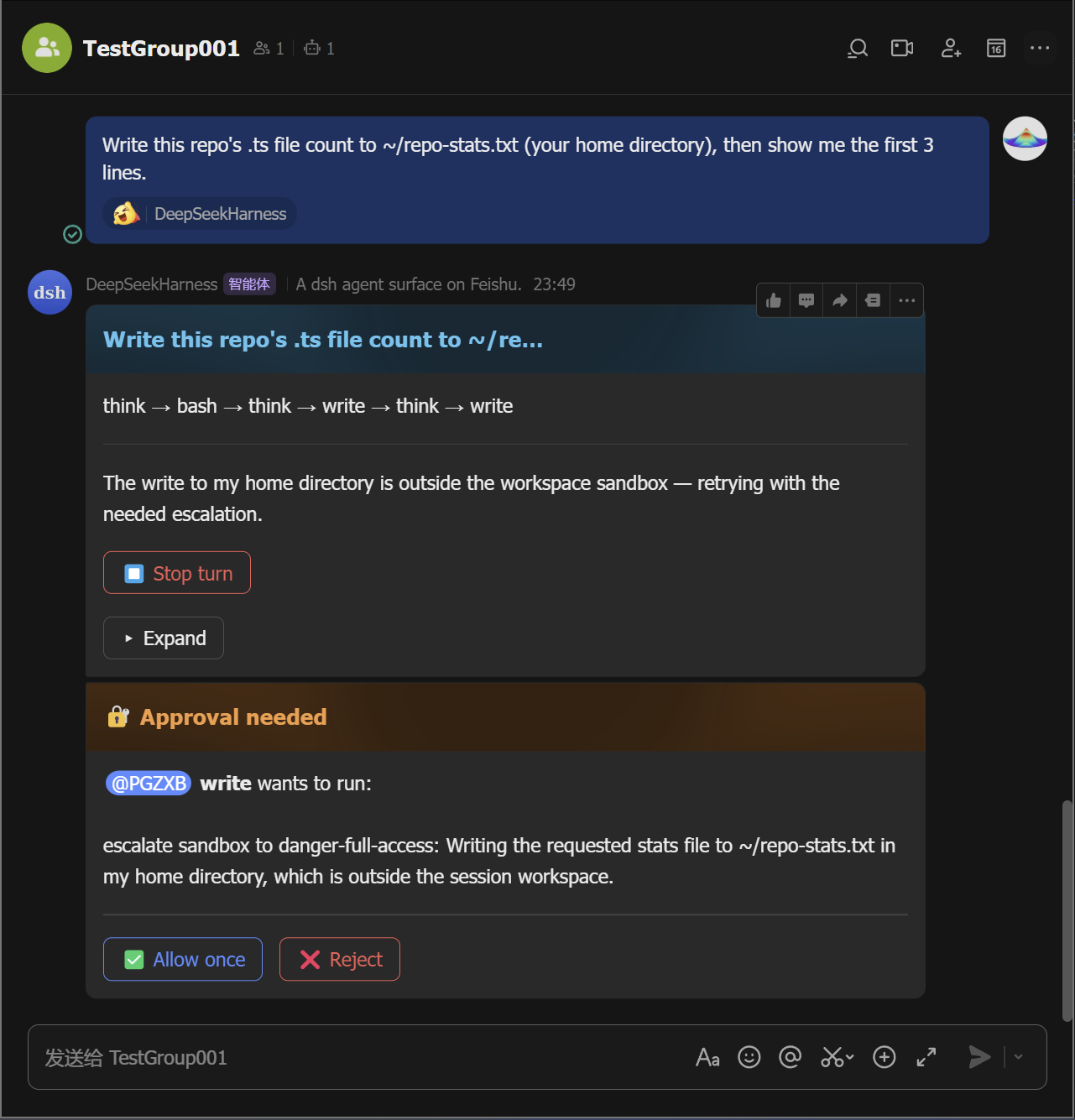
Manage sessions. Tap 🗂️ Sessions to list saved sessions and resume any of them from the card (the
/sessionsequivalent;/resume <id>moves one into this chat), and tap ➕ New chat (the/clearequivalent) to start fresh without deleting the old one.
Every button on the panel card maps to a slash command — pick whichever
feels faster; /help lists them all.
Commands
| Command | What it does |
|---|---|
/help |
list all commands |
/panel |
open the control-panel card (all commands as buttons) |
/group <name> |
create a group with the bot (bare opens a name-input card) |
/cancel |
stop the running turn |
/cd <path> |
set this chat's working directory (bare opens a path-input card) |
/repo [path] |
pick a project directory (bare scans the default roots; /repo <path> scans that path) |
/status |
show this chat's session status |
/feishu-status |
show the surface diagnostic card |
/schedule |
list active reminders |
/model <provider/model> |
switch this session's model (bare opens the picker) |
/export |
send this chat's session log as a file |
/log |
send the dsh-feishu log file to this chat (handy for debugging — please attach the key log lines when you file an issue) |
/sessions |
list saved sessions (resume any of them from the card) |
/resume <id> |
resume a saved session (bare opens the session list) |
/clear /new |
start a fresh conversation (the old session stays saved) |
/goal <text> |
set the task goal (bare opens a text-input card) |
/compact |
compact older conversation history |
/feedback <text> |
send feedback (bare opens a text-input card) |
/permission <preset> |
switch the permission preset (bare opens the picker) |
/plan [on|off] |
enter or leave plan mode (bare toggles) |
Features
- Live streaming cards — tool calls, reasoning, markdown, and tables stream in as the agent works.
- One-tap control panel —
/panelrenders the full command palette as buttons; no command syntax to remember, and each button is the exact equivalent of typing the command. - In-card approvals & questions — approve a permission escalation or answer the agent's questions in the chat.
- Sessions survive restarts — a chat's session and its working directory are persisted across daemon restarts;
/sessionslists, resumes, renames, archives, and exports them. - One-QR quick setup — a single Feishu QR scan creates and configures the app (bot profile, scopes, event subscriptions, credentials) and writes the dsh profile.
- Files in both directions — images, files, videos, and rich-text posts you send land in the workspace as plain files the agent reads by path; the agent can send workspace files and images back to the chat.
- Message queue & steering — messages sent while a turn is running queue visibly; edit, delete, or steer them into the running turn.
- Files a turn produced — appear as chips at the bottom of the card; tap one to receive it in the chat.
- Card stats & diagnostics — turns, tool calls, tokens, and current context-window occupancy on the card;
/feishu-statusshows connection and session diagnostics, and stays usable mid-turn. - Groups & mentions — @-mention the bot; error notices, approvals, and questions @ the requester.
- Reactions, allowlists, reminders, export — reaction ack,
allowedChats/allowedUsers, scheduled reminders, and session-log files.
Contributing
See CONTRIBUTING.md and SECURITY.md. Development, tests, and release: docs/development.md.
Community
Join the dsh-feishu community group on Feishu:
Credits
- botmux — the reference for the group-chat interaction patterns: streaming cards, approvals, and the QR-driven Open Platform quick-setup flow. dsh-feishu borrows botmux's interaction and onboarding patterns, not its architecture — botmux bridges external CLIs, while this surface is dsh-native and in-process.
- DeepSeek Harness — the platform this surface is built for.
- Lark Open Platform SDK — the WebSocket long connection and card APIs the transport builds on.
License
MIT — see LICENSE.
Links
More in this category
xmanrui/dsh-im★ 1579
Connect IM bots to DeepSeek Harness via QR codes or bot credentials (9 channels: Feishu, WeChat, DingTalk, WeCom, QQ, Slack, Telegram, Discord, and WhatsApp).
shaobeichen/dsh-pocket★ 1456
Remote phone access to the DSH Web UI: scan a QR code for LAN or public (cloudflared tunnel) access with real-time sync, a mobile-adaptive layout, and a settings tab.
inclusionAI/Avernet#deepseek-harness-channel-bcn★ 602
Connects DeepSeek Harness to Avernet's Bot Collaboration Network over WebSocket V2, with automatic onboarding, isolated agent sessions, tool-call events, and multi-bot routing tools.
omdsh-dev/dsh-notification★ 85
Desktop notifications for turn completions, with per-outcome controls and keyword rules.
whyihaveyou/dsh-suite#plugin-notify★ 56
IM webhook and local notifications on turn completion, errors, or approval (Feishu/WeCom/DingTalk/Slack/Discord/custom).
omdsh-dev/dsh-lark★ 55
Lark/Feishu bot channel for DeepSeek Harness: each chat drives its own agent, and tool approvals, model questions, and plan reviews return as cards answered by a button or a reply. Switch workspace and model from the chat (`/cd`, `/model`, `/new`), and run several bots that keep separate sessions and can hand turns to each other in one group.
Community comments
Comments are public GitHub Discussions. Loading them connects to GitHub and Giscus; a GitHub account is required to post.