One-click publish of DSH conversations as Markdown articles on a Halo CMS blog: confirm in the GUI, type the console password (never stored), and the Q&A record is created through the Halo REST API.
Install
# from GitHub (first run asks for allowBuilds approval — follow the hint, retry)
dsh plugin --profile web add github:NickyWooden/dsh-halo
Any plugin you install runs third-party code with your own permissions — it can read your files, use your credentials, and reach the network, and tool approvals don’t sandbox it. GitHub-sourced plugins also run build scripts at install time — pnpm blocks those until you allow them, so an install can stop with ERR_PNPM_GIT_DEP_PREPARE_NOT_ALLOWED or ERR_PNPM_IGNORED_BUILDS; dsh prints the exact key to add under allowBuilds in your profile’s pnpm-workspace.yaml, and the install works on the next run. Allowing a build is a trust decision: only install sources you trust, and pin a commit (github:owner/repo#sha).
README
This plugin publishes its README in Chinese only.
DSH(DeepSeek Harness)Web GUI 插件:在输入栏模型选择下拉框左侧添加「发布对话」按钮,点击并确认后把当前会话的问答实录整理成 Markdown 文章,通过 Halo CMS REST API 创建到你的个人博客;同时在 设置 → Plugins → Halo Blog 提供配置页。
功能
- 发布对话按钮(
conversation.input.right,输入栏内、模型选择下拉框左侧)- 点击后先弹出确认框「是否发布到halo?」,再弹出密码输入框(掩码显示,防窥视)要求手动输入 Halo 控制台密码;两步都通过才真正发布。取消任一步或留空密码则不发布。
- 宿主进程读取当前会话的持久化日志(
$DSH_HOME/sessions/<工作区>/session-<id>/*.jsonl.zstd),解压并提取问答轮次:只保留用户提问、AI 的最终回复,以及ask_user_question的提问与选择;大模型思考过程(reasoning思维链)和伴随工具调用的中间进度叙述会被过滤掉。 - 每次发布自动重新登录 Halo 控制台,因此不存在 Cookie 过期问题。Halo 2.x 要求密码在提交前用登录页内嵌的 RSA 公钥加密(服务端 Base64 解码 + 私钥解密),插件按同样方式处理:
GET /login→ 取_csrf、XSRF-TOKEN cookie 与publicKey(优先/login/public-key,回退解析页面内联脚本)→ Node crypto 以 RSA PKCS#1 v1.5 加密密码并 Base64 编码 →POST /login拿 SESSION;随后调用 Halo 控制台 APIPOST /apis/api.console.halo.run/v1alpha1/posts创建文章(rawType 为markdown,偏好编辑器标注为 ByteMD)。 - 成功后按钮显示「已发布 ✓」并附「打开文章」链接;失败时显示错误原因。
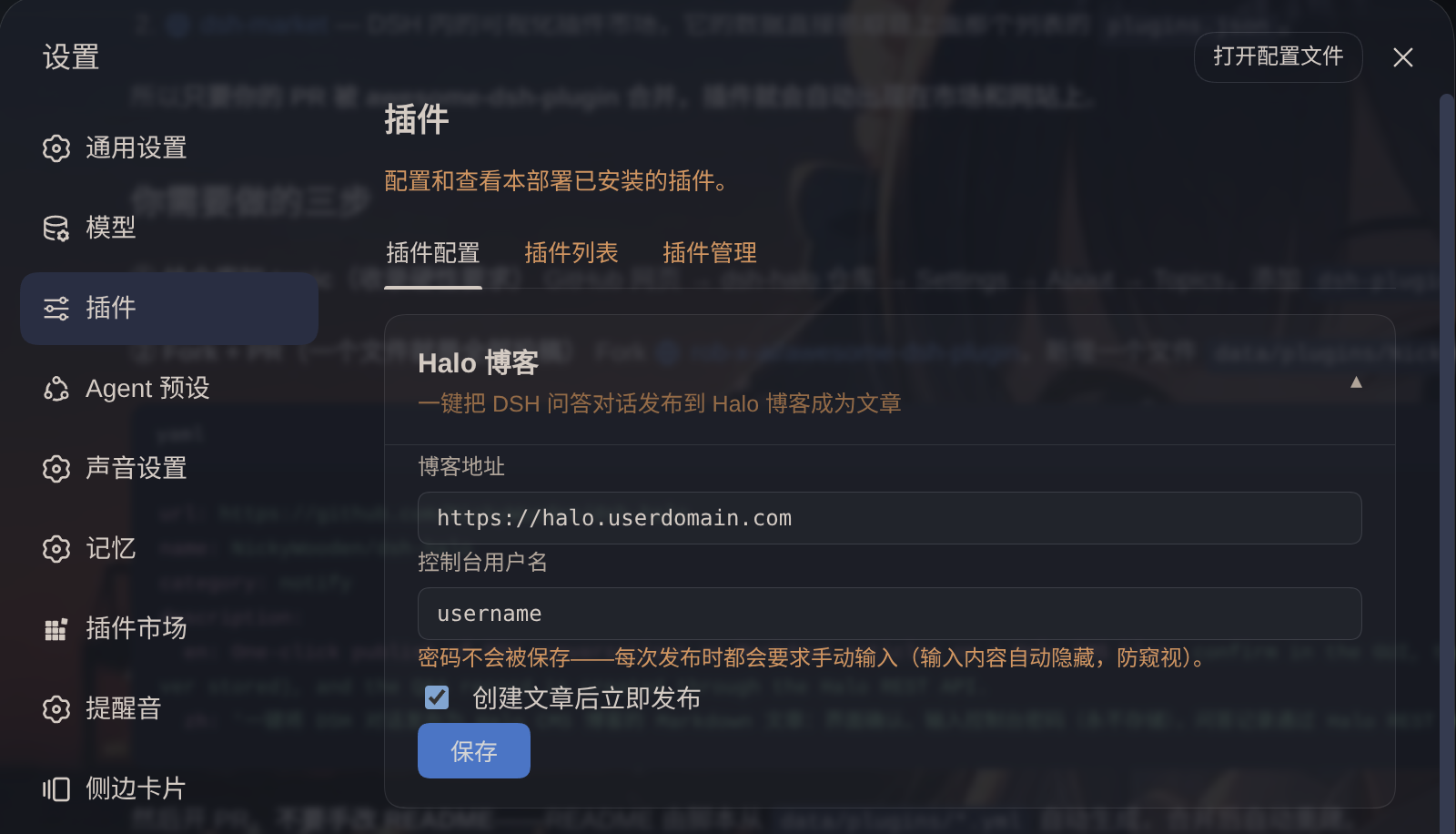
- Halo Blog 设置页(设置 → Plugins)
- 博客地址:如
https://blog.example.com - 控制台用户名:Halo 后台登录账号;密码不保存,发布时手动输入
- 发布开关:开启 = 创建文章后立即发布;关闭 = 仅创建草稿不发布
- 博客地址:如
工作原理
| 层 | 说明 |
|---|---|
宿主端 lib/index.js |
注册/派生 dsh-halo 设置命名空间(blogUrl / username / publishImmediately,三个字段均标记 .volatile())与 POST /dsh-halo/publish 路由。设置写入按宿主能力自适应:0.1.7+ 宿主(SettingsForms 只有 describe/update/replace/mutate、无 register,命名空间改由插件 Config schema 派生,见 #677)经 canRegister() 守卫跳过后回退到 settings.update(NS, …);更早的宿主走 register + scope。登录流程为 GET /login(取 _csrf + XSRF-TOKEN cookie + RSA 公钥)→ Node crypto 以 PKCS#1 v1.5 加密密码 → POST /login(urlencoded 表单,redirect: manual 检查 302 Location 判断成败);zstd 解压优先用 Node 内置 zlib.zstdDecompressSync,回退到系统 zstd 命令;Markdown→HTML 优先 pandoc,回退到内置转换器 |
浏览器端 lib/client.js |
注入输入栏按钮与 Plugins 设置页;发布时依次弹出确认框与密码输入框,把用户输入的密码随请求发给宿主路由;所有网络请求走同源宿主路由,避免跨域问题 |
密码不落盘:控制台密码不写入 ~/.dsh/settings.yaml、不出现在任何配置中——每次点「发布对话」都会弹框要求手动输入,密码只存在于该次 HTTP 请求与登录过程中。即使插件源码外泄,攻击者也无法找回密码,因为磁盘上既没有密钥材料也没有密文。
安全:发布路由仅接受 loopback / same-origin 调用(fail-closed);本机 DSH 设置文档中只持久化用户名与博客地址。
使用说明
配置:打开 设置 → Plugins → Halo Blog,填写博客地址与控制台用户名后保存。密码不会被保存——每次发布时都会要求手动输入(掩码显示,防窥视)。
发布:在输入栏中点击模型选择下拉框左侧的「发布对话」按钮。

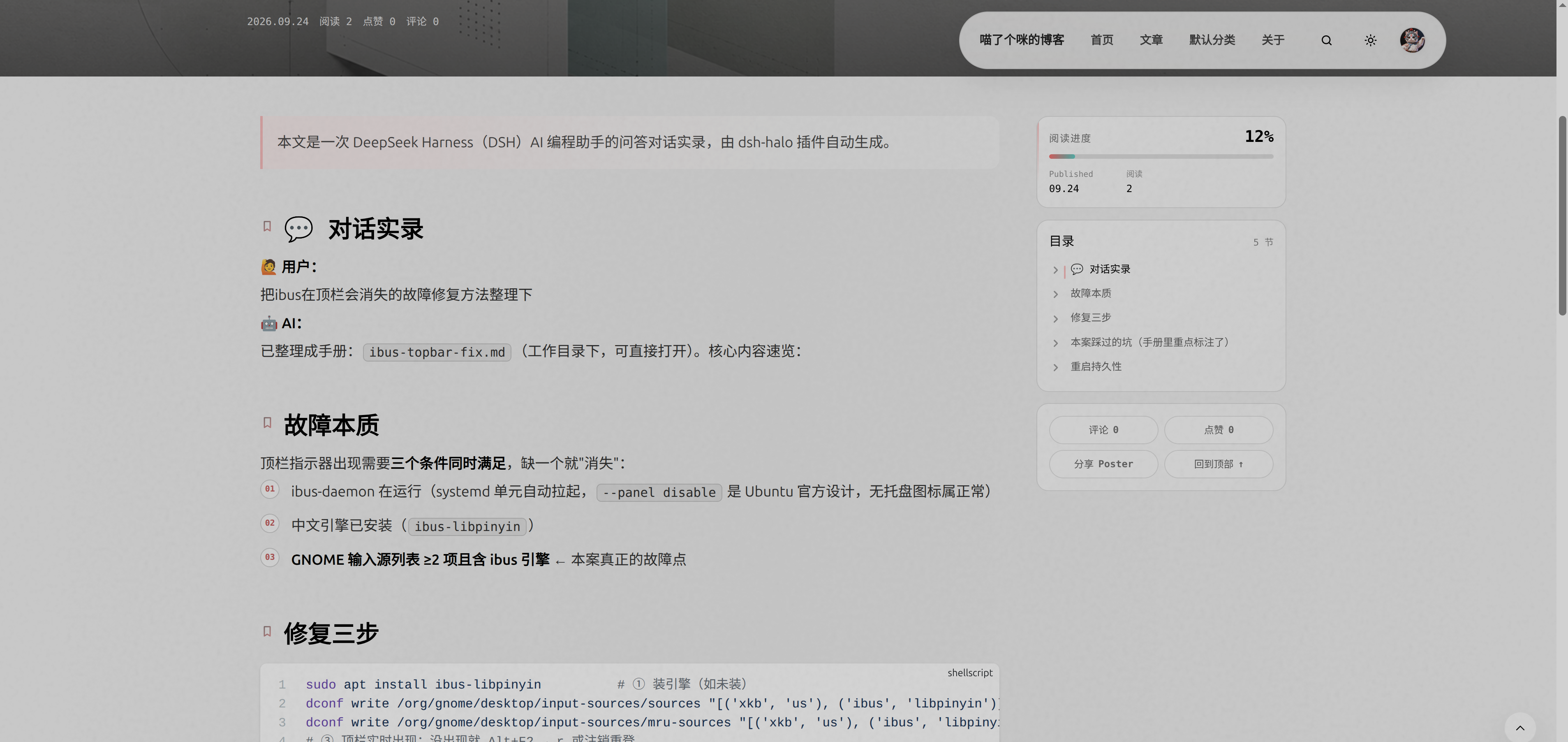
确认并输入密码:先弹出确认框「是否发布到halo?」,再弹出密码输入框;两步都通过后,当前会话的问答实录即通过 Halo REST API 创建为博客文章。成功后按钮显示「已发布 ✓」并附「打开文章」链接;失败时显示错误原因。
安装
从插件市场 / npm(推荐):
dsh plugin --profile web add dsh-halo
# 然后重启 dsh web
本地开发(link: 方式):
git clone git@github.com:NickyWooden/dsh-halo.git
dsh plugin --profile web add link:${pwd}/dsh-halo
注意:仓库内的
node_modules/@deepseek-ai/schemastery是指向 profile node_modules 的符号链接(已 gitignore),仅用于让link:方式安装时宿主端能解析 peer 依赖;npm 安装时由 pnpm 自动处理。
发布到插件市场
DSH 的「插件市场」(dshmarket,设置 → Plugin Market)以 npm registry 为分发源、以 awesome-dsh-plugin 目录为浏览数据。上架步骤:
GitHub 仓库:把本包推到
github.com/<you>/dsh-halo,添加dsh-plugintopic;仓库需创建满 1 天才能投稿。npm 发布:
repository.url已指向本仓库,直接npm publish(若担心无 scope 名被抢注,可改用@<you>/dsh-halo)。市场安装优先走「仓库可验证的 npm 包」,秒装。目录投稿:向 awesome-dsh-plugin 提 PR,新增一个文件
data/plugins/<owner>__dsh-halo.yml:url: https://github.com/<you>/dsh-halo name: <you>/dsh-halo category: tools description: en: One-click publish of DSH conversations as Markdown articles on a Halo CMS blog. zh: 一键把 DSH 问答对话发布为 Halo 博客文章。可选加分项:仓库内放截图(市场卡片展示,图片走 GitHub 托管)、开启 GitHub Discussions(评论区由 giscus 驱动)。
已知限制
- 仅支持 Halo 2.x(
api.console.halo.runAPI 组;登录流程按 2.26 的/login+_csrf表单 + RSA 密码加密实现,若未来版本更换登录页结构需同步调整extractCsrf/extractPublicKey)。 - 文章标题取自会话标题(无标题时用时间戳兜底);slug 为
dsh-<日期>-<时间>,重复发布会生成新文章而不是覆盖。 - 只发布「用户提问 + 生成结果」,大模型思考过程会被过滤掉:
reasoning(思维链)块从不收录;伴随工具调用的中间进度叙述被丢弃,每个问答回合只保留最终回复(若该回合没有纯文本收尾——工作延续到了下一条用户消息——则回退取最后一条可见文本作为结果)。AI 的提问(ask_user_question)与用户的选择属于可见对话,予以保留。
Links
More in this category
xmanrui/dsh-im★ 3118
Connect IM bots to DeepSeek Harness via QR codes or bot credentials (9 channels: Feishu, WeChat, DingTalk, WeCom, QQ, Slack, Telegram, Discord, and WhatsApp).
shaobeichen/dsh-pocket★ 2685
Remote phone access to the DSH Web UI: scan a QR code for LAN or public (cloudflared tunnel) access with real-time sync, a mobile-adaptive layout, and a settings tab.
OpenPetsHQ/openpets#dsh★ 1373
Bridges DeepSeek Harness lifecycle status, errors, and approval requests to a locally running OpenPets desktop companion.
c1overzz/dsh-bili-scroll★ 1150
Let your DSH agent browse Bilibili on its own, read subtitles, write a daily digest, and @ you when it finds something worth your attention.
inclusionAI/Avernet#deepseek-harness-channel-bcn★ 599
Connects DeepSeek Harness to Avernet's Bot Collaboration Network over WebSocket V2, with automatic onboarding, isolated agent sessions, tool-call events, and multi-bot routing tools.
zaofan-make/dsh-qqbot★ 213
QQ official bot channel for DeepSeek Harness (feature-rich fork of tencent-connect/dsh-qqbot): group and private chat with the full agent, sticker library with auto-tagging and AI meme replies, group management (join approval and mute), botplay interactive card events with paginated catalogs, user extension registry (custom slash commands and QQ tools), scheduled wakeups, remote approvals over QQ, and a floating dock web UI.
Community comments
Comments are public GitHub Discussions. Loading them connects to GitHub and Giscus; a GitHub account is required to post.