Connect Notion from the GUI with OAuth 2.0 + PKCE — official Notion MCP, no integration token.
Install
# from npm (prebuilt)
dsh plugin --profile web add dsh-notion-oauth-ui
# from GitHub (first run asks for allowBuilds approval — follow the hint, retry)
dsh plugin --profile web add github:MerkurevSergei/dsh-notion-oauth-ui
Any plugin you install runs third-party code with your own permissions — it can read your files, use your credentials, and reach the network, and tool approvals don’t sandbox it. GitHub-sourced plugins also run build scripts at install time — pnpm blocks those until you allow them, so an install can stop with ERR_PNPM_GIT_DEP_PREPARE_NOT_ALLOWED or ERR_PNPM_IGNORED_BUILDS; dsh prints the exact key to add under allowBuilds in your profile’s pnpm-workspace.yaml, and the install works on the next run. Allowing a build is a trust decision: only install sources you trust, and pin a commit (github:owner/repo#sha).
README
Connect Notion from the DeepSeek Harness GUI with OAuth 2.0 (authorization code + PKCE) — no Integration Token to copy, and no terminal required. Pages, databases and comments are reached through the official Notion MCP server.
Features
- GUI login — a "Notion" page under Settings with a one-click Login (no terminal, no Integration Token).
- OAuth + PKCE — dynamic client registration (RFC 7591), no
client_id/secret to copy. - Silent refresh — access token refreshed automatically; refresh token rotated atomically.
- Tools as
mcp__notion__*— search, read/create pages, databases, comments via the official MCP server. - CLI fallback —
dsh notion loginfor headless / CLI profiles.
Setup
1. Install — open Plugins in the sidebar, then Add plugin, enter dsh-notion-oauth-ui and press Install.

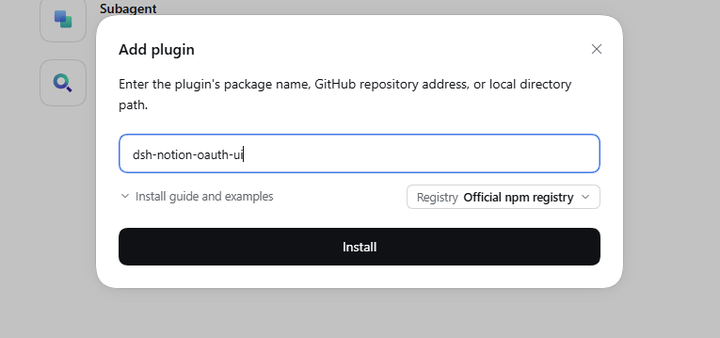
2. Open Settings — the gear at the bottom of the sidebar, or Ctrl + ,.

3. Sign in — open Notion and press Login.
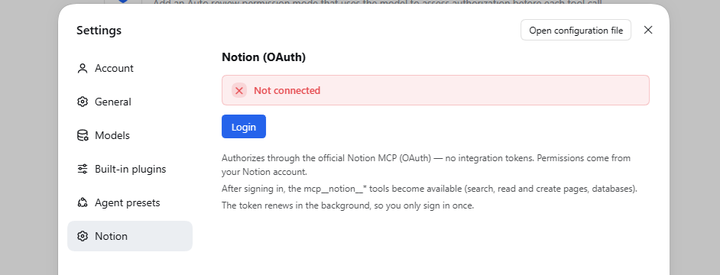
4. Approve — the browser opens the Notion consent page: pick a workspace, tick the I recognize and trust this URL checkbox, then press Continue.
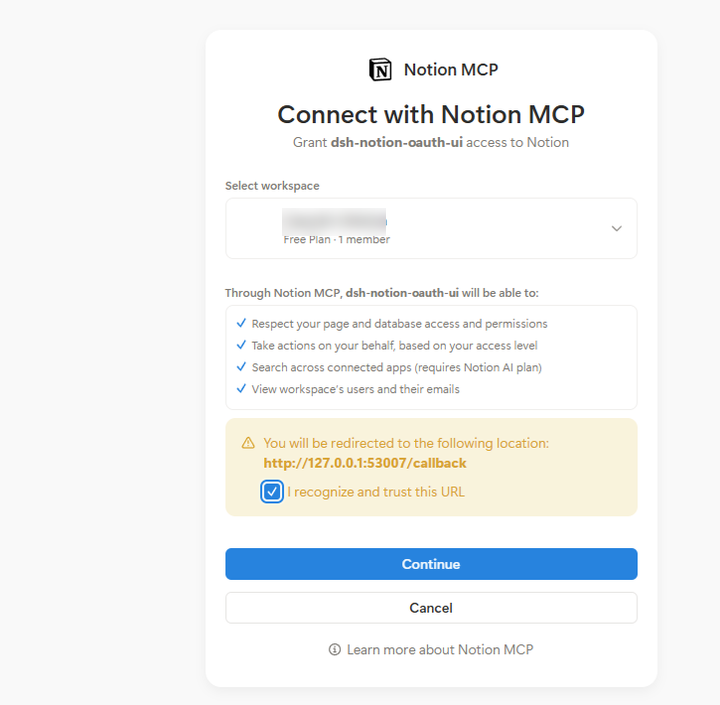
5. Done — the page switches to Connected, and the mcp__notion__* tools become available.
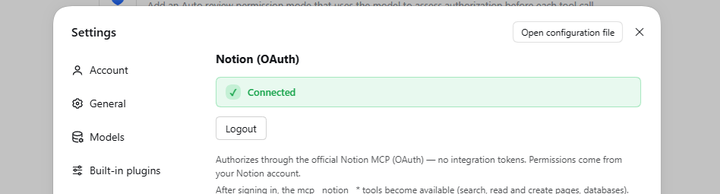
On a headless or CLI-only profile the same flow runs from the terminal:
dsh plugin --profile <name> add dsh-notion-oauth-ui
dsh notion login
Config
| Key | Default | Meaning |
|---|---|---|
mcpUrl |
https://mcp.notion.com/mcp |
Notion MCP server URL |
port |
53007 |
Local OAuth callback port (127.0.0.1) |
refreshLeadMs |
300000 (5 min) |
Refresh the token this far before it expires |
refreshRetryMs |
60000 (1 min) |
Retry interval when a refresh attempt fails |
Security
- Loopback-only control routes. The Settings page talks to
/api/dsh-notion-oauth-ui/{status,login,logout}. Each route is pinned to one HTTP method (GET /status,POST /login,POST /logout) and accepts only requests whose remote address andHostare loopback and that are notSec-Fetch-Site: cross-site. When anOriginis present it must be the app itself (dsh-app://app) or the same host. The Desktop shell proxies renderer calls and stripsOrigin/Sec-Fetch-Site, so an absentOriginis normal; the two POST routes therefore additionally requireContent-Type: application/json— not a CORS-simple value, so a cross-site caller first needs a preflight that these routes reject. - OAuth hardening. Authorization code + PKCE (S256), a per-flow
statethe callback server verifies, and a 10-minute deadline on the callback. A malformed or forged callback is answered with 400 and leaves the pending login running, so a stray local request cannot kill a real authorization. - Transport.
mcpUrlmust behttps://— the plugin refuses to load otherwise. Discovery endpoints (authorization, token, registration) are read from whatever themcpUrlresource advertises, so keep it on a trusted origin. - Token at rest. The access/refresh token is stored as a single record in the
DSH credentials service (
NOTION_OAUTH). That store is only as private as your OS user account: tool processes run as the same user, so any plugin with credentials access can read every stored secret (NOTION_OAUTH,DEEPSEEK_API_KEY, …), not just its own. The token is never exposed to the browser half, never returned by an HTTP route, and never written to logs.
Development
pnpm install      # installs dev dependencies and builds lib/ via the prepare hook
pnpm run build    # rebuilds lib/index.js (host) and lib/client.js (browser half)
lib/ is build output and is not committed; pnpm install and pnpm pack
regenerate it through the prepare script.
pnpm run typecheck checks the sources against the DSH host packages
(@deepseek-ai/*). DeepSeek Harness provides those at runtime, and their npm
publication is currently incomplete — some transitive packages are missing from
the registry — so typechecking needs an environment that supplies them. The
build itself has no such dependency.
License
MIT — see LICENSE.
Reuses code and design patterns from two MIT-licensed Notion plugins:
mingzeng21/dsh-notion(published asdsh-notion-mcp) — Copyright (c) 2026 mingzengzhengjy01/dsh-notion-connector— MIT per its package.json
Links
More in this category
xmanrui/dsh-im★ 3780
Connect IM bots to DeepSeek Harness via QR codes or bot credentials (9 channels: Feishu, WeChat, DingTalk, WeCom, QQ, Slack, Telegram, Discord, and WhatsApp).
shaobeichen/dsh-pocket★ 3136
Remote phone access to the DSH Web UI: scan a QR code for LAN or public (cloudflared tunnel) access with real-time sync, a mobile-adaptive layout, and a settings tab.
c1overzz/dsh-bili-scroll★ 1471
Let your DSH agent browse Bilibili on its own, read subtitles, write a daily digest, and @ you when it finds something worth your attention.
OpenPetsHQ/openpets#dsh★ 1404
Bridges DeepSeek Harness lifecycle status, errors, and approval requests to a locally running OpenPets desktop companion.
inclusionAI/Avernet#deepseek-harness-channel-bcn★ 610
Connects DeepSeek Harness to Avernet's Bot Collaboration Network over WebSocket V2, with automatic onboarding, isolated agent sessions, tool-call events, and multi-bot routing tools.
zaofan-make/dsh-qqbot★ 278
QQ official bot channel (enhanced fork of tencent-connect/dsh-qqbot): full agent chat in groups and DMs, rich media, an auto-tagged sticker library with AI image replies, join approval, mute and broadcast, scheduled wakeups, remote approvals over QQ, interactive cards, multi-account instances, extensions, member profiles, and token-saving value-scored wakeups.
Community comments
Comments are public GitHub Discussions. Loading them connects to GitHub and Giscus; a GitHub account is required to post.