API regression and acceptance workbench: snapshot the responses of the endpoints you register before the agent edits the backend, rerun them all after the edit, and review a structured field-level diff (status codes, added and removed fields, numeric old → new values with the delta) beside the captured source diff, accepting each endpoint one by one before exporting a Markdown or single-file HTML report.
Install
# from npm (prebuilt)
dsh plugin --profile web add dsh-apirevise
# from GitHub (first run asks for allowBuilds approval — follow the hint, retry)
dsh plugin --profile web add github:Lostforest7/dsh-apirevise
Any plugin you install runs third-party code with your own permissions — it can read your files, use your credentials, and reach the network, and tool approvals don’t sandbox it. GitHub-sourced plugins also run build scripts at install time — pnpm blocks those until you allow them, so an install can stop with ERR_PNPM_GIT_DEP_PREPARE_NOT_ALLOWED or ERR_PNPM_IGNORED_BUILDS; dsh prints the exact key to add under allowBuilds in your profile’s pnpm-workspace.yaml, and the install works on the next run. Allowing a build is a trust decision: only install sources you trust, and pin a commit (github:owner/repo#sha).
README
Snapshot your APIs. Rerun after the agent edits. Accept each difference — don't guess.
Pre-release v0.1.0. Verified with DSH Web 0.2.0-rc.2 on Windows, Node 24. UI and reports are Chinese. The real-model closed loop passed on 2026-10-01: baseline → real DeepSeek V4-Flash edited the backend → rerun → structured diffs → per-item acceptance → report. Model steps were never mocked; see docs/real-model-validation.md.
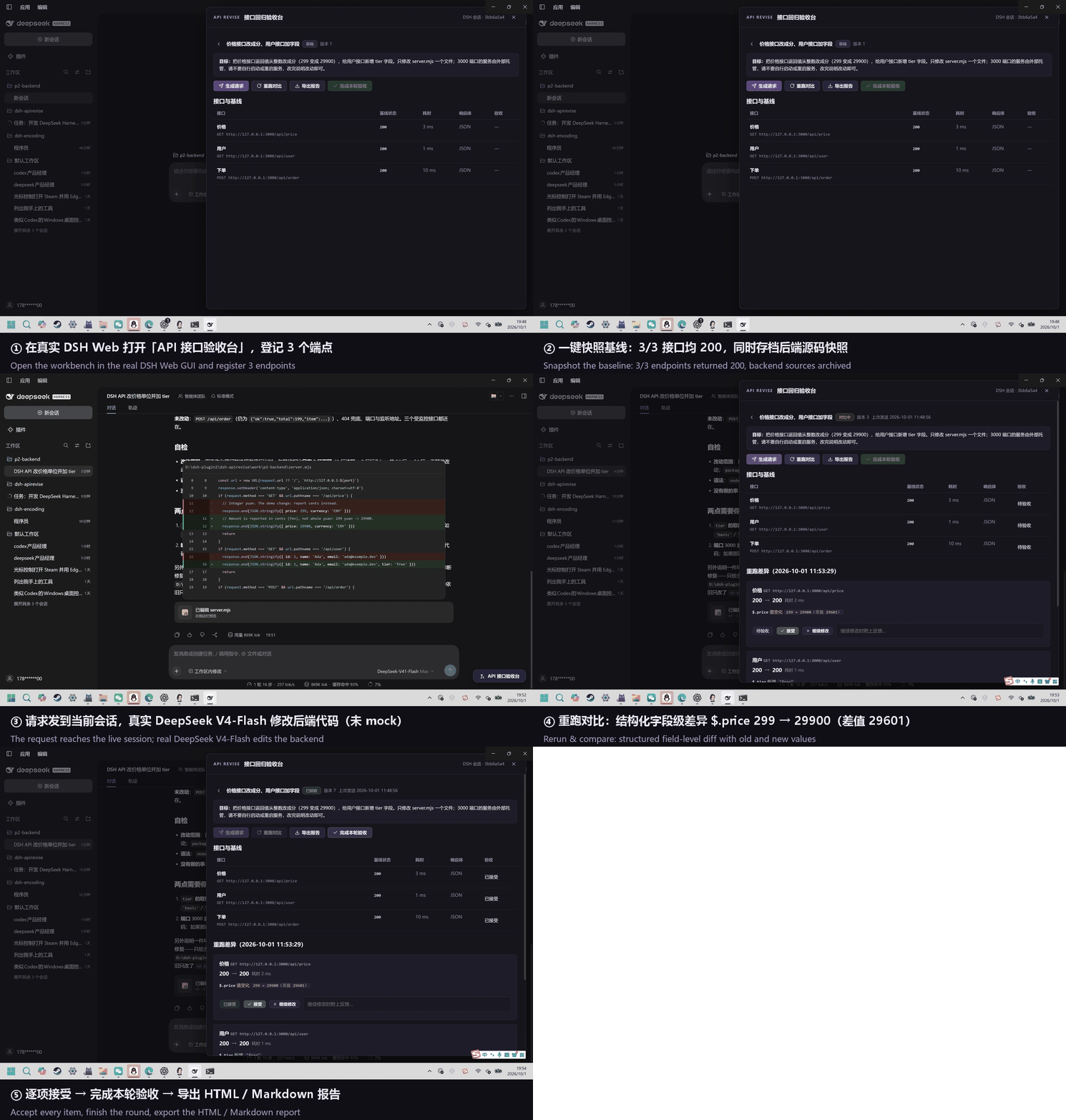
This 64-second walkthrough uses stills from the actual run on 2026-10-01 (DSH Web 0.2.0-rc.2 + real DeepSeek V4-Flash). It is not a continuous recording. Details: docs/real-model-validation.md.
Why: your DSH agent changes backend code, and you no longer know whether endpoint behavior changed. DSH API Revise records response baselines before the edit and shows structured, field-level differences after it — status codes, fields, and numeric values with old → new values — side by side with a source-code diff. You accept every difference item by item, and export a report.
What you get
- Register endpoints: method + URL + optional headers/body, all typed by hand in the DSH Web panel (no traffic capture — that is v2).
- Baseline snapshot: each endpoint is requested once and its response (status / headers / JSON or text body) is stored in the project's
.dsh-apirevise/directory, together with a bounded snapshot of backend source files. - Current-session handoff: the change goal plus the monitored endpoint list is sent to the current DSH session through DSH's normal prompt queue.
- Rerun & compare: after the model edits, one click re-requests every endpoint and produces a structured diff — JSON field-level differences (added / removed / type / value, numeric delta), status-code changes highlighted, text patch for plain-text bodies.
- Per-item acceptance: accept each endpoint, or mark it “needs work” with feedback that travels back into the next request. Comparisons go stale when the source changed after the rerun: you must rerun before accepting. Only when every endpoint is accepted against the current rerun can the round be completed.
- Portable reports: Markdown plus a single-file HTML report with embedded diffs, XSS-escaped and served with a strict CSP. Facts only — diffs never claim “the API is fine”; acceptance is the human's decision.
Install
Use Node 22.19+ (22.x) or Node 24. Install and configure DSH according to its official documentation. DSH handles your model credentials; API Revise has no separate API key.
From npm
dsh plugin --profile web add dsh-apirevise
Published as dsh-apirevise@0.1.0. A pre-release tarball is also attached to v0.1.0.
Source checkout
git clone https://github.com/Lostforest7/dsh-apirevise.git
cd dsh-apirevise
npm ci
npm run build
Stop DSH, then register the checkout in its Web profile and restart:
dsh plugin --profile web add /absolute/path/to/dsh-apirevise
dsh web
The repository includes built lib/ files so DSH can load the plugin without running a package build script.
Use it
- Start your backend locally (e.g.
node server.mjsfrom examples/api-server, port 3000). - Open a DSH project session whose directory is the backend project. Click API 接口验收台 at the bottom right.
- Create a round: title (what to change), goal (sent to the session), and the endpoints to monitor. Creating the round snapshots the baseline immediately.
- Click 生成请求, review it, and 发送到当前会话. The model edits the backend code.
- After the model finishes, click 重跑对比. Review the structured diffs and the source-code diff; accept each endpoint or attach feedback and send the session back to work.
- When every endpoint is accepted, click 完成本轮验收, then 导出报告.
Add .dsh-apirevise/ to your project's .gitignore.
What it is not
- Not a traffic-capture proxy (v2 direction); not a frontend tool (that is dsh-revise); not a test-framework runner (that is dsh-test-workbench territory).
- It never claims “the API is definitely fine.” Diffs present facts — status / fields / numeric old-and-new values — and acceptance remains a human decision.
- The model step is never mocked in validation; see docs/real-model-validation.md.
Development
npm ci
npm run check        # typecheck + unit tests + build
npm run dev          # standalone workbench preview (examples/api-server) on http://127.0.0.1:4320
Unit tests are fixture-based and run offline (loopback HTTP only), no DSH and no network required: tests/unit.
License
MIT
Links
More in this category
yjh051108/dsh-routing-suite★ 7028
One repository, three parts: a runtime injector for DSH plugin packages (inject, hot-reload, unload, promote a dev staging tool to the front, route self-heal, plus a settings-page plugin manager that lists, unloads and drags folders in to internalize), a task-aware reasoning-mode router agent preset (router-standard / router-spec / router-react), and a graded two-level task protocol whose six tools (commit_star, lock_stage, revise_do, edit_plan, mark_task, redteam_verdict) pin task state to disk. The injector implementation ships in-tree, so the install carries its own behaviour rather than a dependency list.
strukto-ai/mirage#dsh★ 3942
Swaps the filesystem and bash providers for a mirage virtual workspace: file tools and shell commands run over mounted resources (RAM, S3, Redis, Slack, Gmail, Notion, Postgres) instead of the host disk, with per-mount read/write/exec modes, per-command sandbox routing (monty, pyodide, quickjs in process; docker, e2b, daytona remote), and installed CLIs (git, gh, slack, linear, ntn, gws, or one you register) as head words in the virtual terminal.
first-fluke/oh-my-agent#dsh★ 1481
Runs project OMA checks before and after tool execution and when a turn tries to finish. Installs its OMA CLI dependency and initializes unconfigured projects on first use. Requires Node.js 22+; initial setup needs network access and project write access.
MichengAI/dsh-skills-manager★ 623
Manages local DeepSeek Harness skills in Settings and shows shared Agent skills as read-only.
hust-open-atom-club/oh-dsh★ 324
Community distribution: TUI, desktop, and Web UI as one bundle with layered installation.
Fishquito7/dsh-skill-mcp-panel★ 290
Manages DSH skills and MCP servers from the web settings: skill cards with hot enable/disable, workspace scopes, groups, batch migration and drag-and-drop import, plus stdio/HTTP MCP CRUD with connection tests, secret redaction and the unified dsh-panel CLI.
Community comments
Comments are public GitHub Discussions. Loading them connects to GitHub and Giscus; a GitHub account is required to post.