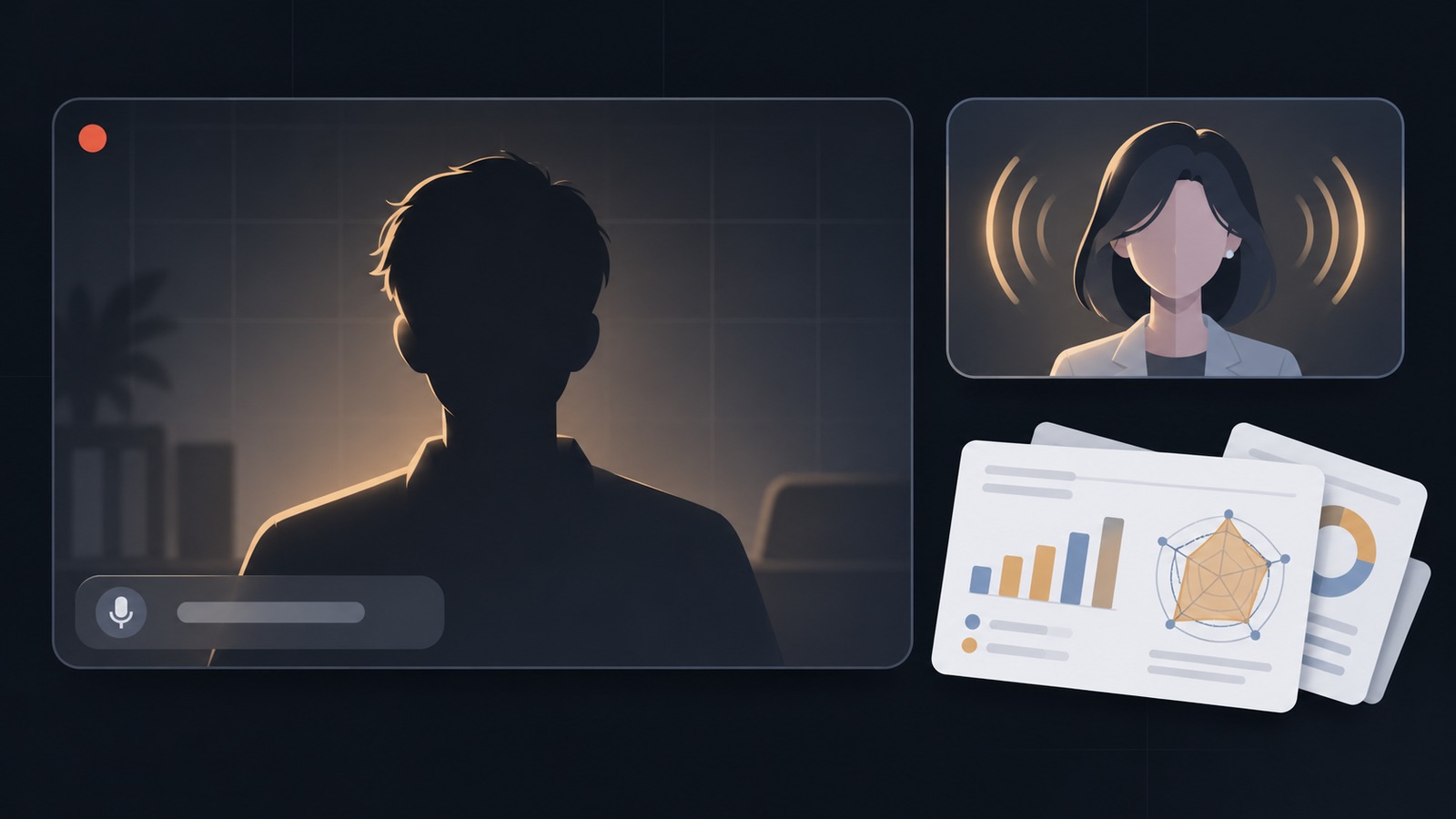
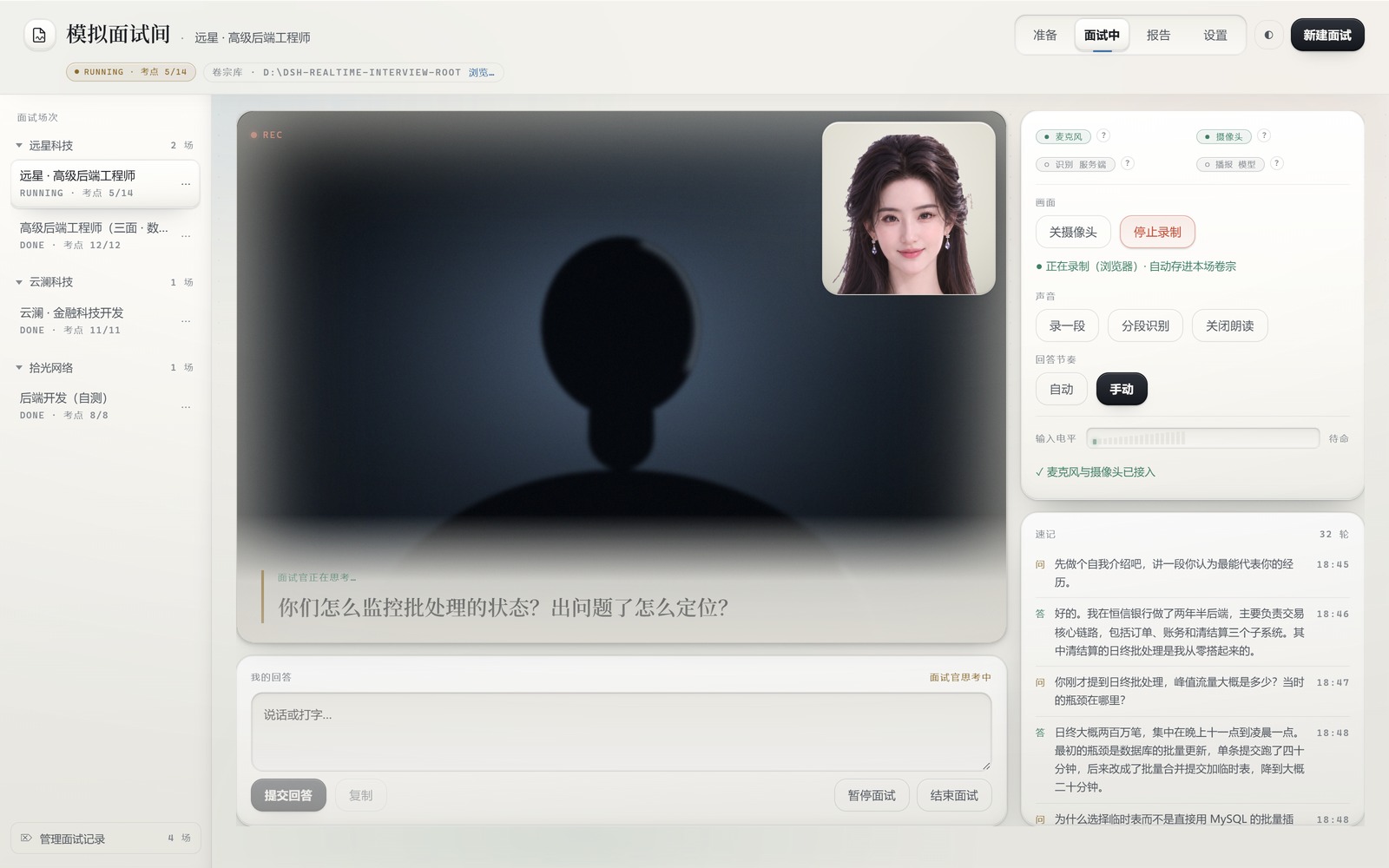
Mock interview room for DeepSeek Harness: a resume and a job JD become a tiered checklist, then a live round-by-round interview runs in the sidebar with camera view, microphone transcription and spoken questions, ending in a per-checkpoint post-interview report. Two skills (interview-prep, interview-conduct) drive the flow, and transcripts, recordings and reports stay on your own machine. Its HTTP routes have no DSH access check, so a web page open in your browser could call them.
Install
# from npm (prebuilt)
dsh plugin --profile web add dsh-realtime-interview
# from GitHub (first run asks for allowBuilds approval — follow the hint, retry)
dsh plugin --profile web add github:LiangshouX/dsh-realtime-interview
Any plugin you install runs third-party code with your own permissions — it can read your files, use your credentials, and reach the network, and tool approvals don’t sandbox it. GitHub-sourced plugins also run build scripts at install time — pnpm blocks those until you allow them, so an install can stop with ERR_PNPM_GIT_DEP_PREPARE_NOT_ALLOWED or ERR_PNPM_IGNORED_BUILDS; dsh prints the exact key to add under allowBuilds in your profile’s pnpm-workspace.yaml, and the install works on the next run. Allowing a build is a trust decision: only install sources you trust, and pin a commit (github:owner/repo#sha).
README
This plugin publishes its README in Chinese only.
简历 + JD
    │
    ▼
① 准备底稿 ───── 助手读 JD、拆岗位要求、映射你的经历,落一份分级考点清单
    │
    ▼
② 逐轮面试 ───── 按清单提问,按你的回答追问;你说的每一句都进转录
    │
    ▼
③ 实时摄像与语音  摄像头画面、麦克风转写、问题朗读、整场连续录制
    │
    ▼
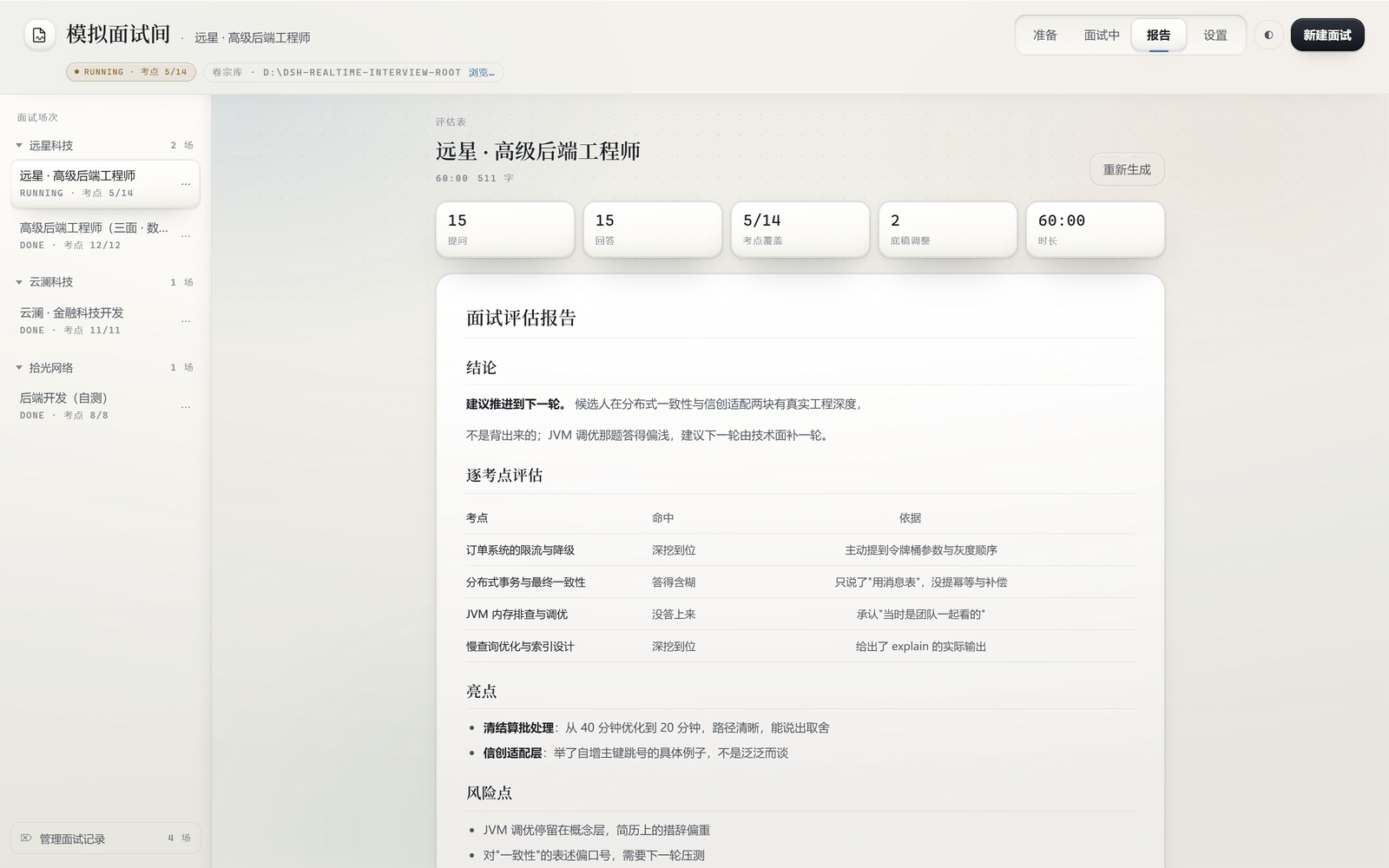
④ 事后报告 ───── 逐考点评估、亮点与风险点、清单调整回顾、改进建议
插件不写面试题,也不写报告——题目与判断由模型产出,插件负责结构、状态与留痕。面试在 DSH 侧栏的「模拟面试间」面板里进行,提问与对话在 DSH 对话区。每一场面试是一个卷宗目录,全部数据集中在一个工作区根下(Windows 上优先挑非系统盘,没有别的盘才用用户目录;可在设置页换位置)。
安装
npm 包名 dsh-realtime-interview(首次公开发布:0.9.0)。由 DSH 自己装进当前 profile:
dsh plugin --profile web add dsh-realtime-interview
或者直接跟助手说「装一下 dsh-realtime-interview」,它会调 plugin_manager 的 install_bundle。
装完刷新页面,左侧栏出现「模拟面试间」。已发布版本:npm view dsh-realtime-interview versions。
从源码装(开发者):
node scripts/build.mjs     # 构建 + 全部闸门
node scripts/pack.mjs      # → release/dsh-realtime-interview-<version>.tgz
再让 plugin_manager 的 install_bundle 指向那个 tgz。不要指向源码目录——理由见 AGENTS.md §1。
它能做什么
- 材料归档。 简历收 txt / md / docx / pdf,也能粘贴;JD 收 txt / md,或给一个链接让插件直接抓。抓不到就如实说,并给出粘贴兜底。
- 面试官底稿。 一份分级考点清单(core / deep / bonus),每条写明「为什么问它」。面试中可以随时增删改,每次调整都记理由。
- 逐轮面试。 点「开始面试」,助手自动开场;你答完,它被唤醒出下一题。回答节奏可以手动(自己点发送),也可以自动(说完静音约 2 秒自动提交,带 2 秒反悔窗口)。两种模式都会唤醒面试官。
- 画面与声音。 摄像头画面、麦克风转写、问题自动朗读、整场连续录制。录制每 5 秒落一块到本场卷宗,崩了也保留已录的部分。
- 虚拟面试官。 舞台右上角一张会说话的脸:口型由 TTS 音频的包络驱动,听你说话时视线跟着指针。
- 暂停与续接。 暂停时释放设备、计时停走;续接从上一问接着问,转录与底稿沿用,中断的时间不算面试时长。
- 事后报告。 结束后由助手基于转录原话写:逐考点评估、亮点与风险点、清单调整回顾、改进建议。面试不足 3 分钟时按钮会说明「太短」,但仍然可以生成。
- 可复用。 简历库存一次、多场复用;岗位档案让同一个岗位的第二次面试继承上次的考点基线。
- 收拾干净。 归档(收起来)、删除、批量清理、重置这一轮(彻底删或留副本)、续接——四种动作语义分明,互不顶替。
- 隐私开关。 录像与录音可在设置页关掉;关掉后不会自动开录。
隐私
- 简历、JD、转录、录像、报告全部写在你自己机器上的卷宗目录里。插件不上传。
- 对外只发两种请求:你自己给的 JD 链接,以及你在设置页配置的语音服务端点。
- 语音供应商(Qwen / MiMo / MiniMax / 任意 OpenAI 兼容 / 百度 / Edge)都是按需开启的:不配凭据就走浏览器自带能力。注意:Chromium 自带的语音识别会把音频送到浏览器厂商的服务,不是纯本地;介意就用键盘输入,或在设置页指定一家你信得过的供应商。面板永远显示现在走的是哪条链路、为什么。
- 密钥写进 DSH 的凭据存储,不进插件配置文件,界面永不回显。机器上已经配好的凭据会直接列出来供选择。
- 面试工作区会登记进 DSH 的项目列表,助手派活默认落在同一个目录,不会把请求发到别的项目去。
环境要求
- Node ≥ 20(
package.json的engines)。 - DeepSeek Harness ≥ 0.1.7(
package.json的engines.dsh):需要支持 bundle 与客户端模块注入的版本。本插件在 0.2.2-rc.3 上开发与实测;声明的下界取 0.1.7,是因为插件对宿主的新能力一律降级而不是报错(没有ctx.credentials就把 key 退回环境变量,没有ctx.speechToText就走浏览器识别),用不着把门关死。若你的 DSH 更老而插件仍要装,宿主会给出allow-version的具体命令,或用插件管理器的版本豁免放行。升级插件后 Host 半边要重启 DSH 才生效,只改浏览器半边刷新页面就够。 - 摄像头(可选):DSH 桌面端的 Electron 权限处理只放行纯音频,浏览器拿不到摄像头。所以桌面端改走 Host 侧 ffmpeg 采集;机器上没有 ffmpeg 时,插件如实说「这台机器没有摄像头采集程序」,面试本身不受影响——麦克风、键盘、报告照常。
- 装 ffmpeg:
winget install Gyan.FFmpeg(或choco install ffmpeg/brew install ffmpeg),或把ffmpeg.exe的绝对路径填进设置页。 - DirectShow 采集失败的机器会自动回落到 Chromium 的 Media Foundation 通道;面板会显示现在走的是哪一条。
- 装 ffmpeg:
- 语音(可选):不配置也能面试——走浏览器自带能力,或直接用键盘输入。配置供应商后才是真模型。
- WebGL2:虚拟面试官需要它。没有时舞台上显示「形象不可用 · 面试照常进行」。
文档
| 文档 | 读者 | 内容 |
|---|---|---|
| docs/PRD.md | 人 | 产品定义:问题、用户、主流程、不做什么 |
| docs/DETAIL.md | 人 | 插件详情页:怎么用、要准备什么、已知限制、数据在哪;末尾附实现要点 |
| docs/API.md | 开发者 | Host ⇄ Client 的 HTTP 契约、Agent 工具契约 |
| docs/DESIGN.md | 界面开发者 | 视觉 token、字号档位、组件签名、各屏结构、验收闸门 |
| docs/TURN-TAKING.md | 开发者 | 话轮状态机、派活、暂停与继续 |
| docs/VOICE.md | 开发者 | 语音链路、预设表、凭据规则、失败语义 |
| docs/VOICE-ASR.md | 接入者 | ASR 模型 ID、端点、协议、坑 |
| docs/VOICE-TTS.md | 接入者 | TTS 模型 ID、音色表、端点、协议、坑 |
| docs/BRAND.md | 维护者 | 品牌素材:图标、徽标、宣传海报的提示词 |
| docs/MARKET.md | 维护者 | 发到 DSH 插件市场:给 awesome-dsh-plugin 提一个 PR |
| docs/RELEASE.md | 维护者 | 发版流程:手动发布的每一步、验证与回滚 |
| AGENTS.md | 开发者 / Agent | 开发纪律 |
| ROADMAP.md | 人 | 未实现与待优化项 |
| CHANGELOG.md | 人 | 版本记录 |
分工作法:VOICE.md 管插件侧(预设、凭据、回落、失败语义),VOICE-ASR.md / VOICE-TTS.md 管厂商侧(全部可用模型、音色、协议细节、官方文档链接)。接入不用再去翻官方文档。
给 Agent
插件向 DSH 注册 31 个工具与 2 个技能。
| 阶段 | 工具 |
|---|---|
| 建场次、归档材料 | interview_prepare interview_save_resume interview_save_jd interview_apply_resume interview_list_resumes interview_delete_resume interview_save_profile interview_apply_profile interview_sync_profile interview_list_profiles |
| 底稿 | interview_save_checklist interview_mutate_checklist |
| 面试中 | interview_record_turn interview_get_context interview_pause interview_resume interview_continue_session interview_request_agent interview_agent_session |
| 收尾 | interview_finish |
| 整理场次 | interview_list_sessions interview_archive_session interview_reset_session interview_delete_session interview_purge_empty_sessions |
| 语音与设备 | interview_voice_status interview_asr_status interview_voice_prepare interview_camera_diagnose |
| 卷宗库 | interview_workspace_root interview_set_workspace_root |
两个技能:
interview-prep— 面试前:读简历与目标岗位 JD,拆解 JD 要求,映射到候选人的真实经历,产出一份分级的考点清单并落盘。interview-conduct— 面试中:按流程提问(自我介绍 → 项目介绍 → 清单深挖 → 收尾),边问边调整考点清单,最后写事后分析报告。
这两个技能只在面试工作区里露头:别的会话(写代码、别的项目)不会看到它们, 技能目录不会因此多出与当前任务无关的两条。
工具与技能逐项签名见 docs/API.md §3–§4。每个工具都是 src/host/service.js 的一个方法,与界面按钮走同一条路。
开发
node scripts/build.mjs               # 构建 + 语法 / SSR / 性能 / 布局闸门
node --test tests/*.test.js          # 单测
node dev/shoot.mjs                   # 截图到 dev/shots/
node dev/check-camera-release.mjs    # 摄像头释放回归闸门
node scripts/check-plan-anchors.mjs  # 复核方案里引用的代码位置
源码在 src/,client.js 是生成物,跑起来的是 release/ 里的 tarball。纪律见 AGENTS.md。
虚拟面试官形象按目录装:assets/avatar/<id>/ 凑齐 avatar.json / rig.json / built/layers.json / built/base.png 就是一份形象,设置页下拉里多一项。每份形象自带 NOTICE.txt(原画出处、授权与复现步骤)。运行时是 mesh-avatar(MIT),随包分发,零下载、零联网。
许可
MIT,© LiangshouX。包内第三方资源各自保留原始许可,见 assets/ 下的 NOTICE.txt。
贡献
仓库在 github.com/LiangshouX/dsh-realtime-interview。提 PR 前请读 AGENTS.md 的开发纪律,并跑通 node scripts/build.mjs 与 node --test tests/*.test.js。
问题
Links
More in this category
Tencent/WeKnora#dsh-weknora★ 37918
Four read-only tools over a WeKnora knowledge base: list knowledge bases, hybrid passage search, reassemble one document's chunks in order, and WeKnora's own cited RAG or ReAct-agent answer with a resumable session id.
DayuanJiang/next-ai-draw-io#dsh-plugin★ 37097
Draws draw.io diagrams in DeepSeek Harness through the next-ai-drawio MCP server: the link in the reply opens a live preview in the right sidebar, you can edit the diagram by hand, and each AI change is a version you can restore. Node.js 18+; npx downloads the MCP server on first use.
superdesigndev/treg★ 8650
Tool catalog for agents: search ~2,600 external endpoints (SEO and SERP, backlinks, social, people and company enrichment, ad libraries, scraping) by the task you want done, read each one's parameters and per-call price, then call it with the credential injected server-side. Ships the skill plus an MCP row that stays disabled until TREG_TOKEN is set.
T-Auto/dsh-ops★ 5964
Provides bash, PowerShell 7, and high-performance Rust tools for DSH on Windows to reduce token usage.
sixtysevenlf/dsh-blender-plugin★ 2216
Lets a DSH agent drive a local Blender over a direct TCP channel with 15 tools: viewport frames, custom-angle renders, Python execution, headless and job offload, transaction rollback, and a planning layer of 228 ops across 34 families.
helloHub1212/dsh-windows-mcp★ 2002
Bridges the CursorTouch/Windows-MCP desktop automation server into DSH through the official MCP client bridge, registering its screenshot, UI tree snapshot, mouse and keyboard input, clipboard, process and registry tools as mcp__windows__* tools for the model, and adds a windows_mcp_doctor diagnostic tool. Computer Use is off by default and is switched on from the plugin panel.
Community comments
Comments are public GitHub Discussions. Loading them connects to GitHub and Giscus; a GitHub account is required to post.