Multi-threaded downloader plugin for DeepSeek Harness with bundled aria2: probes the target for Range support, then picks aria2 (4 or 8 connections by file size) or falls back to curl.
Install
# from npm (prebuilt)
dsh plugin --profile web add @leisureyu/dsh-smart-dl
# from GitHub (first run asks for allowBuilds approval — follow the hint, retry)
dsh plugin --profile web add github:LeiSureYu/dsh-smart-download
Any plugin you install runs third-party code with your own permissions — it can read your files, use your credentials, and reach the network, and tool approvals don’t sandbox it. GitHub-sourced plugins also run build scripts at install time — pnpm blocks those until you allow them, so an install can stop with ERR_PNPM_GIT_DEP_PREPARE_NOT_ALLOWED or ERR_PNPM_IGNORED_BUILDS; dsh prints the exact key to add under allowBuilds in your profile’s pnpm-workspace.yaml, and the install works on the next run. Allowing a build is a trust decision: only install sources you trust, and pin a commit (github:owner/repo#sha).
README

简体中文 · English
A downloader for DeepSeek Harness (DSH) with bundled aria2: automatic multi-connection for large files, curl fallback, resumable downloads, checksum verification against the official docs. All six platforms fully supported — Windows / Linux / macOS. HarmonyOS available since 1.9.1.
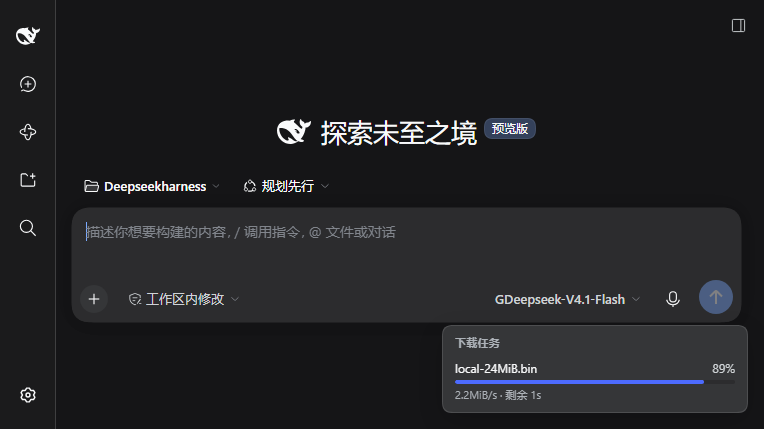
Install
In the DSH sidebar Plugins → Add plugin, paste the package name, then restart DSH:
@leisureyu/dsh-smart-dl
Command line (desktop DSH: use its own bundled CLI):
dsh plugin --profile web add @leisureyu/dsh-smart-dl
Quick start
Basic download — automatic probing, multi-connection, resume:
smart_download({ "url": "https://example.com/tool-1.4.0.zip" })
Verify against the official docs — checksum + mirror (a proven same-origin GitHub mirror is picked automatically):
smart_download({
  "url": "https://github.com/owner/repo/releases/download/v1.4.0/tool.zip",
  "sha256": "9f86d081884c7d659a2feaa0c55ad015a3bf4f1b2b0b822cd15d6c15b0f00a08",
  "mirror": "auto"
})
A whole batch — concurrent, capped, per-entry results; one failure never aborts the rest:
smart_download({
  "targets": [
    { "url": "https://example.com/a.iso", "output": "a.iso" },
    { "url": "https://example.com/b.iso", "sha256": "…" }
  ],
  "maxBandwidth": "4M",
  "timeoutMs": 600000
})
In the background — returns a taskId immediately; the panel shows it as usual:
smart_download({ "url": "https://example.com/big.iso", "background": true })
// poll download_status(taskId); cancel / retry from the download manager
Features
| Feature | How |
|---|---|
| Multi-connection (4/8 by size, automatic curl fallback) | default |
| Resume (same-origin fingerprint check) | default |
| Checksum verification | sha256 / checksum (MD5 / SHA-1 / SHA-256 / SHA-512) |
| Expected-size verification | expectedSize |
| Mirror acceleration (verified same-origin, automatic) | mirror: "auto" |
Proxy (probe / mirror / download all consistent, NO_PROXY aware) |
proxy |
| Batch downloads | targets + maxBandwidth + timeoutMs |
| Background execution | background: true |
| Existing-file policy | ifExists: "overwrite" | "skip" | "rename" |
| Custom headers (credentials travel over stdin, never in argv) | userAgent / referer / headers |
| Server-supplied filenames / disk-space preflight | default |
smart_download parameters
| Parameter | Type | Notes |
|---|---|---|
url / targets |
string / array | Exactly one. Batches: max 50 entries, per-entry results. |
output |
string | Output path; defaults to Content-Disposition → query param → URL segment. |
sha256 |
string | Expected SHA-256. Bare hex, sha256:<hex>, SRI forms all accepted. |
checksum |
string | Same, plus MD5 / SHA-1 / SHA-512 (inferred from length). Mutually exclusive with sha256. |
expectedSize |
integer | Expected bytes (the size the docs print). Conflicts with the declared length are rejected before downloading. |
ifExists |
string | overwrite (default) / skip / rename. |
mirror |
string | Mirror prefix (e.g. https://gh-proxy.com/) or "auto". |
proxy |
string | http(s) proxy, shared by probe / mirror / download. Falls back to HTTPS_PROXY etc. |
userAgent / referer / headers |
string / object | Extra request headers, shared by probe and download. |
maxBandwidth |
string | Total bandwidth cap for the call, e.g. "2M", "500K", "1500000". |
timeoutMs |
integer | Per-entry timeout (1000–1800000 ms). |
background |
boolean | Run in the background; returns taskId / batch id immediately. |
download_status parameters
| Parameter | Notes |
|---|---|
taskId |
Look up one task. |
batchId |
Filter by batch (returned by background batches). |
limit |
Max tasks to return (default 10). |
Environment variables
| Variable | Effect |
|---|---|
DSH_SMARTDL_MIRRORS |
Overrides the built-in mirror candidate list. |
DSH_SMARTDL_ARIA2_PATH |
Explicit path to an aria2 binary; takes precedence over the bundled subpackage and PATH (falls back to curl on failed verification, never to another source). |
HTTPS_PROXY / HTTP_PROXY / ALL_PROXY |
Proxy source when proxy is not passed. |
NO_PROXY |
Matching hosts connect directly (applies to an explicit proxy too). |
DSH_PROGRESS_DIR / DSH_DOWNLOAD_PROGRESS_DIR |
Override the two progress-track directories. |
Supported platforms
| Platform | Architectures | Subpackage | Status |
|---|---|---|---|
| Windows | x64 / arm64 | @leisureyu/dsh-aria2-win32-* |
✅ Full support |
| Linux | x64 / arm64 | @leisureyu/dsh-aria2-linux-* |
✅ Full support |
| macOS | x64 / arm64 | @leisureyu/dsh-aria2-darwin-* |
✅ Full support (built from official source in this repo's CI) |
| HarmonyOS | arm64 | @leisureyu/dsh-aria2-ohos-arm64 |
🟡 Available since 1.9.1; bundled subpackage is on the roadmap — multi-connection needs an aria2c on PATH or DSH_SMARTDL_ARIA2_PATH for now |
All six Windows / Linux / macOS combinations are fully supported (bundled aria2, multi-connection). The package manager installs only the subpackage matching the current platform. The OpenHarmony Node runtime reports process.platform === 'ohos' and is not Linux-binary compatible (different kernel — the musl static build cannot be reused), so it gets its own subpackage: 1.9.1 lands runtime recognition and the fallback chain (curl single-connection out of the box, automatic multi-connection when an aria2c is on PATH); the bundled binary will be built in this repo's CI with the OHOS SDK from official source — same trust model as the macOS subpackage. See COMPATIBILITY.md.
How it works
smart_download(url, …)
  │ 1. validate arguments (protocol allow-list, digests, headers, proxy, size) — before any request
  │ 2. probe the server (HEAD → Range GET fallback; length & Range support)
  │ 3. large file + Range → bundled aria2 multi-connection (4/8 by size)
  │    otherwise → curl; aria2 failure falls back automatically
  │ 4. verify: bytes vs declared/expectedSize; digest vs sha256/checksum
  ▼
{ success, path, method, size, … }   progress also streams to the panel
Every skip, fallback and failure states its reason in the result and progress — no silent degradation.
Security & permissions
http(s)only; protocol allow-list, redirect allow-list, filename sanitisation — untrusted input never reaches the download- Header credentials travel over stdin to the subprocess; never in argv, never persisted, never replayed on retry
- Contacts nothing beyond the original URL (or its mirror/proxy); no telemetry
- Full threat model and the five defence layers: SECURITY.md
Compatibility
| Item | Requirement |
|---|---|
| Node.js | ≥ 22 |
| DSH | all 0.2.x (older versions from 0.1.7-rc.1 also supported); see COMPATIBILITY.md |
FAQ
- Blocked by Defender? Heuristic warning on the unsigned
aria2c.exe; add the project'snode_modulesto the exclusions. - No speed-up? The server does not support Range, or the file is small — already fell back to curl;
reasonexplains. - "aria2 not found"? All six Windows / Linux / macOS combinations have subpackages (if a mirror did not sync them, switch to the official npm registry); on HarmonyOS, provide your own aria2c via PATH or
DSH_SMARTDL_ARIA2_PATH— otherwise it falls back to curl. - Multi-connection on HarmonyOS? Since 1.9.1 the plugin works out of the box there (curl single-connection). Two routes to multi-connection: put a self-built
aria2cpath intoDSH_SMARTDL_ARIA2_PATH, or onto PATH; the bundled ohos-arm64 subpackage is on the roadmap. - GitHub downloads slow? Pass
mirror: "auto". - How to verify a checksum? Pass the digest from the official docs as
sha256; four common notations accepted. - More → TROUBLESHOOTING.md
Documentation
| Document | Contents |
|---|---|
| CHANGELOG.md | per-version changes |
| docs/COMPATIBILITY.md | platform / Node / package-manager matrix; how the macOS subpackage is built and trusted |
| docs/SECURITY.md | threat model, five defence layers |
| docs/TROUBLESHOOTING.md | symptom → cause → fix |
| docs/ARCHITECTURE.md | internal structure |
Development
pnpm install
pnpm test        # node:test; no real network required
pnpm build       # outputs dist/
pnpm check       # typecheck
Pushing a v* tag triggers the release: binary jobs for all three platforms (macOS builds OpenSSL and aria2 from the official source, with SLSA provenance) → tests → subpackages first, then the main package. Publishing uses npm trusted publishing (OIDC); brand-new packages fall back to the NPM_TOKEN secret, since OIDC cannot bootstrap a first publish.
Third-party components & license
- Plugin code: MIT
- Bundled aria2 1.37.0: GPL-2.0-or-later. Sources: Windows x64 from the official release, Linux from abcfy2/aria2-static-build, Windows arm64 from minnyres/aria2-windows-arm64, macOS built in this repository's CI from the official source (see COMPATIBILITY.md).
- The macOS binary additionally statically links OpenSSL 3.5.4 built in this repository's CI from the pinned official source (Apache-2.0; aria2 ships an OpenSSL linking exception), bundled since 1.9.2.
Disclaimer
Community-maintained third-party plugin. Not an official product; not affiliated with or endorsed by DeepSeek AI. "dsh" in the name only denotes compatibility.
Links
More in this category
Tencent/WeKnora#dsh-weknora★ 38093
Four read-only tools over a WeKnora knowledge base: list knowledge bases, hybrid passage search, reassemble one document's chunks in order, and WeKnora's own cited RAG or ReAct-agent answer with a resumable session id.
DayuanJiang/next-ai-draw-io#dsh-plugin★ 37147
Draws draw.io diagrams in DeepSeek Harness through the next-ai-drawio MCP server: the link in the reply opens a live preview in the right sidebar, you can edit the diagram by hand, and each AI change is a version you can restore. Node.js 18+; npx downloads the MCP server on first use.
superdesigndev/treg★ 8818
Tool catalog for agents: search ~2,600 external endpoints (SEO and SERP, backlinks, social, people and company enrichment, ad libraries, scraping) by the task you want done, read each one's parameters and per-call price, then call it with the credential injected server-side. Ships the skill plus an MCP row that stays disabled until TREG_TOKEN is set.
T-Auto/dsh-ops★ 5995
Provides bash, PowerShell 7, and high-performance Rust tools for DSH on Windows to reduce token usage.
helloHub1212/dsh-windows-mcp★ 2331
Bridges the CursorTouch/Windows-MCP desktop automation server into DSH through the official MCP client bridge, registering its screenshot, UI tree snapshot, mouse and keyboard input, clipboard, process and registry tools as mcp__windows__* tools for the model, and adds a windows_mcp_doctor diagnostic tool. Computer Use is off by default and is switched on from the plugin panel.
sixtysevenlf/dsh-blender-plugin★ 2259
Lets a DSH agent drive a local Blender over a direct TCP channel with 15 tools: viewport frames, custom-angle renders, Python execution, headless and job offload, transaction rollback, and a planning layer of 228 ops across 34 families.
Community comments
Comments are public GitHub Discussions. Loading them connects to GitHub and Giscus; a GitHub account is required to post.