Accelerated GitHub download manager for DeepSeek Harness. Adds a download panel in the sidebar and a github_download tool the agent can call to fetch GitHub files, release assets, source archives and gists through gh-proxy into the workspace, with progress, pause/resume, multi-channel link conversion and a download-history list.
Install
# from GitHub (first run asks for allowBuilds approval — follow the hint, retry)
dsh plugin --profile web add github:LPRabdusamat/dsh-gh-downloader
Any plugin you install runs third-party code with your own permissions — it can read your files, use your credentials, and reach the network, and tool approvals don’t sandbox it. GitHub-sourced plugins also run build scripts at install time — pnpm blocks those until you allow them, so an install can stop with ERR_PNPM_GIT_DEP_PREPARE_NOT_ALLOWED or ERR_PNPM_IGNORED_BUILDS; dsh prints the exact key to add under allowBuilds in your profile’s pnpm-workspace.yaml, and the install works on the next run. Allowing a build is a trust decision: only install sources you trust, and pin a commit (github:owner/repo#sha).
README
This plugin publishes its README in Chinese only.
GitHub 资源下载管理器插件。左侧栏提供一个下载管理面板(下载中 / 已完成 / 失败分类、进度条、实时速度、暂停/继续/重试/删除/打开文件夹),主要供 Agent 在下载 GitHub 源码时自动调用,同时支持手动粘贴链接下载。
界面风格:哆啦A梦色调的界面 + 我的世界箱子风的按钮/控件。
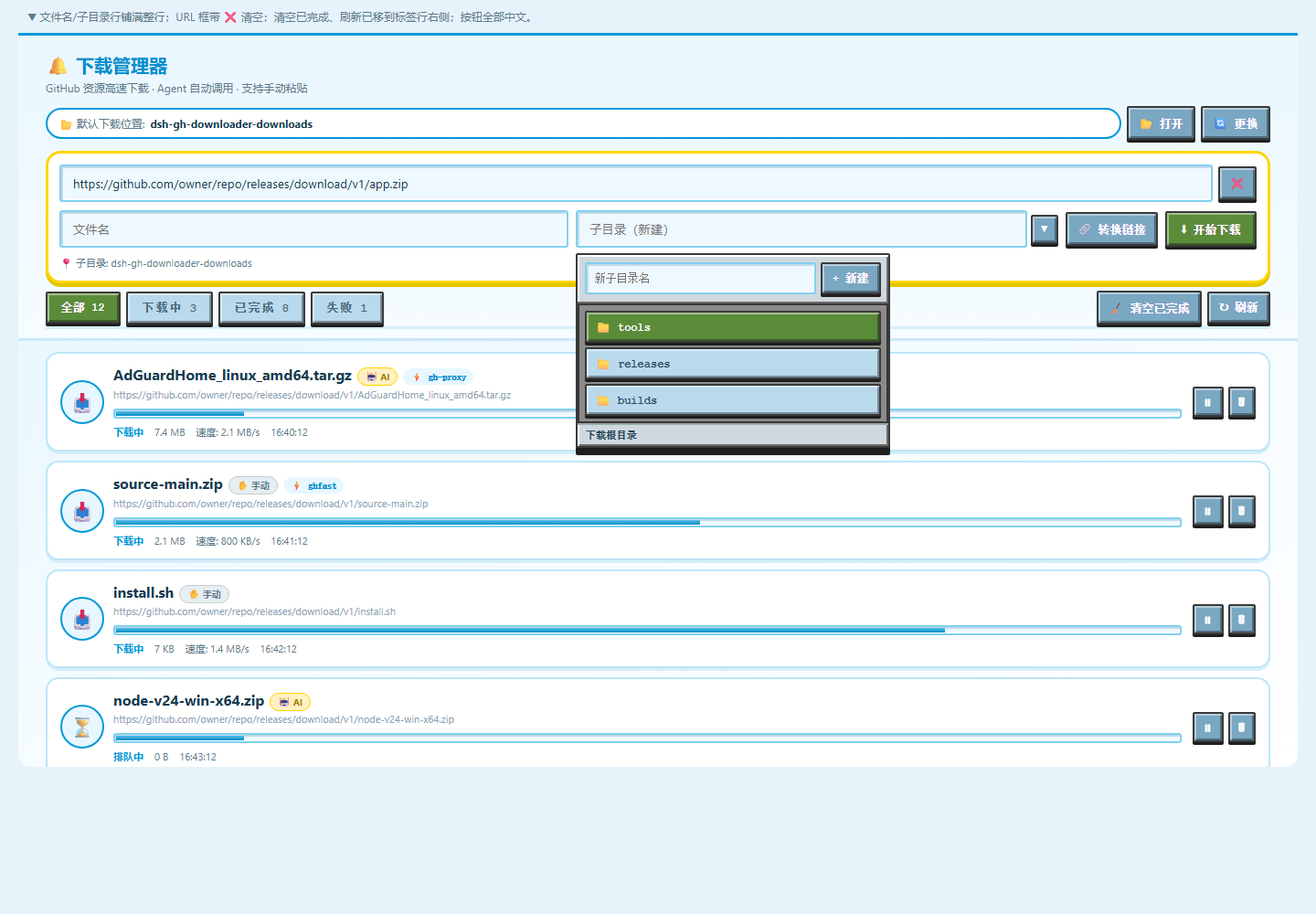
快速安装:把「安装教程 — 方式一」里那段提示词整段发给 DSH 里的 AI,它会自动帮你装好。详见下方完整教程。
让 agent 用这个插件下载:安装后无需额外配置。直接对 AI 说「帮我下载 https://github.com/... 这个 release / 源码包」,它会自动调用
github_download走加速通道下载。
功能
Agent 自动调用(主用途)
github_download({ url, fileName?, relativeDir?, wait? })— AI 遇到 GitHub 链接时调用,通过加速代理下载到工作区。传wait:true可等待下载完成再返回。github_download_status({ id? })— 查询单个任务进度,或列出全部任务。- 工具描述中明确要求 AI 下载任何 GitHub URL 时都走本插件(而非 curl/wget)。
- Agent 创建的任务自动出现在面板里,带
AI来源标记。
面板(左侧栏「GitHub 下载」)
- 上半部分固定(粘贴框 / 转换 / 目录位置 / 标签),只有下面的下载列表滚动,任务多也不乱。
- 顶部「默认下载位置」旁边有:
- [打开]:在系统文件管理器中打开该目录。
- [更换]:箱子风下拉浏览工作区目录,选新位置,持久化到
settings.json。
- 粘贴框右侧有 ❌ 用于清空链接。
- 文件名:可选,不填自动取 URL 末段。
- 子目录:可选,是输入框 + ▼ 下拉。▼ 在框下方内嵌列出下载目录里的文件夹供选择;输入框里输入名字则新建子目录。
- [开始下载]:用默认前缀(gh-proxy.com)直接下载。
- [转换链接]:解析后弹窗列出多条通道候选(gh-proxy 主站 / 备用 / ghfast / 直连),每条最右侧有 复制链接 和 下载 两个图标按钮,点下载直接从该通道开始。
- 分类标签:全部 / 下载中 / 已完成 / 失败,带计数;清空已完成、刷新放在标签行右侧。
- 每行显示:文件名、来源(AI/手动)、通道标记、URL、进度条、百分比、大小、速度、时间。
- 操作:暂停、继续、取消、重试、删除、打开文件夹、清空已完成。
- 所有文案固定中文,不受 DSH 界面语言影响。
下载引擎
- 多个 gh-proxy 加速通道,默认
https://gh-proxy.com/。 - GitHub 域名白名单(github.com / raw / codeload / objects / api.github.com / gist 等);
/blob/浏览链接自动改写为 raw 直链。 - 真实字节进度与速度计算,HTTP Range 断点续传(暂停/继续保留已下载部分)。
- 并发队列(默认 3,可配置),流式落盘不缓存整包。
- 任务账本持久化到
<DSH_HOME>/dsh-gh-downloader/tasks.json,重启后历史保留,中断任务恢复为可续传的暂停态;默认目录变更存到同目录的settings.json。
安装教程(新手照做即可)
方式一:让 AI 帮你装(最省事,推荐)
复制下面整段提示词,粘贴到 DSH 对话里发送即可。AI 会自己执行安装命令:
请帮我安装 DSH 插件 dsh-gh-downloader(已发布在 npm 官方源)。

请执行:
dsh plugin --profile desktop add dsh-gh-downloader

安装后确认 dsh-gh-downloader 已加入 desktop profile 的 dsh.profile.bundles,然后告诉我需要重启 DSH 生效。
安装成功后重启 DSH,左侧栏出现「GitHub 下载」入口即完成。
方式二:手动命令行安装
- 确认环境:DSH 已安装,且
dsh命令可用(DSH 桌面版用自带 CLI)。 - 打开终端(PowerShell / CMD 均可),执行:
dsh plugin --profile desktop add dsh-gh-downloader
- 看到类似
+ dsh-gh-downloader@0.1.0 ...的输出即安装成功。 - 重启 DSH(本 profile 未启用 HMR,不重启不会加载)。
- 验证:左侧栏出现「GitHub 下载」图标,点开是下载管理器面板。
如果你的默认 profile 不叫
desktop,把命令里的desktop换成你的 profile 名(在C:\Users\Administrator\.dsh\profiles\下能看到)。备选(从 GitHub 仓库装):如果 npm 源暂时不可用,也可以用 GitHub 地址安装,效果一样:
dsh plugin --profile desktop add git+https://github.com/LPRabdusamat/dsh-gh-downloader.git
在线更新
插件已发布到 npm,不用重新安装就能升级。以后出新版时:
- 在 DSH 的插件页面找到
dsh-gh-downloader,点「更新」即可; - 或让 AI 执行:
dsh plugin --profile desktop update dsh-gh-downloader
或直接对 AI 说「把 dsh-gh-downloader 更新到最新版」。更新后重启 DSH 生效。
方式三:本地目录安装(适合想自己改代码的人)
这个方式是干嘛的? 普通安装(方式一/二)是把插件从 npm / GitHub 下载一份"副本"装进 DSH,以后你改不到它。而"本地目录安装"是让 DSH 直接用你电脑上一个文件夹里的插件代码——你改那个文件夹里的代码,重启 DSH 就生效,不用重新下载、不用重新安装。适合想自己改插件、加功能、调试的人。普通用户用方式一/二就够了,可以跳过这个。
手把手步骤:
第 1 步:把插件代码下载到本机
打开 PowerShell,先 cd 到一个你想放插件的地方(比如 D 盘根目录):
cd D:\
然后克隆仓库(就是把 GitHub 上的代码下载到 D:\dsh-gh-downloader 文件夹):
git clone https://github.com/LPRabdusamat/dsh-gh-downloader.git
执行完后,检查一下文件夹在不在:
dir D:\dsh-gh-downloader
能看到 package.json、lib 文件夹等内容就对了。
第 2 步:把这个文件夹安装给 DSH
dsh plugin --profile desktop add file:D:/dsh-gh-downloader
注意这里的写法:
file:开头是固定写法,表示"从本机文件夹安装"D:/dsh-gh-downloader就是第 1 步下载的文件夹路径(用正斜杠/,不要用反斜杠\)- 如果你的文件夹在别处,比如
C:\Users\你的名字\我的插件,就写成file:C:/Users/你的名字/我的插件
第 3 步:重启 DSH
重启后左侧栏出现「GitHub 下载」即成功。
第 4 步(可选):改代码测试
现在你可以直接用记事本/VSCode 修改 D:\dsh-gh-downloader\lib\ 里的代码,改完重启 DSH就生效,不用再执行任何安装命令。这就是这个方式最大的好处。
常见问题:如果第 2 步报错"路径不存在",说明第 1 步的文件夹路径和命令里写的不一致,用
dir 你的路径确认一下实际路径。
验证安装是否成功
安装命令会自动把插件加入 profile 的 dsh.profile.bundles 并用 pnpm 建立依赖。可以检查:
# 查看 profile 配置里是否有 dsh-gh-downloader
Get-Content C:\Users\Administrator\.dsh\profiles\desktop\package.json | Select-String dsh-gh-downloader
看到 dsh-gh-downloader 即正常。
卸载
dsh plugin --profile desktop remove dsh-gh-downloader
开发者:改源码后同步
file: 安装改源码即时生效;git/npm 安装是 pnpm 复制的实体文件,改源码后需同步再重启:
$src='<你的源码目录>\lib'
$dst='C:\Users\Administrator\.dsh\profiles\desktop\node_modules\dsh-gh-downloader\lib'
Copy-Item "$src\index.js" "$dst\index.js" -Force
Copy-Item "$src\client.js" "$dst\client.js" -Force
配置
cordis.patch.yml 的行配置:
- insert:
    - id: dsh-gh-downloader
      name: dsh-gh-downloader
      config:
        proxy: https://gh-proxy.com/
        downloadDir: dsh-gh-downloader-downloads
        concurrency: 3
        timeoutMs: 0
| 字段 | 默认 | 含义 |
|---|---|---|
proxy |
https://gh-proxy.com/ |
默认加速前缀(「开始下载」用) |
downloadDir |
dsh-gh-downloader-downloads |
下载目录,相对工作区根目录 |
concurrency |
3 |
并发下载数 |
timeoutMs |
0 |
单任务超时(毫秒),0 为不限 |
运行时可通过面板的「更换」按钮改默认下载位置,覆盖 downloadDir 并写入 settings.json(优先级高于 patch 配置)。
通道
「转换链接」弹窗中的候选通道定义在 lib/index.js 顶部的 CHANNELS 数组,可自行增删:
const CHANNELS = [
  { id: 'gh-proxy',     label: 'GH-Proxy (主站)', prefix: 'https://gh-proxy.com/' },
  { id: 'gh-proxy-org', label: 'GH-Proxy (备用)', prefix: 'https://gh-proxy.org/' },
  { id: 'ghfast',       label: 'GhFast',          prefix: 'https://ghfast.top/' },
  { id: 'direct',       label: '直连 GitHub',     prefix: '' },
]
结构
dsh-gh-downloader/
├── package.json          # dsh.bundle.patch + dsh.client 声明
├── cordis.patch.yml      # Host loader 行 + 配置
├── icon.svg
├── lib/
│   ├── index.js          # Host:AI 工具 + HTTP 路由 + 下载引擎 + 持久化
│   └── client.js         # Client:下载管理 main 面板 + 侧栏入口(无 JSX/构建步骤)
├── preview.html          # 面板静态预览(浏览器直接打开)
└── README.md
HTTP 路由(供面板调用)
全部为 POST,路径前缀 /api/dsh-gh-downloader/:
| 路由 | 用途 |
|---|---|
list |
列出全部任务 |
create |
新建下载任务(可指定 channel / proxyUrl) |
op |
任务操作:pause / resume / cancel / retry / remove / open / openDir / clearCompleted |
config |
读取配置与通道列表 |
setDir |
更换默认下载目录 |
convert |
把 GitHub URL 转换成多通道候选链接 |
browse |
浏览目录(base=download 下载目录内 / base=workspace 工作区) |
许可
MIT
Links
More in this category
Tencent/WeKnora#dsh-weknora★ 38385
Four read-only tools over a WeKnora knowledge base: list knowledge bases, hybrid passage search, reassemble one document's chunks in order, and WeKnora's own cited RAG or ReAct-agent answer with a resumable session id.
DayuanJiang/next-ai-draw-io#dsh-plugin★ 37218
Draws draw.io diagrams in DeepSeek Harness through the next-ai-drawio MCP server: the link in the reply opens a live preview in the right sidebar, you can edit the diagram by hand, and each AI change is a version you can restore. Node.js 18+; npx downloads the MCP server on first use.
yikart/AiToEarn#dsh-plugin-aitoearn★ 28812
Generate copy, images and short videos, and publish with one click to Douyin, Kuaishou, Xiaohongshu, WeChat Official, Bilibili, Facebook, TikTok and more, covering the full content lifecycle from creation to publishing and monetization.
superdesigndev/treg★ 9804
Tool catalog for agents: search ~2,600 external endpoints (SEO and SERP, backlinks, social, people and company enrichment, ad libraries, scraping) by the task you want done, read each one's parameters and per-call price, then call it with the credential injected server-side. Ships the skill plus an MCP row that stays disabled until TREG_TOKEN is set.
T-Auto/dsh-ops★ 6039
Provides bash, PowerShell 7, and high-performance Rust tools for DSH on Windows to reduce token usage.
Hithink-Tech-Org/Financial-API#hithink-finance★ 4659
Query Hithink Finance data in DeepSeek Harness, view charts in chat, and save refreshable dashboards.
Community comments
Comments are public GitHub Discussions. Loading them connects to GitHub and Giscus; a GitHub account is required to post.