macOS notch panel for DeepSeek Harness: running sessions and pending approvals sit above every window, approvals are decided in place, and clicking a row opens that conversation in the desktop app. Requires macOS 14+ and Xcode Command Line Tools.
Install
# from GitHub (first run asks for allowBuilds approval — follow the hint, retry)
dsh plugin --profile web add github:JiayangSUNwinter/dsh-island-bridge
Any plugin you install runs third-party code with your own permissions — it can read your files, use your credentials, and reach the network, and tool approvals don’t sandbox it. GitHub-sourced plugins also run build scripts at install time — pnpm blocks those until you allow them, so an install can stop with ERR_PNPM_GIT_DEP_PREPARE_NOT_ALLOWED or ERR_PNPM_IGNORED_BUILDS; dsh prints the exact key to add under allowBuilds in your profile’s pnpm-workspace.yaml, and the install works on the next run. Allowing a build is a trust decision: only install sources you trust, and pin a commit (github:owner/repo#sha).
README
This plugin publishes its README in Chinese only.
把 DeepSeek Harness 的会话状态与待审批操作,投影到 macOS 刘海上的原生灵动岛——审批在岛上直接裁决,点一行跳回那个对话。

这解决什么问题
并行开几个 Agent 会话时,人常常不在 DSH 窗口前:
- 审批看不见 → 工具审批积压在会话里,Agent 空转等人;
- 任务找不回 → 切走再回来,要靠回忆哪个会话在跑、跑到哪了;
- 现有手段不够 → 系统通知(如 dsh-notify-me)无法就地裁决,网页浮层被窗口遮挡就消失。
dsh-island-bridge 用一颗系统级、原生、数据不出本机的悬浮面板同时盖住这两件事。
| 方案 | 任何 App 前台可见 | 可就地裁决 | 数据出本机 |
|---|---|---|---|
| 系统通知中心 | ✓ | ✗ 第三方 App 不支持交互按钮 | 视实现 |
| DSH 页面内浮层 | ✗ 窗口被遮挡即不可见 | ✓ | ✓ |
| 云中继 + 手机推送 | ✓ | ✓ | ✗ 经第三方云 |
| 本项目(原生刘海面板) | ✓ | ✓ | ✓ 仅 stdio / 同源路由 |
截图
| 待审批 | 并行任务 |
|---|---|
|
 |
| 单个任务 | 完成提示 |
|---|---|
 |
 |
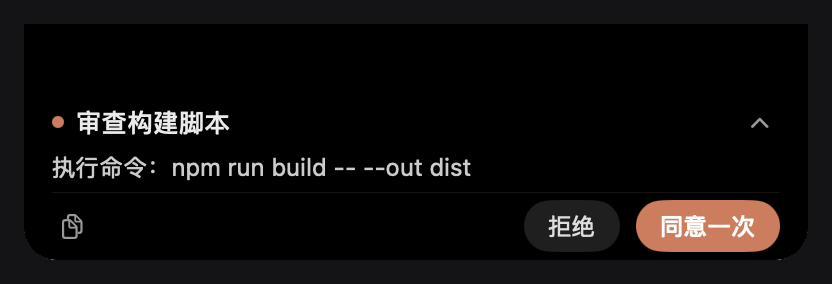
截图取自原生面板本身(Retina 2x):审批时整颗岛只显示待交互内容,正文可滚动、按钮钉在底部;无待交互时显示运行会话行,会话结束后在同一个岛上出一条 24pt 完成提示。
特性
- 审批不漏,岛上即决:
allowed-once/rejected与原审批瀑布动词一致,不产生额外权限语义。 - 审批独占:只要有待交互,整颗岛只显示审批(来源、队列、完整正文、按钮),不夹带运行任务与完成提示。
- 全文可读:正文在岛内滚动,不截断;按钮钉在底部,不会被正文滚走。
- 点击即达:点任务行或审批来源 → 唤醒 DSH 并精确打开对应会话(不经窗口猜测)。
- 完成提示:会话结束时同一岛上出一条 24pt 单行提示,3 秒后自动收回,连续完成不叠窗。
- 单实例、可自愈:宿主只托管一个 helper 进程;崩溃重启有退避与预算,迟到事件不影响新进程。
- 更完整的任务标题:默认会话名展示完整首条消息,手动或模型生成的名称保留;任务列表按文字在392–560pt间自适应加宽,长标题末尾省略并悬停查看全文。
- 动态高度:1 项 96pt / 2 项 124pt / 3 项 152pt,上限 178pt 后内部滚动。
工作原理
flowchart LR
  subgraph DSH["DSH 桌面端进程"]
    AW["审批瀑布<br/>approval/request<br/>user-questions/request"]
    ST["会话状态<br/>agents · sessions · projections"]
    BR["dsh-island-bridge<br/>lib/index.js"]
    CL["桌面客户端<br/>lib/client.js"]
    RT["同源已鉴权路由<br/>/api/island-navigation/*"]
  end
  subgraph NATIVE["原生 helper(Swift)"]
    P["NSPanel 刘海面板"]
  end

  AW -- "answerer(prepend + global)" --> BR
  ST -- "快照" --> BR
  BR -- "stdin JSON 行" --> P
  P -- "decision / open" --> BR
  BR -- "settle → 原审批动词" --> AW
  P -- "点击任务行" --> CL
  CL --> RT --> P
  CL -- "uiWorkspace.openSession" --> DSH
- 桥接以 answerer 身份加入审批瀑布,岛上裁决与本地 UI 竞速,本地先答就用本地结果。提问只镜像到岛上并跳回 DSH 回答;答案、取消和超时保持 DSH 原有语义,交互结束立即清理岛上的提示。
- 面板通过 stdio JSON 行与宿主机通信;helper 二进制首次运行时由
swiftc编译并按源码哈希缓存。 - 导航复用 DSH 已有的同源、已鉴权 Fetch 通道,不新开端口、不注册公网入口。
环境要求
| 项 | 要求 |
|---|---|
| 系统 | macOS 14+(Apple Silicon 优先;需要带刘海的屏幕效果最佳) |
| DSH | 桌面端 >= 0.2.1-rc.2 |
| 工具链 | Xcode Command Line Tools(首次运行 swiftc 编译原生面板):xcode-select --install |
| Node | ≥ 22(DSH 自带运行时即可,仅测试与脚本用到) |
安装
桌面端(推荐)
在 DSH 的插件管理页里从 GitHub 安装 JiayangSUNwinter/dsh-island-bridge,然后重启 DSH。
命令行
# 从 GitHub 安装
dsh plugin --profile desktop add github:JiayangSUNwinter/dsh-island-bridge

# 或从本地仓库根目录安装(开发用)
dsh plugin --profile desktop add link:"$PWD"
装完重启 DSH。本仓库按 awesome-dsh-plugin 的收录要求组织(dsh.bundle manifest、screenshots.json、分类与描述),收录后也能在 DSH Market 里一键安装。dsh plugin 会把参数转发给 pnpm,并在成功后把包名写进 profile 的 dsh.profile.bundles;本包的 cordis.patch.yml 经 dsh.bundle.patch 声明,作为组合层随该 bundle 加载。
以桌面 profile 为例,三处都要在,缺一不生效:
包目录可被解析:
~/.dsh/profiles/desktop/node_modules/dsh-island-bridge指向仓库(软链或file:依赖);~/.dsh/profiles/desktop/package.json的dsh.profile.bundles含"dsh-island-bridge";~/.dsh/profiles/desktop/cordis.patch.yml末尾追加:- insert: - id: island-bridge name: 'dsh-island-bridge'
改完重启 DSH。卸载时逆向删除这三项并重启。
安装位置与运行时文件:
$DSH_HOME/dsh-island-bridge/island-helper        # 首次启动自动编译的原生面板
$DSH_HOME/dsh-island-bridge/island-helper.sha256 # 源码哈希缓存,源码变了自动重编
使用
| 操作 | 效果 |
|---|---|
| 点常驻区(绿点 / 橙点) | 展开岛,显示任务列表或审批卡 |
| 点顶部收起 / 点岛外 | 收起;同一审批的状态刷新不会再弹开,新审批仍会展开 |
| 「同意一次」/「拒绝」 | 回传与原审批动词一致的裁决,4 秒未确认允许重试 |
| 「在 DSH 回答」(提问卡) | 打开对应会话去回答,不会被当成工具权限批准 |
| 点任务行 / 审批来源标题 | 唤醒 DSH 并打开该会话(不产生裁决) |
| 复制按钮 | 复制审批全文 |
配置
| 环境变量 | 默认 | 说明 |
|---|---|---|
DSH_ISLAND_DEBUG |
未设置 | 设为 1 后写入诊断日志 $DSH_HOME/dsh-island-bridge/bridge-debug.log |
DSH_HOME |
~/.dsh |
DSH 数据目录,决定 helper 二进制与日志位置 |
隐私与安全
- 数据源是 DSH 进程内的官方接缝(审批瀑布、会话 store),不抓屏、不 hook 其他进程、不解析日志。
- 与面板的通信只有 stdio;导航走 DSH 已有的同源已鉴权路由,不监听端口、不联网、无遥测。
- 面板是只读状态 + 审批裁决 + 跳转,v1 不含内容输入,不能替你在会话里发 prompt。
- 诊断日志默认关闭;开启后只落在本机
$DSH_HOME下。
故障排查
| 现象 | 处理 |
|---|---|
| 岛上没有面板 | 看 DSH 日志里的 [island-bridge] 输出;确认 swiftc 可用(swiftc --version) |
找不到 swiftc |
xcode-select --install 后重启 DSH |
| 升级插件后面板行为没变 | 重启 DSH,桥接会按源码哈希重新编译 helper |
| 点任务行只唤醒窗口、不跳会话 | 导航只在桌面端(dsh-app: 协议)生效,普通浏览器不消费 |
| 装完插件列表里没有 | 重跑一次 dsh plugin --profile desktop add …,并确认 profile 的 dsh.profile.bundles 含 dsh-island-bridge |
开发
npm test                      # 23 项 Node/进程/窗口/导航测试 + 55 条原生断言(需 macOS + Xcode CLT)
npm run check                 # 只做语法检查
npm run build:helper -- --out ./build   # 手动编译原生面板到本地 build/
测试直接从源码编译 helper,无第三方依赖;原生断言通过 tests/core-regressions.swift 注入并与面板代码同进程运行。原生集成测试统一使用 --test-protocol:保留实际模型和窗口几何检查,窗口不可见且不安装鼠标监听,不会在桌面弹出“配置检查”等测试提示或与正式岛重叠。可见演示需显式使用 --demo。
目录结构:
.
├─ lib/index.js           # 宿主半边:审批 answerer、快照推送、helper 托管
├─ lib/registry.js        # 待交互注册表(permission / ask_user_question)
├─ lib/helper-host.js     # 单实例 helper 监督(合并重启、退避预算)
├─ lib/navigation.js      # 桌面端导航的 wait/ack 路由
├─ lib/client.js          # 桌面客户端半边:收到 open 命令后精确打开会话
├─ helper/island-helper.swift  # 原生 NSPanel 面板(AppKit + SwiftUI)
├─ cordis.patch.yml       # bundle 组合层:向宿主插入 island-bridge 服务
├─ tests/                 # Node 测试 + Swift 原生断言
└─ docs/                  # 产品需求、显示规格、修复与验收记录
已知限制
- 仅 macOS;Windows / Linux 不做支持(
package.json已声明os: darwin)。 - 只投影运行中的根会话;子代理不单独成行。
- v1 为只读状态 + 审批裁决 + 跳转,不含内容输入;手机端 / 远程推送不在范围内。
- 首次安装需要本机编译(约数秒到一分钟),之后按哈希复用二进制。
路线图
- 多显示器与不同刘海尺寸的锚定微调
- 会话完成提示聚合与静音时段
- 可配置的展开快捷键与岛体主题
- 拖拽排序 / 钉住常驻任务
文档
许可
MIT © 2026 JiayangSUNwinter
English
dsh-island-bridge projects DeepSeek Harness session state and pending approvals onto a native macOS notch panel, so you can approve or reject tool calls without switching back to DSH, and click any row to jump straight into that conversation.
- Local only: data flows over stdio plus DSH's existing same-origin, authenticated routes. No ports, no network, no telemetry.
- Approvals first: while anything is pending the island shows only the pending queue with the full body and the same
allowed-once/rejectedverbs as DSH itself. - Requirements: macOS 14+, DSH desktop
>= 0.2.1-rc.2, Xcode Command Line Tools.
dsh plugin --profile desktop add github:JiayangSUNwinter/dsh-island-bridge
Licensed under MIT.
Links
More in this category
xmanrui/dsh-im★ 3118
Connect IM bots to DeepSeek Harness via QR codes or bot credentials (9 channels: Feishu, WeChat, DingTalk, WeCom, QQ, Slack, Telegram, Discord, and WhatsApp).
shaobeichen/dsh-pocket★ 2685
Remote phone access to the DSH Web UI: scan a QR code for LAN or public (cloudflared tunnel) access with real-time sync, a mobile-adaptive layout, and a settings tab.
OpenPetsHQ/openpets#dsh★ 1373
Bridges DeepSeek Harness lifecycle status, errors, and approval requests to a locally running OpenPets desktop companion.
c1overzz/dsh-bili-scroll★ 1150
Let your DSH agent browse Bilibili on its own, read subtitles, write a daily digest, and @ you when it finds something worth your attention.
inclusionAI/Avernet#deepseek-harness-channel-bcn★ 599
Connects DeepSeek Harness to Avernet's Bot Collaboration Network over WebSocket V2, with automatic onboarding, isolated agent sessions, tool-call events, and multi-bot routing tools.
zaofan-make/dsh-qqbot★ 213
QQ official bot channel for DeepSeek Harness (feature-rich fork of tencent-connect/dsh-qqbot): group and private chat with the full agent, sticker library with auto-tagging and AI meme replies, group management (join approval and mute), botplay interactive card events with paginated catalogs, user extension registry (custom slash commands and QQ tools), scheduled wakeups, remote approvals over QQ, and a floating dock web UI.
Community comments
Comments are public GitHub Discussions. Loading them connects to GitHub and Giscus; a GitHub account is required to post.