Multi-character Galgame conversation view with separate character and reply-model selection, per-character affection, memory, dialogue history, and CG galleries, plus responses informed by task events across Harness sessions.
Install
# from npm (prebuilt)
dsh plugin --profile web add dsh-whale-galgame
# from GitHub (first run asks for allowBuilds approval — follow the hint, retry)
dsh plugin --profile web add github:JAdpp/dsh-whale-galgame
Any plugin you install runs third-party code with your own permissions — it can read your files, use your credentials, and reach the network, and tool approvals don’t sandbox it. GitHub-sourced plugins also run build scripts at install time — pnpm blocks those until you allow them, so an install can stop with ERR_PNPM_GIT_DEP_PREPARE_NOT_ALLOWED or ERR_PNPM_IGNORED_BUILDS; dsh prints the exact key to add under allowBuilds in your profile’s pnpm-workspace.yaml, and the install works on the next run. Allowing a build is a trust decision: only install sources you trust, and pin a commit (github:owner/repo#sha).
README
Overview
Between Harness tasks, discover an “extraordinary” coworker relationship with the model girls~(∠・ω< )⌒★
dsh-whale-galgame is a standalone multi-character Galgame interface plugin built for DeepSeek Harness Web. By blending naturally into your daily workflow, it turns impersonal AI interactions into warm, lasting companionship:
- Six model girls with distinct personalities: DeepSeek (the whale girl), Claude, GPT, Gemini, Kimi, and Grok, each with independent sprites, affection, memories, and backgrounds.
- Appearance and model are decoupled: Like the whale-girl sprite but want an in-depth conversation with Claude or GPT? Mix and match the character image and underlying reply model freely.
- Side Story mode: Go beyond one-to-one Q&A with multi-character daily scenes, work-recap skits, and dedicated milestone stories.
- A bond system that grows with you: Daily interaction and accumulated work tokens both raise affection, unlocking more intimate dialogue styles and AI-generated commemorative CGs.
- A lightweight, lovable desktop pet: Keep it in a corner of the screen and click once to jump into the Galgame view.
The plugin interface is currently in Simplified Chinese. This page translates the installation and usage documentation.
What it does
- Choose the displayed character separately from the reply model. A role can follow the workspace model or be pinned; replies can use the default
deepseek-v4-flash, follow the workspace, or use a model listed by DSH. - The six roles keep separate affection, level, profile, dialogue history, reply choices, consumed-task memory, custom sprite, CG gallery, and background data, all shared globally across workspaces; the current role, token balance, and plugin preferences remain continuous too.
- Side Story branches support more than one-to-one interaction: trigger themed daily skits between characters, humorous work recaps, and milestone-story replays.
- Each turn offers close, neutral, and distant reply options in shuffled positions. Free-text input remains available.
- Switching roles also switches to that role's built-in background. The whale-girl still defaults to the deep-sea palace; her new seaside study is an optional built-in alternative. A user upload or saved CG overrides role defaults until a built-in background is restored.
- Manage the background, per-role sprite, dialogue archive, CG gallery, and desktop pet from the interface. Clicking the pet opens the
galgametab.
Affection and cross-session context
Relationship progression
Each role begins at Lv.1 with 0 affection and keeps its own state. The close, neutral, and distant reply choices apply +1, 0, and -1 respectively, with their positions shuffled each turn; free text uses lightweight keyword rules. While the plugin is running, newly observed Harness assistant/message usage events from every workspace enter one global token balance. Every 5,000 accumulated input and output tokens add 1 point to whichever role is current when settlement runs. A settlement redeems at most 3 points and keeps the remaining balance; model calls initiated by the plugin itself are excluded, and usage from before the plugin started is not recalculated. After a 24-hour grace period without activity, every role loses 2 points per day, with a floor of 0.
The level threshold is 30 + 15 × (Lv - 1): 30, 45, 60, and so on. Reaching it raises the level and carries any surplus into the next one; there is no level cap. Relationship tone has five stages and remains at the closest stage from Lv.5 onward. With a valid DashScope key configured, each level-up attempts to generate a commemorative CG.
Harness task events
For each event source, the plugin examines at most 16 top-level live and persisted Harness sessions from that workspace, limited to the past 72 hours and the final 240 events in each session. Local deterministic rules classify activity as code debugging, code development, document summarization, document writing, literary creation, research, data analysis, visual design, presentation work, translation and proofreading, or task planning, then merge the safe result into the global event feed. Text classification uses only explicit user text submitted by a person; tool names and turn-end status may also contribute. Tool arguments, tool results, and assistant body text are neither read nor sent.
Only fixed category and status cues are passed to the Galgame reply model and CG generation service. While answering the current topic, the character naturally adds one brief acknowledgement—for example, reminding the player to rest after a debugging task. Each role's consumed-event fingerprints and last-mention time live in the global state: switching workspaces will not cause that role to proactively mention the same event again, and different events remain at least 30 minutes apart. Task events affect the topic, not affection directly.
Bundled default art
The installed plugin embeds 22 runtime visual assets: six character sprites, seven built-in backgrounds, eight whale-girl expressions, and one 11-row desktop-pet animation atlas from dsh-deepseek-girl-pet. The six images below are the default role sprites; assets/default/ lists every exported file and its runtime purpose. The npm installation carries only the client bundle with embedded art, rather than duplicating the raw exports or generated-art source.
The six new role backgrounds are shown below. Claude, GPT, Gemini, Kimi, and Grok use their matching scene by default. DeepSeek keeps palace-night.webp as the whale-girl default; the seaside study shown here is a selectable built-in alternative.
The remaining runtime assets comprise eight full-resolution transparent whale-*.webp expression images and the 8-column × 11-row pet-spritesheet.webp animation atlas. The first 21 default images and the pet atlas use different licenses; see the NOTICE and third-party license index for sources, modifications, and file-by-file licensing.
The Galgame layout, dialogue box, controls, and decorations are public in src/client/index.ts; there is no undisclosed UI-image pack.
Install
DeepSeek Harness must be installed with a working dsh command and Web profile.
dsh plugin --profile web add dsh-whale-galgame
After installation, stop the running Web profile and start it again:
dsh --profile web
If a source installation exposes the command as pnpm dsh, keep the same arguments.
Update and remove
dsh plugin --profile web update dsh-whale-galgame
dsh plugin --profile web remove dsh-whale-galgame
Stop and restart the Web profile after either operation.
Installing from GitHub (tracking main)
Only needed to follow the latest commit instead of the published release:
dsh plugin --profile web add github:JAdpp/dsh-whale-galgame#main
A git install runs this repository's prepare build script on the spot, which
pnpm blocks by default. The first run fails with
ERR_PNPM_GIT_DEP_PREPARE_NOT_ALLOWED and prints a key; add it to the profile's
pnpm-workspace.yaml:
allowBuilds:
  'dsh-whale-galgame@https://codeload.github.com/JAdpp/dsh-whale-galgame/tar.gz/<commit>': true
The key pins one commit, so it has to be updated from pnpm's output every time you follow a new one. Installing from npm skips all of this — the published package is prebuilt and runs no install-time scripts.
Use and settings
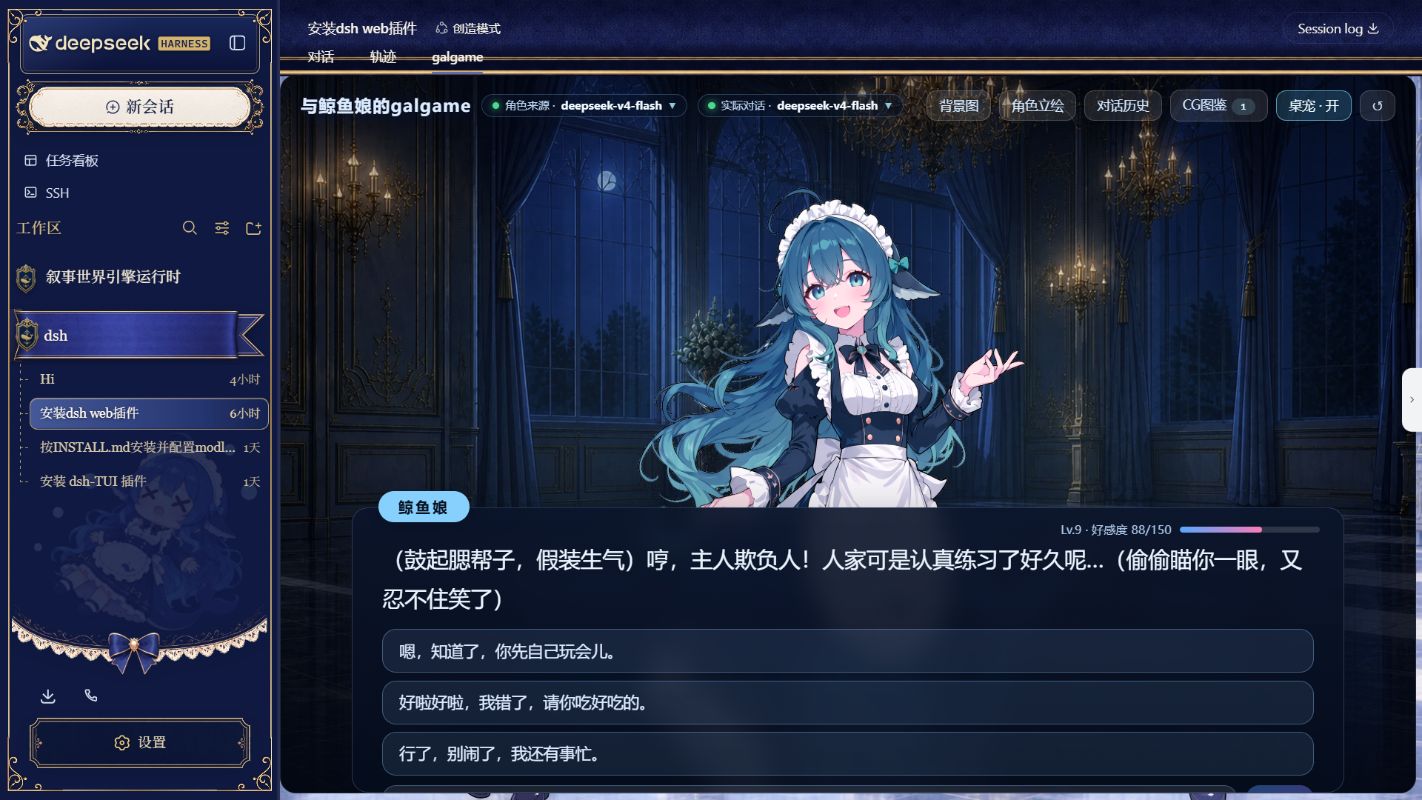
The Galgame top bar controls the displayed character and actual dialogue model. It also accepts a background or a sprite for the current role. PNG, JPEG, WebP, and AVIF are supported, with a 12 MB browser-side limit per file.
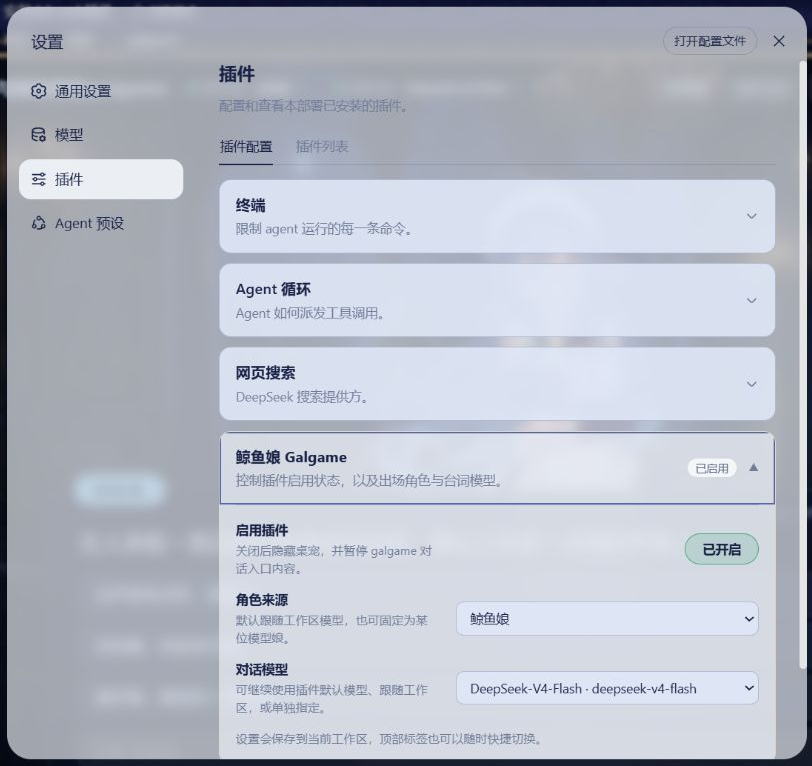
Settings → Plugins → Whale Girl (鲸鱼娘) contains the plugin toggle, a separate desktop-pet visibility switch, and the default character and reply-model choices. Hiding the pet still leaves the galgame conversation tab available for restoring it. Disabling the whole plugin pauses Galgame dialogue and affection settlement without deleting existing data.
Customize a character profile
Select Character profile, next to Character sprite in the Galgame top bar, to edit six fields for the current role:
- Character nickname
- What the character calls the user
- First greeting
- Personality
- Speaking style
- CG appearance description
Custom profiles are stored separately for all six roles and shared across every workspace. Save profile and Restore defaults change only these six fields for the current role; neither resets that role's affection or level, long-term memory, or custom sprite. Before any real user/role exchange, changing or restoring First greeting updates the opening greeting in place while leaving any automatic entrance narration untouched. Once a real exchange exists, the plugin will not insert, replace, or replay it in the history. The CG appearance description guides future level-up CGs and does not rewrite images already saved in the gallery.
Custom profile text cannot override the plugin's safety constraints or its one-sentence reply limit.
Side Story
Side Story gives the model girls a more theatrical space for narrative scenes:
- Situational skits and daily interactions: Beyond regular conversation, trigger playful exchanges between model girls, short work-break stories, and scenario-specific scenes.
- Work-event recap skits: Turn recent tasks into lighthearted recap scenes, such as “the whale girl's late-night debugging appreciation party.”
- Story archive and replay: Unlocked Side Story scenes are archived automatically and can be revisited at any time in the dialogue history.
Built-in desktop pet
The desktop pet ships inside this plugin; no separate installation is needed. It is enabled by default for new installations and appears in the lower-right corner of the main DSH interface. Clicking it opens the galgame tab. Desktop pet · On/Off in the Galgame top bar and Show desktop pet under Settings → Plugins → Whale Girl (鲸鱼娘) stay synchronized and affect only pet visibility; the galgame tab remains available if the pet is hidden. Enable plugin controls the whole plugin; disabling it hides the pet and pauses Galgame dialogue and affection settlement.
Optional generated CGs
Level-up CGs use DashScope qwen-image-3.0 at 1920 × 1080 by default. Without a DashScope key, chat, role switching, history, affection, and custom images still work; only CG generation is unavailable.
Provide the key only through the local environment that starts DSH:
$env:DASHSCOPE_API_KEY = 'your-local-key'
dsh --profile web
DASHSCOPE_API_KEY='your-local-key' dsh --profile web
Do not write a real key into repository files or commit one to Git.
Data and privacy
Runtime data is split into two layers; treat both as private data:
DSH_HOME/storages/dsh-whale-galgame/global.jsonstores the complete continuous Galgame state: the current role; each role's relationship progress, profile, dialogue history, current reply choices, consumed-task memory, custom sprite, CG gallery, and background; the global task-event feed, token-settlement balance, deduplication fingerprints, and plugin preferences..whale-girl-save.jsonat the active workspace root now contains only a lightweight event-source and legacy-migration marker. It no longer keeps a separate story, dialogue, task-memory, or token ledger.A new workspace immediately continues the same current role, dialogue history, reply choices, and relationship progress. Workspace and session identities are used only to locate Harness event sources and deduplicate collection; they do not restart the story or show the former cross-workspace refusal page.
The first time an old v9 workspace save is opened, the plugin merges its migratable story and role data into the global file above, then rewrites that workspace's
.whale-girl-save.jsonas a source/migration marker.Ordinary dialogue is sent to the model provider selected in DSH.
Generating a level-up CG sends a text prompt to DashScope.
With skit web sourcing enabled (the default), the plugin searches through DSH's web capability. The query is built only from the model name a character stands for plus topic words: it contains none of your conversation, workspace contents, or any Harness text.
Search results are used for that one skit; the summary and source links are stored in the skit log (inside the save), while page bodies are never written to disk.
Choosing "local task categories only" under Settings → Plugins → Whale Girl (
鲸鱼娘) → skit sourcing disables networking entirely: no search request is made.Generating a group CG sends the characters' appearance descriptions and the skit's situation to DashScope as a text prompt. It only runs when you click it.
User-uploaded backgrounds and sprites remain in the global save and are not included in either external request.
Raw Harness text is never written to a Galgame save. Global state keeps only fixed category and status cues, opaque deduplication fingerprints, and last-mention times; external requests likewise receive only fixed category and status cues.
This plugin repository's .gitignore cannot protect a different workspace automatically. If the active workspace is itself a Git repository, add these entries to that workspace's .gitignore:
.whale-girl-save.json
.whale-girl-save.*.json
Development
npm ci
npm run sanitize:backgrounds
npm run embed:art
npm run export:art
npm run verify
lib/ and src/client/art.generated.ts are build output and are not committed. The prepare script runs npm run embed:art and tsdown on install, so git-hosted installs build themselves and the repository tarball stays small; after cloning, run npm install once to produce them locally. npm run sanitize:backgrounds strips non-visual WebP metadata from the six role backgrounds, npm run embed:art writes the allowlisted files into the runtime source, and npm run export:art reproduces all 22 public assets for byte-level checking.
License and credits
Code, the Galgame UI implementation, and documentation are covered by the MIT License. The six character sprites, seven built-in backgrounds, and eight whale-girl expressions—21 default images in total—are distributed under CC BY-NC-SA 4.0; project-produced AI-assisted images are offered under that license only to the extent the maintainer holds the applicable rights. The pet-spritesheet.webp atlas and code directly inherited from dsh-deepseek-girl-pet retain its MIT license. See the file-by-file NOTICE and preserved upstream texts in assets/default/licenses/.
Finally, thank you to the people who made specific artwork and implementation knowledge available to the community:
- 上善 created the original whale-girl character: Pixiv · Bilibili.
- ZipZipPipe added DeepSeek elements to that character in the maid whale-girl redesign: Pixiv · Bilibili.
- Small-tailqwq provided the deep-sea palace background used by this plugin through the open-source project dsh-deep-whale.
- f0909172434 / dsh-deepseek-girl-pet released the DSH whale-girl desktop pet under MIT. This plugin's pet feature is a derivative of that project, and its
pet-spritesheet.webpis identical to the upstream atlas. This project changed the plugin integration and visual styling and added the click-to-open-Galgame interaction. - The Claude-, GPT-, Gemini-, Kimi-, and Grok-inspired sprites, six daily-life role backgrounds, and the Galgame UI are unofficial, AI-assisted project artwork. They are not official character designs, partnerships, or endorsements from the named companies.
If these open-source materials and implementations help you, consider starring dsh-deep-whale and dsh-deepseek-girl-pet, or following 上善 and ZipZipPipe on Pixiv or Bilibili. Please report installation, runtime, or compatibility problems to this repository's Issues rather than asking the artists to troubleshoot plugin code.
DeepSeek, Claude, ChatGPT/GPT, Gemini, Kimi, Grok, and related marks belong to their respective owners. This is an unofficial community plugin and is not affiliated with, partnered with, or endorsed by those owners.
Related dsh Galgame projects
- gal-view - A Galgame-style conversation view for the DSH Web GUI, with a visual editor for scene elements
- dsh-galgame - Galgame mode interface plugin
- AutoWebUI - DSH Galgame mode
Links
More in this category
PC2005-cloud/dsh-pet#dsh-pet★ 883
Desktop pet for the DSH Web UI with 25 transparent animations, screen wandering, click reactions and drag, plus a reproducible asset-generation pipeline.
Nagi-ovo/dsh-ads★ 639
Parody ads in 2005-Chinese-web style: sidebar banners, in-chat feeds, corner popups, and a close button whose hit area is smaller than it looks. All fictional.
vlln/whale-girl★ 340
Desktop pet (QQ-pet style): floats in the corner, draggable, feedable, playable.
a86582751/dsh-nexttavern★ 122
Roleplay workspace for DeepSeek Harness: import SillyTavern/TauriTavern character cards or author one from scratch through an interactive flow; turn a long TXT novel into a playable card with either an intensive or a coarse reading pass; the main agent consults worldbooks on demand, and prose is read in a dedicated tavern reader tab; explore multiple worldlines inside one conversation (regenerate, edit-and-send, explicit clone); scoped style presets with 16 built-in styles, a character agent cluster, a standalone decision card, and card or novel export; long stories hold together through a frozen settings prefix, a hard-cut context window, traceable director notes and keyword/semantic/hybrid recall, with embeddings either online or fully local. Targets Harness 0.1.2-alpha.3 and applies its documented compatibility patches.
yyh-001/dsh-meme★ 115
Chat meme stickers: text-only send, mood auto-send, QQ/WeChat-style picker, auto-learn, custom packs.
Sutera-Diffusus/dsh-whale-musume★ 96
A whale-girl desktop pet for the DeepSeek Harness Web UI: pat-to-raise growth, work-state poses per tool type, 494 dialogue lines, 30 achievements, a growth diary, drag physics, theme sync and an accessibility mode. Chat-keyword sensing and API-balance care ship off and are opt-in; an optional weather mood calls Open-Meteo only after you name a city. No telemetry.
Community comments
Comments are public GitHub Discussions. Loading them connects to GitHub and Giscus; a GitHub account is required to post.