Persistent C/C++, Python, and TypeScript definition navigation with a standalone workspace UI for DeepSeek Harness.
Install
# from npm (prebuilt)
dsh plugin --profile web add dsh-code-navigator
# from GitHub (first run asks for allowBuilds approval — follow the hint, retry)
dsh plugin --profile web add github:Islulua/dsh-code-navigator#path:/packages/code-navigator
Any plugin you install runs third-party code with your own permissions — it can read your files, use your credentials, and reach the network, and tool approvals don’t sandbox it. GitHub-sourced plugins also run build scripts at install time — pnpm blocks those until you allow them, so an install can stop with ERR_PNPM_GIT_DEP_PREPARE_NOT_ALLOWED or ERR_PNPM_IGNORED_BUILDS; dsh prints the exact key to add under allowBuilds in your profile’s pnpm-workspace.yaml, and the install works on the next run. Allowing a build is a trust decision: only install sources you trust, and pin a commit (github:owner/repo#sha).
README
dsh-code-navigator is an independent DSH plugin that keeps a language-server process and its opened documents alive per workspace. It supports DSH 0.1.2-alpha.3 and newer releases in the 0.1.2 line.
It packages the LSP service definition required by its stdio provider, so a normal profile installation does not depend on a separately installed DSH LSP plugin.
It exposes ctx.codeNavigator to other host plugins and /code-navigator/api/* for browser adapters. It deliberately owns neither a sidebar nor ctx.lsp, so it can coexist with dsh-better-sidebar, the stock LSP provider, and other UI plugins.
Supported servers are clangd for C/C++, Pyright for Python, and typescript-language-server for JavaScript/TypeScript. Pyright, TypeScript Language Server, and TypeScript are installed with this package. clangd is an LLVM native executable and remains a system dependency; install it with Xcode Command Line Tools, an LLVM package, or your operating system's package manager. The status bar explains when clangd is unavailable while the rest of the plugin remains active.
The plugin probes all supported servers during activation and caches the result. An unavailable server does not prevent the plugin or workbench from loading. In particular, a missing clangd skips C/C++ warm-up, indexing, document notifications, and definition requests while leaving file browsing, editing, syntax highlighting, Python, and TypeScript operational.
Screenshots
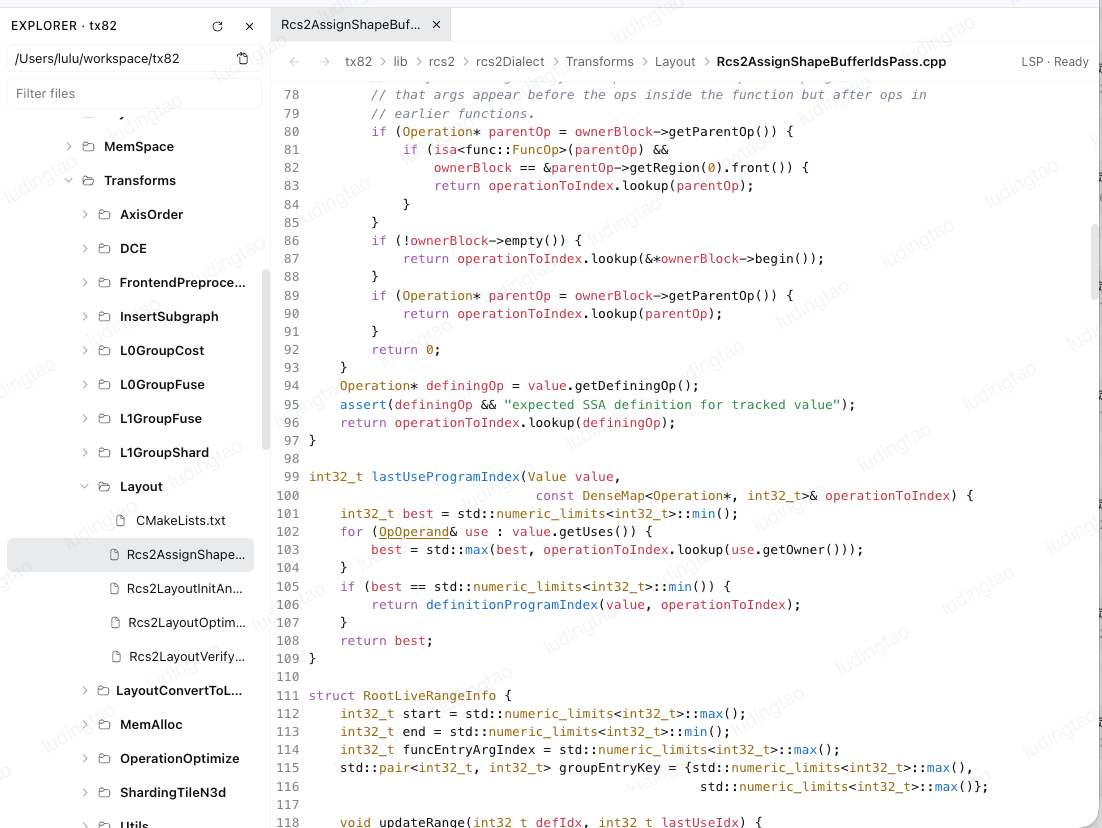
Standalone workbench — Explorer, tabs, breadcrumb, editor, and LSP status
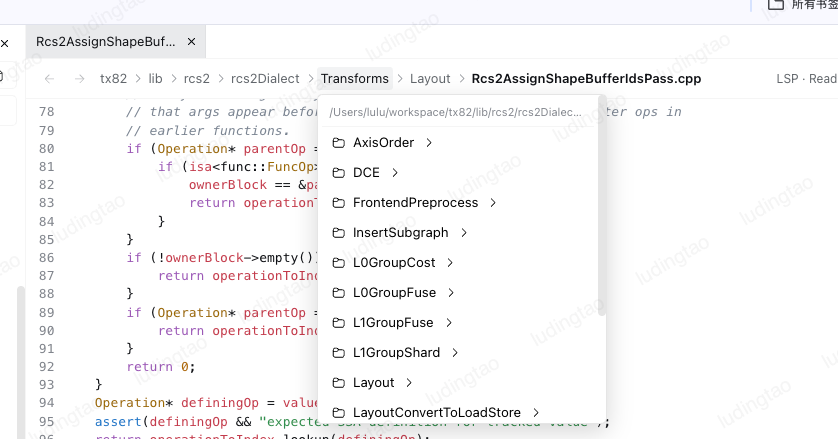
Clickable breadcrumb directory picker
Back and forward navigation controls

Install clangd for C/C++ navigation
clangd is optional for the plugin but required for C/C++ indexing and definition lookup. Check and install it before opening a C/C++ workspace:
clangd --version

# macOS
brew install llvm

# Debian / Ubuntu
sudo apt-get install clangd
Windows users can install an official LLVM release and add clangd.exe to PATH. If the executable is installed elsewhere, set clangdCommand to its absolute path. Current downloads and platform instructions are maintained by the clangd project.
clangd discovers compile_commands.json from the active workspace, preferring the root, build/, and out/build/. When clangd is available, the standalone workbench starts that discovery and initializes the server as the workspace opens, before the first source file is selected.
Installation
Install the npm package into the Web profile, inspect the composed layer, and restart DSH:
dsh plugin --profile web add dsh-code-navigator
dsh --profile web --dump-config
dsh web
For a local package archive, replace the package name with the archive path. A GitHub dependency is not supported from this development monorepo because the publishable package lives under packages/code-navigator; registry and tarball releases contain the prebuilt entry points.
Configuration
Defaults work without a profile override. To customize native clangd or discovery bounds, replace the bundle row in the profile's cordis.patch.yml:
- id: code-navigator
  name: dsh-code-navigator
  config:
    clangdCommand: /opt/homebrew/opt/llvm/bin/clangd
    clangdArgs: [--background-index, --clang-tidy]
    projectSearchDepth: 4
    projectSearchDirectoryLimit: 500
    quickOpenFileLimit: 50000
    maxDocumentBytes: 4000000
pyrightCommand and typescriptLanguageServerCommand optionally select external executables. Leave them empty to use the versions bundled with the plugin.
The public lifecycle is open, change, definition, and close. A UI adapter should call open when a code tab opens, change as its document changes, and close when the last matching tab closes; definition calls then avoid the transient didOpen/didClose work of the standard provider.
When dsh-better-sidebar is also enabled, the optional browser adapter adds Cmd/Ctrl-click definition lookup to code tabs, back and forward controls in the sidebar's top-right control strip, and a compact LSP project/server status line below the editor. The host navigator remains usable by other plugins without this adapter.
Without BetterSidebar, the browser module mounts a lightweight right-side workbench. It selects the current DSH session's workspace, loads its root directory automatically, and opens a file in a tab when the user clicks its tree row. The workbench uses the Sidebar's visual and interaction model: an Explorer tree, tabs, a token-driven CodeMirror editor with C/C++, Python, JavaScript/TypeScript, JSON, and YAML highlighting, a status toolbar, and Cmd/Ctrl-click or Cmd/Ctrl+Enter definition lookup. Right-clicking a file tab offers Close, Close Others, and Close All. The toolbar renders the active file as a workspace-relative breadcrumb; clicking a directory segment opens that directory and lets the user descend into folders or open a sibling file. Ctrl+P on Windows/Linux or Cmd+P on macOS opens a filename-first fuzzy search across the current workspace; Arrow Up/Down selects a result, Enter opens it, and Escape closes the palette. The workspace file index starts in the background and is reused for later searches. The workbench owns its bundled React, icon, and CodeMirror runtime, so it does not load a Sidebar chunk. It keeps its own back/forward history and sends debounced editor changes to the persistent server. The workbench is not mounted when BetterSidebar is available, so the two plugins never create competing editor panes.
UI adapters
The host plugin owns project detection, persistent language-server processes, document lifecycle, and navigation requests. Browser adapters only supply the editor and file-browser experience.
dsh-better-sidebar is one optional adapter. Its generic editor lifecycle and top-bar extension points let the navigator add document notifications, modifier-click navigation, status, and history controls without importing the sidebar implementation. If it is absent, the built-in workbench uses the same HTTP API and provides the required file browser, editable text view, navigation history, and server status. A future UI plugin can call ctx.codeNavigator directly or use the HTTP API without depending on either adapter.
Development and release checks
pnpm install
pnpm --filter dsh-code-navigator check:release
pnpm --filter dsh-code-navigator pack
check:release runs strict type checking, unit tests, a clean production build, and npm package linting. prepack always rebuilds lib/, so a registry tarball never depends on stale local output.
Marketplace status
The stable package is published to npm under the latest tag. Community Market discovery requires this exact stable version, the public repository declared by repository, and compatibility with the DSH/Cordis runtime shipped by the current Desktop release. Use prerelease versions only for tarball or npm prerelease testing.
Security and resource limits
All file and project requests resolve through the active DSH filesystem service and are rejected when the canonical target is outside the selected workspace. Request bodies, displayed source files, project discovery, and Quick Open indexing are bounded. Language servers run through the DSH subprocess service and are terminated when the plugin unloads.
Links
More in this category
Tencent/WeKnora#dsh-weknora★ 34626
Four read-only tools over a WeKnora knowledge base: list knowledge bases, hybrid passage search, reassemble one document's chunks in order, and WeKnora's own cited RAG or ReAct-agent answer with a resumable session id.
superdesigndev/treg★ 5760
Tool catalog for agents: search ~2,600 external endpoints (SEO and SERP, backlinks, social, people and company enrichment, ad libraries, scraping) by the task you want done, read each one's parameters and per-call price, then call it with the credential injected server-side. Ships the skill plus an MCP row that stays disabled until TREG_TOKEN is set.
T-Auto/dsh-ops★ 3102
Provides bash, PowerShell 7, and high-performance Rust tools for DSH on Windows to reduce token usage.
TencentCloudBase/CloudBase-AI-Toolkit#dsh-plugin★ 1139
Tencent CloudBase backend for DeepSeek Harness — scaffold and deploy full-stack apps from chat, render query results as table cards with paging, sorting and CSV export, preview a deployment on its domain, and call the CloudBase MCP toolset (`mcp__cloudbase__*`) with device-code login.
sixtysevenlf/dsh-blender-plugin★ 599
Lets a DSH agent drive a local Blender over a direct TCP channel with 16 tools: viewport frames, custom-angle renders, Python execution, headless and job offload, transaction rollback, and a planning layer of 186 ops across 28 families.
anysearch-team/anysearch-dsh★ 537
AnySearch-powered real-time web and vertical search provider for DeepSeek Harness.
Community comments
Comments are public GitHub Discussions. Loading them connects to GitHub and Giscus; a GitHub account is required to post.