Recovers socket cause chains, key HTTP response headers, and size-limited error bodies from failed DSH model requests, shows them next to the native error, and adds bounded extra retries for model and compaction requests.
Install
# from npm (prebuilt)
dsh plugin --profile web add dsh-better-tips
# from GitHub (first run asks for allowBuilds approval — follow the hint, retry)
dsh plugin --profile web add github:HakureiMonika/dsh-better-tips
Any plugin you install runs third-party code with your own permissions — it can read your files, use your credentials, and reach the network, and tool approvals don’t sandbox it. GitHub-sourced plugins also run build scripts at install time — pnpm blocks those until you allow them, so an install can stop with ERR_PNPM_GIT_DEP_PREPARE_NOT_ALLOWED or ERR_PNPM_IGNORED_BUILDS; dsh prints the exact key to add under allowBuilds in your profile’s pnpm-workspace.yaml, and the install works on the next run. Allowing a build is a trust decision: only install sources you trust, and pin a commit (github:owner/repo#sha).
README
English | 简体中文
[!IMPORTANT] This is an independent community plugin. It is not published, maintained, or endorsed by DeepSeek, and it does not modify DeepSeek Harness core packages.
Currently supported: DSH version:
>=0.2.2-rc.2 <0.3.0(0.2.2-rc.3verified) Node.js:>=24.9.0OS: Windows tested; Linux and macOS expected compatible, not yet testedIf there is any platform or upstream error format that needs compatibility, please submit an issue. If it's useful, please stars let more people can see it~ Thanks♪(・ω・)ノ
dsh-better-tips is a zero-configuration error diagnostics and bounded retry plugin for DeepSeek Harness (DSH). It recovers low-level socket cause chains, key response headers, and error bodies that are stripped or flattened into generic messages (like [TRANSPORT] Connection error.) by upstream SDKs and pi-ai.
Contents
- The Problem It Solves
- Live Examples
- Quick Start & Installation
- Why dsh-better-tips?
- Configuration
- Privacy & Security Boundaries
- Development & License
The Problem It Solves
Connection, gateway, and compaction failures in DSH often lack useful troubleshooting details. This plugin extends error display and retry behavior without modifying DSH core files:
- Clearer Errors & Troubleshooting Checks: Shows connection and compaction failures with cause chains, key response headers, and error bodies. Bodies are capped at 4096 characters by default, with truncation marked.
- Failure Retries & Native Fallback: Separate extra-retry budgets for model and compaction requests. When no usable capture exists, the DSH native error is shown directly.
- Compaction Visibility: Shows automatic and manual compaction failures in the chat, along with available attempt records and diagnostics.
- One-Click Troubleshooting Reports: Summarizes errors and environment details, filters common credential patterns, and copies the report for support tickets or AI debugging.
- History Folding & Log Slices: Folds earlier errors and shows the exact log event with nearby records. Source-location references are also available for some known errors.
Live Examples
Captured from sanitized local reproductions in the real DSH rendering pipeline.
1. Clean Default View & Collapsible Latest Error
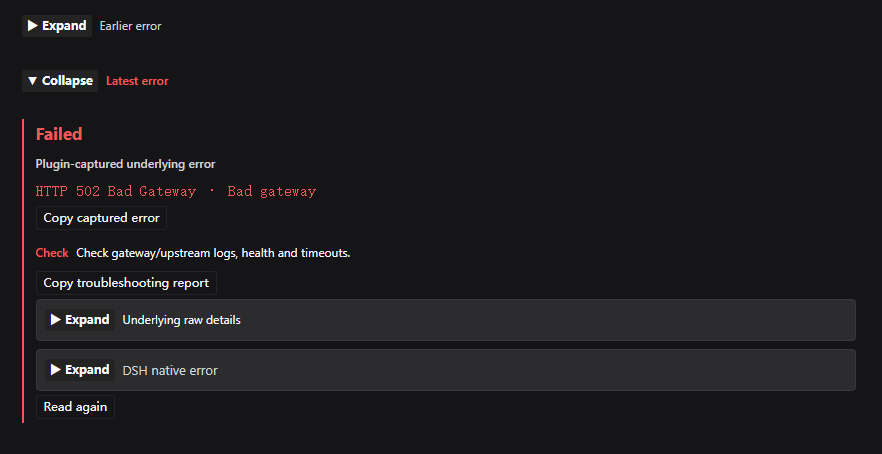
Shows a concise underlying headline and one targeted check by default, while keeping Underlying raw details and DSH native error as independent drawers. Even the latest error can be manually collapsed into a red Latest error summary.
2. Case A: Connection Drop (Socket Cause Chain Recovery)
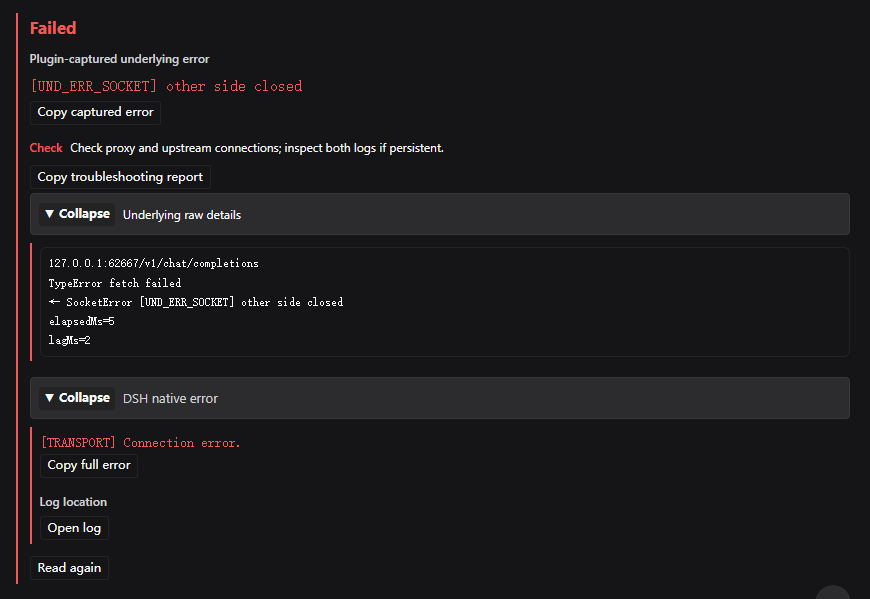
Where native DSH only shows [TRANSPORT] Connection error., the plugin surfaces [UND_ERR_SOCKET] other side closed and preserves the full TypeError: fetch failed → SocketError: other side closed chain in raw details.
3. Case B: HTTP 429 Rate Limit (Headers & Top-Level JSON)
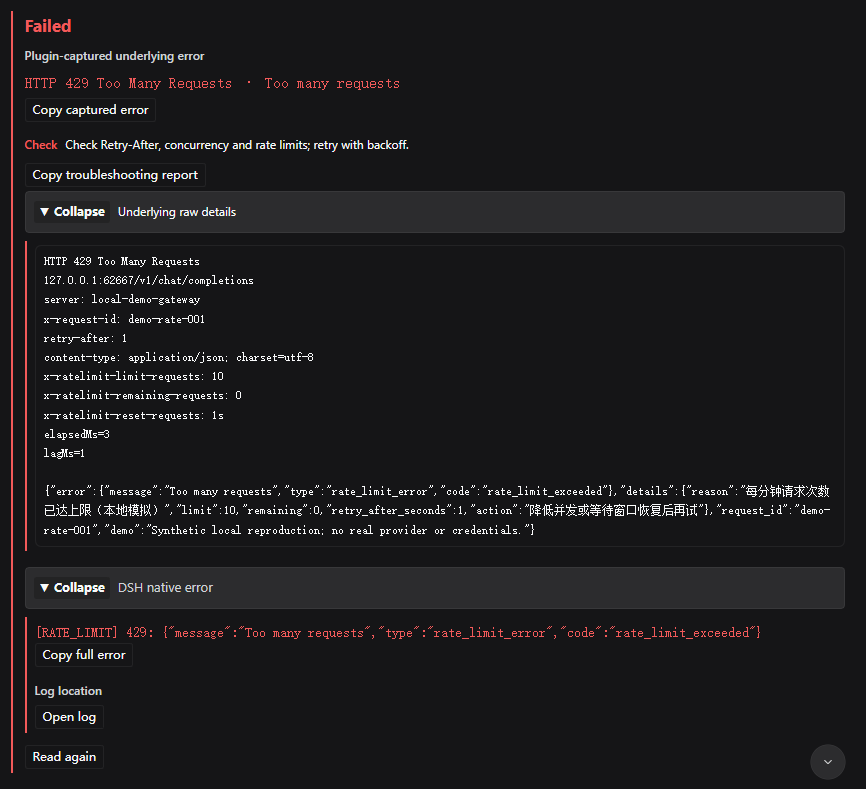
Recovers top-level JSON fields (details, request_id) stripped by the OpenAI SDK alongside retry-after, x-ratelimit-*, and x-request-id response headers.
4. Case C: HTTP 502 Bad Gateway (Proxy & Upstream Diagnostics)
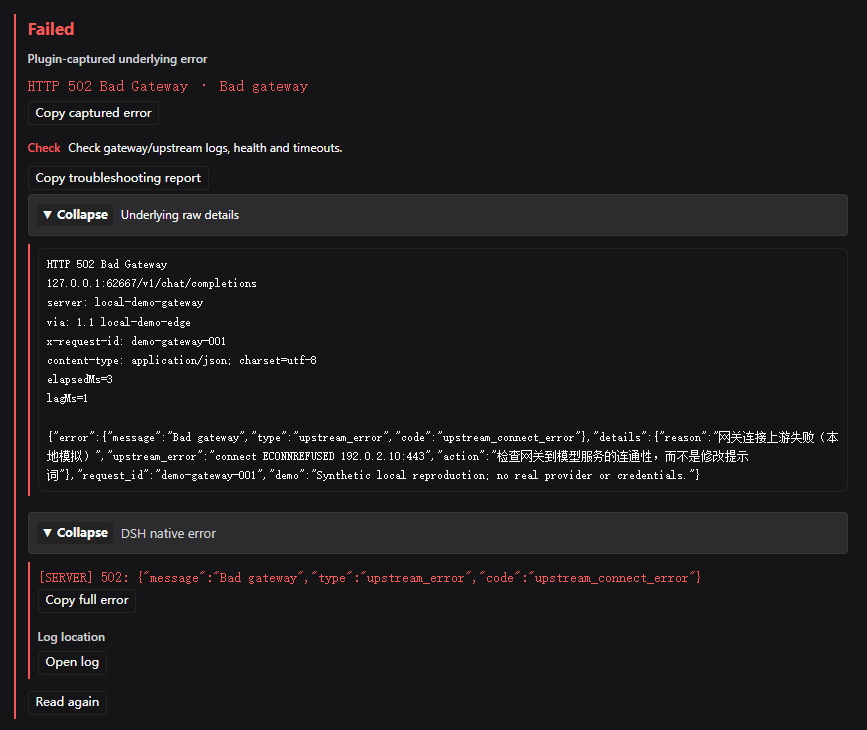
Exposes server, via, and x-request-id headers plus upstream connection diagnostics (connect ECONNREFUSED 192.0.2.10:443) to separate proxy issues from upstream outages.
Quick Start & Installation
Works out of the box with zero configuration.
1. Install via DSH GUI (Recommended)
Open Plugins -> Add plugin in DeepSeek Harness and enter:
https://github.com/HakureiMonika/dsh-better-tips
2. Install via CLI
# Install from npm
dsh plugin add dsh-better-tips

# Or install from GitHub
dsh plugin add https://github.com/HakureiMonika/dsh-better-tips
(For local development, pass the absolute local directory path instead.)
Why dsh-better-tips?
What Gets Lost Upstream
For example, an OpenAI-compatible pi-ai connection uses Fetch → OpenAI SDK → pi-ai → DSH Session Events. Some troubleshooting details can be lost along this path:
| Failure Scenario | What Native DSH Shows | What Gets Lost Upstream | What dsh-better-tips Recovers |
|---|---|---|---|
| TCP / TLS Connection Drop | [TRANSPORT] Connection error. |
DNS failure, refused port, expired cert, or peer reset? | Captured cause chain (e.g., SocketError: other side closed [UND_ERR_SOCKET]) |
| HTTP 429 Rate Limit | Only nested error message text |
Reset timer, quota headers, request ID, and top-level details |
Key rate-limit headers and a size-limited error body |
| HTTP 502 / 504 Gateway Error | Terse status code or Bad gateway |
Edge proxy failure or upstream origin connection refusal? | Gateway headers (server, via) and top-level upstream diagnostics (ECONNREFUSED) |
Context Compaction (/compact) Failure |
Generic message on manual /compact; silent on auto-compaction |
Which model failed? How long did it take? How many retries ran? | Inline failure card with available model, usage, and network diagnostics |
| Repeated Retry Clutter | Stacked error rows cluttering the chat stream | Which row is latest? Which capture belongs to which retry attempt? | Auto-folds earlier errors; allows collapsing the latest error into a red Latest error label |
Core Capabilities
- Network Evidence & Request Matching: Captures cause chains, key response headers, size-limited error bodies, and stream read failures. Matches errors by request identity and log position, marking unconfirmed records separately.
- Error Handling & Native Fallback Mechanism: When an error does not involve a network failure (e.g., malformed tool-call JSON
MALFORMED_RESPONSE) or has no confirmed capture for the current error, the plugin yields gracefully—displaying the full DSH native error and copy button directly in the main area while tucking empty capture states into collapsed details. - Separate, Bounded Retry Budgets: Adds up to 2 retries per model step and 2 per compaction request by default, with increasing delays. Uses adapter-provided retry delays when available, capped by the configured limit. This plugin does not retry
AUTH,QUOTA, orCONTEXT_WINDOW_EXCEEDED; other retry plugins remain unchanged. - One-Click Redacted Reports & Log Inspector: Copies a structured plain-text report (with live third-party plugin versions, timing, and evidence) in one click, and lazily loads raw session log events by
seqalong with the physical log file path. - Automatic Bilingual UI (Chinese / English): Automatically follows the active DSH interface language (Chinese in Chinese DSH, English in English DSH). Mounted error cards, troubleshooting checks, disclosure buttons, and report date formats switch live without a separate setting, while upstream error messages, payloads, and codes remain untranslated as raw evidence.
Configuration
Override the installed plugin's settings in your profile's cordis.patch.yml. The entire config is replaced, so retain the settings you need. Set both retry budgets to 0 to disable this plugin's extra retries.
- id: better-tips
  name: dsh-better-tips
  config:
    enabled: true              # Host capture and retry switch
    extraRetries: 2            # Extra retries per model step (0–20)
    compactionRetries: 2       # Extra retries per compaction request (0–10)
    initialDelayMs: 1000       # Initial delay in ms
    maxDelayMs: 20000          # Maximum wait per retry
    jitterRatio: 0.2           # Random delay variation (0–1)
    retryableCodes:            # Codes eligible for extra retries
      - PI_AI_ERROR
      - TRANSPORT
      - TIMEOUT
      - SERVER
      - EMPTY_RESPONSE
      - RATE_LIMIT
    captureDetails: true       # Capture network evidence
    captureHosts: []           # Selected hosts; empty captures all
Privacy & Security Boundaries
- Capture Scope: The recorder does not actively collect request bodies, request headers, URL query strings, or successful response bodies. Error bodies and nearby log events may still contain input text.
- Credential Filtering: Diagnostic output, reports, and log display copies filter common credential patterns. Some authentication errors have their bodies hidden. Native errors and Copy full error preserve the original text; review before sharing.
- In-Memory Evidence: Captures and linked records are kept in bounded process memory and cannot be recovered after exit. Copied reports and DSH session logs are unaffected.
⚠️ Sharing Notice: Pattern redaction does not replace human review. Always check reports for echoed prompt text or personal data before sharing externally.
Development & License
npm run check   # Syntax and module checks
npm test        # Run all 240 offline contract and regression tests
Licensed under the MIT License. Issues and Pull Requests are welcome at GitHub Issues.
Links
More in this category
yjh051108/dsh-routing-suite★ 7029
One repository, three parts: a runtime injector for DSH plugin packages (inject, hot-reload, unload, promote a dev staging tool to the front, route self-heal, plus a settings-page plugin manager that lists, unloads and drags folders in to internalize), a task-aware reasoning-mode router agent preset (router-standard / router-spec / router-react), and a graded two-level task protocol whose six tools (commit_star, lock_stage, revise_do, edit_plan, mark_task, redteam_verdict) pin task state to disk. The injector implementation ships in-tree, so the install carries its own behaviour rather than a dependency list.
strukto-ai/mirage#dsh★ 3788
Swaps the filesystem and bash providers for a mirage virtual workspace: file tools and shell commands run over mounted resources (RAM, S3, Redis, Slack, Gmail, Notion, Postgres) instead of the host disk, with per-mount read/write/exec modes, per-command sandbox routing (monty, pyodide, quickjs in process; docker, e2b, daytona remote), and installed CLIs (git, gh, slack, linear, ntn, gws, or one you register) as head words in the virtual terminal.
first-fluke/oh-my-agent#dsh★ 1467
Runs project OMA checks before and after tool execution and when a turn tries to finish. Installs its OMA CLI dependency and initializes unconfigured projects on first use. Requires Node.js 22+; initial setup needs network access and project write access.
MichengAI/dsh-skills-manager★ 577
Manages local DeepSeek Harness skills in Settings and shows shared Agent skills as read-only.
hust-open-atom-club/oh-dsh★ 324
Community distribution: TUI, desktop, and Web UI as one bundle with layered installation.
Fishquito7/dsh-skill-mcp-panel★ 278
Manages DSH skills and MCP servers from the web settings: skill cards with hot enable/disable, workspace scopes, groups, batch migration and drag-and-drop import, plus stdio/HTTP MCP CRUD with connection tests, secret redaction and the unified dsh-panel CLI.
Community comments
Comments are public GitHub Discussions. Loading them connects to GitHub and Giscus; a GitHub account is required to post.