Windows-native tools for DSH agents: clipboard read and write, system notifications, hosts file inspection and network diagnostics, each returning structured data with UI cards from injection-safe PowerShell.
Install
# from npm (prebuilt)
dsh plugin --profile web add dsh-win-toolkit
# from GitHub (first run asks for allowBuilds approval — follow the hint, retry)
dsh plugin --profile web add github:Edge-Echo/dsh-win-toolkit
Any plugin you install runs third-party code with your own permissions — it can read your files, use your credentials, and reach the network, and tool approvals don’t sandbox it. GitHub-sourced plugins also run build scripts at install time — pnpm blocks those until you allow them, so an install can stop with ERR_PNPM_GIT_DEP_PREPARE_NOT_ALLOWED or ERR_PNPM_IGNORED_BUILDS; dsh prints the exact key to add under allowBuilds in your profile’s pnpm-workspace.yaml, and the install works on the next run. Allowing a build is a trust decision: only install sources you trust, and pin a commit (github:owner/repo#sha).
README
Let your agent use Windows itself: read the clipboard, raise a notification, inspect the hosts file, test whether a port is open.
When you need this
- You copied something and want the agent to read it directly, instead of pasting it into the chat
- A long task finishes while you are in another window and you want a desktop notification
- GitHub is unreachable and you want the agent to diagnose it rather than guess
Every value crosses the PowerShell boundary as Base64, so clipboard contents and hostnames cannot inject a command. doctor checks the environment before you run into a missing piece.
Gives your dsh agent real Windows superpowers — clipboard, system notifications, hosts file inspection, and network diagnostics — backed by safe, parameterized PowerShell. No extra installs, no admin rights required for the current toolset.
中文文档见 README.zh.md。
Feedback
Installs are visible in the download counts; whether this helps is not. If you use it, one line about the actual task is worth more than a star — particularly if it did not work, which is the case that never gets reported:
- what you were trying to do
- whether it did it
- what was missing or wrong
Tell me in an issue — or if something is already broken, just open a normal bug report.
Check your environment first
dsh-win-toolkit doctor
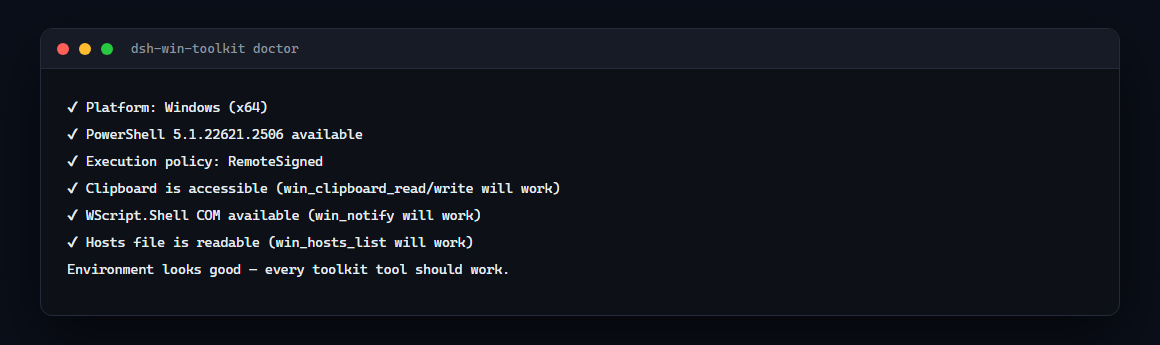
It verifies the platform, PowerShell, execution policy, clipboard access, WScript.Shell COM and hosts readability — everything the tools rely on.
Requirements
| OS | Windows 10 or 11 — the tools call powershell.exe |
| PowerShell | 5.1+ (the default on Windows 10/11); PowerShell 7 works as well but is not required |
| Privileges | none for the current tools — everything is read-only except clipboard write and the notification popup |
| Node | 22+ (for the plugin host) |
Run dsh-win-toolkit doctor to verify all of the above on your machine before blaming the plugin.
Tools
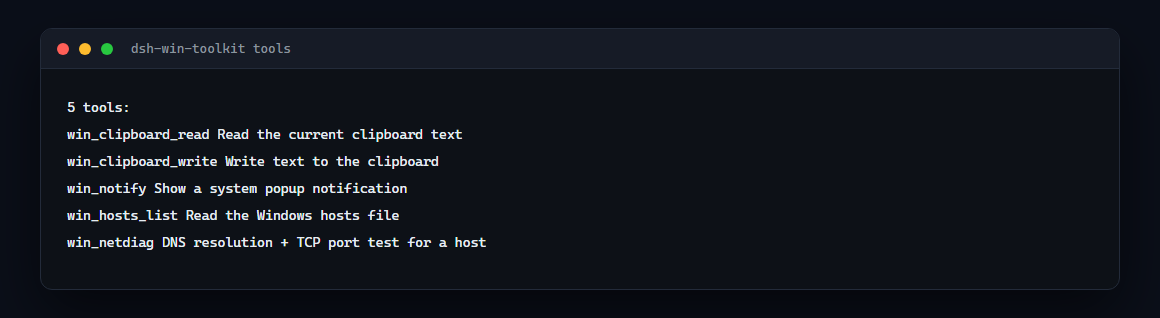
| Tool | What it does |
|---|---|
win_clipboard_read |
Read the current clipboard text |
win_clipboard_write |
Write text to the clipboard |
win_notify |
Show a system popup notification (auto-closes) |
win_hosts_list |
Read the Windows hosts file |
win_netdiag |
DNS resolution + TCP port test for any host |
win_window_list |
List visible windows: title, process, PID |
win_window_focus |
Bring a window to the front by title substring |
win_screenshot |
Capture the screen to a PNG and return its path and size |
win_process_list |
Top processes by memory, optionally filtered by name |
win_open |
Open a file, folder or URL with the default application |
Install
dsh plugin --profile web add dsh-win-toolkit
dsh web   # restart
Then just ask your agent, e.g.:
- "check if github.com:443 is reachable" →
win_netdiag - "put this text on my clipboard" →
win_clipboard_write - "notify me when you're done" →
win_notify
How it works
Every tool runs a short PowerShell snippet through powershell.exe -NoProfile -NonInteractive. All user input crosses the script boundary as Base64 — never string-interpolated — so argument injection is structurally impossible.
- Config:
psTimeoutMs(default 20000) — per-call PowerShell timeout, settable in your profile'scordis.patch.ymlunder thewin-toolkitentry. - Windows-only: tools fail loudly with a clear error on non-Windows platforms (the entry itself is a no-op there).
Roadmap
win_hosts_edit(admin-gated hosts entries),win_env,win_service,win_window,win_task,win_netdiagdeep mode (proxy check, DNS server, traceroute).
Troubleshooting
- Tools fail with "PowerShell failed": usually an anti-virus or execution-policy quirk — the plugin uses
-NoProfile -NonInteractivebut policy still applies. CheckGet-ExecutionPolicy; the plugin does not require RemoteSigned. - Want to see exactly what runs? The PowerShell snippets are short and readable in
src/index.ts.
Links
- npm: https://www.npmjs.com/package/dsh-win-toolkit
- GitHub: https://github.com/Edge-Echo/dsh-win-toolkit
- License: MIT
Related
Part of the dsh-toolkit family — small, independently useful pieces for DeepSeek Harness:
- dsh-mcp-bridge — install six curated MCP servers, verified in CI
- dsh-win-toolkit — clipboard, notifications, hosts, port checks on Windows
- dsh-netassist — network and proxy diagnosis with a concrete next step
- dsh-driftwatch — behaviour-drift reports between two session logs
- dsh-ledger — what the agent did to your files, provably unaltered
- dsh-release-evidence — one verifiable artifact per release
- mcp-netassist — the same network checks as an MCP server, any client
Links
More in this category
6Mikao9/dsh-wsl-workspace★ 106
Add a WSL workspace from the web GUI without needing to install dsh or related tools again inside WSL. Bash commands and file read/write operations run within the local WSL distribution on the host machine, while Windows files remain accessible.
XINY11451/dsh-wsl★ 10
Extends the working range of DSH into WSL. Files in the distribution can be read, written, edited and searched by DSH directly. Depending on the task, the AI chooses for itself: run a one-off command, or open its own terminal and run several commands there to finish the job. Typing `dsh` in a WSL terminal calls DSH (type `dsh help` there for details), fusing WSL and DSH deeply. Every terminal you open can collaborate visually with the AI.
173787247/dsh-wsl-env★ 3
Injects WSL distro, Linux path mapping, /mnt/c CRLF and git caveats, and NODE_USE_ENV_PROXY into the system prompt.
173787247/dsh-wsl-open★ 3
Opens WSL Linux paths from DeepSeek Harness chat in the Windows default app or Explorer.
Han-1413141/dsh-wsl-native★ 3
Use Windows and native Linux DSH sessions in one Windows window, with WSL environment switching and bidirectional system tools.
liyu34/dsh-wsl-tray★ 3
Windows desktop shortcut and system-tray launcher for DSH running in WSL, with fully hidden startup, tray open/restart/exit menu, and a plugin-configuration card to manage the shortcut.
Community comments
Comments are public GitHub Discussions. Loading them connects to GitHub and Giscus; a GitHub account is required to post.