Archived-conversation manager for DeepSeek Harness: view archived conversations grouped by workspace, restore them, and reveal their transcript folders.
Install
# from GitHub (first run asks for allowBuilds approval — follow the hint, retry)
dsh plugin --profile web add github:Earnest02522/dsh-archive-manager
Any plugin you install runs third-party code with your own permissions — it can read your files, use your credentials, and reach the network, and tool approvals don’t sandbox it. GitHub-sourced plugins also run build scripts at install time — pnpm blocks those until you allow them, so an install can stop with ERR_PNPM_GIT_DEP_PREPARE_NOT_ALLOWED or ERR_PNPM_IGNORED_BUILDS; dsh prints the exact key to add under allowBuilds in your profile’s pnpm-workspace.yaml, and the install works on the next run. Allowing a build is a trust decision: only install sources you trust, and pin a commit (github:owner/repo#sha).
README
A plugin for DeepSeek Harness that adds archived-conversation management: a sidebar entry that lists your archived conversations — grouped by workspace, searchable — and lets you restore them one by one or all at once, open one straight back into the main view, or jump to the folder the conversation belongs to.
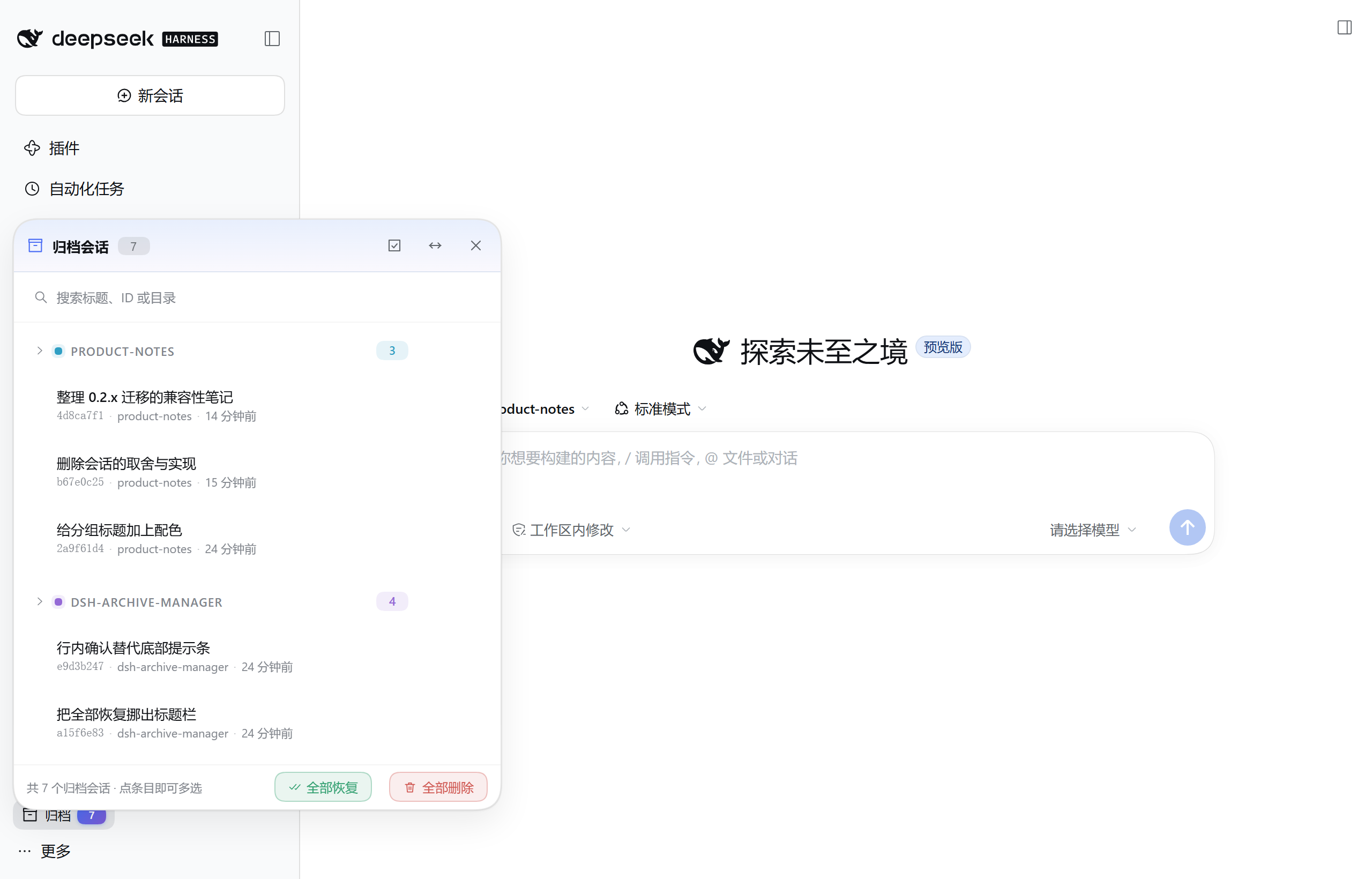
Screenshots use fabricated demo data from a throwaway profile — no real session titles, paths or account details: panel · multi-select · inline delete confirm · group actions · folded group · sidebar entry.


What the built-in features cover (DSH 0.2.x). Modern DSH already ships an Archive session action, an archived filter (
default/show/only), pinning, and a native archive API. This plugin does not replace those — it adds what they do not do:
- A single archived overview — one panel that lists every archived conversation, grouped by workspace, with per-group counts.
- Bulk restore — tick conversations (or select all) and restore the selection in one go, instead of unarchiving them one by one from the sidebar.
- Search — filter the archive by title, session id or working directory.
- Restore & open — restore a conversation and immediately reveal it in the main view.
- Delete, one or many — remove archived conversations from disk, after an inline confirmation that happens on the row (or once for a batch, or once per workspace group).
- Restore or delete a whole workspace group from its heading — and fold a group away when you do not need to see it.
- Delete all / restore all from the panel footer, away from the ✕.
- Reveal the working directory of an archived conversation.
Features
- Archived overview, grouped by workspace — popup panel opened from a
button at the bottom of the sidebar (
sidebar.footer.action). Every archived conversation is listed under its workspace heading (sessions that no workspace claims fall into Ungrouped), newest first, with title, short session id, relative time and working directory. - Restore — removes the session from the archive set through DSH's own
workspaces.unarchiveSession(...)service, so the sidebar, the workspace accounting and the durability layer all stay in sync. - Restore all / Delete all — the footer carries both global actions, each
with an icon and a label, deliberately far from the ✕ (one gap away from the
close button they were too easy to hit by accident). Restore all unarchives
every visible conversation; Delete all asks once in the footer
(
Permanently delete all N archived conversations?) before deleting them sequentially. Both report partial failures instead of stopping, and both respect the current search filter. - Colour, not a sea of grey — every workspace group gets a stable accent
colour hashed from its id (so colours do not jump when rows are deleted),
used by the heading dot, the count pill and the group's tint; the trigger
badge and the panel header are gradient, row actions have tinted hover tones
(blue open, green restore, amber reveal, red delete), and the bulk bar and
empty-state tile are tinted brand surfaces. All colours derive from
--dsw-alias-*tokens, so they follow the active theme. - Multi-select — every row is a selection target: clicking anywhere on the row bar ticks it, and the checkbox on the left is just the visual cue (it appears on hover, stays visible while a selection exists, and is always shown on touch). A bulk bar then offers Restore selected, Delete selected and Clear, and the header toggles Select all over the visible rows. Clicks that land on one of the row actions still run that action instead of selecting. The selection is pruned against the live archive set, so a batch can never act on a row that has already gone.
- Collapsible workspace groups — the workspace heading itself is the fold
toggle (chevron, accent dot, title, count). Folding hides that group's rows and
leaves a one-line receipt (
3 hidden); it is purely visual, so folded rows stay selected and stay inside Restore all / Delete all. - Per-workspace actions — each workspace heading reveals restore this group and delete this group on hover, with the count baked into the tooltip. Deleting a group asks in place, inside its own heading, for that group only.
- Restore & open — restores and then opens the conversation in the main
view through the
uiWorkspaceservice (skipped gracefully when that service is not available). - Reveal working directory — asks the host to reveal the session's
cwdin the platform file manager (session/openWorkspacePath { action: "reveal" }). - Delete permanently — the only destructive action. Pressing the trash icon
turns that row into an inline
Delete? / Delete / Cancelprompt, so the panel neither reflows nor loses your place; a batch asks once for the whole selection. Confirming asks the host to unlink the transcript, drops the id fromarchivedSessionIds, detaches it from its workspace and announcesapi-session/removed, so the sidebar forgets it without a restart. Conversations with running work are refused (session-active). - Opens and closes itself —
Esccloses the panel, a pointer press anywhere outside closes it too (no manual ✕ needed), the header drags, all eight edges/corners resize, the geometry is clamped to the viewport, and row actions stay visible on touch devices. - Optional wide sidebar entry — the footer entry ships as a compact chip; the stretch button in the panel header swaps it for a full-width row that lines up with the conversations above it. The choice is remembered per browser, and the collapsed rail stays a single square icon either way.
- Comfortable targets — the workspace heading is a full-width 34px-tall toggle, the four row actions are 30px squares with 16px glyphs, rows are 50px tall, and the panel now opens at 456×552 (minimum 344×280) so the controls are not crammed against the text.
- i18n — Chinese and English UI text, picked from the DSH locale first and the browser language second.
- Client-side UI, one Host Remote — the panel is plain ESM served straight to the browser (no build step); the single destructive operation is a small host service instead of a filesystem hack from the page.
Why most of this is a client-only plugin
Older releases (≤ 0.5.x) registered a root Typert Remote service
(ctx.archiveManager) on the host and mounted a hand-written descriptor from
the browser bundle with ctx.remote.$mount(...). That design did not survive
DSH 0.2: contributed descriptors are validated strictly (validateContribution
→ requireStrictInputs, plus namespace collisions against the built-in
remote.* services), and the archive feature became a first-class part of the
workspaces client service. Everything reversible — listing, search, restore,
open, reveal — therefore talks to services DSH already provides.
Deletion is the one thing DSH does not provide. There is no delete endpoint
in sessionController, nothing writable in workspace-files, and the browser
cannot touch ~/.dsh/sessions/.... So v0.7.0 added exactly one Host Remote:
| Layer | What happens |
|---|---|
Host plugin (src/index.js) |
ArchiveManagerService extends TypertRemoteService (service key / namespace archiveManager) with one remote method, deleteSession(request): checks for running work, locates the transcript through sessionPersistence.stat + locate, unlinks it, prunes the id from archivedSessionIds, detaches it from every workspace, and emits api-session/removed. The method returns an outcome value ({ deleted: true, … } or { deleted: false, reason }) instead of throwing. |
Browser plugin (src/client.js) |
Registers a sidebar.footer.action slot entry. Reads workspaces.list ({ items, archivedSessionIds, pinnedSessionIds, … }) and sessions.list ({ ids, byId, … }) as reactive snapshot stores, restores through workspaces.unarchiveSession(id), opens through uiWorkspace.openSession(id), reveals through remote.session.openWorkspacePath({ path, action: "reveal" }), and deletes through the mounted remote.archiveManager.deleteSession({ sessionId }). If that mount fails, the panel still renders and the delete action reports itself as unavailable. |
No DSH source is patched. The plugin is discovered by the standard loader (the
profile's cordis.patch.yml / dsh.profile.bundles) and its browser half by
the client module loader (dsh.client.platform = "web").
Compatibility
- DSH 0.2.1-rc.3 and newer (desktop app) — verified against
@deepseek-ai/dsh-desktop-runtime 0.2.1-rc.3: the host service registers, thearchiveManager/deleteSessionendpoint answers over the real gateway, the bundle is served, the slot is registered and the panel renders against the liveworkspaces/sessions/remote.sessionservices. - Version gate: the manifest declares
engines.dsh(>=0.2.1-0 <1.0.0), which is the only requirement DSH 0.2 evaluates. Older releases relied on@deepseek-ai/dsh-*peer ranges instead, and semver prerelease rules made0.2.1-rc.3fail>=0.1.0-rc.6— that is exactly why 0.5.x was reported as incompatible with the current desktop app. - DSH 0.1.x is no longer supported. The plugin relies on the
workspacesclient service (archive snapshot +unarchiveSession), thesession/openWorkspacePathendpoint, and theTypertRemoteService/@Remotehost API of the 0.2 line. - Platform-agnostic: revealing a folder is delegated to the host, so it works with Explorer, Finder and xdg-open alike.
Install
Official CLI — npx (recommended, no global install)
npx --yes @deepseek-ai/dsh plugin --profile desktop add https://github.com/Earnest02522/dsh-archive-manager.git
The desktop app's profile is desktop; a dsh web install uses --profile web.
npx --yes @deepseek-ai/dsh runs the official CLI straight from the npx cache,
so no global install is needed — most machines do not have dsh on PATH.
The desktop profile must exist before installing: open DeepSeek Harness Desktop once, then fully quit it while running the command.
Or: global install, then plain dsh
npm install -g @deepseek-ai/dsh
dsh plugin --profile desktop add https://github.com/Earnest02522/dsh-archive-manager.git
Both forms are equivalent. The package declares a dsh.bundle manifest, so
plugin add installs the dependency and registers its loader line
automatically — no manual patch editing. From a local checkout a path works too:
npx --yes @deepseek-ai/dsh plugin --profile desktop add "file:D:\path\to\dsh-archive-manager"
After install: restart DSH (or let the patch HMR re-compose the config), then hard-refresh the browser (
Ctrl+Shift+R).
Windows install script (legacy fallback)
Open PowerShell and cd into the repo folder first, then run the script:
cd <path-to-repo>          # e.g. cd D:\dsh-archive-manager
powershell -ExecutionPolicy Bypass -File .\scripts\install.ps1
Or from anywhere, with the repo at <repo>:
powershell -ExecutionPolicy Bypass -File <repo>\scripts\install.ps1
# non-default profile:
powershell -ExecutionPolicy Bypass -File <repo>\scripts\install.ps1 -ProfileName desktop
The script auto-detects the profile (desktop, then web, then the only
profile present), copies the plugin into <profile>/node_modules, and enables
it in the profile's cordis.patch.yml (a timestamped backup is created first).
If the entry already exists it is a no-op.
Linux / macOS install script
The repo also bundles a bash installer with the same auto-detection:
cd <path-to-repo>          # e.g. cd ~/dsh-archive-manager
bash scripts/install.sh
# non-default profile / scoped package name:
bash scripts/install.sh web "@earnest020522/dsh-archive-manager"
It uses $DSH_HOME when set, otherwise ~/.dsh, and handles the empty []
patch template automatically.
Manual install
Copy this folder to
%USERPROFILE%\.dsh\profiles\desktop\node_modules\dsh-archive-manager(or into thedsh.profile.bundleslist of the profile you use).Edit
%USERPROFILE%\.dsh\profiles\desktop\cordis.patch.ymland append:- insert: - id: dsh-archive-manager name: dsh-archive-managerRestart DSH, then hard-refresh the browser (
Ctrl+Shift+R).
Verify
- The sidebar foot shows a 归档 / Archive button next to Settings.
- Click it: archived conversations appear under their workspace headings with search, row actions and a footer counter.
- Hover a row: the trash icon offers Delete; the row itself turns into a
Delete? / Delete / Cancelprompt and, once confirmed, reports已删除 / Deleted. Running conversations are refused, and the row disappears on its own. - Tick a few checkboxes: the bulk bar appears above the footer with Restore selected / Delete selected; deleting a batch asks once for the whole selection.
- Hover a workspace heading: restore this group and delete this group appear on the right; deleting asks inside the heading and touches only that group.
- Click a workspace heading: its rows fold away, leaving a
N hiddenline; click again to unfold. Folded rows stay part of the bulk actions. - Restore all and Delete all sit in the footer with labels, not next to the ✕; Delete all asks in the footer before unlinking anything.
- The panel is colour-coded per workspace (dot, count pill, group tint) instead of a flat grey surface, and follows the active theme.
- Click anywhere outside the panel: it folds away, exactly like pressing
Esc. - The host half is live when
archiveManager/deleteSessionanswers; a missing host half only disables the trash icon (the rest still works). - With DSH's devtools open, the browser bundle
plugins/??dsh-archive-manager/client.jsmust appear in the page's preload list and must not raise a module-loader error.
Uninstall
npx --yes @deepseek-ai/dsh plugin --profile desktop remove dsh-archive-manager
# with a global install, the equivalent is:
#   dsh plugin --profile desktop remove dsh-archive-manager
then restart DSH. Legacy fallbacks: run
powershell -ExecutionPolicy Bypass -File .\scripts\uninstall.ps1, or remove the
dsh-archive-manager loader entry from the profile's cordis.patch.yml and
delete <profile>/node_modules/dsh-archive-manager.
Development
No build step: src/index.js is the host plugin (one remote method),
src/client.js is the browser bundle in module-loader format. Sanity checks:
node --check src/index.js
node --check src/client.js
node test/client.test.mjs
node test/client.test.mjs runs test/client.test.mjs, a dependency-free
harness with a hand-written mini React runtime that stubs
window.__ModuleLoader__, document and navigator, applies the plugin to a
fake ctx, and asserts 220 behaviours: the load contract, slot registration
(name / id / order / locale), Chinese fallback translation, grouping
(3 workspaces → 3 groups), search filtering, single restore (service call +
toast + reactive row removal), restore-and-open, bulk restore, reveal request
payload, the row-inline delete confirmation (the row keeps its place and the
panel keeps its geometry, nothing is deleted before you confirm, the descriptor
carries the strict codecs the gateway requires, the mount is reused, the archive
snapshot is re-synced afterwards), multi-select restore and delete, Select
all, selecting by clicking the row bar (and clicks on an action button not
selecting while they still run the action), per-workspace restore and delete (the group asks inside its own heading
and only that group is touched), restore-all and delete-all living in the footer
instead of beside the ✕, folding a group (rows hide, the receipt counts them,
other groups keep theirs, unfolding restores them), click-away dismissal,
the entry-width preference (compact by default, remembered once switched, the
collapsed rail staying square), the target sizes (30px action squares, a 34px
group toggle, 50px rows),
refused deletion while a conversation is
running, degraded mode without unarchiveSession or without a remote gateway,
empty-archive and narrow-sidebar rendering, drag/resize geometry math, Esc
handling, plus static assertions over both halves (browser bundle: only react
is required, no $mount on hand-written descriptors for the old endpoints, no
unlink; host half: imports only node:fs/promises and the Typert protocol,
unlinks a single file and never a directory tree). It finally checks the docs
themselves: the main README is Chinese and carries the one-line feature list,
every embedded screenshot exists as a real PNG, and both languages link to each
other.
The plugin's own sources are the only inputs; the harness never touches a DSH installation.
How delete works (and what it costs)
Deleting is not an archive operation — archive only hides a session id.
Delete is destructive and irreversible:
- It refuses while the conversation is running. The host asks the
workspace/session-activitywaterfall first; any active work means the request comes back as{ deleted: false, reason: "session-active" }and the panel tells you to stop the run first. - It removes the transcript file. The host resolves the log through
sessionPersistence.stat(id)+locate(...)(which handles compressed.jsonl.zstdlogs) and unlinks exactly that one file. If the file is gone already, the call still succeeds withexisted: false. - It cleans up the bookkeeping. The id is dropped from
archivedSessionIds(workspaces.unarchiveSession), detached from every workspace that lists it, andapi-session/removedis emitted so open windows drop the row without a restart. DSH's own query index reconciles the missing log on its next scan. - It cannot be undone. There is no trash, no undo, and the built-in Restore action has nothing left to restore. If you only want a conversation out of the way, use Archive instead.
Bulk delete runs the same single-session call in sequence: one row that is still
running fails on its own and is reported as Deleted N, M failed, while the
rest of the batch goes through. Nothing is ever deleted recursively — every
request unlinks one resolved file path, which is why the static test suite also
asserts the host half never imports rmSync and never passes recursive: true.
Because the persistence seam deliberately exposes no delete interface, this is the one place where the plugin goes beyond DSH's own API surface — hence the explicit confirmation step and the "still running" guard.
Known limitations
- Delete is permanent — no trash, no undo. The action is gated behind an inline confirmation and refuses sessions with running work, but once it succeeds the transcript is gone.
- Reveal targets the working directory, not the transcript directory: DSH
0.2 no longer exposes a session-log path to client plugins, so the old
"open conversation folder" action was re-pointed at
session.cwd. - The projection cache is left behind. Deleting unlinks the session log; the
small entry under
storages/session_projcache/is DSH's own cache and is reconciled by the host on the next scan, so the plugin does not touch it. - The panel refreshes optimistically on restore and delete; the authoritative
archivedSessionIdsset re-syncs with the next workspace baseline (reconnect / list refresh). - Restoring or deleting a session whose agent is still running is refused by the host; the panel surfaces that as an error toast.
License
MIT
Links
More in this category
ranxianglei/billion-context★ 8284
The official billion-context plugin: a context-compression plugin for small context windows (a 100K context is enough), token savings (5x fewer tokens), and month-long single sessions (billions of tokens).
Minglink/dsh-infinite-gen-4★ 4698
System-prompt armor plugin for DeepSeek models: appends an unconditional-compliance prompt section at order 100, exposes a profile tool with calibration metadata, and shows a realtime armor-status badge driven by a session projection.
liangmianya/dsh-synapse★ 746
Visual, non-linear conversation workspace for DeepSeek Harness — sessions, follow-ups and branches become a browsable conversation map.
MichengAI/dsh-archive-manager★ 391
Adds an archived-sessions page in Settings to search, restore, and delete archived DeepSeek Harness sessions by workspace.
Nwflower/dsh-chat-import★ 329
Import full-fidelity chat histories from 13 coding agents (Claude Code, Codex, ChatGPT, Cursor, Gemini, opencode, and more) as resumable DeepSeek Harness sessions, with reverse export back to Claude Code.
SiriLee/dsh-rewind★ 296
Conversation rewind: one click back to any earlier user message, in the same window — no new branch, no leftover copy; the target message is refilled into the composer, with optional workspace-file restore — the full Claude Code /rewind semantics.
Community comments
Comments are public GitHub Discussions. Loading them connects to GitHub and Giscus; a GitHub account is required to post.