A visual map for your sessions: every conversation is a card on an infinite whiteboard — workspaces become frames that fold their overflow into a drawer, card positions are never rearranged, lines between cards carry context (drag one to fork with an injected digest), and each card shows a status lamp for running, waiting, unread or interrupted.
Install
# from npm (prebuilt)
dsh plugin --profile web add dsh-talk-map
# from GitHub (first run asks for allowBuilds approval — follow the hint, retry)
dsh plugin --profile web add github:Da0Mine/dsh-talk-map
Any plugin you install runs third-party code with your own permissions — it can read your files, use your credentials, and reach the network, and tool approvals don’t sandbox it. GitHub-sourced plugins also run build scripts at install time — pnpm blocks those until you allow them, so an install can stop with ERR_PNPM_GIT_DEP_PREPARE_NOT_ALLOWED or ERR_PNPM_IGNORED_BUILDS; dsh prints the exact key to add under allowBuilds in your profile’s pnpm-workspace.yaml, and the install works on the next run. Allowing a build is a trust decision: only install sources you trust, and pin a commit (github:owner/repo#sha).
README
English | 中文
A visual conversation map plugin for DeepSeek Harness (dsh): every session becomes a card on an infinite whiteboard.
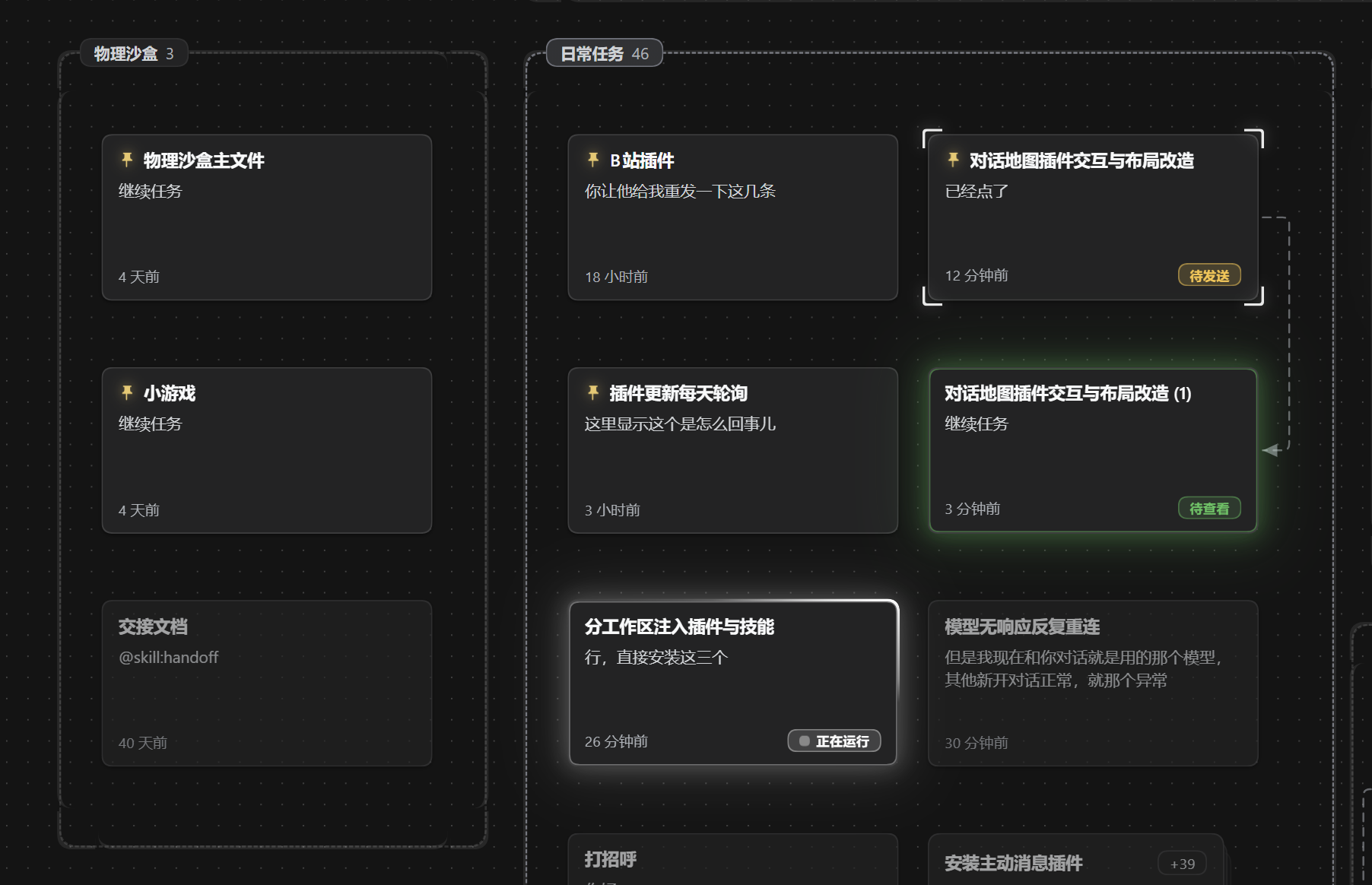
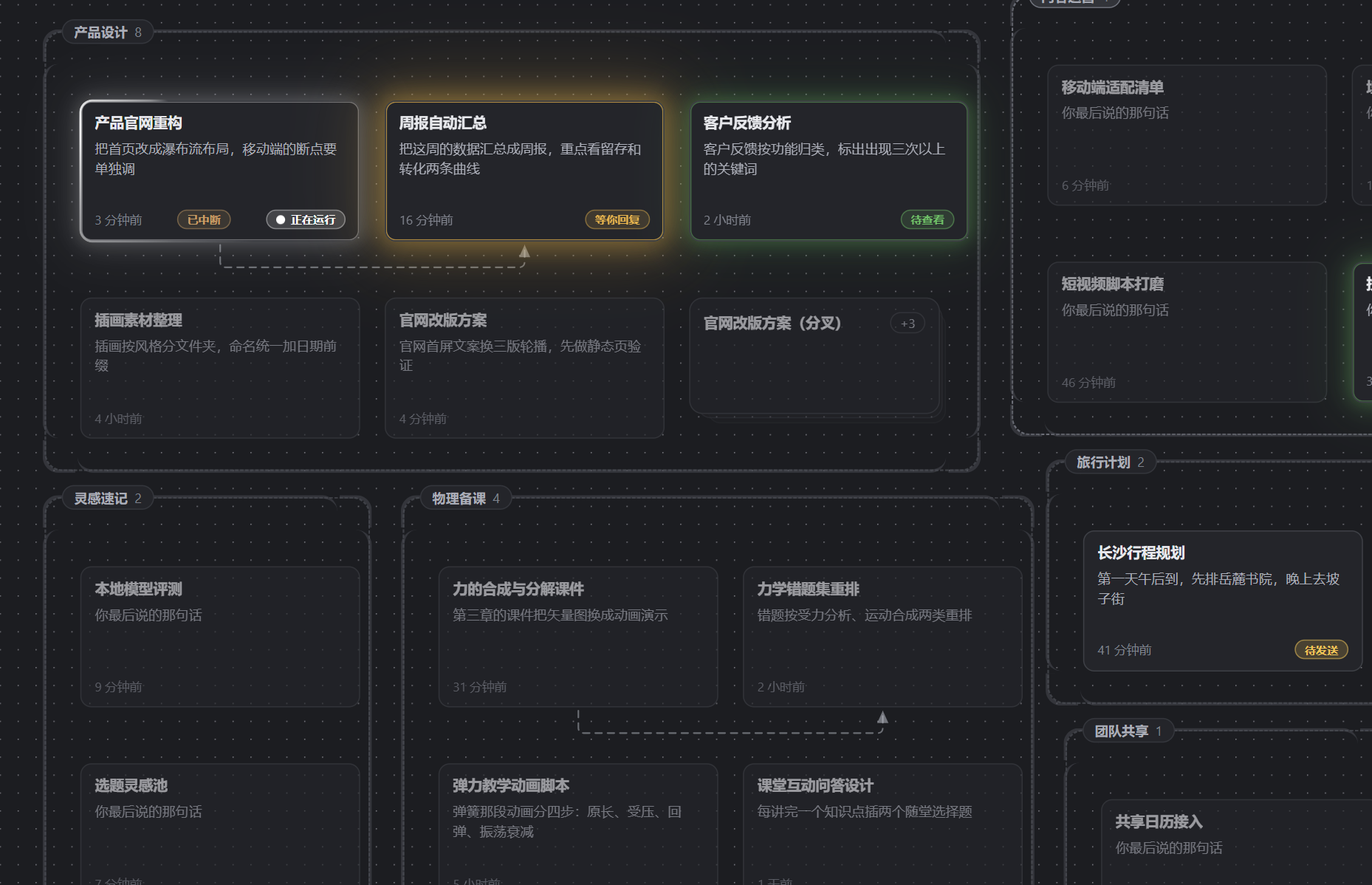
- Spatial memory instead of working memory: free placement + grid snapping, and nothing ever rearranges your cards — if you remember "that conversation was bottom-left", it stays bottom-left. Designed for ADHD users, useful for everyone.
- Folders stay readable: a workspace becomes a frame that auto-expands or folds its overflow into a stack cell you can open as a drawer; pinned cards stay in front.
- Double-click to chat: double-click empty canvas to start a new session; the card is born exactly where you clicked.
- Draw an edge to fork: drag a line from a card onto empty space, preview (and edit) the context digest to inject, confirm — a new session starts knowing the old conversation.
- Card front = resume surface: title, the last thing you said, relative time and a status lamp (running / finished / unread / waiting / interrupted). One glance tells you what to do next.
- Lines mean something: a link whose context is still up to date disappears; one that has fallen behind stays visible as a dashed line with an arrow. Fork lineage is always drawn.
- Automatic digests: a three-field digest (summary / key findings / next step) is generated on demand through your deployment's default model; hit ⟳ on a card to regenerate.
- Bilingual interface: the map's own copy renders in Chinese or English. The pill in the map header cycles Auto → 中文 → English; Auto follows dsh's own language, and the choice is remembered across restarts.
Install
# npm (recommended)
dsh plugin add dsh-talk-map

# or straight from GitHub — built artifacts are committed, so there is no build step
dsh plugin add github:Da0Mine/dsh-talk-map
Restart dsh web; a map button appears at the sidebar foot.
Usage
| Action | Effect |
|---|---|
| Sidebar map button / Esc | toggle the map |
| Drag a card | place it (16px grid snap, persisted) |
| Double-click empty space | create a session there and enter it |
| Double-click a card | open that session |
| Drag from a card handle to empty space | preview injection → fork a new session |
| Click a stack cell | open the drawer listing the folded conversations |
| ⟳ on a card | regenerate the digest |
| Right-click a card / a line / a folder | pin, rename, mark unread, archive, delete, push switch, delete line |
| Language pill in the map header | cycle Auto → 中文 → English |
Where data lives
- Canvas data (positions, edges, digests):
$DSH_HOME/storages/talk_map.jsonvia dsh's official storage-domain, atomically persisted. - Sessions themselves stay fully owned by dsh — this plugin reads them, and creates new ones only through official APIs when forking.
- Digests use your configured default model through dsh's local LLM channel; there are no other external requests.
Compatibility
Built and tested against DeepSeek Harness 0.2.1-rc.3. The structural contracts live in src/client/dsh.ts and src/host/dsh-host.ts — start there when upgrading.
Roadmap
Multi-board shelf (project = board, WIP limit) · whole-board archive/shelve · timeline view (camera fly-back) · alias cards · multi-parent merge UI · selection-level injection · quick-ask on card.
Development
pnpm install
pnpm run build        # host → lib/, client → client/client.js
pnpm run probe        # headless end-to-end probe (150 checks)
dsh plugin --profile dev add /abs/path/dsh-talk-map
MIT License.
Links
More in this category
Minglink/dsh-infinite-gen-4★ 3781
System-prompt armor plugin for DeepSeek models: appends an unconditional-compliance prompt section at order 100, exposes a profile tool with calibration metadata, and shows a realtime armor-status badge driven by a session projection.
ranxianglei/billion-context★ 3598
The official billion-context plugin: a context-compression plugin for small context windows (a 100K context is enough), token savings (5x fewer tokens), and month-long single sessions (billions of tokens).
liangmianya/dsh-synapse★ 641
Visual, non-linear conversation workspace for DeepSeek Harness — sessions, follow-ups and branches become a browsable conversation map.
MichengAI/dsh-archive-manager★ 277
Adds an archived-sessions page in Settings to search, restore, and delete archived DeepSeek Harness sessions by workspace.
Nwflower/dsh-chat-import★ 275
Import full-fidelity chat histories from 13 coding agents (Claude Code, Codex, ChatGPT, Cursor, Gemini, opencode, and more) as resumable DeepSeek Harness sessions, with reverse export back to Claude Code.
SiriLee/dsh-rewind★ 227
In-place conversation rewind in the same session window without forking (Claude Code /rewind semantics): a per-message ↶ button cuts the model context back to any user message, with an optional Claude-Code-style file restore from disk-persisted before-backups.
Community comments
Comments are public GitHub Discussions. Loading them connects to GitHub and Giscus; a GitHub account is required to post.