Archived-session manager for DSH Web: workspace-grouped list, FTS5 full-text search over session content with per-session snippets, restore-and-open, and hard delete.
Install
# from npm (prebuilt)
dsh plugin --profile web add @chushiz/dsh-archive-manager
# from GitHub (first run asks for allowBuilds approval — follow the hint, retry)
dsh plugin --profile web add github:ChuShiZ/dsh-archive-manager
Any plugin you install runs third-party code with your own permissions — it can read your files, use your credentials, and reach the network, and tool approvals don’t sandbox it. GitHub-sourced plugins also run build scripts at install time — pnpm blocks those until you allow them, so an install can stop with ERR_PNPM_GIT_DEP_PREPARE_NOT_ALLOWED or ERR_PNPM_IGNORED_BUILDS; dsh prints the exact key to add under allowBuilds in your profile’s pnpm-workspace.yaml, and the install works on the next run. Allowing a build is a trust decision: only install sources you trust, and pin a commit (github:owner/repo#sha).
README
English · 中文
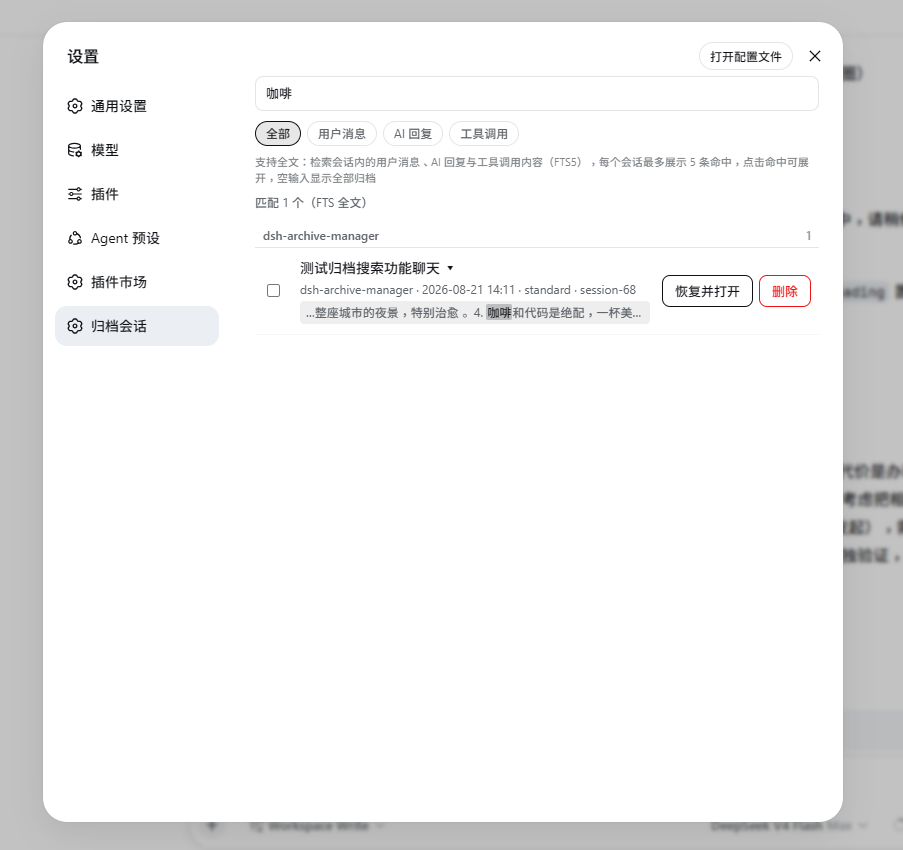
A DeepSeek Harness Web GUI plugin for managing archived sessions, under Settings > 归档会话. The harness's built-in "archive" is one-way: it only hides a session, with no un-archive. This plugin adds browse, restore, and true delete:
- Browse — archived sessions grouped by workspace.
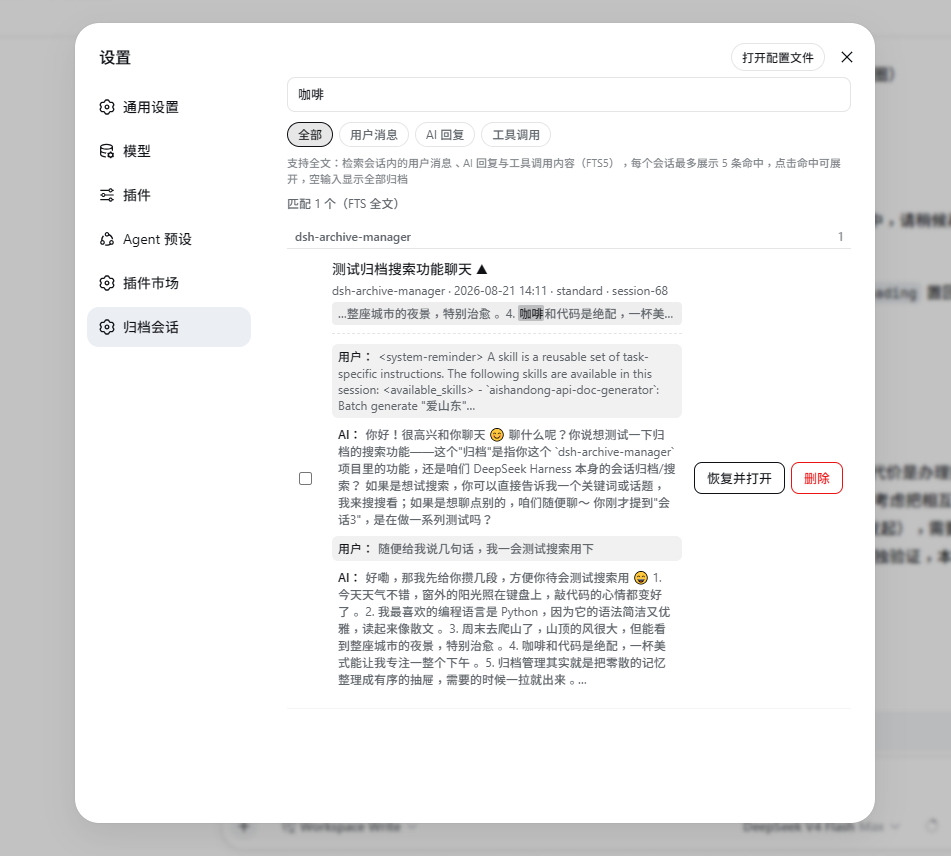
- Full-text search — searches session content: user messages, assistant replies, and tool-call commands and output, plus title / cwd / id / preset matching. Highlighted, keyword-centered snippets, up to 5 hits per session, filterable by type.
- Batch ops — checkboxes + top-bar batch delete; live agents are cancelled before removal.
- Preview — click the title to expand the last 4 user/assistant messages without restoring.
- Restore & open — un-archive and open, so you can view history and continue the conversation.
- Delete — physically removes the session's log directory. Irreversible.
Install
dsh plugin --profile web add @chushiz/dsh-archive-manager
Refresh the page after installing (Cmd/Ctrl+Shift+R); restart dsh if it does not show up. On Desktop, install it from the plugin market in Settings (设置 → 插件市场).
Compatibility
| dsh version | status |
|---|---|
0.2.0-rc.2 |
✅ tested locally: list, search and preview work |
| other versions | ⚠️ not tested |
Security
- Delete has no recycle bin: a
node -ecommandrmSyncs that session's own directory (<sessions>/<workspace>/<session id>/). Irreversible. - That command runs in the
danger-full-accesssandbox mode by default (a caller may passworkspace-writeto tighten it), applies only to archived sessions, and cancels any still-running agent for that session first. - The web routes
/archive-manager/api/*use the same trust fence as the host's/api: a mandatory Host header (DNS-rebinding defense), cross-site origins refused, an 8 KiB body cap.
License
MIT
Links
More in this category
Minglink/dsh-infinite-gen-4★ 2516
System-prompt armor plugin for DeepSeek models: appends an unconditional-compliance prompt section at order 100, exposes a profile tool with calibration metadata, and shows a realtime armor-status badge driven by a session projection.
ranxianglei/billion-context★ 717
The official billion-context plugin: a context-compression plugin for small context windows (a 100K context is enough), token savings (5x fewer tokens), and month-long single sessions (billions of tokens).
liangmianya/dsh-synapse★ 505
Visual, non-linear conversation workspace for DeepSeek Harness — sessions, follow-ups and branches become a browsable conversation map.
Nwflower/dsh-chat-import★ 221
Import full-fidelity chat histories from 13 coding agents (Claude Code, Codex, ChatGPT, Cursor, Gemini, opencode, and more) as resumable DeepSeek Harness sessions, with reverse export back to Claude Code.
Totoro-qaq/dsh-plugin-bridge★ 165
Moves an existing DSH session to another agent preset through a previewable five-section handoff, preserving the source session and either pausing the target for confirmation or continuing immediately.
Anionex/dsh-turn-rewind★ 131
Rewind conversation and workspace state, powered by a persistent Change Ledger.
Community comments
Comments are public GitHub Discussions. Loading them connects to GitHub and Giscus; a GitHub account is required to post.