Trading-terminal style cost tracker for DeepSeek Harness: sidebar balance and today spend, per-step RMB cost table, auto-synced official pricing with peak/off-peak, cross-session and per-day summaries, tool-level attribution, and cost forecast.
Install
# from GitHub (first run asks for allowBuilds approval — follow the hint, retry)
dsh plugin --profile web add github:CZ1900/suanzhang-dsh
Any plugin you install runs third-party code with your own permissions — it can read your files, use your credentials, and reach the network, and tool approvals don’t sandbox it. GitHub-sourced plugins also run build scripts at install time — pnpm blocks those until you allow them, so an install can stop with ERR_PNPM_GIT_DEP_PREPARE_NOT_ALLOWED or ERR_PNPM_IGNORED_BUILDS; dsh prints the exact key to add under allowBuilds in your profile’s pnpm-workspace.yaml, and the install works on the next run. Allowing a build is a trust decision: only install sources you trust, and pin a commit (github:owner/repo#sha).
README
A little "bookkeeper" for DeepSeek Harness (dsh): your balance, today's spending, and how much each model step costs — all crystal clear, no more guessing.
Why install it?
When using DeepSeek, don't you often wonder:
- How much balance do I have left? — Checking means digging through the web console. Annoying.
- How much did I spend today? — You only feel it at the end of the month.
- How much did this one step cost me? — The table only shows token counts; seeing it in RMB is what matters.
- Where did the money go? — Which model burns the most? Which tool is the priciest?
Install suanzhang and the answers are right in front of you:
| You care about | suanzhang gives you |
|---|---|
| Remaining balance | Always visible in the sidebar, auto-refreshed |
| Today's spend | Right there in the sidebar too |
| Cost per step in RMB | Per-step cost table in the "算账" tab |
| Where the money went | Visualized by model, by tool, by day |
| How much more to chat | Cost forecast: avg per step × steps |
What it looks like
A clean trading-terminal style (think Bloomberg):
- Sidebar footer:
当前余额:¥xx.xx,今天用了:¥xx.xx— click it to jump straight into the 算账 tab. - 算账 tab: a four-cell quote bar on top (Balance / Today / Total / Cache savings) → per-step cost table below.
- Click any step row: auto-jumps to the "Trajectory" tab and highlights that step.
- Auto-synced official pricing: follows the DeepSeek official price page; price changes take effect automatically.
Screenshot
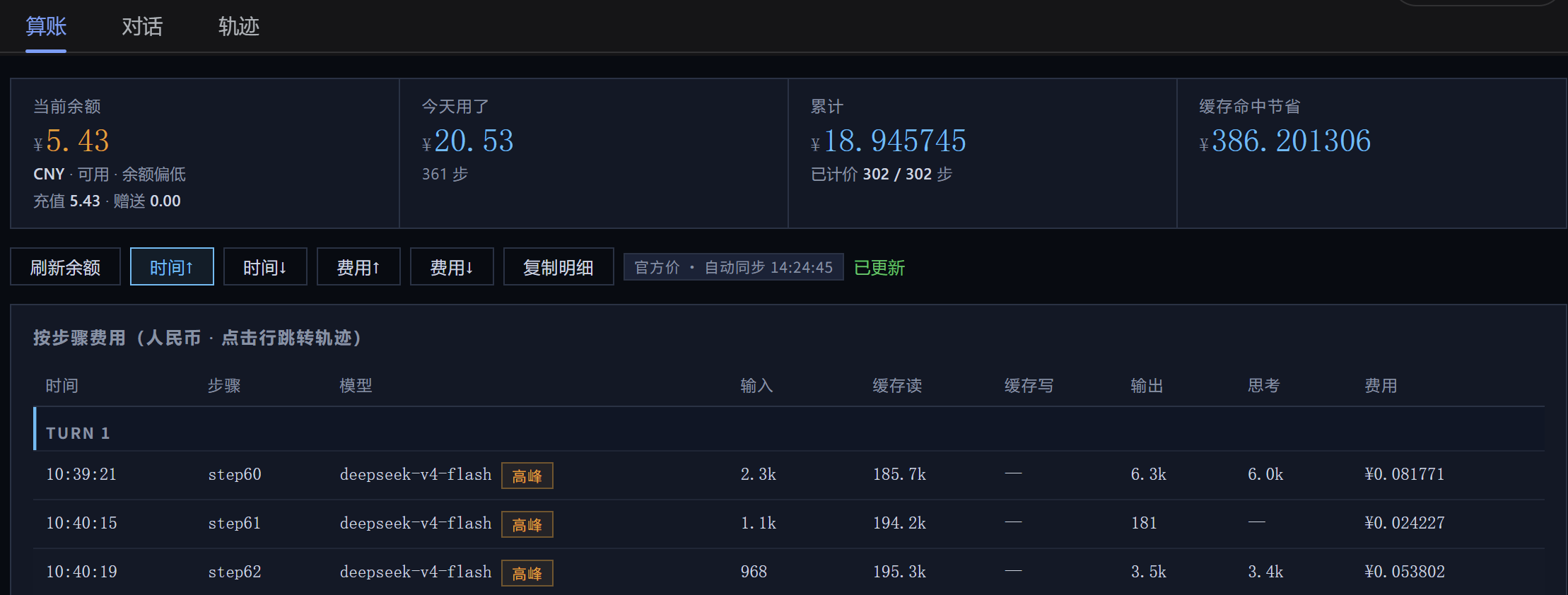
Sidebar balance & today's spend · 算账 tab quote bar + cost table · Analysis bars + cost forecast
Requirements
- A machine with DeepSeek Harness installed (
dsh webruns). - Your own DeepSeek API Key (configured in Harness settings).
- Internet access (needed for balance and official pricing queries).
Installation
Option 1: Install from GitHub (recommended)
pnpm add https://github.com/CZ1900/suanzhang-dsh.git
Then edit cordis.patch.yml under your Harness profile, adding at the top:
- insert:
    - id: suanzhang
      name: suanzhang-dsh
Restart dsh web and refresh — you'll see the balance in the sidebar and the "算账" tab in the session header.
Option 2: Local install
Copy the folder into your Harness profile's node_modules:
# inside the DSH profile directory (e.g. ~/.dsh/profiles/web):
cp -r /path/to/suanzhang-dsh node_modules/
Then add the same two insert lines to cordis.patch.yml and restart.
Privacy
| Action | Where data goes | Uploaded? |
|---|---|---|
| Balance check | GET https://api.deepseek.com/user/balance (with your Key) |
Only to DeepSeek official |
| Official pricing | https://api-docs.deepseek.com public page |
No auth, read-only |
| Cost/summary calculation | Reads your local session logs | Never leaves your machine |
| Display / sort / charts | Local browser computation | Never leaves your machine |
FAQ
Q: Does the plugin itself consume tokens? A: Zero. It never calls any model — pure local computation plus two free HTTP requests. The tokens you actually spend are from chatting in dsh, unrelated to this plugin.
Q: Will prices go stale? A: No. Official pricing auto-syncs; when DeepSeek adjusts prices the plugin follows automatically. If fetching ever fails, it falls back to built-in prices so nothing breaks.
Q: Which models are supported? A: DeepSeek V4-Flash / V4-Pro (including peak/off-peak pricing), plus deepseek-chat / deepseek-reasoner. Other models show as "未计价" (not priced).
For developers
- Code layout:
lib/index.js(Host: balance/pricing/summary/today RPCs),lib/client.js(browser UI). - Key constants (hard-coded in
lib/index.js): API key ref defaults toDEEPSEEK_API_KEY, baseURL defaults tohttps://api.deepseek.com, peak hours 9:00–14:00, low-balance threshold ¥20. - To change the poll interval: bump
60000(ms) inlib/client.js.
License
MIT — use it, fork it, credit it.
Links
More in this category
bowenliang123/dsh-context★ 1925
DSH context insight panel: Context dashboard + /context command + Context browser — one-stop context lifecycle management with categorized composition, content details, evolution trends, compaction/injection events, and stats.
Han-1413141/dsh-cost-meter★ 383
Per-session and daily API cost, budget with usage %, official balance, history dashboard, and one-click official price sync with peak/off-peak pricing.
wssfk12138/dsh-damage-pulse★ 251
Tracks DeepSeek token usage, per-call and session costs, and account balance with cache-aware charge animations in the DSH Web UI.
zh667/TokenLedger★ 204
Sidebar usage panel that attributes tokens to the relay site that served each request, read from your existing provider config: today/month/all-time totals, per-site and per-model breakdowns, a year activity heatmap, and New API / Sub2API / DeepSeek balances.
Ychris12138/dsh-usage-stats★ 170
Multi-provider usage dashboard with provider/model token breakdowns, calendar drill-downs, account balances, and OpenCode Go / Z.ai subscription quota tracking.
PolinniZhong/dsh-personal-center★ 118
Personal center for DeepSeek Harness: cross-session usage statistics, per-model cost estimation, global custom instructions, a global font-size adjuster, a data-driven desktop pet with bitmap & vector skins, and a conversation status overview, all local and offline.
Community comments
Comments are public GitHub Discussions. Loading them connects to GitHub and Giscus; a GitHub account is required to post.