Take over the system input shortcuts for the chat input box and configure behavior independently for each shortcut.
Install
# from GitHub (first run asks for allowBuilds approval — follow the hint, retry)
dsh plugin --profile web add github:Boliban/dsh-enter-customizer
Any plugin you install runs third-party code with your own permissions — it can read your files, use your credentials, and reach the network, and tool approvals don’t sandbox it. GitHub-sourced plugins also run build scripts at install time — pnpm blocks those until you allow them, so an install can stop with ERR_PNPM_GIT_DEP_PREPARE_NOT_ALLOWED or ERR_PNPM_IGNORED_BUILDS; dsh prints the exact key to add under allowBuilds in your profile’s pnpm-workspace.yaml, and the install works on the next run. Allowing a build is a trust decision: only install sources you trust, and pin a commit (github:owner/repo#sha).
README
This plugin publishes its README in Chinese only.
DSH(DeepSeek Harness)Web 插件:接管聊天输入框的系统输入快捷键,为每个快捷键独立配置行为。配置通过 DSH 用户设置持久化保存。
功能
- 接管系统输入快捷键:
Enter、Ctrl+Enter、Shift+Enter、Alt+Enter和右下角发送按钮 - 每个快捷键可独立选择行为:
- 发送消息:空闲立即发送;忙碌时自动排队,回合结束后发送
- 繁忙时插入消息:空闲立即发送;忙碌时进入系统队列(与系统内置的"在繁忙时插入消息"机制完全一致,可在输入框上方的队列栏查看、编辑、引导入回合)
- 换行:插入换行,不发送
- 无作用:按键无任何效果(也不触发系统默认行为)
- 设置持久化:配置写入用户设置文档(
~/.dsh/settings.yaml的dsh-enter-customizer段),重启不丢失;系统设置页「输入快捷键」直接编辑 - 发送失败提示:失败时在输入栏正上方浮动显示错误提示(3.2 秒后自动消失)
- 安全护栏:中文输入法组合输入(IME)、斜杠命令菜单/弹层打开、机器忙碌(提交中)、含 @引用/图片的草稿、空草稿、停止按钮等场景自动放行给系统默认处理
截图
设置界面
设置 → 输入快捷键,每个快捷键独立配置行为:
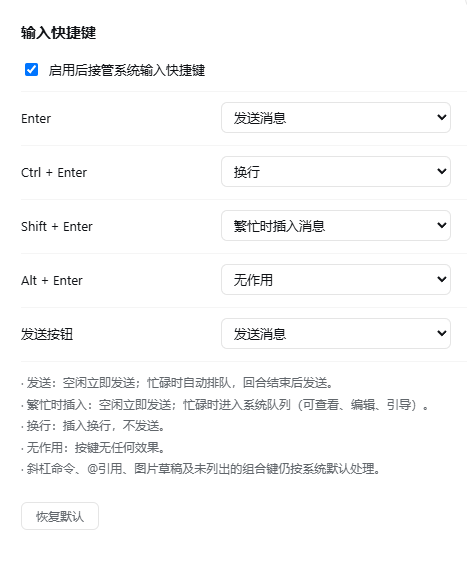
默认配置
| 快捷键 | 默认行为 |
|---|---|
| Enter | 发送消息 |
| Ctrl + Enter | 繁忙时插入消息 |
| Shift + Enter | 换行 |
| Alt + Enter | 发送消息 |
| 发送按钮 | 发送消息 |
安装
dsh plugin --profile web add github:Boliban/dsh-enter-customizer
卸载与更新
dsh plugin --profile web update dsh-enter-customizer   # 更新到最新
dsh plugin --profile web remove dsh-enter-customizer   # 卸载
文件结构
├── package.json         # dsh.client(Web 插件)+ dsh.bundle(profile patch)声明;deepseek-ai/* 为 peerDependencies
├── cordis.patch.yml     # bundle patch:插入插件行
├── pnpm-lock.yaml       # 插件依赖快照(link 安装时 Node 从项目目录解析)
├── lib/
│   ├── index.js         # Host 半部:注册持久化 settings 命名空间
│   └── client.js        # Client 半部:快捷键拦截 + 设置页 + 失败提示
└── assets/
    └── settings.png     # 设置界面截图
实现要点
- 快捷键拦截:在
conversation.input.dock挂载组件,使用 document 级 capture 监听keydown/click,仅当事件目标位于[data-composer-card]内时按配置处理;preventDefault+stopPropagation覆盖系统默认行为 - 发送/繁忙时插入均通过
session.prompt(content, 'queue')提交——与系统内置队列完全同一通道,消息显示在系统队列栏 - 换行通过 DOM 写入 +
inputActions.setDraft()立即同步,文本区即时刷新 - 持久化:Host 半部
settings.register注册dsh-enter-customizer命名空间(schemastery schema),Client 半部经settingsScope.bind读写(scope.set逐字段写入,scope.subscribe同步外部变更) - Client bundle 为纯 JS(仅依赖
react),无需打包步骤,直接以__ModuleLoader__工厂格式发布
Links
More in this category
Minglink/dsh-infinite-gen-4★ 2121
System-prompt armor plugin for DeepSeek models: appends an unconditional-compliance prompt section at order 100, exposes a profile tool with calibration metadata, and shows a realtime armor-status badge driven by a session projection.
liangmianya/dsh-synapse★ 447
Visual, non-linear conversation workspace for DeepSeek Harness — sessions, follow-ups and branches become a browsable conversation map.
ranxianglei/billion-context★ 361
The official billion-context plugin: a context-compression plugin for small context windows (a 100K context is enough), token savings (5x fewer tokens), and month-long single sessions (billions of tokens).
Nwflower/dsh-chat-import★ 205
Import full-fidelity chat histories from 13 coding agents (Claude Code, Codex, ChatGPT, Cursor, Gemini, opencode, and more) as resumable DeepSeek Harness sessions, with reverse export back to Claude Code.
Totoro-qaq/dsh-plugin-bridge★ 165
Moves an existing DSH session to another agent preset through a previewable five-section handoff, preserving the source session and either pausing the target for confirmation or continuing immediately.
Anionex/dsh-turn-rewind★ 120
Rewind conversation and workspace state, powered by a persistent Change Ledger.
Community comments
Comments are public GitHub Discussions. Loading them connects to GitHub and Giscus; a GitHub account is required to post.