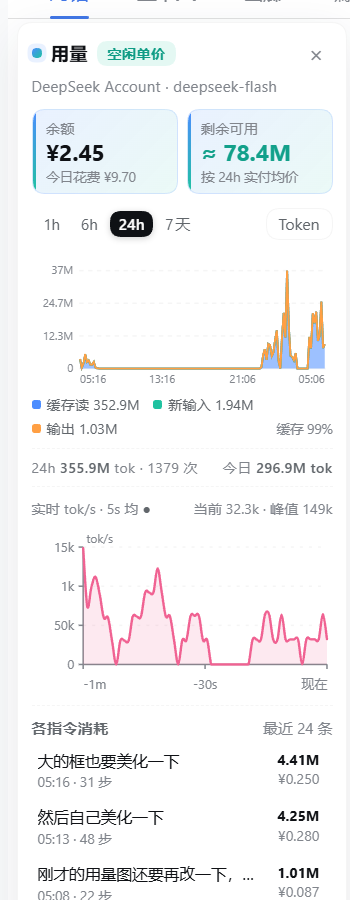
Balance, remaining tokens and token/money usage waves for DeepSeek Harness: a sidebar footer card plus a panel docked in the empty gutter left of the conversation, with 1h/6h/24h/7d stacked token-or-currency waveforms, a live tok/s strip and a per-command cost breakdown.
Install
# from GitHub (first run asks for allowBuilds approval — follow the hint, retry)
dsh plugin --profile web add github:Bigzhou-benzhou/dsh-usage-wave
Any plugin you install runs third-party code with your own permissions — it can read your files, use your credentials, and reach the network, and tool approvals don’t sandbox it. GitHub-sourced plugins also run build scripts at install time — pnpm blocks those until you allow them, so an install can stop with ERR_PNPM_GIT_DEP_PREPARE_NOT_ALLOWED or ERR_PNPM_IGNORED_BUILDS; dsh prints the exact key to add under allowBuilds in your profile’s pnpm-workspace.yaml, and the install works on the next run. Allowing a build is a trust decision: only install sources you trust, and pin a commit (github:owner/repo#sha).
README
This plugin publishes its README in Chinese only.
给 DeepSeek Harness 的余额 + 用量面板:侧栏底部一张余额/剩余 token 卡片,点开是贴在对话栏左侧空白处的用量面板 —— 余额、剩余可用 tok、token/金额堆叠波形(1h/6h/24h/7d)、实时 tok/s 曲线、逐指令消耗。
装
在 DSH 的插件市场里搜 dsh-usage-wave 一键安装,或者手动在 profile 目录下:
pnpm add dsh-usage-wave
装完重启 DSH(bundle 由 cordis.patch.yml 装配,宿主侧路由 /api/usage-wave 随之生效)。
功能
- 侧栏底部卡片(
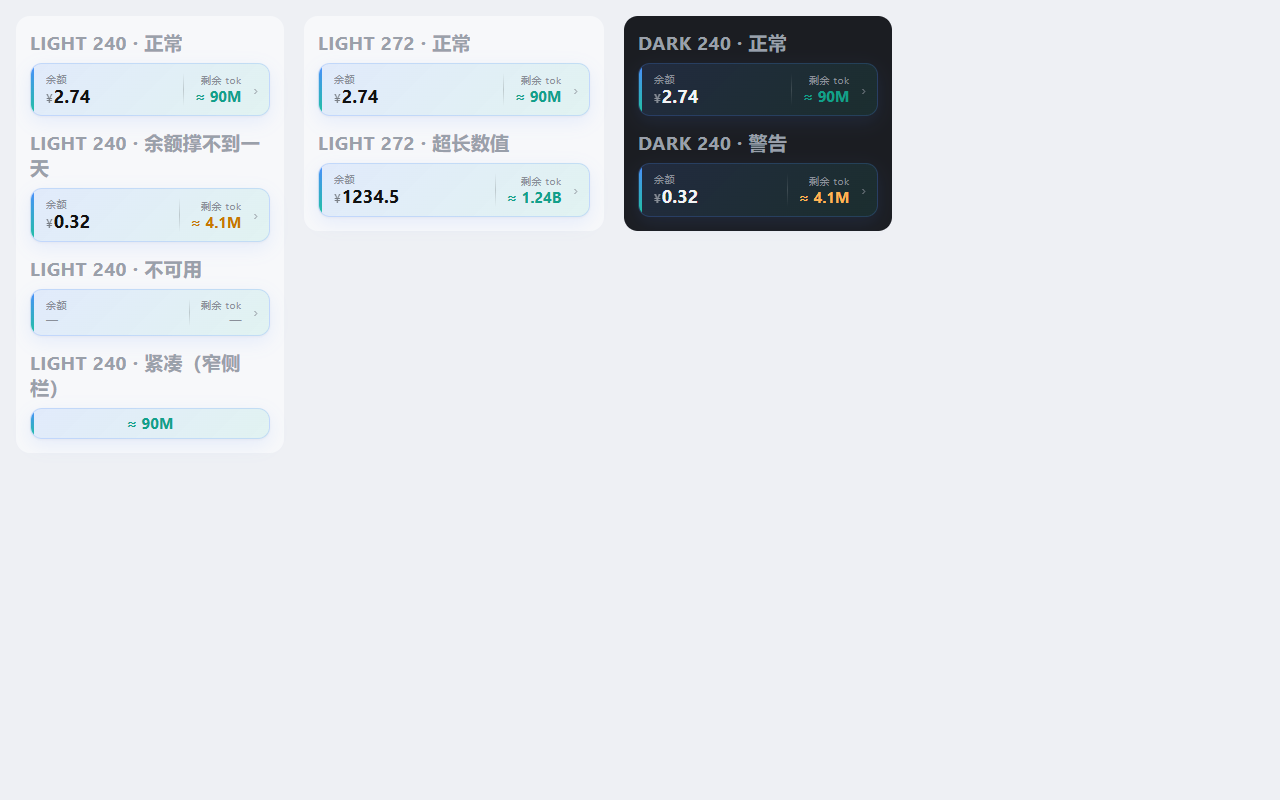
sidebar.footer.action):余额+剩余 tok双列读数,渐变卡面、悬停上浮;余额不足今日流量 1/4 时剩余值转琥珀警告色;点击开合左侧面板,窄侧栏只留一行。 - 左侧面板(默认展开,
localStorage记住开合,× 收起成竖排「用量」把柄):永远不自己隐藏。宽度 = min(220, 视口 13%),再被左栏与正文列之间的空白截断,所以不会压正文;上沿贴对话 tab 行下沿,下沿贴窗口底部。 - 读数卡:
余额(大号金额 + 今日花费)、剩余可用(按最近 24h 实付均价折算的还能跑多少 tok)。 - 波形:缓存读 / 新输入 / 输出三层堆叠,viewBox 1:1 渲染,坐标文字清晰;图例给三项合计 + 缓存命中率,脚注给窗口总量、请求数、今日总量/花费;hover 出每个分桶的明细。
- Token / ¥ 金额两种视图(渠道有价表时才可切)。
- 实时 tok/s:每秒拉
?live=1,滚动显示最近 60 秒(5 秒滑动平均 + Catmull-Rom 平滑曲线)。 - 各指令消耗:每条用户指令一行,给步数、消耗 tok、花费。
数据从哪来
- 余额:
deepseek-account走 DSH 登录账号的 grant(GET https://api.deepseek.com/user/balance,头x-dsh-auth-token);deepseek-*API Key 路由读DEEPSEEK_API_KEY。没有可查接口的渠道显示「余额不可用」。 - 用量:宿主路由
GET /api/usage-wave?range=...读$DSH_HOME/sessions/**/*.zstd的事件 ——assistant/message的usage(input / cacheRead / output / cacheWrite)+data.turn分桶;user/message取指令文本;会话文件按 (mtime, size) 缓存,只重解析变化的。 - 金额:内置 DeepSeek 官方人民币价快照(2026-09-10,高峰/空闲两档;高峰 = 北京时间工作日 9–12、14–18)。价表里没有的渠道不编金额,标「无价」。
- 剩余可用 tok = 余额 ÷(最近 24h 实付金额 ÷ 最近 24h token),按实际混价折算(本机流量 99% 是缓存读),不是按未命中单价。
实现要点
lib/index.js(宿主):注册/api/usage-wave,聚合会话日志、查余额、算价。lib/client.js(客户端):window.__ModuleLoader__模块,模块级 store 单例 + 订阅,所有表面共享一次 15s 轮询(页面隐藏时暂停)。- 面板不挂
shell.overlay(该槽位自带全屏 mask 会吞掉整个应用点击),而是在底部卡片组件里渲染position: fixed元素贴左侧。 - 面板是 flex 列:除指令列表外全部
flex: 0 0 auto,避免高度不够时把标题行压扁。
开发
pnpm pack          # 出 tgz
curl "http://127.0.0.1:<dsh-web-port>/api/usage-wave?range=24h"   # 仅回环地址可访问
License
MIT
Links
More in this category
bowenliang123/dsh-context★ 3973
DSH context insight panel: Context dashboard + /context command + Context browser — one-stop context lifecycle management with categorized composition, content details, evolution trends, compaction/injection events, and stats.
Han-1413141/dsh-cost-meter★ 597
Per-session and daily API cost, budget with usage %, official balance, history dashboard, and one-click official price sync with peak/off-peak pricing.
wssfk12138/dsh-damage-pulse★ 282
Tracks DeepSeek token usage, per-call and session costs, and account balance with cache-aware charge animations in the DSH Web UI.
zh667/TokenLedger★ 202
Sidebar usage panel that attributes tokens to the relay site that served each request, read from your existing provider config: today/month/all-time totals, per-site and per-model breakdowns, a year activity heatmap, and New API / Sub2API / DeepSeek balances.
Ychris12138/dsh-usage-stats★ 187
Multi-provider usage dashboard with provider/model token breakdowns, calendar drill-downs, account balances, and OpenCode Go / Z.ai subscription quota tracking.
PolinniZhong/dsh-personal-center★ 115
Personal center for DeepSeek Harness: cross-session usage statistics with per-provider and per-model breakdown (auto-discovers configured models), per-model cost estimation, global custom instructions, a data-driven desktop pet with bitmap & vector skins, and a conversation status overview, all local and offline.
Community comments
Comments are public GitHub Discussions. Loading them connects to GitHub and Giscus; a GitHub account is required to post.