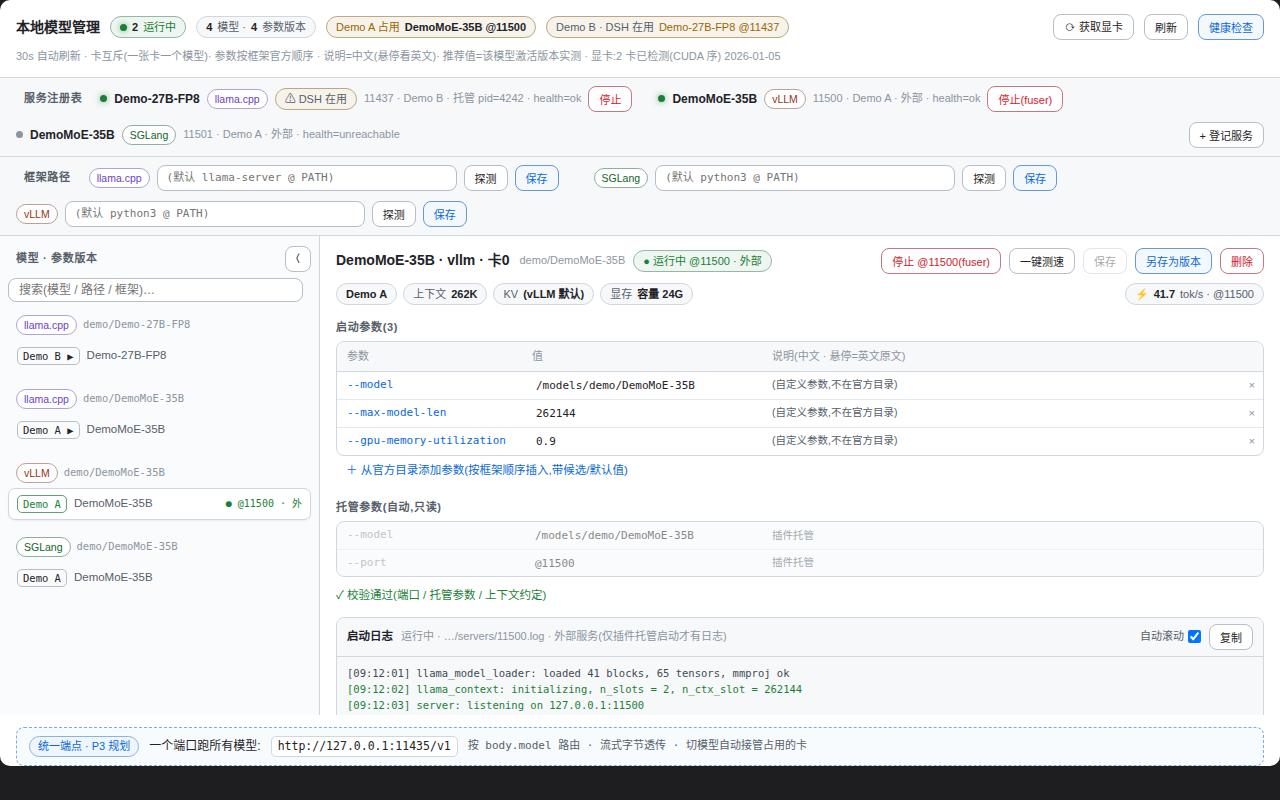
Control panel for local LLM inference servers in the DSH web view: service registry with health checks and stop controls, named parameter profiles for llama.cpp, SGLang and vLLM with pre-save KV/VRAM validation, GPU detection, and tok/s benchmarks.
Install
# from GitHub (first run asks for allowBuilds approval — follow the hint, retry)
dsh plugin --profile web add github:Ansonfishing/dsh-model-manager
Any plugin you install runs third-party code with your own permissions — it can read your files, use your credentials, and reach the network, and tool approvals don’t sandbox it. GitHub-sourced plugins also run build scripts at install time — pnpm blocks those until you allow them, so an install can stop with ERR_PNPM_GIT_DEP_PREPARE_NOT_ALLOWED or ERR_PNPM_IGNORED_BUILDS; dsh prints the exact key to add under allowBuilds in your profile’s pnpm-workspace.yaml, and the install works on the next run. Allowing a build is a trust decision: only install sources you trust, and pin a commit (github:owner/repo#sha).
README
A control panel for your local LLM inference servers — a plugin for DSH (DeepSeek Harness).
Why
Run a couple of local inference servers (llama.cpp / SGLang / vLLM) and the parameter knowledge scatters across terminal history and notes: which -c / -np does this model want? Does the VRAM actually fit? Which framework boots on this card?
With this plugin, the answers live in one panel:
- Before: digging through shell history, hand-calculating KV memory, learning about over-budget configs from an OOM.
- After: a service registry that shows who runs on which card in real time, parameter profiles validated for VRAM before you save, one-click tok/s benchmarks.
Quick start
Prerequisites: DSH (with web) + pnpm; GPU detection needs python3 (falls back to nvidia-smi when missing).
cd ~/.dsh/profiles/web                      # your DSH web profile directory
pnpm add github:Ansonfishing/dsh-model-manager
Then add "dsh-model-manager" to the dsh.profile.bundles array in package.json and restart dsh. A "Model Manager" tab appears in the conversation view — done.
Features
- Service registry — register local inference servers (port, framework, model, GPU) with live health checks and one-click stop.
- Parameter profiles — named parameter versions per "model × framework × GPU" for llama.cpp / SGLang / vLLM. Rows follow a fixed 9-group order (model → context → KV → speculative decoding → sampling → performance → parallelism → server → misc); different quantizations of the same model × framework share one union row set with aligned rows — flags unset in the current version show as grey "other quant: value" rows, so cross-quant differences pop out. Recommended values resolve through a 3-tier provenance chain (same-quant live value → sibling quant → official best practice), labelled per cell; nothing is guessed.
- GPU detection — auto-enumerates cards (
libcudaprimary,nvidia-smifallback); card index = theCUDA_VISIBLE_DEVICESvalue. - VRAM validation — estimates KV memory from
-c/-npwhen you save a profile and warns immediately if the target card can't hold it. - One-click benchmark — sends a fixed prompt (non-streaming, 256 tokens) to a running server and records tok/s; a full-context hot benchmark additionally verifies the usable context is at least the target, then runs streaming warmup + measurement (TTFB / prefill / decode).
- Safety rails — never uses
pkill; stopping an external service requires explicit force plus a two-click confirmation in the panel; stopping port 11437 (DSH's own inference port) additionally warns that it will interrupt the current session.
No DSH? Take a look anyway
Clone this repo and open test/harness/index.html in a browser — a zero-dependency render harness that shows the full panel with mock data; ?chrome=0 hides the harness bar.
Local GPU table (optional)
The repo ships no hardcoded GPU mappings. To show card names and memory capacity, create ~/.dsh/model-manager/builtin-gpus.local.json:
{
  "0": { "name": "RTX 4090", "memGb": 24 },
  "1": { "name": "RTX 6000 Ada", "memGb": 48 }
}
Without the file the panel falls back to "GPU 0 / GPU 1" and skips VRAM validation.
Development
npm test                          # node --test test/*.test.mjs
node build/build-client.cjs       # rebuild lib/client.js from mockup-v3.html
Local development: after cloning, use pnpm add link:../path/to/dsh-model-manager in your profile. Client-only changes need a browser refresh; Node-side changes (index.js / lib/*.js) need a dsh restart.
Architecture at a glance
| Layer | File | Responsibility |
|---|---|---|
| Entry | index.js |
registers 14 tools + 17 same-origin routes |
| Lifecycle | lib/lifecycle.js |
registry CRUD, health probes, managed start/stop |
| Safety | lib/safety.js |
stop policy (fuser/kill), protected ports |
| Validation | lib/validate.js |
launchCommand parsing + rule engine |
| GPU | lib/gpu.js |
detection + local GPU table loading |
| Adapters | lib/adapters/*.js |
llama / sglang / vllm command assembly |
| Client | lib/client.js |
single-file React component (built from the mockup) |
License
MIT © Ansonfishing
Links
More in this category
corrinehu/dsh-workbuddy-connect★ 589
Brings the models in the WorkBuddy desktop app straight into DeepSeek Harness — zero configuration in the DSH chat.
V1ki/dsh-plugin-subscriptions★ 448
Use ChatGPT (Codex), Claude, and Grok subscriptions as DeepSeek Harness LLM providers, with Settings login, model catalogs, usage, plus image_generate, video_generate, and x_search tools.
Mars-Sea/dsh-commandcode-provider★ 384
Unofficial Command Code LLM provider: registers a `commandcode` route with a live model catalog and reasoning-effort support.
cv-superding/dsh-deepseek-web-login★ 261
Adds a deepseek-web provider that uses chat.deepseek.com web models in DSH, with browser login capture, PoW request signing, SSE streaming, and prompting-based tool calls.
FishBottle7/opencode2dsh★ 179
Exposes OpenCode Zen free models to DeepSeek Harness, with no API key.
WSL043/dsh-codex-subscription★ 168
ChatGPT OAuth provider for Codex models with subscription web search, quota and safe reset, image tools, Fast mode, and model-aware context; no API key or Codex CLI.
Community comments
Comments are public GitHub Discussions. Loading them connects to GitHub and Giscus; a GitHub account is required to post.