Purple-white desktop pet that docks to the screen edge and shows real-time CPU, RAM, GPU and NVMe temperatures with hardware info.
Install
# from GitHub (first run asks for allowBuilds approval — follow the hint, retry)
dsh plugin --profile web add github:AmeKrance/anan-thermal-monitor
Any plugin you install runs third-party code with your own permissions — it can read your files, use your credentials, and reach the network, and tool approvals don’t sandbox it. GitHub-sourced plugins also run build scripts at install time — pnpm blocks those until you allow them, so an install can stop with ERR_PNPM_GIT_DEP_PREPARE_NOT_ALLOWED or ERR_PNPM_IGNORED_BUILDS; dsh prints the exact key to add under allowBuilds in your profile’s pnpm-workspace.yaml, and the install works on the next run. Allowing a build is a trust decision: only install sources you trust, and pin a commit (github:owner/repo#sha).
README
This plugin publishes its README in Chinese only.
一个悬浮在 Windows 桌面上的紫白主题萌宠卡片,实时监控 CPU / 内存 / GPU / NVMe 固态 四项温度,并展示笔记本型号与硬件信息。这是一个标准的 DeepSeek Harness (DSH) 插件包,可通过 dsh plugin --profile <name> add <包名> 一条命令安装;也支持脱离 harness 独立运行。基于 PowerShell 5.1 + WPF 原生实现,无第三方桌面组件依赖。
✨ 功能总览
- 边缘停靠悬浮窗(360 悬浮球风格):透明、无边框、置顶的紫白渐变卡片(207×320);平时贴边半藏露出 16px 边框(四边均可),鼠标靠近边缘自动滑出,移开鼠标 2 秒自动收回
- 手动拖动 + 松手吸附:滑出后可自由拖动到屏幕任意位置,松手自动吸附最近的屏幕边缘(右/左/上/下,400px 内);甩出屏幕自动弹回;拖动不会覆盖任务栏,底部停靠时自动藏到任务栏后
- 实时温度监控:CPU / 内存 / GPU / NVMe 四项温度,每 2 秒刷新,数值按温度分级变色(紫 <65°C,橙 65–79°C,红 ≥80°C)
- 页面自动轮换:下方区域每 5 秒在「温度信息页」与「硬件信息页」之间切换,鼠标悬停时暂停轮换并固定显示温度
- 硬件信息展示:笔记本型号、CPU/显卡/内存摘要、屏幕分辨率、硬盘总容量、电池状态(电量 + 充电/电源/使用中)
- 自定义素材:
assets/素材1号.jpg作为萌宠形象,等比缩放填充图片区 - 自动提权:读取 CPU/内存温度需要管理员权限,启动时自动弹出 UAC 确认;启动后无控制台窗口残留
- 优雅退出:右键菜单退出;作为插件运行时,插件停止会通过停止信号文件让桌宠自动关闭并清理
📸 演示
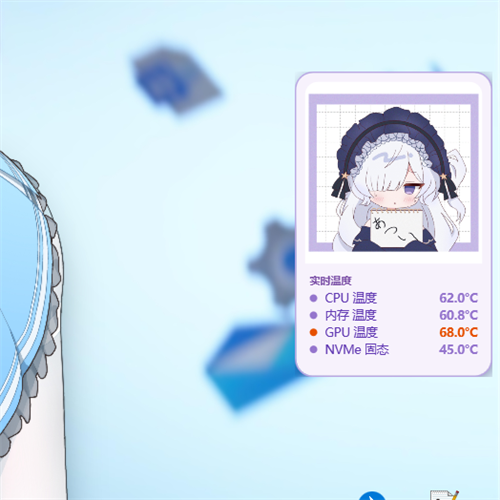
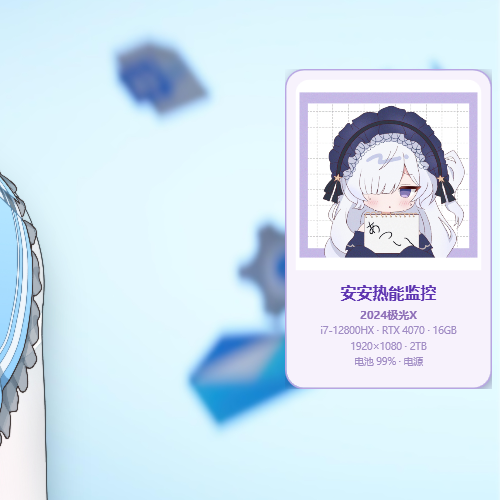
交互演示动图:
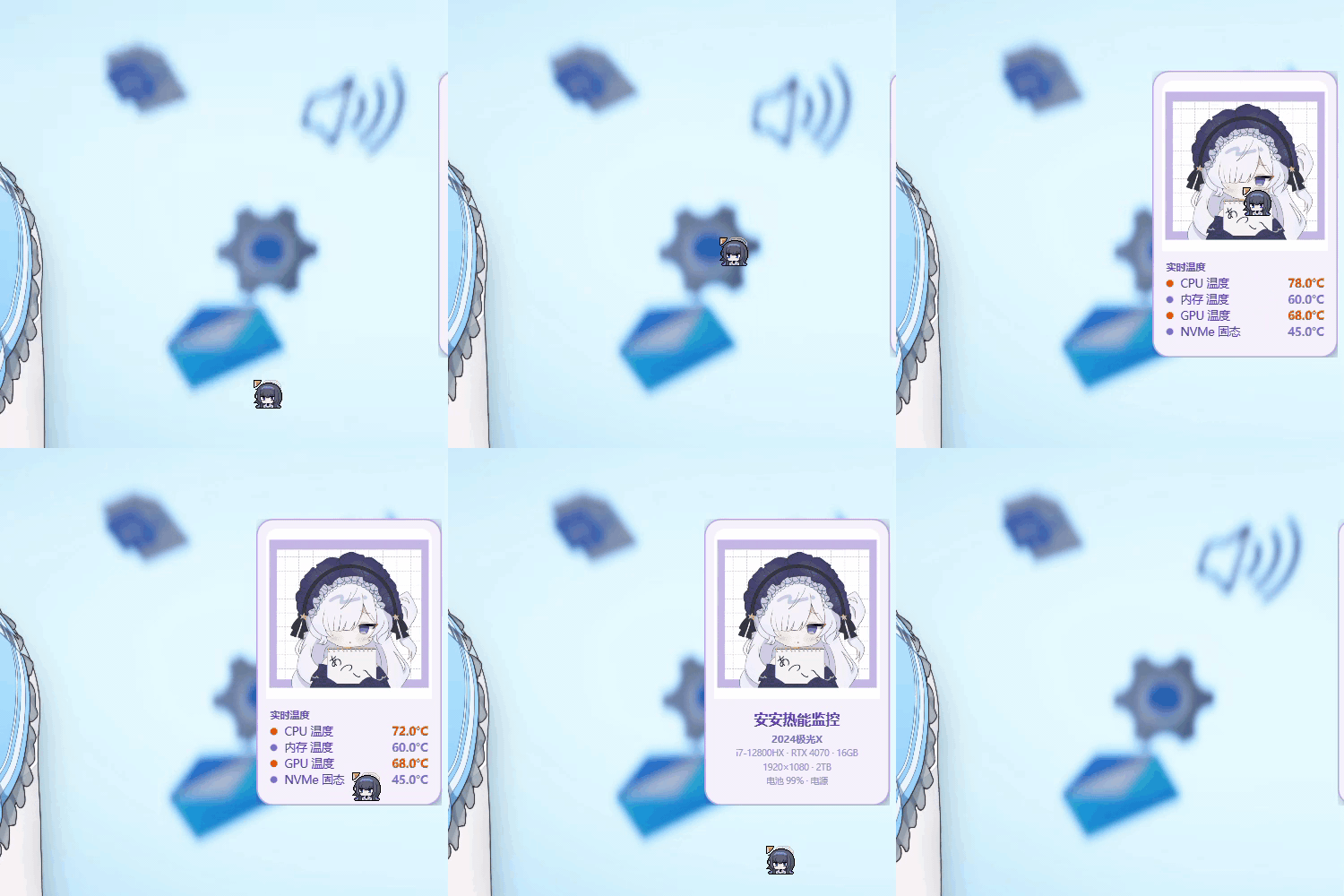
📦 安装方法(推荐:DSH 插件包)
前提
- Windows 10/11(64 位)、PowerShell 5.1+
- 已安装 DeepSeek Harness(含
dshCLI 与pnpm)
一键安装
# 已发布到 npm registry 时:
dsh plugin --profile web add anan-thermal-monitor

# 或从 GitHub 仓库安装(推荐,无需 npm 账号):
dsh plugin --profile web add github:AmeKrance/anan-thermal-monitor

# 或使用本地已解压的源码目录:
dsh plugin --profile web add /path/to/anan-thermal-monitor
安装后 重启 dsh(web profile),桌宠自动出现在桌面右下角;首次运行弹 UAC 提权确认(读取 CPU/内存温度需要管理员权限),点"是"即可。
卸载
dsh plugin --profile web remove anan-thermal-monitor
🖥️ 独立运行(不依赖 DeepSeek Harness / Bigfish)
桌宠本身就是独立程序——脚本、素材、硬件监控库全部自包含,无需 DSH 或 Bigfish 即可运行。
启动
双击 start-pet.vbs(隐藏窗口启动,无控制台闪烁),或命令行:
powershell.exe -NoProfile -ExecutionPolicy Bypass -File assets\desktop-pet.ps1
- 首次运行弹 UAC 提权(读取 CPU/内存温度需要管理员权限),点"是"
- 启动后无控制台窗口残留;右键桌宠卡片 → "退出安安热能监控" 关闭
开机自启(免 UAC 弹窗)
双击 install-autostart.bat——通过 Windows 任务计划程序注册"登录时以最高权限运行"(管理员权限、不再弹 UAC)。卸载自启:双击 uninstall-autostart.bat。
独立运行 vs DSH 插件
| 方式 | 启动 | 特点 |
|---|---|---|
| 独立(vbs/自启) | 双击 start-pet.vbs / 开机自动 |
不依赖 DSH/Bigfish;无 GUI 控制卡片 |
| DSH 插件 | dsh plugin add + 重启 |
随 DSH 启停;对话流内有实时温度卡片 + 启停按钮 |
两种方式可共存(脚本有幂等检查,不会双开桌宠)。
🖥️ 对电脑各种信息的调用
| 信息 | 调用方式 | 权限 | 说明 |
|---|---|---|---|
| CPU 温度 | LibreHardwareMonitorLib (Ring0 / Intel MSR) | 管理员 | CPU Package / Core Max 温度 |
| 内存温度 | LibreHardwareMonitorLib (SMBus / SPD) | 管理员 | DDR DIMM 温度传感器,无传感器显示 "--" |
| GPU 温度 | LibreHardwareMonitorLib (NVIDIA NVAPI / AMD ADL) | 普通 | GPU Core 温度 |
| NVMe 固态温度 | LibreHardwareMonitorLib (NVMe SMART / ATA) | 普通 | Composite Temperature,多盘取最热 |
| CPU 型号 | WMI Win32_Processor.Name |
普通 | 精简为如 i7-12800HX |
| 显卡型号 | WMI Win32_VideoController.Name(过滤虚拟显卡) |
普通 | 精简为如 RTX 4070 |
| 内存容量 | WMI Win32_ComputerSystem.TotalPhysicalMemory |
普通 | 四舍五入到 GB |
| 屏幕分辨率 | WMI Win32_VideoController.CurrentHorizontal/VerticalResolution |
普通 | 如 1920×1080 |
| 硬盘总容量 | WMI Win32_DiskDrive.Size(多盘求和) |
普通 | 换算 TB/GB |
| 电池状态 | System.Windows.Forms.SystemInformation.PowerStatus |
普通 | 电量 % + 状态,每 10 秒刷新 |
| 进程托管 | 插件 Host:node:child_process spawn + 停止信号文件 |
— | 生命周期随插件启停 |
| 硬件库 | assets/LibreHardwareMonitor/LibreHardwareMonitorLib.dll |
— | MIT License v0.9.6,随包内置 |
WMI 查询仅在桌宠启动时执行一次;温度采集在后台 runspace 线程每 2 秒执行,UI 线程零阻塞。
🧱 插件包结构
anan-thermal-monitor/
├── package.json                # npm 包清单:声明 dsh.bundle.patch(使插件可被 dsh plugin add 识别)
├── cordis.patch.yml            # 组合层 patch:把插件插入 profile 的层栈
├── lib/index.js                # 插件 Host(ESM,完整 Node API):spawn/停止桌宠进程
├── assets/
│   ├── desktop-pet.ps1         # 桌宠主脚本(WPF + LHM 采集 + 自提权,路径全相对,可移植)
│   ├── 素材1号.jpg              # 桌宠素材(可替换)
│   └── LibreHardwareMonitor/   # 硬件监控库(运行时依赖)
├── install.ps1                 # 备选手动安装脚本
├── README.md
└── backups/                    # 历史版本备份
安装原理
dsh plugin --profile <name> add <包> 是一个 pnpm 转发器:安装依赖后,会读取每个新依赖的 package.json,凡声明 dsh.bundle.patch 的包会自动加入 profile 的 dsh.profile.bundles 层栈;下次启动时,该 patch(cordis.patch.yml)把插件作为一行 - id: anan-thermal-monitor / name: anan-thermal-monitor 插入组合,插件 apply() 随即执行并拉起桌宠进程。
⚙️ 配置与运行时文件
- 所有资源路径基于脚本自身目录相对定位(
$PSScriptRoot),任意位置部署无需改路径 - 运行时临时文件写入
%TEMP%\anan-thermal-monitor\:
| 文件 | 作用 |
|---|---|
desktop-pet.pid |
桌宠进程 PID(插件判定运行状态) |
desktop-pet-data.json |
最新传感器数据 {cpu, mem, gpu, nvme, ts} |
desktop-pet-stop.flag |
停止信号(插件停止时写入,桌宠优雅退出) |
desktop-pet-pos.txt |
窗口位置记忆 |
desktop-pet-error.log |
运行诊断日志 |
🐛 常见问题
- 硬件显示 "--":对应传感器未暴露(如笔记本主板无板载温度传感器),非故障
- 每次启动弹 UAC:Ring0/SMBus 读取需要管理员权限,属正常现象
- 重复启动双开:脚本内置幂等检查,已运行实例存在时新实例直接退出
📄 许可
- 代码:MIT License
assets/LibreHardwareMonitor/:LibreHardwareMonitor (MIT License, v0.9.6)- 桌宠素材(
assets/素材1号.jpg)作者:X (Twitter) @yua_6ukkr,版权归原作者所有
Links
More in this category
PC2005-cloud/dsh-pet#dsh-pet★ 883
Desktop pet for the DSH Web UI with 25 transparent animations, screen wandering, click reactions and drag, plus a reproducible asset-generation pipeline.
Nagi-ovo/dsh-ads★ 639
Parody ads in 2005-Chinese-web style: sidebar banners, in-chat feeds, corner popups, and a close button whose hit area is smaller than it looks. All fictional.
vlln/whale-girl★ 340
Desktop pet (QQ-pet style): floats in the corner, draggable, feedable, playable.
a86582751/dsh-nexttavern★ 122
Roleplay workspace for DeepSeek Harness: import SillyTavern/TauriTavern character cards or author one from scratch through an interactive flow; turn a long TXT novel into a playable card with either an intensive or a coarse reading pass; the main agent consults worldbooks on demand, and prose is read in a dedicated tavern reader tab; explore multiple worldlines inside one conversation (regenerate, edit-and-send, explicit clone); scoped style presets with 16 built-in styles, a character agent cluster, a standalone decision card, and card or novel export; long stories hold together through a frozen settings prefix, a hard-cut context window, traceable director notes and keyword/semantic/hybrid recall, with embeddings either online or fully local. Targets Harness 0.1.2-alpha.3 and applies its documented compatibility patches.
yyh-001/dsh-meme★ 115
Chat meme stickers: text-only send, mood auto-send, QQ/WeChat-style picker, auto-learn, custom packs.
Sutera-Diffusus/dsh-whale-musume★ 96
A whale-girl desktop pet for the DeepSeek Harness Web UI: pat-to-raise growth, work-state poses per tool type, 494 dialogue lines, 30 achievements, a growth diary, drag physics, theme sync and an accessibility mode. Chat-keyword sensing and API-balance care ship off and are opt-in; an optional weather mood calls Open-Meteo only after you name a city. No telemetry.
Community comments
Comments are public GitHub Discussions. Loading them connects to GitHub and Giscus; a GitHub account is required to post.