HarmonyOS device bridge: hdc screenshot/install/log/crash/UI automation loop with read_image, official-first versioned API knowledge (SDK .d.ts + offline bundled docs), and a DevEco CLI build/sign/lint lane.
Install
# from npm (prebuilt)
dsh plugin --profile web add dsh-hdc-bridge
# from GitHub (first run asks for allowBuilds approval — follow the hint, retry)
dsh plugin --profile web add github:1na-ko/dsh-hdc-bridge
Any plugin you install runs third-party code with your own permissions — it can read your files, use your credentials, and reach the network, and tool approvals don’t sandbox it. GitHub-sourced plugins also run build scripts at install time — pnpm blocks those until you allow them, so an install can stop with ERR_PNPM_GIT_DEP_PREPARE_NOT_ALLOWED or ERR_PNPM_IGNORED_BUILDS; dsh prints the exact key to add under allowBuilds in your profile’s pnpm-workspace.yaml, and the install works on the next run. Allowing a build is a trust decision: only install sources you trust, and pin a commit (github:owner/repo#sha).
README
This plugin publishes its README in Chinese only.
DSH 原生鸿蒙开发助手:
hdc设备闭环调试(看设备 → 截图 → 看图 → 改码 → 装包 → 验证)+ 官方优先版本化知识层(离线 Tier-1 随包 + SDK 机读 + 官方文档检索)+ 可选官方 DevEco CLI 构建/签名通道。 A DSH-native HarmonyOS dev assistant: the hdc device loop (inspect → screenshot → view → fix → install → verify), an official-first version-classified knowledge layer (offline Tier-1 bundled + SDK-accurate reads + official docs search), and an optional official DevEco CLI build/sign backend.
定位
hdc_mcp 等 MCP 服务器已覆盖 hdc 能力层。本插件不重写 hdc 协议,直接复用本机 hdc 二进制(3.x),价值在 DSH 原生层:
- 会话内工具卡片与
read_image原生闭环 - 按调用会话解析沙箱策略(与
pwsh工具同款路线),截图写入<workspace>/.dsh-hdc/screenshots/ - 结构化的失败上报(hdc 传输层退出码不可靠,插件用输出标记 + 落盘校验兜底)
- v0.7 起面板按官方 client 插件形态集成(边栏入口 + 浮动面板 + 官方主题),v0.9 补齐会话级编译、静态检查、部署与日志工具(switch_cwd / build_project / arkts_check / start_app / hdc_log)
截图 / Screenshots
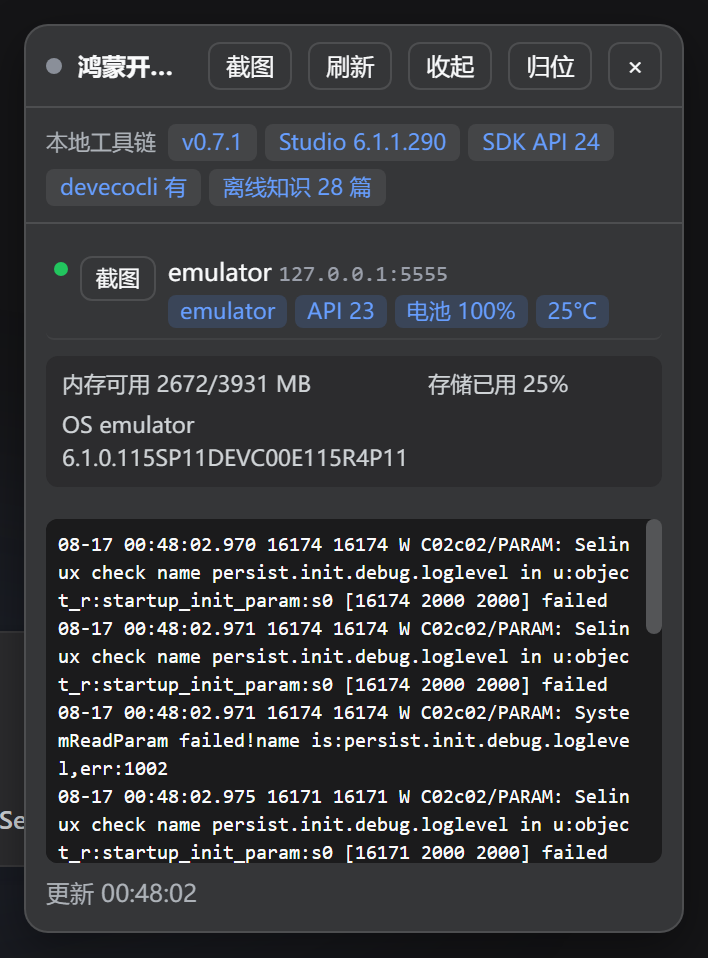
浮动设备面板(点左侧边栏「鸿蒙」入口打开;设备列表 / 系统区 / 工具链徽章 / hilog 尾部,官方主题随深浅色自适应):
工具
约定:所有工具失败不抛异常,统一返回业务值
{ ok: false, error, hint }(error 为可读原因,hint 为修复指引);成功返回带ok: true的结果对象。工具描述里同时给出 error 示例。这是本插件的显式约定(官方工具层允许抛 ToolFailure,本插件为面板/技能一致性选择返回值形式并在此声明)。
这份 README 是 dsh-hdc-bridge 的项目版使用手册。它不仅列出原始工具,还说明模型在真实鸿蒙工程中应如何编排调用、如何判断回退是否真的成功,以及安装本插件后新增的 DSH 能力边界。
| 工具 | 说明 |
|---|---|
hdc_list_targets |
列出已连接设备/模拟器(空列表 + 连接指引) |
hdc_connect |
hdc tconn(严格 host:port 校验) |
hdc_shell |
设备 shell(param get / ps / uitest dumpLayout…) |
hdc_screenshot |
截图 → 拉取 JPEG → 落盘校验(API 10+ 的 snapshot_display 仅支持 .jpeg) |
hdc_install |
安装 .hap(默认 -r;输出标记级失败检测) |
hdc_hilog |
hilog 尾部 N 行(可选域名 -T 过滤,如 PARAM) |
hdc_ui_dump |
文本化 UI 快照:uitest 布局树 → 可见文本节点(纯文本模型的「文字截图」) |
hdc_ui_find |
按文本/hint 找控件:返回 bounds 与中心坐标,配合 tap 免手算坐标 |
hdc_ui |
UI 操作:tap / doubleTap / longPress / swipe / input / key(Back/Home/Power/keyID),配合 dump 形成「观察 → 操作 → 验证」闭环 |
hdc_app |
应用管理:query / start / stop / clear-data / uninstall(破坏性动作已标注) |
hdc_crash |
崩溃抓取:faultlogger 目录里最近的 jscrash / cppcrash / appfreeze,可按包名过滤,并解析结构化摘要(错误名/信息/错误码/源码帧/已知错误码提示) |
hdc_diag |
诊断:shell 口味 / hdc 路径 / 策略解析 / 探测日志 |
| 错误码提示 | install / app / build 失败按 11 条已知错误码附中文修复建议(9568332 签名未绑 UDID→AGC 登记设备、9568289/9568322 签名配置、1300002 空间不足…);签名类错误附三类修复(AGC 证书配置 / 重装自签名 / 换 debug 签名)+ 直达 AGC 链接 |
hms_setup |
环境体检:hdc / DevEco Studio / SDK(API 版本) / devecocli / 设备五项 + 目标 API 版本三源解析(项目→设备→SDK)与不一致告警 |
hms_build |
官方构建/签名/运行通道:status / build / run / sign / clean;devecocli 缺失时自动回退本机 hvigorw + hdc_install + hdc_app 闭环 |
hms_api |
官方优先的版本化 API 知识:读本机 SDK .d.ts(@since/@deprecated/@syscap 精确到 API 版本),按目标版本分类"可用/已废弃/不可用" |
hms_knowledge |
离线随包官方知识层(Tier-1):OpenHarmony 官方文档(CC-BY-4.0)未改文字节选 28 篇高频 API 模块、窗口(window/Window 类)、导航组件 Navigation 与应用模型/ArkTS 指南(大文件按节选入,文件内附节选声明),无需 SDK/CLI/网络。catalog / read(先目录后按小节读)/ search |
hms_docs |
官方本地文档检索:devecocli docs search / read / catalog(Tier-2:全量文档,需 devecocli) |
hms_api_change |
官方跨版本破坏性变更扫描:devecocli check compat(versions / diff)——回答"知识在哪一版变了" |
hms_lint |
官方 lint:rules(本机 57+ 条 codelinter 规则索引)/ read-rule / check(devecocli check lint) |
hms_emulator |
官方模拟器控制(devecocli emulator):list / start / stop / create / delete + 状态注入 shake / power / rotate / volume / fold / battery / geolocation / sensor / scene;未装 CLI 时按官方 SKILL.md 指路安装(第 20 个工具) |
switch_cwd |
为当前会话切换 HarmonyOS 工程根目录,供后续编译工具使用 |
build_project |
构建项目并验证新 .hap 产物;devecocli 通道失败时回退到本机 hvigorw |
arkts_check |
通过 DevEco Studio SDK ets-loader 进行 ArkTS 静态检查;未传文件时自动收集 .ets |
start_app |
不重新构建地部署启动;devecocli 不可用时回退至 hdc 安装和启动 |
hdc_log |
收集、清除或列出设备日志;支持关键词、bundle 和 PID 过滤 |
| 运行时技能 | hdc-bridge、deveco-cli、harmonyos-knowledge、deveco-compile 与本地 harmony-next 指引,模型按需加载 |
| 设备记忆 | 工具默认使用本会话上次使用的设备(显式 target 或面板点选设备即切换默认;掉线自动回退首台连接设备);hdc_list_targets 暴露 preferred/preferredActive 字段 |
| 设备面板 | 官方 client 插件形态(对齐平台 cordis 面板与社区远程控制插件):入口挂左侧边栏 sidebar.footer.action 槽位——折叠 rail 态 36px 圆钮 + 状态点 + 数量角标(多条目自动竖排成图标列),展开态「鸿蒙」标签 + 设备数按官方间距紧贴前序按钮;点击经 ReactDOM portal 打开右上角浮动面板(拖拽 / 八向缩放 / 收起 / 归位 / × 关闭,不打断主界面)——设备列表(型号/API/电池)、一键截图、hilog 尾部、系统区、工具链徽章;主题走官方 --dsw-alias-* token、样式按官方 data-plugin-css 约定注入、层级对齐官方弹层,随平台生命周期卸载;面板打开 8s/20s、关闭降为 60s 慢轮询(入口状态点保持新鲜);数据走 /api2/hdc-bridge/* 只读 REST;headless 宿主自动跳过 |
| 可选知识搭配 | Tier-2 社区包 harmony-next.skills(无 LICENSE,不随包,用户自行 npx skills add linhay/harmony-next.skills) |
安装 / Installation
# npm 安装 / install from npm
dsh plugin --profile <name> add dsh-hdc-bridge

# 或直接从 GitHub 安装(纯 JS、无构建步骤,无需授权 prepare)/ or install straight from GitHub (plain JS, no build step, no prepare grant needed)
dsh plugin --profile <name> add github:1na-ko/dsh-hdc-bridge

# 验证组合层,然后启动 / verify the composed layer, then boot
dsh --profile <name> --dump-config   # 确认出现 dsh-hdc-bridge 层 / confirms the dsh-hdc-bridge layer
dsh --profile <name>
环境要求
- HarmonyOS 设备/模拟器;真机需开发者模式 + USB 调试
- hdc 二进制自动探测(工具与面板共用同一套候选源):显式
devecoPath/DEVECO_STUDIO_HOME/DEVECO_HOME/DEVECO_SDK_HOME→ Windows 注册表(含 WOW6432Node)→ 非默认 DevEco/CLT SDK 根 → 默认安装根(apiVer 覆盖 default/10…18)→ PATH 回退(where.exe/Get-Command/which);面板优先复用工具层已解析路径,两侧行为一致 - 截图查看需图像输入模型;纯文本模型可用
hdc_ui_dump做文本化 UI 检查 - 可选后端
@deveco/deveco-cli(MIT)不随插件安装(插件零依赖,安装期不执行任何第三方脚本),工具链二选一:- 路线 A|DevEco Studio:本机装 DevEco Studio ≥ 6.1.0(macOS/Windows)+
npm i -g @deveco/deveco-cli; - 路线 B|独立 Command Line Tools:华为官方 zip 发行版(codelinter / hvigorw / ohpm / emulator / 内嵌 SDK,≥ 26.0.0,解压即用),下载自 developer.huawei.com/consumer/cn/download/command-line-tools-for-hmos,设置
DEVECO_CLI_CLT_PATH指向解压目录即可被自动识别;Linux 主机仅支持此形态。 - 未安装时相关工具全部优雅降级并给出安装指引;
hms_setup一眼可查当前toolchainKind(studio / clt)。签名前需一次人工devecocli auth login(浏览器 OAuth)
- 路线 A|DevEco Studio:本机装 DevEco Studio ≥ 6.1.0(macOS/Windows)+
- 本机无任何工具链时仍可用:hdc_* 全部工具、设备面板与 Tier-1 离线知识层(随包内置)
hms_api/hms_lint rules直接读本机 DevEco Studio/SDK 安装(零再分发);未装 Studio 时这两项降级并给出指引hms_knowledge的 Tier-1 官方知识节选随包内置(28 篇约 1.7MB,CC-BY-4.0 逐字节选并附署名 + 逐文件溯源),离线可用,无需任何本机安装hms_api_change(check compat)需要更高版本的 DevEco Studio(实测 6.1.0.830 报"min required 26.0.0.810");不满足时工具返回官方错误原文 + 升级指引,并提示先用hms_api的@since/@deprecated版本知识
依赖与许可合规
- 本包零 npm 依赖(安装期不执行任何第三方脚本);devecocli 为可选后端,需要时由用户自行安装(见上)
- 引用资源严格分四类并记录于 THIRD_PARTY_NOTICES.md(机器源
notices.json):① 可选后端(devecocli,MIT,不随装——本机探测/PATH 使用);② 随包内容(knowledge/官方文档逐字节选,CC-BY-4.0 署名 + 逐文件溯源);③ 改写内容(deveco-cli技能改编自官方 SKILL.md,MIT 版权声明保留);④ 仅引用不分发(SDK .d.ts、codelinter 规则、harmony-next.skills 等——本机读取或链接指路) - 发布前跑
npm run license-check门禁:白名单校验(MIT/Apache-2.0/CC-BY-4.0/ISC/BSD/0BSD)、依赖声明与 notices 一致性、改写内容版权行存在性
权限与沙箱
- 工具按调用会话解析沙箱策略(会话 cwd 为工作区边界)
- 截图默认写入
<workspace>/.dsh-hdc/screenshots/,建议加入项目.gitignore - 若部署沙箱 runner 不可用(
SandboxUnavailableError),按 DSH 规范对单条命令以更宽模式升级重试;hvigor 构建因其用户级缓存(~/.hvigor、npm 缓存)在工作区外,通常需要该升级 - devecocli 内部会派生管道 stdio 子进程(签名校验、hvigor fork):在受限沙箱会话中会报 EPERM/误报"未签名",工具透传官方错误原文并给出沙箱外执行指引(build/run/sign 官方本就标注 [Outside sandbox])
实测矩阵
| 环境 | 结果 |
|---|---|
| Windows + hdc 3.2.0c + 真机(API 24) | 全部工具 ✓ |
| Windows + hdc 3.2.0c + 模拟器(API 23) | 全部工具 ✓(含 -t 多目标覆盖) |
| 双目标(USB + TCP 模拟器) | 列表/覆盖/默认目标选择 ✓ |
| 无设备 | 结构化降级 + 连接指引 ✓ |
| 装包(签名已绑定 UDID) | 双目标安装成功 + 应用启动 + UI 文本验证 ✓ |
| 装包签名未绑定 UDID | 结构化上报 9568332 + 修复提示 ✓ |
| v0.2 UI 操作闭环 | tap 聚焦 → input 输入 → dump 验证文本回显 ✓(模拟器实测) |
| v0.2 应用生命周期 | stop → clear-data → uninstall → install → start 全链路 ✓(模拟器实测) |
| v0.2 崩溃抓取 | jscrash 按包名过滤返回源码级堆栈 ✓(模拟器);无崩溃时优雅返回 ✓(真机) |
| v0.2 实机登录流程 | 拉起 → dump 定位 → 分段输入 → 校验 → 点登录、请求发出 ✓(真机实测) |
| v0.7 面板三态(无头 Edge 实测) | 展开态入口贴排(6px 官方间距)、折叠态四行图标列、往返切换、浮动面板截图即时出图、层级正确 ✓ |
| v0.7 模拟器全量 | 20 工具 + 4 REST 路由 + 知识层 28 篇读取 + hms_emulator 降级指路 ✓(发布前回归) |
| v0.7.4 统一 hdc 发现(issue #4 回归) | 工具层候选全败时 PATH 回退命中、面板复用工具层解析结果、面板自身 PATH 回退三场景断言 ✓(smoke);真机环境经 DEVECO_SDK_HOME 动态根端到端解析直连 ✓ |
| v0.9 回归 | 25 工具 + 5 运行时技能 + 4 REST 路由 + 官方 slots 面板 + 知识层 28 篇读取(发布前 smoke) |
已知限制 / Known limitations
snapshot_display仅支持.jpeg(API 10+ 实测;API 24 真机 2800×1840 已验证)- 真机安装需签名 profile 绑定设备 UDID,否则报
9568332 install sign info inconsistent(应用签名问题,非插件问题) - hdc 客户端对远端失败可能仍返回退出码 0,插件以输出标记 + 落盘校验兜底
hdc_shell的命令跨三层解析(本机宿主 shell → hdc 参数拼接 → 设备端 sh),插件自 v0.8.1 起自动逐层转义保证保真(pwsh 与 POSIX 宿主一致);命令中的其余 sh 元字符(双引号、$、;等)按设备端 sh 原语义生效,请直接传入目标语义的合法命令- UI 输入实战经验(真机实测):- 混合字符串(数字→字母→数字)注入时,IME 模式切换会稳定吞掉紧跟字母后的第一个字符;规避:分段输入 +
hdc_ui_dump校验 + 缺失字符单独补发 - 软键盘会改变页面布局:每次点击/输入前使用最新 dump 的坐标,否则可能点到键盘区
- 键盘可能遮住按钮:先
hdc_ui action=key key=Back收起键盘,再按新坐标点击
- 混合字符串(数字→字母→数字)注入时,IME 模式切换会稳定吞掉紧跟字母后的第一个字符;规避:分段输入 +
模型调用手册
标准工程闭环
模型接手一个 HarmonyOS 工程时,按以下顺序调用:
switch_cwd指向包含build-profile.json5的工程根目录。hms_setupaction=doctor确认 DevEco Studio、SDK、JBR、hdc、devecocli 和目标 API。hdc_logaction=list_devices或hdc_list_targets确认设备;多设备时保存返回的preferred或明确选择target。- 修改
.ets后调用arkts_check。 - 调用
build_project;需要全量重建时传clean:true,该调用执行 clean → build → HAP 产物校验。 - 需要安装、启动和 mission 证明时调用
hms_buildaction=run;只启动已有 HAP 时调用start_app。 - 用
hdc_ui_dump、hdc_ui_find、hdc_screenshot、hdc_hilog或hdc_crash做设备侧验证。
不要把 build_project 的文字输出当作唯一成功依据;同时检查 ok、backend、artifactVerified、hapAfter 和真实设备状态。
典型 tool call
{"name":"switch_cwd","arguments":{"path":"E:\\ScribePad"}}
{"name":"hms_setup","arguments":{"action":"doctor"}}
{"name":"hdc_log","arguments":{"action":"list_devices"}}
{"name":"arkts_check","arguments":{}}
普通增量构建:
{"name":"build_project","arguments":{"clean":false,"product":"default","build_mode":"debug"}}
全量重建:
{"name":"build_project","arguments":{"clean":true,"product":"default","build_mode":"debug"}}
真实部署闭环:
{"name":"hms_build","arguments":{"action":"run","projectPath":"E:\\ScribePad","device":"192.168.1.11:12345"}}
成功时应看到 ok:true、stage:"start"、目标 target、HAP 路径和 missionVerified:true。只清理构建目录时使用 hms_build action=clean;它是 clean-only,不会自动重新 build。
start_app 的安全调用方式
start_app 不重新构建。未传 hvd 时只发现设备,不安装、不启动:
{"name":"start_app","arguments":{}}
模型应从返回的在线设备列表中选择目标,再显式调用:
{"name":"start_app","arguments":{"hvd":"192.168.1.11:12345"}}
可选参数是 ability、module、target。当 devecocli 的设备发现通道被 mojo 阻断时,主提示仍以 hdc 的真实在线设备为准,不再并列显示误导性的“未检测到可用设备”。
UI 观察 → 操作 → 验证
{"name":"hdc_ui_dump","arguments":{}}
{"name":"hdc_ui_find","arguments":{"text":"登录","exact":true}}
把 hdc_ui_find 返回的 center 坐标传给操作工具:
{"name":"hdc_ui","arguments":{"action":"tap","x":540,"y":1460}}
{"name":"hdc_ui","arguments":{"action":"input","text":"test@example.com"}}
每次键盘弹出、页面滚动或窗口改变后,都要重新 dump/find,不能复用旧坐标。键盘遮挡时先发送 {"action":"key","key":"Back"}。
截图、日志和崩溃
{"name":"hdc_screenshot","arguments":{}}
截图返回的本地 JPEG 路径交给 read_image。纯文本模型使用:
{"name":"hdc_hilog","arguments":{"lines":200,"tag":"PARAM"}}
{"name":"hdc_log","arguments":{"action":"collect","bundle":"com.example.scribepad","lines":300}}
{"name":"hdc_crash","arguments":{"kind":"all","bundleName":"com.example.scribepad","lines":80}}
新增能力速查
设备层(12 个工具)
hdc_list_targets 列出全量 hdc targets;hdc_connect 连接 TCP 设备;hdc_shell 执行设备 shell;hdc_screenshot 截图并拉回 JPEG;hdc_install 安装 HAP;hdc_hilog 读取 hilog;hdc_ui_dump 文本化 UI 层级树;hdc_ui_find 按文本/hint 查控件并计算中心点;hdc_ui 执行 tap、doubleTap、longPress、swipe、input、key;hdc_app 管理应用生命周期;hdc_crash 读取 faultlogger 崩溃;hdc_diag 诊断本机插件和沙箱状态。
官方工具链层(8 个工具)
hms_setup 汇总 hdc/Studio/SDK/devecocli/设备和三源 API 版本;hms_build 封装官方 build/run/sign/clean/status;hms_lint 提供本机 57+ 条规则、规则文档和官方 lint;hms_api 从本机 SDK .d.ts 读取模块、声明和 @since/@deprecated/@syscap;hms_knowledge 提供 28 篇离线官方知识;hms_docs 访问 devecocli 官方本地文档;hms_api_change 扫描 SDK 版本间破坏性变更;hms_emulator 控制模拟器和注入电量、GPS、传感器、折叠、旋转、运动场景等状态。
DevEco Code 编译层(5 个工具)
switch_cwd、build_project、arkts_check、start_app、hdc_log 是从 deveco-code-gitcode 对照移植的会话编译闭环。它们共享会话工程根目录、沿用官方参数命名,并在本插件层补充 hdc 设备过滤、HAP 产物校验、JBR 注入和结构化失败结果。
返回值契约
hdc_log action=list_devices返回devices、全量targets、preferred、preferredActive;COM 串口只保留在targets。hms_build build返回backend、artifactVerified、hapBefore、hapAfter;没有真实 HAP 时不得ok:true。hms_build runfallback 返回stage、hap、bundleName、target、start.ok、missionVerified。build_project返回artifactStale、hapBefore、hapAfter、backend;clean:true的command明确显示 clean → build。start_app未传hvd时返回availableDevices,只做发现;传入hvd后才允许部署和启动。- 构建日志和
hms_build输出会清除 ANSI 转义码;长输出按尾部截断,状态行保持在末尾可见。
知识查询纪律
涉及 ArkTS/API 时先确定目标 API 版本,再按以下优先级:
hms_api:本机 SDK 的机器可读声明和版本标签;hms_knowledge:离线官方节选,适合概念和用法;hms_docs:全量官方本地文档;hms_api_change:跨版本破坏性变更;hms_lint:本机官方规则验证。
示例:
{"name":"hms_api","arguments":{"action":"lookup","module":"@ohos.promptAction","name":"showToast"}}
{"name":"hms_knowledge","arguments":{"action":"search","keywords":"Navigation 路由"}}
{"name":"hms_lint","arguments":{"action":"rules","limit":10}}
面板与 REST
Web profile 注册以下路由:
/api2/hdc-bridge/panel-state:设备、工具链、SDK/API 和面板状态;/api2/hdc-bridge/select:选择会话默认设备;/api2/hdc-bridge/screenshot.jpeg:当前目标截图;/api2/hdc-bridge/hilog:面板日志。
面板入口挂左侧边栏 sidebar.footer.action 槽位(折叠态图标 + 状态点 + 数量角标,展开态「鸿蒙」标签贴排);点击经 ReactDOM portal 打开右上角浮动面板(可拖拽、八向缩放、收起、归位、× 关闭),样式使用 DSH 官方 --dsw-alias-* token 和 data-plugin-css 注入,随平台生命周期卸载。
工具链探测和沙箱
Windows 探测顺序为:显式路径/环境变量 → 注册表(含 WOW6432Node)→ PATH 反查 → 常见 DevEco Studio/SDK 目录。Studio 根目录继续用于定位 SDK API、JBR Java、hvigorw 和 hdc.exe。
构建、运行、签名、compat 等官方命令可能被 DSH 受限策略阻断。插件会返回 mojoFatal 或 outsideWorkspace,并在可行时切换到本地 hvigorw/hdc 回退;回退必须通过真实产物、安装结果和 mission 检查。所有插件管理的 hvigor 任务都会先在项目内的 .dsh-hvigor-tmp 设置 HVIGOR_USER_HOME 和 BUILD_CACHE_DIR(后者把 build.log 等项目缓存也收进隔离目录),首次运行时复用默认 hvigor home 已缓存的 wrapper/pnpm,执行 hvigorw --stop-daemon,再注入 DevEco Studio JBR 的 JAVA_HOME 和 bin 到 PATH,最后以 --no-daemon 执行,避免旧 daemon 缓存裸 java 环境导致 spawn java ENOENT(包括 app_packing_tool.jar / onDeviceTest 类任务)。停止旧 daemon 若被宿主权限策略拒绝不会阻断当前的无 daemon 任务;任务本身仍按真实退出码和产物校验判定成功。hms_emulator list 与 hms_api_change 的 JSON 通道为空时,包装层会重试宿主策略并回退到 devecocli emulator list / check compat versions 的纯文本输出(compat 回退合并 stderr 透传官方原文,且 Studio 低于 26.0.0.810 时由本地版本前置直接合成官方报错),成功路径也始终返回可读 output;hms_emulator list 先确保 hdc 已初始化,再在 hdc 有 Connected 模拟器目标时用 hdc 事实回填,start 会幂等轮询任意 Connected 模拟器目标(兼容 devecocli 的 status/state/isRunning 字段)到 running 才报成功。hms_build / build_project 返回体带 daemonStopped、javaHome、hvigorUserHome、buildCacheDir 诊断字段。签名 OAuth 仍需用户在宿主终端执行一次 devecocli auth login。
当前实测范围
Windows + DevEco Studio 6.1.1.300 + SDK API 24 + TCP 真机 192.168.1.11:12345 已验证:
- 25 个工具、5 个运行时 skill、4 个面板 REST 路由注册;
switch_cwd、ArkTS 32 文件检查、设备首次发现和 preferred 回填;build_project(clean=true)真实 clean → build → HAP 校验;hms_build clean/build/run真实产物、安装、启动和missionVerified:true;start_app无hvd时列设备且不自动部署;- build/run 输出 ANSI 清理;
- 离线知识 28 篇、hms_lint 57+ 规则索引和插件 smoke 回归。
仍需人工覆盖:面板 GUI 视觉逐态、签名 OAuth 成功路径、不同 Studio/SDK 版本;macOS 宿主经社区报告(issue #7)实测验证(SDK API 26,截图/dump 路径已修复)。
路线图
- DevEco CLI(devecocli)构建/签名封装(v0.4:可选后端 + hvigorw 降级)
- 官方优先版本化知识层(v0.4:SDK .d.ts + 官方文档检索 + 跨版本变更扫描 + 官方 lint 规则)
- 按 API 版本整理的官方知识节选随包内置(v0.5:
hms_knowledge,28 个高频主题逐字节选,CC-BY-4.0 合规) - 输入行设备面板(v0.6:Web 宿主 REST 数据通道 + 对话输入行入口)
- 深度优化 + 面板官方化(v0.7:全量回归 smoke、hdc-core/errors 拆分与 11 条错误码、hms_build 工作区预检、
hms_emulator模拟器控制、签名三类指引、Tier-1 扩至 28 篇;面板使用官方 client 槽位和主题 token,胶囊上方锚定展开) - 上游整合移植(v0.9.0:吸收 PR #6——会话编译闭环五工具、运行时技能补全、emulator hdc 交叉校验、CLT 双形态;面板保持官方 client 形态)
- macOS 宿主路径兼容(v0.9.1:社区报告 + 实测验证,joinPath 化修复截图/dump 暂存路径;其余工具待完整实机回归)
- 统一 hdc 发现 + 支持独立 Command Line Tools(v0.10:面板/工具层单源探测、DEVECO_SDK_HOME 动态根、CLT >=26 双形态识别,SDK/hdc/hvigorw/codelinter 全链自动覆盖,Linux 仅 CLT 形态)
License
MIT
Links
More in this category
Tencent/WeKnora#dsh-weknora★ 30675
Four read-only tools over a WeKnora knowledge base: list knowledge bases, hybrid passage search, reassemble one document's chunks in order, and WeKnora's own cited RAG or ReAct-agent answer with a resumable session id.
superdesigndev/treg★ 3596
Tool catalog for agents: search ~2,600 external endpoints (SEO and SERP, backlinks, social, people and company enrichment, ad libraries, scraping) by the task you want done, read each one's parameters and per-call price, then call it with the credential injected server-side. Ships the skill plus an MCP row that stays disabled until TREG_TOKEN is set.
TencentCloudBase/CloudBase-AI-Toolkit#dsh-plugin★ 1126
Tencent CloudBase backend for DeepSeek Harness — scaffold and deploy full-stack apps from chat, render query results as table cards with paging, sorting and CSV export, preview a deployment on its domain, and call the CloudBase MCP toolset (`mcp__cloudbase__*`) with device-code login.
gitroomhq/postiz-agent#dsh-postiz★ 496
Connects DeepSeek Harness to Postiz over MCP: list connected social media channels, fetch per-platform posting rules, and schedule, draft, or publish posts to X, LinkedIn, Instagram, Facebook, Threads, TikTok, YouTube, Reddit, Bluesky, Mastodon, Discord, Slack, Telegram and more; adds a postiz workflow skill.
EthanYoQ/Invoice-Downloader#dsh-invoice-downloader★ 446
Local IMAP invoice download, OCR, archive, and Excel reimbursement summaries for DeepSeek Harness.
anysearch-team/anysearch-dsh★ 430
AnySearch-powered real-time web and vertical search provider for DeepSeek Harness.
Community comments
Comments are public GitHub Discussions. Loading them connects to GitHub and Giscus; a GitHub account is required to post.